

 Come together with the global Drupal community in Rotterdam, 28 Sept – 1 Oct 2026. Sessions, contribution, connection, and Early Bird savings until 8 June.
There are several problems in the current content types overview (admin/build/types):
1) Users are confused by its similarity to the Create Content page, which looks almost identical.
2) Users are confused by the two content types displayed and don't understand the difference or that they are examples and others can be added.
3) It provides little useful information, just a re-hash of the same things you see in Create Content. You have to click into each type to tell anything about how it is set up.
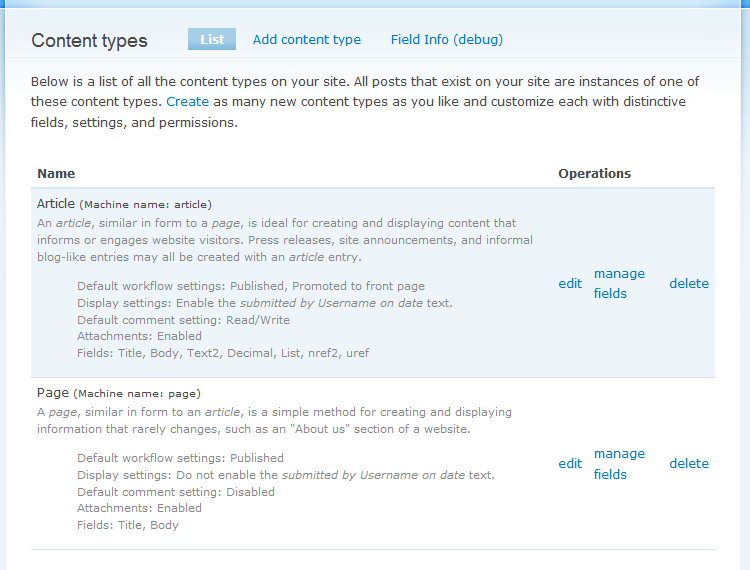
I have worked up a redesign that I think takes care of all of these problems. It adds to the listing a summary of the settings for each type (Promoted to front page, comment settings, etc) and creates a hook that other modules can use to add other summary information or operations to the list. That's handy for CCK which currently has no way to add its 'Manage fields' operation without completely re-writing the whole page.
Plus it ties into the new Fields in Core initiative by providing a list of fields used in that type, including the Title and Body field.
I think this could be a very nice change for D7. Patch and screenshot are attached.
| Comment | File | Size | Author |
|---|---|---|---|
| #32 | ct-en.png | 5.24 KB | sun |
| #32 | ct-de.png | 5.44 KB | sun |
| #25 | 398344-move-machine-name.patch | 1.68 KB | joachim |
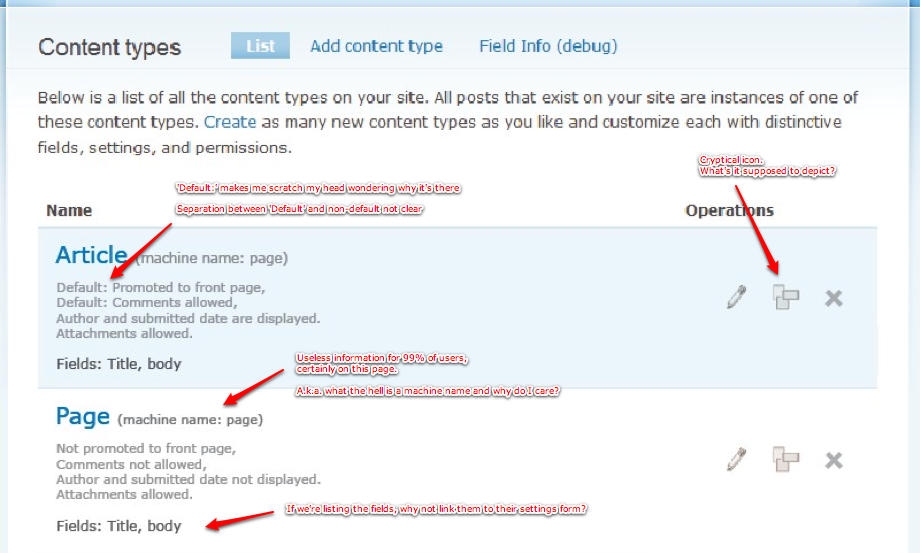
| #18 | ContentTypeOverviewRevisited-comments.png | 277.54 KB | jpoesen |
| #10 | revisited-3.jpg | 56.95 KB | eigentor |





Comments
Comment #1
karens commentedI should note that the screen shot is the way it would look with CCK enabled (the HEAD of CCK is a working UI for Fields in Core), but if CCK is disabled it would look the same except there would be no 'Manage fields' operation and the only fields would be Title and Body.
Comment #2
catchI like this a lot. Subscribing.
Comment #3
Bojhan commentedInteresting, I will be following this one with a lengthy reply - but my initial thoughts tell me that this patch still needs a lot of work. Design-wise just displaying, all of this information is not going to work. Is it really essential information that needs to be shown? I could see fields being somewhat useful, but all the other information seems a bit unnecessary
Comment #4
karens commentedIf you don't want to see all this, you should be happy with what we have now, which shows you nothing. I don't understand why you would *not* want to see this info, that's the whole point. The current screen provides no useful information whatsoever.
And I don't understand what "all of this information is not going to work" means -- there it is in the screen shot. What about it is not going to work?
Comment #5
bjaspan commentedsubscribe
Comment #6
eigentor commentedKaren, this is an amazing amount of text. As we target beginners, I guess they are even less likely to read it like that.
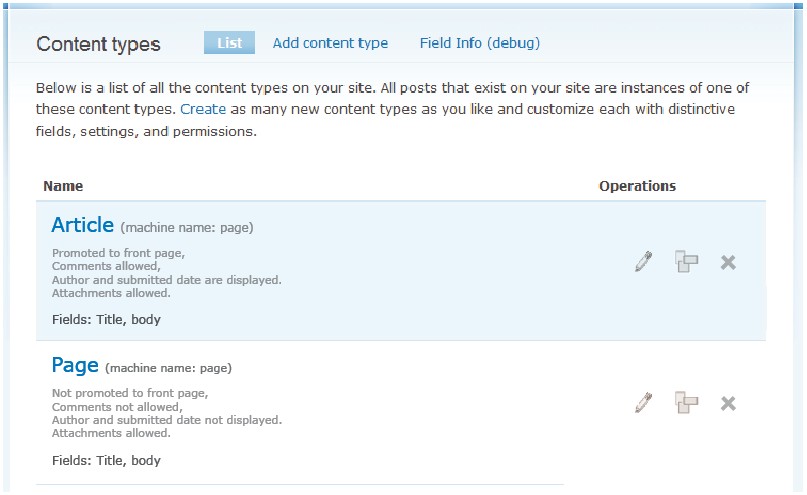
If you want to cut it down to the key differences the two article types, how about a short desscription cut down just to dates (see attached image)
Comment #7
karens commentedI like the screenshot in #6, it accomplishes what I wanted to accomplish. Interesting that you removed the description completely (thinking about the very very long issue that debated exactly what those descriptions should say).
I was worried that the descriptions that talked about how the defaults were set were going to become even more confusing if someone changed the default values, since the description would then be wrong. It's much better to show the settings than to describe a setting that could change.
Comment #8
yesct commentedI like #6 too,
But maybe add the word default?
It's almost implying that each article is promoted to front page. When really, that is the default for all articles, but any article can have that changed by editing that setting on that particular article.
Are some of these setting fixed/required and some just the initial default? Is there any easy way to note that?
Comment #9
eigentor commentedOK, having seen Mark and Leisa http://www.youtube.com/watch?v=bpYz9y4bhTE struggling with this screen, I had to work on it some more :)
Changed the weighing of the words in a way it reflects the actual hierarchy better. Iconized the actions. When you hover the icons, you get a description of the action taken if pressed.
Tried to incorporate the Word default in Screenshot 2. Don't really like it: It adds visual noise to me, as Drumm would say. If someone visits the settings page he sees anyway what is set or not. The information what is default or not could be added in another place. You are right one should know. But then again: if you create a new content type, with the new display of settings like proposed by Karen you find out quickly what has been set by default anyway, because you see it on the overview page...
If we were even more consequent, the user would edit the fields by clicking on their names, and edit the settings clicking on that text...
Comment #10
eigentor commentedAlternative layout, maybe even more intuitive. Could save some vertical space. Use the horizontal space :)
This also illustrates to the user he can change the settings by use of the pencil symbol.
Comment #11
eigentor commentedadded Tag needs Usability review
Comment #12
karens commentedWell I like #9 better than #10 for a couple reasons:
1) I like having all the operations together instead of scattered around, that feels more natural to me.
2) Related to #1, the pencil off by itself looks like an illustration rather than an icon. When it's together with other operations it's obvious what it is. When it's off by itself, it's not.
3) I can't figure out what the other icon is supposed to be, the one with three intersecting boxes. It's next to the fields list in #11, does that mean it's supposed to be 'manage fields'. I like the pencil but this icon didn't make any sense to me.
As to using the word 'default', I think I prefer having it stated, although I can see both arguments.
I saw that video too, we definitely have some work to do here :)
Comment #13
catchThe boxes/fields icon could definitely look a bit more field/form-like. I'm a bit worried introducing icons into this patch will make it harder to get in though (/me remembers the forum icons issue).
Agree with Karen on the placement being better in 9, overall I think I like this.
It also means we could have the descriptions on node/add really targeted towards people posting this content rather than trying to double them up as help text for administrators.
Comment #14
karens commentedRe: the icons, if we introduce icons we should do it consistently across all of Drupal -- if a pencil means 'edit' we should use it everywhere we use 'edit', or at least everywhere we want an 'edit' icon. So although I like the icons, I think I agree with catch that it would be better to use text in this issue and then try to do a follow up issue about the icons (perhaps one that reaches into other places in Drupal so that the icons have more meaning).
And yes, another advantage of this patch is to get away from trying to have descriptions that make sense in both the admin context and the 'add new content' context. That never has worked all that well.
Comment #15
karens commentedAnother thought about the question of using 'Default', we actually have two different things here. We have absolute settings and we have some default behaviors that can be overridden at the node level. If we separate them into two different buckets then we could get rid of the word 'default'. We could move the defaults into the middle column with a heading of 'Default settings'. Not sure how that would look, it's just a thought.
Comment #16
eigentor commentedWill try to incorporate the ideas into another Mockup.
About descriptons: I changed my mind a bit that Descriptions _would_ be helpful. Also because Users can add them anyway to their custom content types. How about the one-sentence ones: http://drupal.org/node/233200#comment-1426070
If the user is given a very short hint about usage of the content types, this will help one group. Another group, that is more analytical in mindset, may prefer the display of the settings.
Comment #17
naheemsays commentedIt seems to me that something like this may also be needed for the node/add page to allow quick differentiation of different node types and their default settings.
I created a separate issue( #446244: Show node settings on create content page. ), but that has been closed, so I will just note it here for people to be aware of and consider improving that page (maybe as part of this issue, as exposing default settings in the UI is what is being discussed here too...)
Comment #18
jpoesen commentedI agree with #16: a short description would be handy.
Other remarks (also included on annotated screenshot):
- the 'machine name' mention is confusing and useless to almost everyone
- the default settings will always be the same for every content type. Why not only list the actual changes to the default settings? Another option would be to come up with an overview of all settings + eye catching indication which settings are changed (in bold or other color). After all, why are we proposing to list (changed) settings on this page too? To spot customizations in a single scan of the screen, right?
- if we're listing the field names, why not let them link to their respective field settings form?
- I agree the 'fields' icon is totally cryptic/unusable
Comment #19
eigentor commentedEven without providing a new screenshot: +1 for Joeris idea to link Field names to their settings page. But I remember some reason was given for not doing this... forgot.
What struck me (apart from a solution for the Default issue): What if there are LOTS of settings on a content type? Other modules can plug in and provide their own stuff: translation, content profile, loads more, the list can be very long.
Do we want to list all that? The idea is to provide a quick overview without going into the content type, but too much information will quickly clutter the interface. Nice concept for that appreciated :)
Comment #20
eigentor commentedAnd as for the machine readable name: presenting it on hovering over the display name might be a compromise. It is true that a "site builder" kind of persona wont need it there, because he will know the machine readable name, and a content editor won't need to know it anyway.
The hover would be better using javascript, m.E., alt texts are just too slow and not reliable in all browsers.
My wild fantasy of an icon for fields has already been considered as not really intuitive ;) so this won't be used. Icons won't be used at all until we have a core set of Icons for Drupal ready.
Comment #21
yesct commentedWhat about a page wide toggle to: "show defaults" or "hide defaults"?
I can see how showing defaults would be useful the first or second time someone who was completely new saw the page. Can the page remember if a user last had show defaults on or off?
If there is a type with more than (x) 10 settings, what about a page wide toggle to "show just the first (x) 10 settings" or "show all settings"? Then the person has a quick fix if the page is too cluttered by tons of settings. At the end of the truncated list of settings a "show more" link? Could these be remembered per user too?
Comment #22
sunWhy don't we simply use vertical tabs here?
Comment #23
joachim commentedCould we restore machine names to their own column?
On a site with a large number of content types, say 12+, having the machine name embedded in a block of text makes it hard to scan down the list and see what's what.
As a site developer I often want to see a quick list of machine names and this is the page I expect to go to.
Comment #24
mthart commentedWhat about making default setting, machine readable names and maybe even fields only visible to those with an admin or site builder role.
I see at least two different user needs here, and beyond the layout challenge, the question of whether to display or not could be solved at the role permissions level.
Comment #25
joachim commentedThis patch just moves the machine name back to its own column; would need combining with other design changes.
Comment #26
Bojhan commented@joachim I think that is a change that is highly development driven. I am quite opposed to such interface elements, its important to understand that the audience of this page is not anymore the developer or the more experienced user - it can now be the novice user. The machine name, although handy for developers should hold the least prominence.
Comment #27
joachim commented@Bojhan I agree that we need this usable by novice users. But moving the machine name where it is now is a usability penalty to the developer.
Any suggestions on how we can accommodate both?
Comment #28
sunI agree with joachim - we cannot optimize everything for the novice user only. This is the only page where site builders/developers can find out about all machine-readable content-type names on their site.
This is important for various reasons - the most trivial being: the internal content-type name is used in node/add/[name] URLs.
For D8, we may think about separating out all core module UIs into separate interface modules, or making their output highly pluggable and dependent on user permissions, so novice users can only see what's relevant for them, and developers can see things differently, or just more. For D7, however, that's too late.
Comment #29
Bojhan commentedThis is an fundamental principle I will fight to death, I always balance the needs of an developer against the needs of a novice users - where ever they conflict. From that I try to make a concise decision, Drupal core should by base be optimized for both groups, since both of them use it. Yet we want to make Drupal more accessible for people, who do not have the technical body of knowledge. In this case, I decided that the trade off in terms of hard to scan for developers is worth against the difficulty that we prone novice users by putting it out as a prominent element - when its not.
@joachim @tha_sun I don't want to be harsh, but your perspective is somewhat biased in terms of this page - since you use it to find that specific element all the time. I hope you agree with me that with D7 we are growing our user base - even more towards those who are not developers or technically sufficient to understand what a machine name is (Since CCK UI is sadly now into core, we are expanding its UI to a far broader and perhaps less knowledgeable group). It is my job to distance myself from both novice, intermediate and experts users - to make an informed decision, taking all the trade offs into mind.
Perhaps we can accommodate both, but I don't think going down the road of this amount of visual prominence is very good.
Comment #30
joachim commented@Bojhan when the field UI one page further in has a drop-down with what appear to me to be raw SQL data types.... having a single word with a 'type' column doesn't strike me as a big deal. It doesn't demand any action: if you don't know what a type is, just think 'hmm, mysterious word but I can ignore it'. If you want to add a field, you need to know what a BIGINT is.
Comment #31
yoroy commented@joachim: How is adding a couple of milliseconds of confusion to the user experience not a big deal?
It's these kinds of small confusions that add up to people turning away from Drupal because it's hard to understand. Not to single this issue out as the one that will do it, but since you put it so literally, I have to respond.
When I see code reviews, patches get set back to needs work for 1 extra space here or there. We *must* be at least as critical when reviewing issues that involve the UI. This is exactly the kind of stuff that unnecessarily increases the cognitive load for users. They might not even consiously notice it but these little things add up. We've seen too many people in the usability tests getting confused or turned off by overly long descriptions, cryptic labels and too-prominent ui elements for edge-case functionality.
As such, things like this are a very big deal. It's not like we're removing the machine name from the ui, we make it less prominent. Bojhan has made it very clear what the trade-off is here and I support his argument.
Comment #32
sunIt is the x-time repeated phrase "Machine name: " that confuses users -- not a single "Type"/"Machine name"/"Internal name" table column header.
More reasons?
Comment #33
robloachPushing to Drupal 8... I would love to have some kind of standardized icon system in Drupal core for the Operations column. Maybe something based off jQuery UI's Icon Framework, since it's already part of Drupal core? Might be out of the scope of this issue though...
Comment #34
Bojhan commentedThis never seemed to actually cause any usability issues, marking as closed because of it.