

 Come together with the global Drupal community in Rotterdam, 28 Sept – 1 Oct 2026. Sessions, contribution, connection, and Early Bird savings until 8 June.
Problem/Motivation
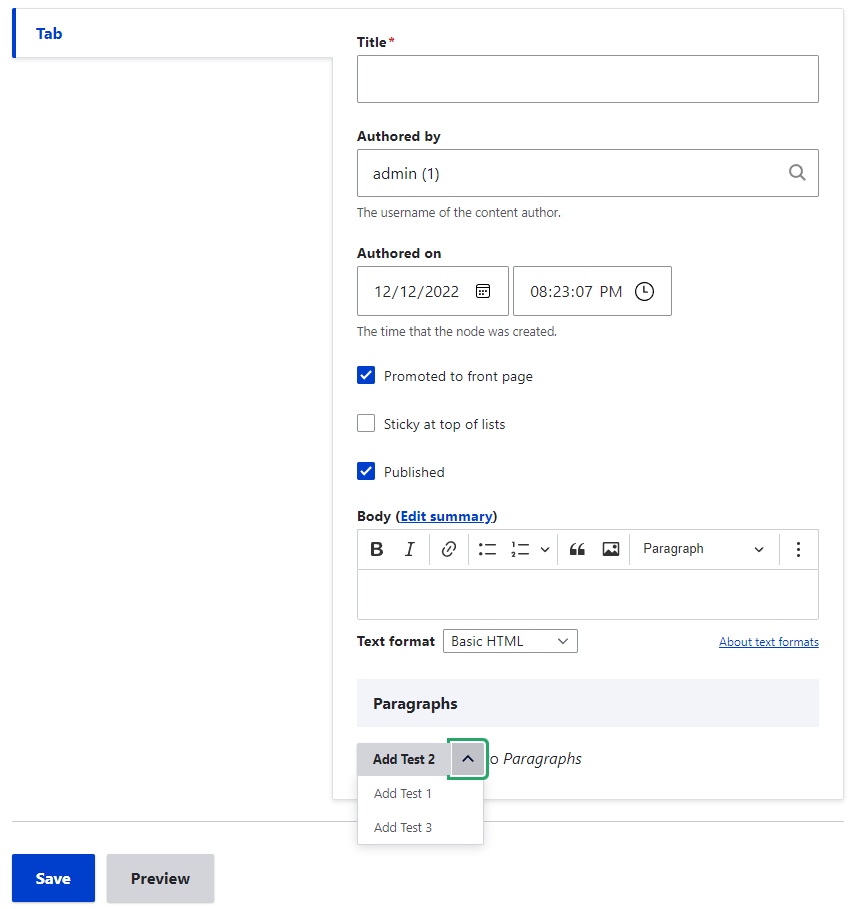
When using the Field Group module with Paragraphs module with a setting of vertical tabs the dropdown button to select the list is not appearing thereby there is no option to choose other paragraph types other than the default one.

Steps to reproduce
Install modules:
- paragraphs
- field_group
- Create a few paragraphs (about 3-4).
- Create a content type with a paragraph reference field. Make it so all paragraphs are selectable.
- Add a field_group tabs (vertical) and tab.
- Put the paragraph field created in step 2 under this tab.
- Try to add a page with paragraph 4.
Result: The dropdown button is not visible at all, thereby not able to select other paragraph types other than the defaukt one.
Expected: Be able to select any item in the dropdown.
Issue fork drupal-3217868
 Show commands
Start within a Git clone of the project using the version control instructions.
Or, if you do not have SSH keys set up on git.drupalcode.org:
 changes




Comments
Comment #2
hikkypo commentedComment #3
vikashsoni commented@Hikkypo i didn't get any issue regarding this for reference sharing screenshot ....
Comment #4
hikkypo commented@vikashsoni.
If you are able could you check a couple of things. In your screenshot, it is not clear that the dropdown is open. This is the part that is not fully visible (see my screenshot).
Secondly, I see you do not use the tabs and tab field groups. This issue could and I think is only there when you use the tabs.
Just for the sake of full disclosure. This requires 2 field groups.
1 field group of the type tabs. (setting vertical)
1 field group of the type tab (with whatever name you prefer)
When you do this it should show the same behaviour.
Comment #5
indrajithkb commentedHi @Hikkypo i haven't checked the issue yet, but from a quick review of your patch, i can see you have directly done the changes on
claro/css/components/vertical-tabs.cssthis file. Here you have to done your changes onclaro/css/components/vertical-tabs.pcss.cssthen compile the file then add your patch here.Changing the version to 9.3.x-dev (if the issue is not with 9.3.x-dev then please change the version back) and moving to NW.
Hope this will help you. Thanks.
Comment #6
hikkypo commentedI added the change to the pcss.css file. This change is not what we want to add in the long run (at least not without further changes) since it creates some whitespace at the top of the container.
Comment #7
sakthivel m commented#7 Please review the patch
Comment #8
maacl commentedAs mentioned in #6 this will create a white space on top of the details tab in size of the vertical tabs. The only way around this I found is using flexbox. But I guess this will open a box of a lot of work and testing, as I see those LTR and RTL comments. I attached a simple patch as PoC.
Comment #9
danflanagan8I just confirmed this is still an issue on 9.3.x. There are a number of other issues related to vertical tabs in Claro that have been fixed recently, but this one is still present.
Comment #11
gauravvvv commentedRe-rolled patch #8, Attached interdiff for same. Please review.
Comment #12
gauravvvv commentedComment #13
gauravvvv commentedComment #15
kristen polThanks for the updated patch. It applies cleanly to 9.3 and 9.4 but not to 10 (see below). This needs manual testing for 9.3 and 9.4 and a separate patch for 10.
Comment #16
ranjith_kumar_k_u commentedRe-rolled #13 for 10.0.
Comment #17
kristen polThanks for the patch for D10.
Needs manual testing for:
Updated the issue summary based on recent information and cleaned up wording and formatting.
Comment #20
arunkumarkRe-rolled the patch to work with Drupal 9.5.x Refer the latest patch for Drupa 9.x version. For the D10 refer #16
Comment #21
arunkumarkComment #22
arunkumarkComment #23
sonam.chaturvedi commentedVerified and tested patch#20. Patch applied successfully on 9.5.x-dev.
Test Steps:
1. Install modules: paragraphs, field_group and claro (theme)
2. Enable Claro theme
3. Apply patch
4. Create few paragraphs type (about 3-4).
5. Create a content type with a paragraph reference field. Make it so all paragraphs are selectable.
6. Add a field_group tabs (vertical)
7. Add a tab and put the paragraph field created in step 2 under this tab.
8. Goto create content page and try to select paragraph 4.
Test Result: Able to select items in the Paragraph dropdown.
Before Patch:

After Patch:

RTBC +1
Comment #24
kristen pol@sonam.chaturvedi Thank you for testing!
We still need code review by a frontend developer and check of core gates but...
we do not need any additional testing.
Thanks :)
Comment #26
gaurav-mathur commentedComment #27
gaurav-mathur commentedI have checked the issue without applying patch in drupal 10.1.x-dev.
Its working fine, looks good for me.
For refer screenshots:-
Comment #28
j_s commentedChecking the account settings page, it seems to squish things too much.
Comment #29
j_s commentedThis patch on 10.1.x tries a slightly different approach.
Comment #30
j_s commentedTested #29 on account settings and this issue's paragraphs example.
Comment #31
deepalij commentedVerified and tested patch #29 on 10.1.x-dev with Claro + field_group.
Patch applied cleanly
The issue got fixed after applying the patch.
Refer to the attached screenshots
Before patch:

After patch:

Comment #32
Shubham Sharma 77 commentedApplied patch #29 applied successfully in drupal-10.1.x-dev.
For ref sharing screenshots. Can be moved to RTBC.
RTBC +1
Comment #33
smustgrave commented#29 introduced a new solution but it does not reflect the issue summary.
Also once 1 set of screenshots have been added any additional screenshots of the same patch are considered duplicative work and don't receive credit. So please not more screenshots.
Comment #34
gauravvvv commentedUpdating attributions
Comment #36
kiwimind commentedHaving taken a look at the D9 patch above, it seems that there's a simple way of amending the styling without changing much else by removing a couple of things.
Please see attached patch for 9.5.x
Comment #37
acemichael commentedAfter the patch #36, paragraphs still go out of container.
Comment #38
acemichael commentedAfter patch #36, paragraphs still go out of container.
Comment #39
acemichael commentedComment #40
nienkevanpoppel commented@acemichael your last screenshot is likely caused by a wysiwyg-editor (although it is not visible in your screenshot). This patch for the ckeditor5 will fix the overflow issue. The patch is a minified JS so excuse the readability but I changed the
flex-wrap:nowrap, toflex-wrap:wrapfor the.ck-toolbar__items.Comment #41
shweta__sharma commentedComment #42
smustgrave commentedDon't think we should be patching the ckeditor library.
Also is this reproducible in core?
Comment #43
j_s commentedI did testing with #36 using the scenario in the original post as well as testing other areas with vertical tabs (account settings, text format settings, content type settings, media type edit, block layout settings) and with some other modules that use vertical tabs (google_tag, entity_embed text format settings, chosen, slick). It seems to work pretty well.
#37 might be more paragraphs related. It may have to do with paragraphs setting a specific size attribute on text fields which goes beyond the container if the screen size is small. But I'd rather see that paragraph content overflow the container so I can actually see the whole thing rather than it get cut off.
Regarding the patch in #40, if there's a vendor library to fix, those fixes should probably go in the vendor's issue queue instead.
I tried checking for vanilla cases and am unsure if the issue can be replicated without contrib help or custom code. But the issue of vertical tabs hiding overflow does stem from Claro. By comparison, it doesn't look like accordions hide overflow. The issue may not affect vanilla, but it does impact certain contrib modules like in the original scenario.
Comment #46
ameymudras commentedComment #47
smustgrave commentedThere are multiple patches and MRs that need to be cleaned up now, solution doesn't fully match what's proposed.
Before/after screenshots should be added to the issue summary.
Comment #48
shweta__sharma commentedI tried to apply some of the patches which are mentioned above on the latest Drupal version 11 but the patch threw some errors.
So I use the recent MR 5376 which has been applied cleanly and the hidden dropdown of a paragraph is now completely visible but the whole paragraph section is going out of the container which needs to be inside the parent container. See -
Before Patch
After Patch
Comment #49
shweta__sharma commentedI think for the paragraph section issue which is going out of the container will fixed in this - https://www.drupal.org/project/drupal/issues/3145188 (similar issue).
Issue summary updated with the latest solution and screenshots.
Thanks!
Comment #50
shweta__sharma commentedComment #51
smustgrave commentedMoving to NW based on the after screenshot, I see that the content is now breaking out of the container.
Comment #52
ameymudras commentedI tested the solution again on 11.x and I am not able to replicate the issue mentioned in #48. Please find the screenshot attached

Comment #53
akshayadhavI tried with recent 2-3 patches along with MR from @ameymudras. The main dropdown issue gets fixed.

I can say that it's not fixing the issue for nested paragraphs.
I can think of 2 solutions:
layout-region--node-main) and make it 100%, so that paragraphs can accommodate properly in it. The reason is that nested paragraphs are being placed in<table>tag. These table tags have a width of 100% and which is overflowing outside the available area.<table>creates such overflow issues. It will be great to change the structure of nested paragraphs by using other tags than the<table>tag. And restructure it. I know this is a very time-consuming solution that needs to be handled at the Paragraphs module level.So we should move this issue just for dropdown-related changes, and fix the nested paragraph overflow issue in different issue.
There is already an issue for it.
Comment #54
akshayadhavComment #55
saschaeggiRemoving
overflow: hidden;will lead to more bugs than solving unfortunately.The culprint of the issue is that the dropdown is not context aware (it opens towards the bottom instead of the top).
So to fix this more generally as it can also happen on other layouts like in tables we should solve the problem around the dropdown itself.
Comment #56
j_s commentedI haven't tried on 11 yet, but on 9 and 10 the issue was more than just the drop downs. It would occur for tables and other fields that get pushed out of view. The fix should be more general to cover all cases, not just a drop-down fix.
Comment #57
bakulahluwaliaThe patch #29 is not working with 10.2.0 release. The code on line 275 is significantly changed.
Comment #58
v.dovhaliuk commentedRerolled patch for the compatibility with 10.2.2 release.
Comment #59
sourojeetpaul commentedHello there,
I've faced the same issue on my D10 instance and looked for the issue and landed upon another issue which seems to be stating this as an issue of Claro theme or the Paragraphs module, but after digging up quite a bit and trying it out with all possible combinations of theme and paragraphs module and field group module, it has come to by notice that the problem is neither with any of the themes nor with the paragraphs module, rather the issue is arising because of field group module.
I've talked about this elaborately there:
https://www.drupal.org/project/field_group/issues/3318730
https://www.drupal.org/project/field_group/issues/3318730#comment-15551915
Also attaching the same screenshots here for quick reference
On my observation the issue starts from the disappearance of the dropdown button itself and some structural changes which is happening because of the field group module. I'm not changing the issue component as there is already an issue with the same, so just adding that as a parent issue and related issue. I think it'll be better if we mark this as a duplicate issue as we're trying to address the same on
https://www.drupal.org/project/field_group/issues/3318730
If you land on any other findings feel free to change accordingly. Though updated the issue summary with my latest findings for a quick overview!
Also not sure how you're reproducing the issue on D11, cause I found that these said modules are not yet ready for D11.
Comment #60
meangreen commentedNumber #58 worked for me! On Claro, drupal 10.2.6 and with field group module 8.x-3.4 , much thanks! @vdovhaliuk
Comment #61
zoee-y commentedRerolled patch #58 for 10.2.6 release.
Fixed incorrect line in details.pcss.css from patch #58.