

 Come together with the global Drupal community in Rotterdam, 28 Sept – 1 Oct 2026. Sessions, contribution, connection, and Early Bird savings until 8 June.
Problem/Motivation
Allow configuring the allowed media types that appear in the media library when embedding media in the CKEditor.
In reviewing #2994699: Create a CKEditor plugin to select and embed a media item from the Media Library, I noticed that we expose all available media types in the media library when it is opened by CKEditor. I pushed back on this in #2994699-59: Create a CKEditor plugin to select and embed a media item from the Media Library, but agreed to open a follow-up to discuss further.
@Wim Leers felt that such a setting would be best represented as a setting of the media_embed filter plugin:
If we want this, then it must be configuration for the media_embed filter, not for the CKEditor integration. Just like we already added a default_view_mode setting, we should then add a allowed_media_types setting. Then the CKEditor integration (but also a similar implementation for any other text editor) can just read that configuration.
After #3074608: Optionally allow choosing a view mode for embedded media in EditorMediaDialog, which adds a similar UI-level setting to the media_embed filter, that seems reasonable.
To be very clear, this feature would NOT influence the filter's business logic. Embedded media items will still be rendered regardless of their type, just as they are now (and as they have been since day one). This setting would only influence the vertical tabs that appear in the media library when opened via CKEditor.
The approach would be similar to the "allowed view modes" setting introduced by #3074608: Optionally allow choosing a view mode for embedded media in EditorMediaDialog -- you can still render a media item in any view mode by setting the data-view-mode attribute on the drupal-media tag, but only certain view modes are exposed in the UI shown to editors when they are embedding media.

Proposed resolution
Add the setting to the media_embed filter, and test coverage.
Remaining tasks
Do that!
User interface changes
There will be a new setting available to site builders when configuring the Media Embed text filter, and the vertical tabs presented in the media library when it is opened via CKEditor will vary according to that setting.
API changes
None.
Data model changes
None.
Release notes snippet
TBD
| Comment | File | Size | Author |
|---|---|---|---|
| #38 | media-reference-config.png | 66.47 KB | webchick |
| #30 | 3073535-30.patch | 15.46 KB | oknate |
| #30 | 3073535--interdiff-29-30.txt | 4.06 KB | oknate |
| #30 | 3073535--interdiff-22-30.txt | 3.84 KB | oknate |
| #29 | helpful link when adding media type.png | 150.83 KB | oknate |



Comments
Comment #2
wim leersThoughts about my argument that this configuration belongs in the
media_embedfilter and not in theDrupalMediaLibraryCKEditor plugin?Comment #3
phenaproximaI'm not sure I agree. The media_embed filter is really about rendering media regardless of how it got there, and it is not in any way concerned with selection, nor should it be. The way I envision it, making the allowed media types configurable is strictly a UX and AX improvement, so therefore there is no reason for the filter to be aware of that.
Comment #4
aaronmchaleOk I can see both sides of the "who should be responsible for the filtering" argument. Here's a couple of thoughts:
Comment #5
wim leersQuoting myself from #2994699-66: Create a CKEditor plugin to select and embed a media item from the Media Library:
Comment #6
wim leers#4: those are indeed factors I've also thought about. 👍 Related to the second point: when changing the configuration after content is already created, this could result in certain things disappearing upon output. That'd be bad. But perhaps also intentional. That's a tough thing to balance.
Comment #7
phenaproximaThis is a perfect articulation of a major reason why the media types should not, IMHO, be limited by the filter. If it causes output to disappear due to an unrelated configuration change, that will be a huge WTF. If we consider this to be strictly a UI improvement, then these kinds of concerns go away entirely.
Comment #8
wim leersThat's what I was hoping you would say :) You also accidentally quoted me selectively, you omitted this part: .
It would be like changing the
FilterHtml'sallowed_htmlsetting: if you stop allowing<blockquote>, all quotes will disappear. Or if you stop allowing<drupal-media>, all media will disappear.To determine what to do, we have to first answer a question. What is it that we want? Is it:
Comment #9
phenaproximaThe blocker is in, so this issue is no longer postponed.
Comment #10
aaronmchaleAfter skimming this issue and thinking on it for a few minutes here's my latest thinking.
I recognise the point made by @phenaproxima in #3, it's a perfectly valid line of thinking and I can agree with that reasoning:
In #4 I said:
What we're talking about here is embedding Entities, Entities (in this case Media Entities) have their own set of permissions and access control handlers, if we start thinking about this as a security feature we just start complicating the access control layer in an unnecessary way.
So I don't think we should consider this strictly a security feature, let's leave that up to the existing access control layers. However that being said after reading #8 by @Wim Leers:
We don't have to think of this as a security feature, but it could still be a valid use-case for filtering. Yes if you remove
<blockquote>fromFilterHtml'sallowed_htmlsetting all formatted quotes disappear, similarly if you remove<drupal-media>then all media disappears. So following that line of thinking it would be perfectly logical that if we put this configuration in the filter settings and you remove some Media Types then media of that type will also disappear.I actually think that's fine, if the site administrator is changing the filtering settings they should realise that any changes there will impact what is displayed in the output of anything using that Input Filter, and that's probably what most sites would want. If I were building a site where I wanted to limit which Media Types could be interested by the user I'd want the piece of mind that when I put the limit in place there would be no way for the user to hack around the restriction by inserting the raw
<drupal-media>markup and linking to media types that shouldn't be rendered there. Just like how when limiting the allowed HTML tags I know that there's no way for the user to hack around that.The scenario above is, I believe, a valid use case because: yes if the administrator wants to actually restrict specific Media Types from specific roles they should do this first with permissions, but maybe they still want Authenticated Users to have access to insert Audio, but only for one particular Text Area Field on the site. So making this part of the filtering is most useful when you think of this in the context of the security of a particular Text Area Field.
Comment #11
wim leersComment #12
xjmThis could use an issue summary update. I've read alarming things here about disappearing output, which makes me concerned about the potential impacts on user expectations and data integrity. :) Does any of that describe a situation that exists in HEAD, or something that would happen only if this feature were implemented?
Comment #13
phenaproximaOK, I think I need to step in here and clear something up.
This issue is NOT about changing what gets rendered by the filter. The filter should have no opinion about what media types it is willing to render out, nor any opinion about what view mode(s) they are to be rendered in. And currently, it does not.
This issue is only about limiting which media types can be chosen in the media library -- i.e., which vertical tabs show up -- when you open it up from within CKEditor. Beyond that, there should be no additional filtering. Additional render-time filtering would indeed bring up questions about disappearing output, which is a hornets' nest that adds complexity, in exchange for little value, IMHO. That sort of thing, if desired, should be in contrib's province.
Wim's point in the IS is about where the setting for "which media types should we show in the library" should live. In the wake of #3074608: Optionally allow choosing a view mode for embedded media in EditorMediaDialog, I agree it should be on the filter. That issue already adds UI-level settings to the filter (which, we know from experimentation, is the most practical place by far to put them), so there's no harm in adding another such setting.
I'm updating the IS to clarify all this.
Comment #14
phenaproximaComment #15
oknateInitial patch (with test coverage!)
Comment #16
oknateComment #17
oknateComment #18
wim leersRead the patch on my tablet. Looks good :) Will review in detail tomorrow.
Comment #19
wim leers👍 This is similar to the setting. It also clearly conveys this affects only the process of selecting media from the Media Library: it does not set the expectation that this affects the filtering process.
👍 Nice — the same helper can be used! Renaming this makes sense. And does not constitute a BC break since this class is new in Drupal 8.8.
Übernit: there are two spaces here instead of one 🤓
Übernit: this variable is not used anywhere, so let's skip the assigning to a variable. 🤓
Comment #20
phenaproximaI think this variable should be called $bundle_options.
Nit:
get_class($this)can bestatic::class. Total stylistic thing, though; no need to change it.As long as we're renaming this method, 'elementValidateOptions' seems strange. How about just
validateOptions()?There's no real need for $filters to be its own variable. But, more to the point...are we sure we can assume that media_embed is present? Maybe we should guard against the possibility that it's not?
@oknate, you have the best testing data. :)
Comment #21
oknateFixing the two nits in #19.
Comment #22
oknateAddressing feedback in #20:
1. ✅ Renamed variable to $bundle_options
2. ✅ Updated to
static::class3. ✅ Updated method name to validateOptions.
4. ✅ DrupalMediaLibrary CKEditor plugin depends on the MediaEmbed filter being enabled. There’s form validation for it. You can’t enable the button until the filter is enabled. If you try to disable the filter while the button is enabled, you get an error message ‘The Embed media filter must be enabled to use the Insert from Media Library button.’. You can hit this function when both the filter and the button are disabled, but only when saving the editor form or hitting an ajax callback on the editor form (such as when selecting an editor from the select and it exits this method because
$editor->isNew(). To be safe, I’ll check if it exists:if ($media_embed_filter = $editor->getFilterFormat()->filters()->get('media_embed’))5. Thanks! This one was a sleeper, it's been in there, but we didn't have any assertions about the media label until now.
Comment #23
wim leersComment #24
wim leersFixed screenshot in issue summary.
Comment #25
webchickThis is a nice little feature, and I can see people wanting to tweak this in their own sites. The patch is very simple, so I'm +1 for core handling this (though it could also happen in a contrib module).
We (@oknate, @phenaproxima, @Wim Leers) got into a discussion in Slack about the checkbox selection though, because:
1) It's a bit funny that you have a setting where checking none means check all, right directly above a setting where checking none == checking none.
And
2) If a couple of these are checked, and others are unchecked and you add a NEW media type, what would be your expectation? I think in most cases, you would expect the new thing you just added to show up in the media library. If you didn't mean that, it's simple enough to see that a mistake was made and correct it... versus if a thing you JUST added is NOT showing up, you go down a rabbithole of "is it permissions?" "is it theming?" "omg, I'm going to start drinking now..."
So TL;DR I think we should invert the logic here to instead "Exclude media types in the Media Library."
Because then you ALSO don't need to add a special help text explaining that not checking things means they're actually checked. :D
Apart from that though, this looks great! Thanks!
Comment #26
seanbI don’t mean to restart the discussion, but personally.
So to me it depends: have I done any specific configuration, then please don’t change it for me.
It feels a bit like when I add a new field to a content type. Sometimes this gets added to existing view modes and it pisses me off because it messes up the layout.
Comment #27
webchickYeah, I can certainly see that perspective. I guess I was just going for frustration that's at least consistent with the rest of core. :D
If went with that approach, we could just commit the patch as-is. My concern though is if that is not your expectation, and you're trying to dig into why stuff isn't showing up like you expect, you need to leave the "Media" world entirely, and go jaunting off into the bowels of "input format" configuration... which is in an entirely different place in the admin panel, and that feels like quite a MASSIVE logical leap for people to make on their own.
@oknate and I discussed this and thought one way to maybe help both concerns would be adding a simple link pointer on the media types page that guides you over to that section to help you out with that discovery. I believe he's working up a patch now.
Comment #28
oknateFixing preview image again. I re-uploaded it. Hopefully it'll stay this time.
Comment #29
oknateAddressing #27: Adding a link on the media form (for both add and edit) that points the site builder over to 'Text formats and editors', where they can discover the settings related to media embedding. This allays concerns the following won't happen:
What we don't want to happen:
1) Site builder 1 has configured 'Media types selectable in the media library' to be a couple of existing types (such as image and video).
2) Site builder 2 (Site builder's less experienced partner) adds a new media type 'Image with fancy border' and goes to test out embedding it in the CKEditor using the Media Library button and doesn't know why their content type won't show up. They keep looking at all the media settings and can't find anything about embedding. There was no indication that they needed to find another part of the CMS to configure embedding.
What should happen now:
On step 2 above, when Sit builder 2 goes to add their media type, they'll see a section about embedding, in which there's a link to another section of the site to configure the embedding settings. They'll start clicking on editors and see that there's the 'Media types selectable in the media library' setting on a few editors, and add their new media type.
New "Embedding options" section of media type form:

Comment #30
oknateAdditional changes to #29:
Comment #32
seanbTo be fair, if I have a media field on an article configured with image and video, a new media type is also not automatically added to my entity reference field. So in that case you need to re-configure your field. I guess this is pretty much the same issue.
Comment #33
oknateThe difference between entity reference fields and the embed settings is that the settings for configuring entity reference fields is still within the 'Structure' tab, but the settings for media embeds is in 'Configuration > Content authoring > Text formats and editors", so the discovery process is more difficult.
That being said, it would be nice to have a 'You might also want to update' message when you add an an entity bundle and there are entity reference fields that reference only a subset of the available bundles for the entity type for which you just added another bundle. On large projects, it's easy to forget every entity reference field in that situation and it would be a nice DX feature to inform the site builder. (In a separate issue, of course.)
Comment #34
wim leers@seanB++
Good points :)
Comment #35
phenaproximaThis should no longer be assigned to me. :)
Comment #36
webchickOk, upon further reflection... (I'm really sorry; it's been a busy week full of many competing priorities; hard to find dedicated brain cycles to any one particular thing. :\)
I believe what @seanB is saying in #32 is that "this is a pre-existing condition." When you add a new media type, you have this same "disconnect" / "OMGWTFBBQ why is my thing not showing up?!" problem with media as entity reference fields. While that's slightly better, in that the place you go to fix that problem is still under Structure, and says "Media" somewhere in it, it still ultimately has the same effect on the confused and frustrated site builder.
The approach @oknate has taken to this for this problem is interesting; providing extra visibility by making the pointer its own top-level vertical tab. However, this is introducing a new UI pattern that we haven't used vertical tabs for before, and I think the UX team would probably want to discuss that more before settling on it as the direction forward.
Therefore, I think the best approach is a new follow-up task for "Help leave "breadcrumbs" between various parts of media configuration" and try and solve this in a more holistic way. And since we'd basically be talking about mostly adding strings here or there, I believe we can commit it post-beta (up until RC) as well. Or not, and then we're not (much) worse off than we started, since we're already frustrating and confusing the crap out of site builders in the current model. ;)
So I'm gonna go do that, then come back to this with the "there should then be parity to how these two types of settings are handled" eyeball and see if we can't get this either RTBCed (for an earlier patch) again or come up with a (small) list of actionable steps to get it done. Thanks for your patience. <3
Comment #37
webchickOk, did that at #3085599: Explore the idea of leaving "breadcrumbs" between various parts of media configuration.
Comment #38
webchickOk, now let's review how the corollary setting—per-field allowed media types—works.
1) You add/configure your media types.
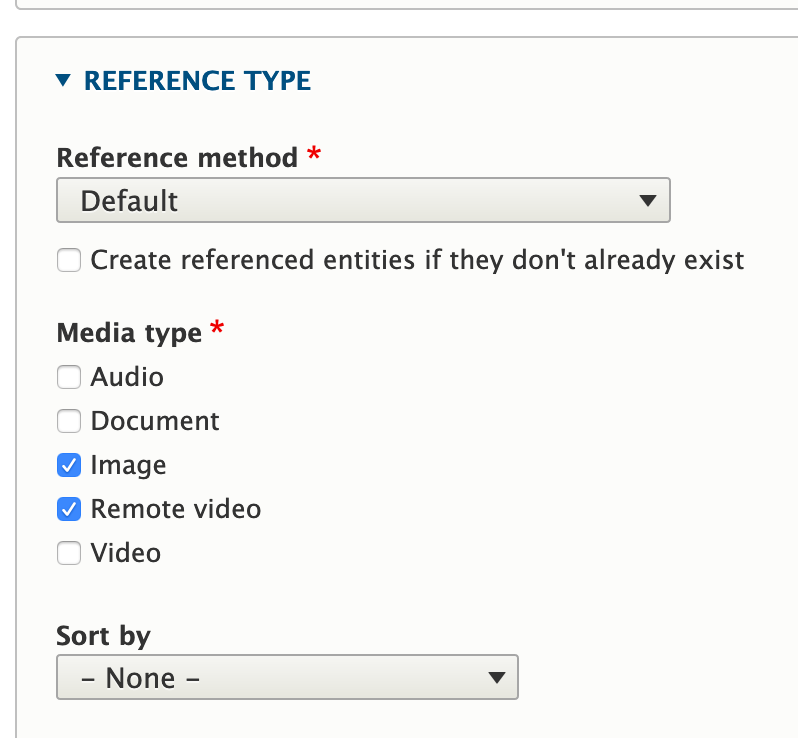
2) You add/configure media entity reference fields, each of which has a required media types selection:
3) When you subsequently add (or remove?) a media type, nothing happens until/unless you go back to the media field(s) and re-configurate those checkboxes. There is no "if none are selected, all are selected" here, since it's a required field. In other words, available media type are "opt-in."
Ergo, one could argue that we should do the same "opt-in" process here, for feature parity. (Though also parity in frustration.)
However, @seanB points out in #26 that how he would expect this to work (and since he, unlike me, actually uses this crap in production, I'm inclined to agree with him :D) is the opposite, where all media types are available by default for embedding, and make the setting opt-out. And that once you've opted out, revert to the Media reference field's behaviour of preserving what you said until / unless you change something.
I think that makes sense? That because embed buttons are by their very nature used in multiple content types/contexts/etc. a more permissive vs. restrictive approach would be warranted.
Though I also think that ideally, these two settings would work the same; in other words, Media reference fields would show all media types by default and only exclude them when checked, and only then become an "opt-in" process. However, that's a whole whack of nonsense since we'd need to start changing fundamental assumptions of underlying entity reference fields, which... no thank you.
TL;DR: Basically, I think we should do one of two things:
1) Keep parity between the two, which means making embeds "opt-in" as well.
2) Make it work like @seanB says in #26.
Opinions?
Comment #39
webchickOk, discussed this further in Slack.
In order to achieve the outcome #26, which it sounds like 3/N media maintainers are in agreement with, we need to keep the old "opt-out" logic that was defined in #22 + screen-shotted in the issue summary. Inverting it means we'd need to do some extra stuff when adding a new media type to make sure they weren't accidentally exposed in an embed config that had been explicitly set up to only include images and remote video (for example).
ERGO. How about we forget I ever said anything back in #25, and re-RTBC for #22. ;)
Comment #41
webchickAaaand... committed and pushed #22 to 8.8.x (with a small coding standards fix). Thanks SO much for dealing with all my questions and related twists and turns, and I really apologize. :P I ask, because I care. :P
I dunno if I'd call this a "highlight," per se, but it is a new capability over 8.7.x and it's a nice feature to have that gives us parity with what we can do with media reference fields. So erring on the side of tagging, which can always be removed.