

 Come together with the global Drupal community in Rotterdam, 28 Sept – 1 Oct 2026. Sessions, contribution, connection, and Early Bird savings until 8 June.
Synopsis
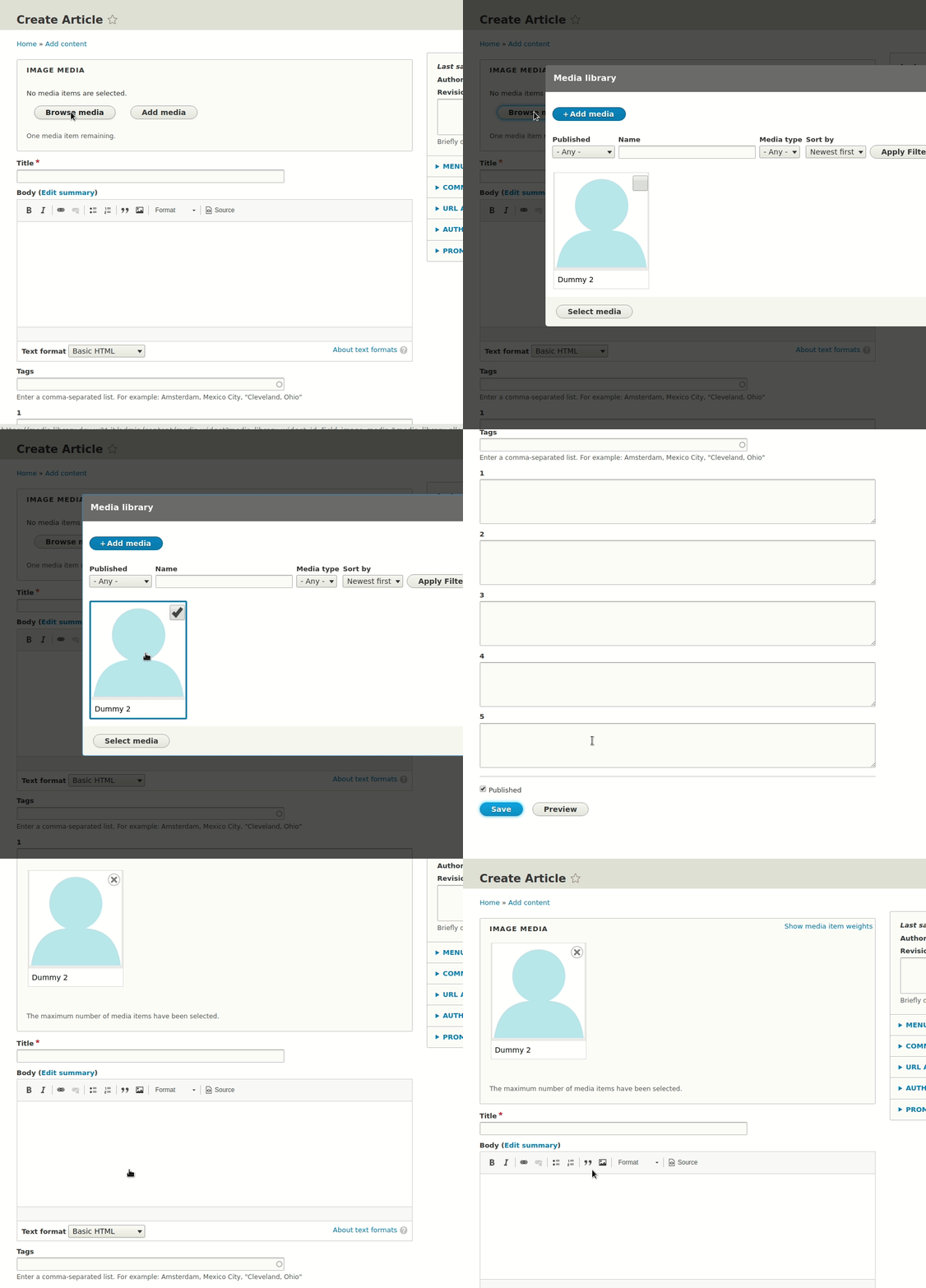
After adding/selecting an existing media item using Media Library Widget, the form focus is shifted towards the bottom of the form with the Media Library Widget out of view in certain cases.
Discussion
The refocus is triggered by Drupal's AJAX API (in Drupal.Ajax.prototype.success). When clicking on the Select media button of the Browse media modal of Media Library Widget, the first target element for the refocus is a Save button (#edit-submit). The next target element is the Update widget button of the Media Library Widget in question. However, since that second target element is invisible (class js-hide), browsers will not refocus on that element. The focus shifts towards the first target element (the submit button of the form) and stays there.
There are 2 reasons the media library should not try to set the focus in the parent form:
- The media library is generic functionality that is not necessarily called from a entity reference widget (for example, we also want to add this to CKEditor).
- The media library dialog currently updates a hidden field in the parent (node) form with a comma separated list of IDs. That triggers a second AJAX command in the node form entity reference widget, to show the media items in that widget. Since that second AJAX command is the last thing that happens, that command should be responsible for setting the focus (the current patch already does this).
Proposed resolution
- It seems that the refocus for the Select media button is not actually needed in this case. We can just disable the refocus by adding the
data-disable-refocusattribute to the Select media button of code>MediaLibrarySelectForm. - We improve the focus for the hidden media_library_update_widget button in the widget form, triggered by the Select media button to update the selection values. The focus should shift back to the open button. When the cardinality is reached, we no longer remove the open button but disable it while still setting the focus there.
- We also improve the focus after clicking the remove button of a selected item in the widget. By default, the focus shifts to the next element in the form. This is good if the user has multiple items selected. If the last item is removed, we shift focus to the open button again
.
Steps to reproduce
Add media
- Install Drupal 8.6.x-dev (Standard profile) in English language.
- Enable
media_librarymodule. - Add a new entity reference field referencing image media to the Article content type. Make sure that Media Library Widget is used for the new field (should be the default).
- Optional: To make the issue more obvious, move the new field to the top of the form by editing the form mode of the content type.
- Optional: To make the issue more obvious, add fields to the bottom of the form (e.g. five plain long text fields).
- Go to Content > Add content > Article
- Click Add media button for the entity reference field you just added.
- Upload an image file
- Add alternative text for image and click Save button
Browse media
Having performed the steps to reproduce for the Add media action above...
- Click Browse media button for the entity reference field you just added.
- Select the image media item you just added.
- Click Select media button.
Expected result
The focus is on the entity reference field with the newly selected media item visible.
Animated GIF of selecting a media item demonstrating the expected result for "Browse media"
Actual result
The focus has shifted further down the form with the entity reference field and the selected media item out of view.
Animated GIF of selecting a media item demonstrating the actual result for "Browse media"
Video of patch #32
https://www.drupal.org/files/issues/2019-03-08/media-library-refocus.mp4
| Comment | File | Size | Author |
|---|---|---|---|
| #52 | 3016807-51.patch | 17.49 KB | seanb |
| #52 | interdiff-49-51.txt | 2.44 KB | seanb |
| #49 | 3016807-49.patch | 17.55 KB | seanb |
| #49 | interdiff-45-49.txt | 2.8 KB | seanb |
| #45 | 3016807-45.patch | 17.6 KB | seanb |




Comments
Comment #2
feyp commentedComment #3
feyp commentedAdded some animated GIFs that demonstrate the actual and the expected result to the IS.
Comment #4
feyp commentedThe same problem apparently exists for the Add media modal and
MediaLibraryUploadForm, so here's a new patch. Also retitled the issue and updated the IS.Comment #5
feyp commentedComment #6
RaphaelBriskie commentedI can confirm the patch (#4) fixes this issue.
Comment #7
marty2081 commentedI can also confirm the patch from #4 fixes the issue.
Comment #8
seanbThis annoyed me as well. Thanks for fixing this. Instead of disabling the focus though, we could wait for #3026636: Allow AJAX links to replace a specific selector and set the focus to whatever we think is best. Let's ask the accessibility team what the most logical place would be, since this impacts screen readers the most.
Even though we can't test which element has the focus (as far as I know), we could at least assert that all the right data attributes are added to the link.
Comment #9
seanbComment #10
seanbOk just looked at this again. Waiting for #3026636: Allow AJAX links to replace a specific selector doesn't make any sense, the focus change is triggered by the form buttons on the modal, not a link. Sorry about that.
Disabling the focus seems like the best way to go for the modal form, so +1 on that. Specially if the modal is going to be used by the CKEditor and/or other (custom) forms in the future.
While writing a test (turns out we actually can test the focus) I looked at where the focus was changing to. Since the selection is the part of the form that actually changes, we should shift the focus to the updated selection div. The attached patch does exactly that.
The old patch needed a reroll as well, so the interdiff was broken.
Comment #12
seanbReroll was needed now #3023802: Show media add form directly on media type tab in media library has landed. That means there is currently only 1 button to go back to the widget.
New patch attached.
Comment #13
phenaproximaNit: Can we use $this->assertJsCondition() in this test for clarity?
Comment #14
seanbFixed #13.
Comment #15
andrewmacpherson commentedseanb asked me to look at this.
Which exact HTML element are you proposing to focus? The proposed resolution doesn't say. I can't tell which element has focus from watching the animated GIF either. That probably means it fails WCAG 2.4.7 Focus Visible.
Usually when dismissing or completing a dialog, focus should return to the control which invoked the dialog.. That way it's easy to reorientate yourself after dealing with the dialog; you're back where you came from. No surprise.
For some reason the add media button disappears - why? That's something we should fix. It's generally not a good idea for parts of the underlying page to disappear while you're in a dialog, esoecially the control that iprompted the dialog. (It's like going to the refrigerator, and finding you've run out of milk. So you go to the shop to buy some milk, and when you come home the refrigerator has gone.)
I didn't understand the discussion about how it determines which element to focus, or the part about the data-disable-refocus attribute. Are these part of the general Drupal AJAX, or specific to media library? What is tbe purpose and behaviour of the data-disable-refocus attribute? I'm confused about the name (it's a peculiar mix of "dis-" and "re-")
Update: I found the bits in RenderElement and ajax.js about the data-disable-refocus, will try to grok those.
Comment #16
andrewmacpherson commentedAside: I hid the animated GIFs. Now they're links. They're a serious WCAG failure, because they loop and there's no way to stop them. It was really hard to pay attention to one while the other was also playing. Movie files would be preferable.
Comment #17
seanbThe last patch shifts the focus to the div element that contains all the selected media items. So you can directly tab to the selected items.
Makes sense, we will fix that.
This has been done because of the field cardinality, since you are not supposed to select more items if the field doesn't allow that. I can see how that can be confusing. If we need to shift the focus back to the button we probably have to solve that in this issue.
There are 2 reasons the media library should not try to set the focus in the parent form:
Still to do (please correct me if I'm wrong):
Comment #18
seanbWhile working on this issue I found fixing this in an accessible way impacted way more than the original intention of the issue. Since I don't want to hijack this issue to fix everything, I created #3035316: ‘Add media’ in MediaLibraryWidget should be a button, not a link to improve the widget accessibility. Let's continue the discussion in that issue and use this issue to add a quick fix.
Comment #19
andrewmacpherson commented#3035316: ‘Add media’ in MediaLibraryWidget should be a button, not a link was very loosely scoped assortment of a11y issues, so I've broken it up into separate issues to make triage easier.
I think we should carry on here for the focus return when the dialog closes.
We already had #2988431: [Meta] Accessibility plan for Media Library Widget as a plan issue with some child issues, so let's make that the parent meta-plan for Media Library accessibility.
Comment #20
seanbHere is a new patch to put the focus back in the widget as well. The open button is currently still removed when the maximum number of items reached. I tried having a disabled button, but these don't allow focus. Disabled buttons are also problematic for accessibility as far as I found.
As long as adding items is allowed, this patch keeps focus on the open button. When the maximum allowed items is reached the open button is removed and the focus is set to the remove button of the first media item.
Once #3035446: Inform assistive tech users about the outcome of using the MediaLibraryWidget dialog lands this might be a lot more clear, since that issue actually announces to the user the maximum number of items is reached.
Comment #21
andrewmacpherson commentedRemove is a kind of "danger" button. I'm wary of moving focus there programatically. There's potential for unintended data loss and/or frustration, say in the case of a user who has a hand tremor and pushes enter accidentally. Heck, that happens to most of us at least once a week.
Some other places we can consider for this fallback:
:tabbablecontrol in the fieldset. Curiously, this turns out to be the show/hide weights button.Comment #22
andrewmacpherson commenteda11y triage: some kind of solution here is a must-have. Updating the a11y plan issue and roadmap.
Comment #23
seanbExcellent point. So let's not do this then.
Since you are essentially done with the field, can we maybe announce something like 'Added 4 items. Maximum number of items selected. Continue with the next field.', and shift focus to the next tabbable element in the form? Which would probably be the next field. That would maybe save users the trouble of tabbing through all elements they just added as well. You can always go back, but that might not be the preferred action.
Comment #24
wim leersComment #25
andrewmacpherson commented#23:
No, that's all out of scope, and almost all of it is a bad idea.
Breaking it down:
Accessibility is about eliminating barriers, and providing an equivalent experience to all users (or as near as we can). It isn't about telling users what to do, or doing things for them that they didn't ask for.
The intended use for
Drupal.announce()is to fill any gaps needed to achieve the equivalent experience. In particular, we use it to notify screen reader users about important visible changes that happen away from the element which has focus. It isn't for providing a detailed running commentary about everything that happens.Comment #26
seanbOk sorry about that then. So what now, which option should I implement?
1. Put a tabindex="-1" on the fieldset legend and use that as the return focus location.
OR
2. Put focus on the first :tabbable control in the fieldset.
Comment #27
andrewmacpherson commentedThere isn't much in it, but I'm leaning to the first :tabbable - because that will have a visible focus.
Comment #28
seanbDone! Focus is now set the first tabbable element in the widget.
Comment #29
phenaproximaI think this line could use a comment.
To prevent a potential "calling a function on null" fatal error here, it might be worthwhile to assert that $checkboxes has at least one item in it before calling click(). (
$this->assertGreaterThanOrEqual(1, count($checkboxes)), I think, would do it).$this->assertJsCondition() should be passed a string of JavaScript code to evaluate, not the result of the evaluation.
Comment #30
seanbFixed #29.
Comment #31
seanbRerolled now #2981044: Unify the grid/table views of the media library landed.
Comment #32
seanbAfter discussing this with JulezRulez the conclusion was that a disabled open button was better than removing it. We also showed the attached patch to rainbreaw and I think she agreed it was best to keep the open button, set the focus and disable it.
I learned we can put the focus to the disabled open button if we set the focus right before we disable the button, so added a JS trick to make that happen. I think this would address the concern from andrewmacpherson in #15. Needed to reroll this patch on top of #3035316: ‘Add media’ in MediaLibraryWidget should be a button, not a link to make that happen though, since we can't really make a link disabled.
While doing this, I also learned that the screen reader focus is not the same as browser focus, and there is very small delay between setting the browser focus and the shift in focus by the screen reader. Added a workaround for that, which probably needs frontend maintainer review. From what I found, there is no way around that though.
Attached is a video to show the focus interaction with voiceover enabled. Interdiff is a bit messed up since I rerolled on top of #3035316: ‘Add media’ in MediaLibraryWidget should be a button, not a link, but still added it to give an indication of the changes. And updated the IS.
Comment #33
rainbreaw commentedAs @seanB mentioned in #32 above, he and @phenaproxima demo'd this with me earlier today.
From an accessibility standpoint, I like the solution of returning the user to a disabled Add Media button. From a usability standpoint, I also like the idea of keeping the button present even for sighted users (in the disabled state), as this makes it clear to the user that they have reached their limit by showing them that nothing is broken, it simply isn't active anymore.
I'm hoping that @seanB's workaround of delaying the deactivation until after the button receives focus passes front end review. If it doesn't, however, another option might be to create a fake button (an item that looks just like an inactive button, but isn't really), make it look deactivated and focusable, and then use aria-label to tell a screen reader that it is a deactivated button.
One thing to keep in mind here, as well, is that re-focusing to the last place one was before a modal opens is not just to support screen reader users. This is also important for users who are relying on just the keyboard (rather than a mouse), as the location they are re-focused on is where they will have to continue tabbing from. If the tab focus does not go to where it was before the user opened the modal, the could be frustrated and have to do extra work.
Comment #35
phenaproximaPostponed on #3035316-34: ‘Add media’ in MediaLibraryWidget should be a button, not a link.
Comment #36
seanb#3035316: ‘Add media’ in MediaLibraryWidget should be a button, not a link landed! This is now unblocked.
I'm also tagging this for backport to 8.7.x, since Media Library will hugely benefit from this UX / a11y improvement and, as an experimental module, this patch may be eligible to land in alpha.
Comment #37
seanbThis might need a bit more explanation. I found that without the
setTimeout(), the browser would move the focus to the disabled button just fine, but the screen readers would move focus to the first element in the page.After quite a bit of searching I found the following in https://webaim.org/discussion/mail_thread?thread=4561:
So there is apparently a virtual buffer that takes time to update, and calling
.focus();andattr('disabled', 'disabled');directly after each other is too fast for the virtual buffer to catch up. If anyone has a better way to solve this, please let me know. I don't like thesetTimeout()at all, but I don't have any other solution at the moment.Comment #38
seanbRerolled since we have landed some issues. Yay!
Also added a visually hidden class to the disabled button. We have shown a demo of this patch to rainbreaw and I think she agreed that this is ok, as long as tab users and screen readers still put the focus back on the disabled button.
Comment #39
rainbreaw commented@seanB and @phenaproxima demo'd this with me on a hangout this morning, AND I just had the pleasure of testing the patch using my keyboard and screen reader (VoiceOver on Mac OSX only).
From my review, this is working well! I did not use my mouse or eyes at all to get through the form, and was able to:
After doing further research and cross-checking, I'm pretty sure that you will have to continue to use the time delay technique in order to give screen readers enough time, since this is an outlying use case for focusing on a disabled item. The only other option would be to not actually disable the button, and instead have it do something different than what it does by default. While typically you wouldn't want to focus on something that the user is not able to interact with, I think this case merits the behavior. To be fair, though, this is an area where a11y conformity becomes subjective, and real-world testing may indicate a better solution.
Based on my conversation with @seanB, I believe this issue will be RTBC once the frontend framework manager signs off.
Comment #40
lauriiiThanks for writing documentation to explain some of the uncommon things you've had to do on this patch, it makes it all very clear! Removing the tag since I don't have any particular concerns about the approach taken here.
Comment #41
phenaproximaThanks, @lauriii! Setting to RTBC per @rainbreaw's feedback.
Comment #42
phenaproximaQuick question -- do we have test coverage asserting that, if you remove an item from the widget, the button appears again? If not, let's add that. Otherwise, back to RTBC.
Comment #43
seanbAdded the test for #42.
Comment #44
phenaproximaTwo nitpicks.
Supernit: It'd be nice to get the element in a variable so we don't have to have this long selector twice.
The ! sort of gets lost in the JavaScript string here. Maybe we could use
.is(":not(:disabled)")instead?Comment #45
seanbFixed #44.
Comment #46
phenaproximaComment #47
larowlanCouple of questions
doesn't this mean someone can manipulate the dom and set the button back to enabled? What impact does that have? Does that allow them to do anything nefarious?
this is a bit confusing - the 'is not going to be disabled' but could use some clarification.
any reason for greater than here and not an explicit quantity? if so, should we add a comment saying why?
Comment #48
phenaproximaPeople can already manipulate the state of the media library, and its DOM -- we don't yet have a tamper-proof hash to validate the important state we are passing back and forth. The issue to add such a hash is open, with a patch: #3038241: Implement a tamper-proof hash for the media library state. So even if people can manipulate the DOM, it doesn't really open any more holes than we've already got.
That said, off the top of my head I can't think of anything especially nefarious this would allow you to do, beyond referencing more media items than are allowed by the field (which would, in turn, cause a validation error later).
Comment #49
seanb#47
1. See #48
2. Fixed. Changed the comment a bit to hopefully better explain what is happening.
3. Fixed.
Comment #50
phenaproximaComment #51
lauriiiI tested the media library with a screen reader and this is a very nice improvement! Let's just change this to use a
js-prefixed class instead.Comment #52
seanbFixed #51.
Comment #53
phenaproximaThanks! Feedback is addressed; back to RTBC.
Comment #54
lauriiiUpdated issue credits
Comment #55
lauriiiCommitted befdca5 and pushed to 8.8.x. Also cherry-picked to 8.7.x. Thanks!
Comment #59
idebr commentedThis code causes the page to focus a visually hidden element on the first page load or when the form is rebuilt using AJAX (for example using Paragraphs). It is quite confusing.
There is an issue to fix this behavior at #3073023: Content Edit page jumps when media library item is placed.