After Drupal core update from 8.4.5 to 8.5.0 block visibility setting tab for "Content types" is not showing anymore. Perhaps this is similar to https://www.drupal.org/project/drupal/issues/2952962 "Block visibility setting tab for Roles not showing"?
Note: I also had issue https://www.drupal.org/project/drupal/issues/2951242 "block_content_update_8400 fails" which I fixed with https://www.drupal.org/project/drupal/issues/2951242#comment-12523500 (comment #25) before attempting the Drupal 8.5.0 update.
The system was installed about one year ago based on Drupal 8.3.1, received every single update along the way, and has 5 languages configured.
To troubleshoot I uninstalled all custom modules and then some more, and also disabled many Views, all to no avail.
Tried a hack with same method as https://www.drupal.org/files/issues/2018-03-20/block_roles_visibility_ba... replacing 'user_role' with 'node_type'. That brought back the setting tab for content types, although now listed below the roles tab. However, when applying a content type setting, the block does not show anymore at all for any content type.
It seems blocks with visibility setting on content types created while still on Drupal core 8.4.5 do work after 8.5.0 update. However, I cannot change the block visibility anymore for content type.
Comparing the blobs in field data of table config for above changed block I see the dysfunctional version of the block is missing "a:1:{s:4:"node";s:29:"@node.node_route_context:node";}", but that may all be due to the crude hack I tried in BlockForm.php as mentioned above.
No errors in dblog and the webserver error log.


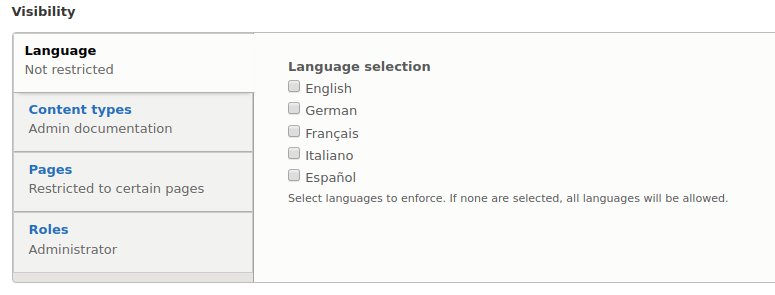
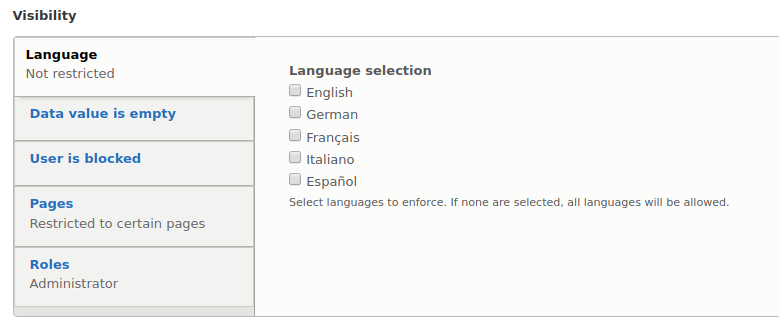


Comments
Comment #2
cilefen commentedHello. There is already a critical issue open for this.
Comment #3
cilefen commentedI mentioned this issue on the other one to see if anyone agrees they are probably the same.
Comment #4
cilefen commentedI am going to reopen this as the other issue seems to have something specifically to do with current user data.
Comment #5
Madis commentedIf you can then test the following:
1. Find the "isSatisfiedBy" function in "www/web/core/lib/Drupal/Core/Plugin/Context/ContextDefinition.php".
2. Add "return TRUE;" inside the "foreach" loop, at the very beginning of it.
3. Check if the tab shows up.
4. If not then try adding "return TRUE;" at the very beginning of the "isSatisfiedBy" function and check if that changes anything.
Only do this temporarily in a dev/testing enviroment. It will help us determine if your problem is related to the one reported in https://www.drupal.org/project/drupal/issues/2952962
Comment #6
hd commentedThanks, Madis, for your feedback. In my test&dev instance, which has been updated from 8.4.5 to 8.5.0, I tested your suggestions:
Adding "return TRUE;" inside the "foreach" loop, at the very beginning of it, does not make a difference. The content types tab does not show up.
Adding "return TRUE;" at the very beginning of the "isSatisfiedBy" function, does make the content types tab show up, and a whole lot more tabs I have never seen there before there.
See the attached screenshots.
Only for the sake of curiosity I also changed a block's configuration to show for only a certain content type, which then resulted in error on pages where the block is configured to potentially show, not hindered due to other visibility settings. Or with other words, the site is configured to not show any sidebar blocks on the front page, and there I do not get the the below error, also no error in the config theme, but for almost all other pages I do get this error:
The website encountered an unexpected error. Please try again later.
Error: Call to undefined method Drupal\Core\Language\Language::getType() in Drupal\node\Plugin\Condition\NodeType->evaluate() (line 111 of core/modules/node/src/Plugin/Condition/NodeType.php).
... and more backtrace information. But I assume that error does not mean anything in the context of this test.
Comment #7
Madis commentedThanks for testing! Looks like these 2 issues don't have quite the same root problem, but I think it's still likely that both originate from changes made here (like cilefen pointed out in the roles issue): https://www.drupal.org/project/drupal/issues/2671964
Comment #8
tim.plunkettI don't see any concrete steps to reproduce this on a new site.
But #2952962-26: Block visibility setting tab for Roles not showing should address both
Comment #9
hd commentedEventually I found out how to reproduce the issue. Install Drupal 8.5.0 or 8.5.1 (the security update).
Install module Typed Data https://www.drupal.org/project/typed_data as requirement for module Rules https://www.drupal.org/project/rules and install module Rules.
Try to configure any block and Block visibility setting tab for Content types should not be showing anymore.
The Drupal system I used to reproduce the above had already some customizations like multilanguage enabled, and a custom content type configured. But otherwise it was still pretty virgin.
On the test&dev version of the actual system with the problem, just uninstalling the Rules module brings back Block visibility setting tab for Content types. It is configurable, and does function as expected.
See attached screen shots of block visibility settings with Rules modules installed and not installed.
I am not convinced that this issue is a duplicate of https://www.drupal.org/project/drupal/issues/2952962 (Block visibility setting tab for Roles not showing).
Comment #10
tim.plunkettSounds like a bug in the Rules module, or in your site config.
Before reopening, can you confirm that it is not a duplicate?
Comment #11
Madis commentedI did some testing and debugging trying to figure this one out:
1) Started with checking the "isSatisfiedBy" function (core/lib/Drupal/Core/Plugin/Context/ContextDefinition.php). With just core "$definition instanceof static" passes for "entity:node" data type. With Rules installed it fails so "$values" ends up being an empty array.
2) Moving to Rules I ended up in "createFromArray" function (modules/contrib/rules/src/Context/ContextDefinition.php). Block visibility settings seem fine when replacing "ContextDefinition::class" with "ContextDefinitionCore::class" as the fallback class (needs cache flush).
I don't know why this is happening though seeing as "ContextDefinition" of Rules is the child class of core's "ContextDefinition" and it doesn't override anything.
Comment #12
tim.plunkettAh, that part might be fixed by #2958785: ContextDefinition isSatisfiedBy() check fails for context using inherited class
Comment #13
Madis commentedCan confirm that the patch in #2958785 fixes it.