

Closed (cannot reproduce)
Project:
Drupal core
Version:
9.3.x-dev
Component:
forms system
Priority:
Minor
Category:
Bug report
Assigned:
Unassigned
Reporter:
Created:
16 Aug 2014 at 05:57 UTC
Updated:
8 Nov 2021 at 10:52 UTC
Jump to comment: Most recent, Most recent file




Comments
Comment #1
roaldumandal commentedComment #2
roaldumandal commentedComment #3
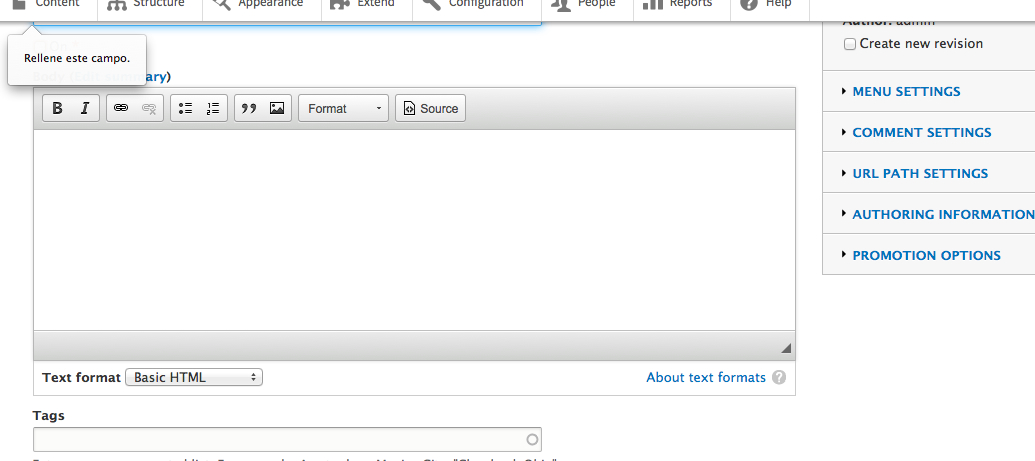
emma.mariaThe screenshot shows the Seven admin theme. Moving this issue over to that component.
Comment #4
gaurav_varshney commentedThis issue is not the seven theme. this is because the label is not required when adding action. this is present in action module.
Comment #5
swetashahi commentedTested with the patch on 8.0.0-alpha14 using Simplytest.me on Firefox browser (v38.0.1) and the popup "Please fill out this field" appears below the erring field.
Please refer below

Comment #6
swetashahi commentedComment #7
manjit.singhComment #8
manjit.singhI dont think it should be in RTBC. Now Popup is coming over the toolbar section, Ideally page should be scroll to that point/field when any field got missed by an author.
Comment #9
Balneum commentedAgreed with @Manjit.Singh that it should scroll to the correct point. At the moment the popup is in the correct place but the page doesn´t scroll to the field.
Comment #10
Balneum commentedThe scroll works in mobile.
Comment #11
gaurav_varshney commentedComment #12
lewisnymanI'm not sure if we should be marking fields required when they aren't to fix a UI bug. Is this a browser bug? Does it happen in Chrome?
Comment #13
manjit.singh@lewis adding a screencast :) Please check this.
Comment #14
manjit.singhComment #15
darol100 commentedI have test this patch and does not scroll up like @Manjit.Singh mention on comment #8. For this reason, I would change it back to "Needs Work". I personally, did not see any different with or without the patch. I test it out on a Google Chrome Version 43.0.2357.81 (64-bit) (Macbook Pro), and Fire Fox Developer Edition 40.0a2 (2015-05-29).
I'm changing the version to the latest version, which is beta 11.
Comment #16
manjit.singh@darol100 Thanks for the feedback. Actually that was just a suggestion from myside that When there was any validation error in a form then page should be scroll to that point/field.
With this, I think we can enhance the D8 functionality.
Also Screencast is just showing the popup issue.
Comment #17
swetashahi commentedComment #18
pakmanlhAfter applied the patch I don't see any difference between before and after.
I think the redirection is working but in the desktop resolutions, the toolbar's height is hidding the field and make a weird effect because the message is showed but the field remains under the toolbar.
Desktop resolution
Mobile resolution
I have no clue which would be the solution.
Comment #19
andypostComment #20
daniel_rempe commentedTested with Firefox 64, Chromium 71, IE 11 and Chrome 71 / FF 65 on Android. Seems to work as designed. Please reopen this issue if it still occurs.
Comment #21
reenreenreen commentedError still exists exactly like in the Screencast from Comment Comment #13. Tested with Chrome and Firefox.
In my opinion the issue can only be solved with Javascript.
Approach would be:
Comment #22
reenreenreen commentedComment #23
reenreenreen commentedThe following code can be executed in the browser console and should solve the problem in most cases. Unfortunately, I don't know where I can insert the code in the Seven theme.
Comment #24
elamanThe issue is browser specific. For example, Safari browser doesn't show popup at all.
Also, this isn't a theme or module specific issue, virtually any form on any theme has this issue.
Comment #26
lucuhb commentedWhen I add the js code from #23 in my custom theme as a new library, this solve the problem, thanks @reenreenreen
Comment #31
quietone commented@roald.umandal, Thank you for reporting this problem. We rely on issue reports like this to improve Drupal core.
Both #18 and #20 could not reproduce the problem. I tested this on 9.3.x, standard install, with Firefox 78.14.0esr and Chromium 90.0.4430.212-1 and was not able to reproduce this error. I tested with adding a node and adding an action.
Therefore, closing as cannot reproduce. If you are experiencing this problem reopen the issue, by setting the status to 'Active', and provide complete steps to reproduce the issue (starting from "Install Drupal core").
Thanks!