

Closed (cannot reproduce)
Project:
Drupal core
Version:
8.0.x-dev
Component:
toolbar.module
Priority:
Normal
Category:
Bug report
Assigned:
Unassigned
Issue tags:
Reporter:
Created:
30 Nov 2012 at 15:19 UTC
Updated:
29 Jul 2014 at 21:36 UTC
Jump to comment: Most recent file



Comments
Comment #1
echoz commentedI can not reproduce. Here's my screenshots for Safari 6.0.2 + FF 17
 _
_ 
(hint: view a narrow width viewport in Safari by opening the Reading List sidebar).
Comment #2
benjifisher@echoz:
Thanks for testing.
I just reproduced it on Windows 7 + FF 12.0. (When I first reported the bug, I was using a Mac.) I hope it does not depend on the specific browser/OS versions. Let me be more explicit about the steps to reproduce:
When I do the last step, I do not see the "Expand" icons.
I am using a day-old pull of D8: commit #0ee0162.
Comment #3
echoz commentedAfter I posted, I did actually see this once after after a combo of steps I was not tracking, but could not reproduce it, and still can't following your steps. I imagine you will have to report reproducible steps for this to get further debugged. I'm not looking at Win now, but if you saw it on the Mac too, it's probably not platform specific.
Comment #4
webchickMarking this way until we get a set of steps to reproduce.
Comment #5
barnettech commentedFunny it was happening to me in Firefox 17.01 on a Mac and I installed a pixel ruler extension to let you know at what width of the browser is was happening, and then I restarted the browser and the problem went away. I'll keep trying to reproduce it again.
Comment #6
barnettech commentedYes! I was able to reproduce the problem following Benjis steps .
1. Narrow Firefox browser to make the menu go vertical.
2. Now click to make it horizontal (important: keep the screen as narrow as possible but so you can still click to make it horizontal in this step, else you won't reproduce the problem)
3. Now click to make vertical
4. Now narrow the screen a bit more
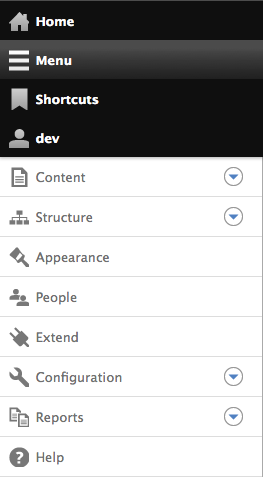
5. You will now see the problem, widen the browser some more then narrow it again, the icons to expand the menus won't be seen again
I can't get it to happen every time.
I CAN get it to happen every time that the expand icons are unavailable if menu is switched to be horizontal and then the screen is too narrow. I'm still trying to reliably every time reproduce when the menu is in vertical mode.... Although I can confirm this is happening in vertical mode.... I'm now just trying to get it to happen to me again.
Comment #7
barnettech commentedWait I think that is the bug --- narrowing the screen when forced back into horizontal mode:
1.) Narrow the screen and make the menu go vertical
2.) Force the menu to be horizontal (while the browser is still very narrow)
3.) Narrow the screen a bit more (only firefox lets you get the screen narrow enough to make this happen I think)
4.) The icons to expand the menus will be gone.
I can reproduce this every time.
Comment #8
mbrett5062 commentedThe icons to expand the menu's only exist on the tool tray. What you have artificially created is a horizontal menu squished to vertical on a small screen. This is not intended functionality, on small screens the default is tool tray not horizontal menu.
I do not see this as a bug or an issue at all.
If you just access the menu on a small screen you will get automatically the tool tray,
If you squish your screen down from wide to narrow, the horizontal menu will change to tool tray at a certain width, and the tray will always have the icons to expand.
Comment #9
benjifisher@mbrett5062:
That explanation covers almost everything. I still have two objections:
1. From looking at the code, I think there is a screen width so narrow that it does not give us a choice. It insists on a vertical menu.
2. If you are right, and my "horizontal" menu is just flowing into a single column. what happens to the toggle control?
To illustrate #2, here are two screen shots. In one, the toggle is there and the horizontal menu is squashed into one column. In the second, the screen is a little narrower and the toggle is missing (consistent with my theory in #1).
Comment #10
mbrett5062 commentedIf you do not mess with things in a way that no user would it all works out of the box. The method to get this non-issue is not a real use case.
However that said the border at end of 'help' and wrapping of horizontal menu should not happen at all in my opinion. The breakpoint at which we jump to vertical tray should happen before wrapping. As I posted in #1855884: Default toolbar breakpoints need adjustment. which was closed.
Comment #11
benjifisherI also noticed the border at the end of 'help': #1854980: Toolbar tray shows stray border at narrow widths.
Real users do all sorts of things that I never anticipate. No matter how much time I spend randomly testing a system, my assumption is that they will stilll come up with something that I have not tried.
Comment #12
mbrett5062 commentedI understand, and agree but do we want to test this to death and compromise good design for the 0.25% use case. Lets get this perfect for the 90% and as near perfect as is reasonable for the other 10% so we can move on to more pressing issues.
I have worked on #939462: Specific preprocess functions for theme hook suggestions are not invoked which is a blocker for twig, I got it green around 3 days ago, and still no reviews. That needs to get in so we can push forwards with twig. I am finding that reviewers are few and far between, and would like to get things like that up to the standard were the toolbar is now. There are many, many other issues/features that could do with more of our time. It is now that we should be looking to get everything up to at least 80% use case ready.
There will always be another few tweaks to do on everything, but lets concentrate our efforts on the major's before we spend time on the very minor faults.
I am not trying to discourage your excellent work on testing and pulling things apart to get to perfection, just would like to get more of the 'must haves' to this level. Hope you understand my meaning and don't take this the wrong way.
Comment #13
rteijeiro commentedCannot reproduce. Tested with 23.0.1 and followed the proposed steps.
Feel free to reopen it if the problem persists but it seems this problem is fixed and the issue is too old.