

 Come together with the global Drupal community in Rotterdam, 28 Sept – 1 Oct 2026. Sessions, contribution, connection, and Early Bird savings until 8 June.
Made a stub page for this at http://drupal.org/getting-started/7/admin (there was a link from the D7 getting started page) - please base off http://drupal.org/getting-started/6/admin, update, add new screenshots etc. (or if you don't have perms to add them, notate where they go and leave a note here so someone with docs perms can).
| Comment | File | Size | Author |
|---|---|---|---|
| #3 | d7admin-figure1.png | 21.79 KB | trevjs |
| #3 | d7admin-figure2.png | 27.4 KB | trevjs |


Comments
Comment #1
trevjs commentedQuestion about where the stub pages is located.
I noticed for the API pages that tabs are used for keeping separate the different drupal versions. Would something like that make more sense than having the Six getting started, and 7 getting started next to each other in the handbook?
It seems like doing it this way would make for a much longer and more confusing table of contents.
I'd be interested in contributing for this page.
Comment #2
trevjs commentedLooks like I'll be working on this. Comments and suggestions would be appreciated.
Comment #3
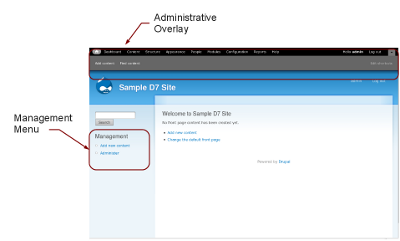
trevjs commentedI've posted my changes. I wasn't sure if the "notes" section from the old page were applicable to D7. The "notes" section also seemed like it might be better on a separate page for troubleshooting new installations. Also, since the "Steps" that appeared on a freshly installed site no longer appear in D7, I decided to integrate that into this page with some modifications. I still need to do a little proof reading of my own. Also, I don't believe I have permissions to add the images.
The images are attached. I can also provide the Opendocument Drawing files if somebody wants to make versions for other languages.
Comment #4
arianek commentedgreat start! just revised this and made a bunch of edits:
- brought up to handbook styleguide standards http://drupal.org/node/338208
- removed several target="_blank" in the links, we don't want link targets in there.
- fixed typos and capitalization
- made links relative ie. /handbook/.... rather than http://drupal.org/handbook/....
- removed the "split summary"
- changed (referring to the admin account) "Ideally, only one person should have access to this account." --> "Ideally, only a developer or advanced site admin should have access to this account."
- removed inline CSS styles
- fixed some HTML tags
- many places "sites" --> "site's", there's an apostrophe when it belongs to the site
- under admin links, config "This includes various pages for back-end elements of the site that don't fit in other categories." --> "This is where you configure the settings for all the various site functionality, including modules."
- under admin links, help "This provides some brief articles on Drupal topics. You should refer to the handbook pages for more detailed information." --> "This section provides basic information on the functionality of the modules installed on the site, including core modules. Each help page has a link to the module's handbook page, where more information can be found."
- drupalized some of the language a bit more
yet to do:
- as for the screenshots, we might want to wait a bit to put them in, since things are still not set in stone, but either way, the first one is too small - we can fit up to 600px wide, so better to make it a bit larger so people can see what's going on.
- i think all the language about "admin overlay" really needs to be "admin toolbar" as it's referring to the toolbar module, which should not be confused with the overlay module.
Comment #5
trevjs commentedThanks for the feedback and edits. The help is much appreciated.
I see what you mean regarding the overlay vs. toolbar. I'll change it to "toolbar."
As for the pictures... I'll hold off for a bit. If you want 600px wide, I can do that. When I redo them would it make more sense to replace the text with numerals or symbols, and then refer to these either in a caption or the body of the text?
Comment #6
arianek commentedhi trev -
hmm. i think the text actually looked just fine, it's simple and straightforward the way you've done that section.
thanks again for adopting this page, it's much appreciated!
Comment #7
trevjs commentedWe are waiting till closer to release before adding images.
Comment #8
arianek commentedchanging back to needs work (postponed is for longer term postponing and i don't want this to get missed!) ;-)
Comment #9
trevjs commentedSeems like a good time to look back at this issue.
It has broken up into two pages:
http://drupal.org/getting-started/7/admin
http://drupal.org/handbook/modules/toolbar
This issue is still open because we were going to add images once things got closer to completion. Do we still need images? I don't know if we do for the first page (admin getting started). It might make since for the toolbar page.
Thoughts?
Comment #10
trevjs commentedSwitching to needs review so that somebody can evaluate my note in #9
Comment #11
arianek commentedhey trevjs - good stuff - i made a bunch of edits to http://drupal.org/getting-started/7/admin just to tweak language, and format some of the navigation paths, and add more page titles. )if you want to see what i changed, you can do a diff on the revisions tab)
the toolbar page does need screenshots, but that also falls under http://drupal.org/node/674456 so i'll let that be taken to the other issue
there is still a bunch of stuff mentioned on http://drupal.org/getting-started/6/admin that's not on the d7 admin page, so i think this still needs a bit more attention before it can be marked fixed.
Comment #12
skesslerI have made some corrections and updates to this http://drupal.org/getting-started/7/admin - some of the pages that link to it should still be added. I think we need to address some of the Drupal Cookbook Content but this is a BIG undertaking.
Thanks,
Steve
Comment #13
arianek commentedHey denverdataman -
Thanks for working on this one, just wondering, can you clarify what you mean by "some of the pages that link to it"? Not quite following. Thanks!
Comment #14
trevjs commentedI need some direction on this. In response to 11, I went through and made a side by side comparison with the D6 version.
Here is how the two versions compare:
D6 Version >> D7 Version Status
Where you are post install >> Covered in "understanding the admin account"
user 1/ understanding the admin account >> Ditto
Administration page >> Sort of covered on the toolbar child page.
Notes >> Not present, some things here may be useful such as the link for setting up cron, and a mention of clean urls.
So, we might think about what notes need to be mentioned specifically for D7.
In response to what Denver said in #12 about things that link to it... he may need to clarify, but I think we could definitely work on linking more to particular pages in the handbook. Some suggestions:
Thoughts? Ideas? Suggestions or criticisms?
Also, would it be useful to start an issue on the order of the child pages. Currently they are this:
Working with contextual links
working with dashboard
working with the overlay
working with the shortcut bar
working with the toolbar
I think working with the toolbar is the most important since it deals with navigating the administration pages. I think it should logically be on the top, but I don't want to start an issue if it has already been discussed elsewhere. Also, there is currently a comment about since the toolbar is optional there should be a page for navigating without it. Perhaps a page for navigating Drupal's admin pages that describes the basic layout, and covers both using the toolbar, and the menus. Or... maybe not. Just a suggestion.
Comment #15
arianek commentedOk, maybe it's not *that* much missing ;)
re: Notes, yes agreed, probably need to see which ones are relevant to D7.
re: Linking, yes gotcha, definitely should link out to relevant areas.
re: Order of pages, I think they're just alphabetical right now, and I'd say no need to file an issue over that, if it makes more sense to order them in the order you'd encounter them, I'll +1 that. As far as the "how to navigate sans toolbar", I think it might make sense to put a little blurb right on the page about it?
Comment #16
trevjs commentedI've added some links, I also took the note about cron from the bottom of the 6 admin page and put it into the paragraph about site reports. Most of the other things that we could link to from here are pretty focused on Drupal 6. I believe this page is adequate for the time being (open to suggestions though), and so I think we can safely let it be for 3 months or so to see what might be added to it.
My only thought at this point might be a short paragraph inviting new site administrators to contribute to the page, and the administrator guide. Maybe also a link to the lullabot article that Webchick wrote about contributing to documentation.
Feel free to correct my categorization if you feel differently. I'll be watching the issue.
Comment #17
arianek commentedAwesome! I just did some final touches, added URL paths for the admin pages, etc. and marked the page as "no known problems".
Marking this as fixed, since we're calling it done till someone has a problem with it. ;) Good work! *hifives*