

 Come together with the global Drupal community in Rotterdam, 28 Sept – 1 Oct 2026. Sessions, contribution, connection, and Early Bird savings until 8 June.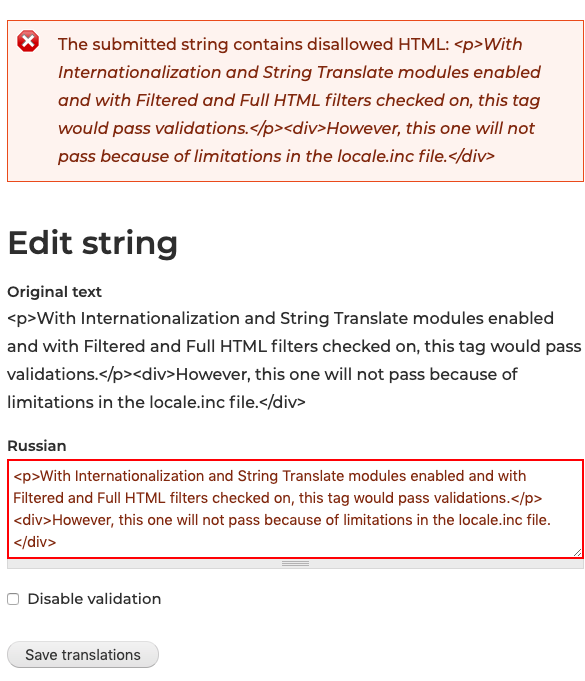
The problem
If you have a Drupal 7 website with Internationalization and String translation modules enabled and if attempts to translate strings containing certain HTML tags cause the The submitted string contains disallowed HTML error, then most probably you have not checked on yet the Filtered HTML and Full HTML on the /admin/config/regional/i18n/strings setting page, which come disabled by default.
However, if the problem persists even after enabling both filters, then most probably you might need this module. It's a really tiny and more of utility type module that maybe didn't needed its own project page. Still because we've encountered the described issue on almost every single multilingual Drupal 7 website we manage, we've decided to have it uploaded on Drupal.org, mostly for our own use, but maybe others also will find it handy.
How to use
1. Enable as usual;
2. Go to the /admin/config/regional/translate/translate and enter the string to translate, which usually gives the above-described error;
3. Click on "Edit" and on the next page you will notice a new checkbox called "Disable validation" just above the "Save translations" button, check it on.
4. Try to save your translation and this time it will pass.
Additional notes
We didn't file this as a bug, because in most cases it probably works as designed. For example, if you are trying to translate strings which originate from Views, then enabling the Internationalization Views could be your solution. However, sometimes enabling additional modules in order to just one or couple strings get translated could be overkill, so there this module comes really handy.
Supporting organizations:
The module has been developed and supported by AltaGrade staff-members.
Project information
- Project categories: Content editing experience, Multilingual, Developer tools
- Ecosystem: Internationalization
 129 sites report using this module
- Created by nickonom on , updated
 Stable releases for this project are covered by the security advisory policy.
There are currently no supported stable releases.


