

Closed (fixed)
Project:
Dynamic display block
Version:
7.x-1.x-dev
Component:
Code
Priority:
Normal
Category:
Support request
Assigned:
Unassigned
Reporter:
Created:
21 Apr 2011 at 01:59 UTC
Updated:
18 Aug 2011 at 04:01 UTC
Jump to comment: Most recent file



Comments
Comment #1
ppblaauw commentedDo you have a link to the site?
Did you create content?
Do you see content in the view?
What steps did you do to create the ddblock instance of the views block display?
Comment #2
regi.bradley commentedI currently don't have a link to the site as it is still in development. I have created a node for my showcase_with_image content type and see the content displayed in the view. To create the ddblock instance, I:
1. Created a views block display
2. Enabled the content type and view under ddblock settings
3. Added an instance to ddblock via /ddblock/instances by entering a title and selecting the block created by my view above.
4. I configured the block to use cycleblock as the display method and upright10p as the theme.
5. Mapped the target/source to fields in my view.
Thank you for your help.
Comment #3
ppblaauw commentedThe steps are all good.
After this you place the ddblock instance in a region?
Did you clear the cache?
Comment #4
regi.bradley commentedI have figured out what was causing this issue. It was not related to ddblock, but rather the specific region in my theme! I tested by putting the block in the content area and the slideshow displays fine now.
Comment #5
ppblaauw commentedset status to fixed
Comment #6
borngunners commentedI have installed mine on Drupal 7, but still having some issues. First of all, it is not showing at all. I have tried to change the block regions to something else, but still can not see any display. I am having the following error:
Comment #7
ppblaauw commented#6
There is no need for preprocess functions in the template.php file for the drupal 7 version.
Maybe you use the preprocess functions from ddblock for drupal 6.
You need to delete the preprocess functions for the ddblock module from the template.php file.
Hope this helps you further, please let me know.
Comment #8
borngunners commentedI have removed the preprocessor from the template.php and I went to view and was trying to edit the DDblock view that I created in views and had this error message:
Notice: Undefined variable: modules in views_slideshow_plugin_style_slideshow->options_form() (line 92 of /home/sonoecho/public_html/sites/all/modules/views_slideshow/views_slideshow_plugin_style_slideshow.inc).Probably a simple step will help me get my images to show where I want them to show... I have downloaded the themes and cycle modules, but i don't see anything working. This is what i did:
-install ddblock module
-Create a view of ddblock
-create a content type
-Go to the DDBlock settings and create an instance
-Provide a name (eg. Views DDblock)
-Configure the block to show up in a region of choice
Comment #9
ppblaauw commenteddid you map the views fields to the slideshow variables?
Comment #10
borngunners commentedDon't know how to do that. Can you explain to me in detail how to do it....
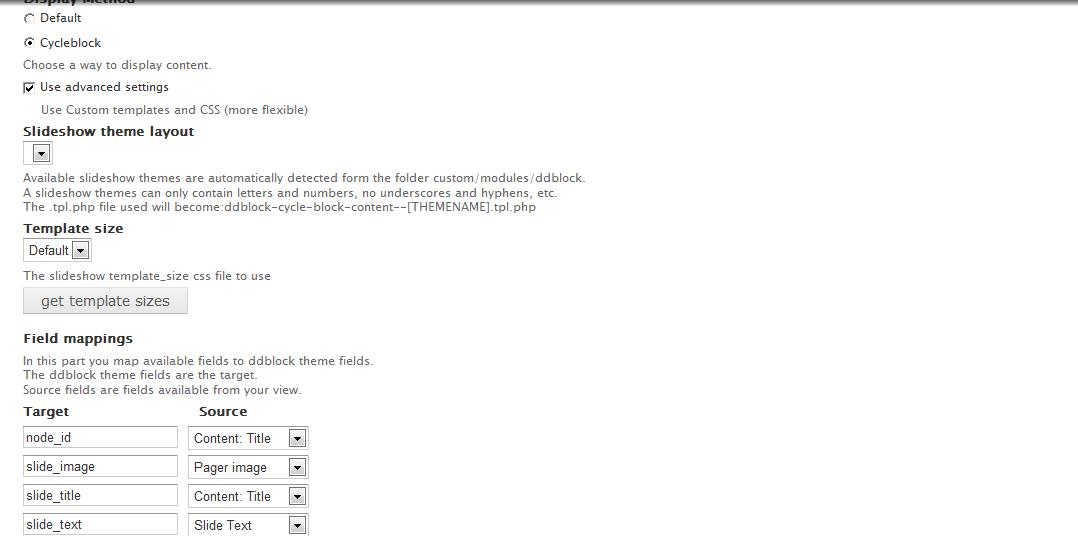
I have the custom ddblock directory in the theme, but nothing is showing up to select:
Available slideshow themes are automatically detected form the folder custom/modules/ddblock.
A slideshow themes can only contain letters and numbers, no underscores and hyphens, etc.
The .tpl.php file used will become:ddblock-cycle-block-content--[THEMENAME].tpl.php
* Warning: include(/home/sonoecho/public_html/sites/all/modules/ddblock/ddblock-cycle-block-content.tpl.php) [function.include]: failed to open stream: No such file or directory in theme_render_template() (line 1234 of /home/sonoecho/public_html/includes/theme.inc).
* Warning: include() [function.include]: Failed opening '/home/sonoecho/public_html/sites/all/modules/ddblock/ddblock-cycle-block-content.tpl.php' for inclusion (include_path='.:/usr/local/php52/pear') in theme_render_template() (line 1234 of /home/sonoecho/public_html/includes/theme.inc).
Comment #11
ppblaauw commented#10
When the content type and view display block to use for the slideshow are enabled in the settings tab of the ddblock module.
The ddblock instance can be made for the views block display in the instance tab.
When the ddblock instance is created for the views block display the instance can be configured via the list tab.
Choosing slideshow template, mapping the views_fields to the slideshow theme fields, setting speed, timeout etc
Hope this helps you further, please let me know
Comment #12
borngunners commentedWell, I followed your comments even though I had already did what you where explain. So i decided to have a print screen of the portion that I think should be setup that is not showing up. I have it attached in this post....
Comment #13
ppblaauw commentedI can see that the "slideshow theme layout" select box is empty.
The themes are not installed in the right place. The slideshow themes should be installed in sites/all/themes/[overall_site_theme]/custom/...
The [overall_site_theme] is the theme which is set as default theme in the themes page.
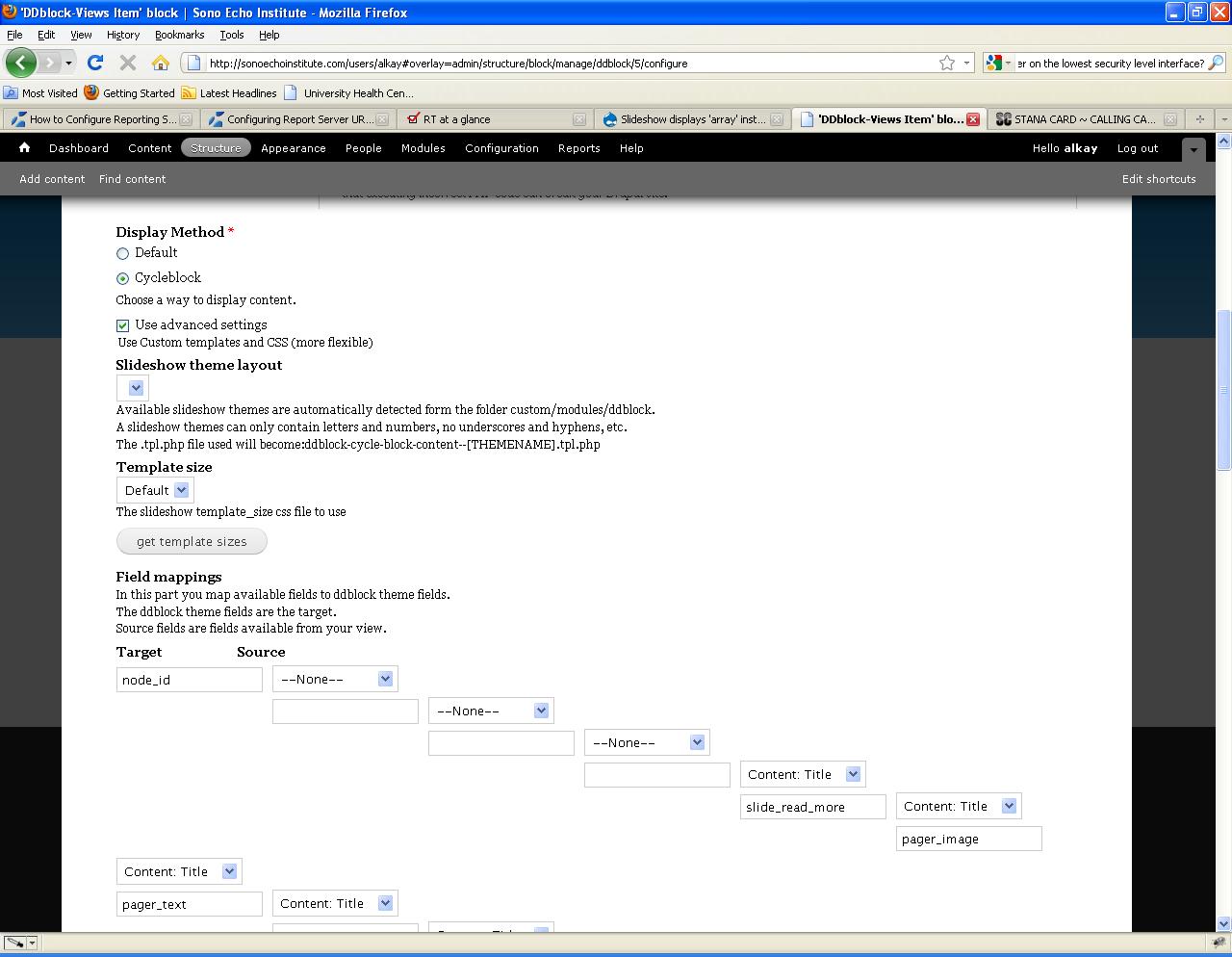
For the mapping of fields I see that layout is scrambled, because there is some indention before each next target field. (Probably added by CSS of your site theme)
Some of the target fields are empty.
In the select box after the target field you can choose which source field you want to map to a target field of the slideshow theme.
Added a screenshot of the same section from my site.
Comment #14
borngunners commentedI do have the custom theme in my theme... It is in a directory called /themename/custom/module/ddblock... I probably have the wrong theme. Can you put a link of the theme that you want me to have in there please.
I tried to use another theme for my site (corolla) it seems to bring up the custom theme, but could not provide me a template size and also, I did not see the slides as slides instead, they showed up vertically one after the other. I have two pictures there. I sent you an email with the login information to see what I am doing whether it is right or not. Please let me know.
Thanks
Comment #15
ppblaauw commentedI see in one of the other posts that you probably use the gordon theme.
When you use the gordon theme, the custom folder should be in sites/all/themes/gordon/
Comment #16
borngunners commentedThat is exactly where I have it, but the target and source does not look like yours they look like you saw in my last print screen. Also, it does not show the slides. Do you want me to create a webinar so you can look at it or login with the info that I provided you earlier?
Comment #17
ppblaauw commentedThe cache needs to be cleared to get new tpl.php template files recognized.
Maybe there are no permissions to read the slideshow theme file on the fileserver.
I can not connect to your site, I have a problem with my ISP.
Some sites I can not connect to.
I asked someone else if they can connect to your site and they can.
Comment #18
cgonsalv commentedWhen configuring the DD block I don't see any options in the select box. I've checked to make sure that folder is in the correct directory. I'm assuming I have the necessary rights to the template folder since I get the following error message.
•Notice: Undefined index: slide_image in include() (line 39 of C:\Program Files\Zend\Apache2\htdocs\p002\sites\all\themes\bartik\custom\modules\ddblock\ddblock-cycle-block-content.tpl.php).
•Warning: Invalid argument supplied for foreach() in include() (line 39 of C:\Program Files\Zend\Apache2\htdocs\p002\sites\all\themes\bartik\custom\modules\ddblock\ddblock-cycle-block-content.tpl.php).
I'm attaching screen shots for the following:
1) Empty select box
2) Error message
3) The theme folder where my dd block is installed.
Used: ddblock-upright10p-60-v7-1-3.zip
Dynamic display block : 7.x-1.0-rc1
Appreciate any help you can provide to get this working. I am using Drupal 7.7
Comment #19
ppblaauw commented#18
bartik is the default theme you use on your site?
it is moved from the themes directory to sites/all/themes?
Comment #20
cgonsalv commentedThere were two Bartik folders. One that came with the core install and another I made under sites/all/themes.
I copied the 'custom' folder along with it's sub-directories under the ORIGINAL (core install) Bartik folder and it worked!! I mistakenly assumed that Drupal would only look at the Bartik folder under sites/all/themes.
Thanks!!