Closed (fixed)
Project:
Date
Version:
6.x-2.x-dev
Component:
Code
Priority:
Normal
Category:
Bug report
Assigned:
Unassigned
Reporter:
Created:
25 Oct 2010 at 13:25 UTC
Updated:
8 Dec 2010 at 15:40 UTC
Jump to comment: Most recent file


Pop defaults to earliest year instead of current year if date field is empty. Must be some change in the jquery ui code. Haven't figured out why it is doing this.
| Comment | File | Size | Author |
|---|---|---|---|
| #7 | datepopup1.7_rangebug.png | 8.42 KB | ccarigna |
| #7 | datepopup_d6.patch | 1.91 KB | ccarigna |
| #4 | datepicker_testcases.png | 16.88 KB | ccarigna |
| #4 | datepicker_defaultdate.patch | 1.33 KB | ccarigna |


Comments
Comment #1
ccarigna commentedThe Datepicker has a setting, defaultDate, which determines the date that is first selected when it displays. Looking at the source of a page, I noticed that it is set to the lowest date range (default is -3 years, eg: {"defaultDate":"-3y"}.
Looks like this gets set at line 92 in date_popup.module.
Removing that line corrects the issue (without that option set, datepicker will simply resort to the default value which is the current date).
Comment #2
karens commentedSure enough. And the D6 version works correctly with that line in there, so something changed in the datepicker I guess.
Thanks for figuring this out :) I committed the change, meant to give you credit but was too quick on the trigger.
Comment #3
ccarigna commentedNo worries. Though now that I think about it, if that line of code is no longer being used, then the if statement around it seems unnecessary (since the $parts array is not being used anywhere else in that function).
However, I did a quick test with D6 using the latest dev release for Date, and noticed the same issue with date popup (the 2.6 release for date is fine though, but that release does not have the defaultDate line in it).
Looking into the revision, it looks like that code was initially added to fix #521990: Date content type calendar popup gives the wrong year (gives the current year) (which it did). However, now that we've removed that line, that bug has been re-introduced into D7.
:(
Not sure the exact way to deal with this and fix both issues. We can try fixing it either within the Date module, or take a closer look at the date picker javascript.
A quick fix/compromise within the date module might be to take the average between the year ranges, and pick the smallest number between the average range and 0.
This means if someone went with the default values (-3:+3), then the default date would simply be 0 (typical use case). If someone limited the date ranges to the future (0:+3), then the average is +1.5y (but if you default to that, it could be annoying for the user), but since we take the smallest value, we'd still use 0. If someone limits the date ranges to the past (-13:-9), then it would default to -11 (and avoids the bug in #521990: Date content type calendar popup gives the wrong year (gives the current year) by having an appropriate default date value set when a user picks a date).
A more elegant/simple fix probably exists for now, but I need to take a closer look into how the ui datepicker works and how it's being initialized on the page.
Comment #4
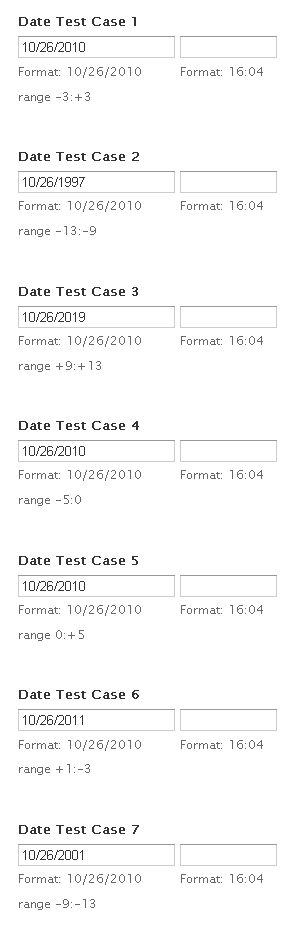
ccarigna commentedThe issue is with datepicker - even if you supply a range of years, it will still render the current year before it renders the select list for other years. This can be fixed by providing a defaultDate (which is what we took out earlier).
I've added back in the defaultDate setting, but this time with a check to see if the range of years a user specifies includes the current year. If it does, the default date is set to 0, otherwise it sets it to the lowest bound date (which should be good enough for cases when the year ranges don't include the current year, like -13:-9 or +9:+13).
I also noticed that any future date ranges (+9:+13) could not be used (even though Date API supports it), and it was originally an issue with datepicker. It looks like date_range_string() does convert the ranges to a format that can be used by datepicker, and it should work properly now that a defaultDate value is supplied.
I've included a screenshot of different test cases. Once reviewed and if everything looks ok, I can put together and test a patch for the D6 version too.
Comment #5
karens commentedCommitted this. A fix for D6 would be appreciated. This part of the code should be the same in D6, so you just need to test that making the same change to D6 works.
Comment #6
karens commentedComment #7
ccarigna commentedI have tested it with D6, and everything worked fine, but only under jQuery UI 1.6. Unfortunately UI 1.7 displays the year selection list (specified with the yearRange option) differently from 1.6 (and 1.8).
The 1.7 version of datepicker renders the range of years relative to the drawn year in the popup, and will re-render the options whenever the year changes. This leads to odd interface problems if someone specifies a range not including zero (such as -10:-5 or +2:+7). I've attached a screenshot which hopefully clarifies the problem.
I've added in a check so that if a site is using UI 1.7, it changes the range and default date to limit this problem. It doesn't behave exactly the same way as the popup in UI 1.6 (or 1.8 under D7), but it is "close enough" so that the popup under these conditions (UI 1.7 and an uncommon range) is still usable. The check is automatic, though it could also be implemented as a date popup configuration option.
If the original intent is to limit the range of years a user can input, then we should be using the min and max date options for the popup. I imagine the years back and forward option for a date field is not meant to actually constrain the years being inputted, since someone filling out a date can manually type in a year exceeding that range anyway (though this might be a whole new discussion or feature).
Comment #8
ccarigna commentedComment #9
bwynants commentedConfirmed to work! (in D6)
Comment #10
threequarks commentedCan confirm too that the D6 patch does work with a fresh install of the latest D6 + date module + jquery ui 1.6
Comment #11
karens commentedI need confirmation that things work in both versions.
Comment #12
karens commentedI should say, those reporting it works, please be clear about which version you're testing.
Comment #13
karens commentedOK, I confirmed it fixes jquery ui 1.7 and there is a comment above that jquery ui 1.6 works, so I have committed this. Thanks!
Comment #14
threequarks commentedi applied the datepopup_d6.patch, posted in comment #7