Hi
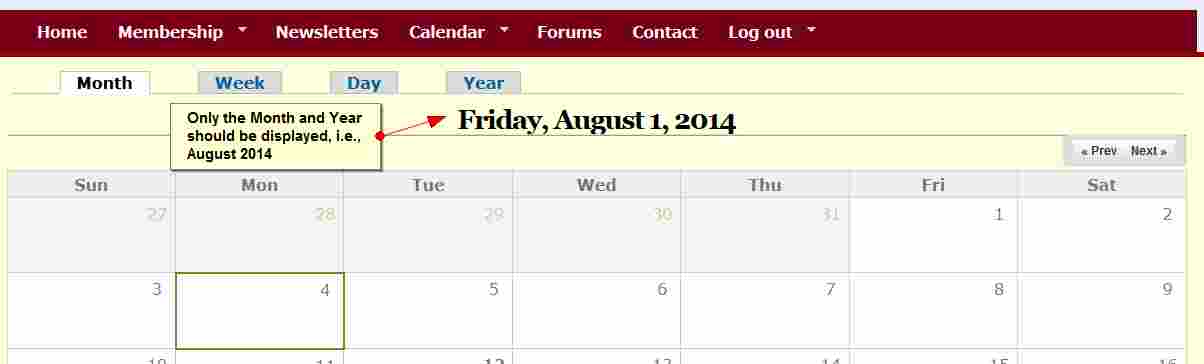
I updated the date module to 7.x-2.8 yesterday, but it seems this is affecting the calender in a block, which is now showing the wrong date in TITLE. Today is 3rd August, but the calender shows 1st August [Friday, August 1]!
I must add that the correct day Sunday 3rd August is showed highlighted below
Nothing has been changed with the site-wide date/calender settings & after checking site settings, they show the correct 3rd October. This /calendar-node-field-date/month/2014-08 as well shows the same wrong date - up!
Please see screenshot.
I assumed posting this here & not under the calendar project is appropriate, because this is the only related module that has been updated.
What could be the problem and how can it be corrected?
Thank you in advance



Comments
Comment #1
lionheart8 commentedComment #2
Mel55113 commentedI believe this is a problem with monthly calendars formatting the date incorrectly. The monthly calendar views should only display the Month and Year. After Date 7.x-2.8 they are showing a format that appears to be "l, F j, Y" (full text day of week comma space full text month space day of the month w/o leading zeros comma 4-digit year).
The attached picture shows the error in a simple month calendar display.
Comment #3
Mel55113 commentedThis appears to be a duplicate of 2294973. I manually applied patch +7 (title_date_formats-2294973-6.patch) which appears to correct the problem.
Comment #4
lionheart8 commentedHi
I checked out the post and some of the comments included using date-7.x-2.9-alpha1.tar.gz which seems to include that patch & after "saving" => /admin/config/regional/date-time/date-views, that solved the issue.
Thank you for your pointer & regards
Comment #5
jkingsnorth commentedOK, marking this as fixed then, since the issue this is related to is also fixed.
Comment #7
edubacco commentedHi all,
I've opened this issue because I can't solve it. After updtaing date module to the 7.x-2.8 version, I had the same problem of lionheart8 on my site. Now I'm using the date-7.x-2.9-alpha1 version but nothing change. I still see the incorrect date on title calendar block and page.
Examples: http://retegasbergamo.it/?q=calendar-node-field-datacalen/month/2014-08
Can I do something?
Thank you so much for your work.
Edubacco
Comment #8
edubacco commentedHi all,
I resolved the problem flushing all cached and then manually updating databases.
Thanks
Edubacco
Comment #9
edubacco commentedComment #10
gmangones commentedHi there, the solution is really Update Date module 7.x-2.9 and clear cache Drupal (Flush caché), after that, you need to go to admin/config/regional/date-time/date-views and select Date views month format without year add you need it (F Y) by default in block is only F.
Thank's