

 Come together with the global Drupal community in Rotterdam, 28 Sept – 1 Oct 2026. Sessions, contribution, connection, and Early Bird savings until 8 June.
Unable to find where I can change the Country and Province from Canada to US... Where are those pull-down lists calling the data from so I can make the changes I need? Specifically I wanted to edit the location information on new page and Canada is all that is available... Please help. Thank you!
| Comment | File | Size | Author |
|---|---|---|---|
| #2 | edit-field.png | 117.34 KB | colincalnan |
| #2 | menu-help.png | 286.71 KB | colincalnan |


Comments
Comment #1
tzukowski commentedComment #2
colincalnan commentedI'm sorry you've had difficulty finding where to change it.
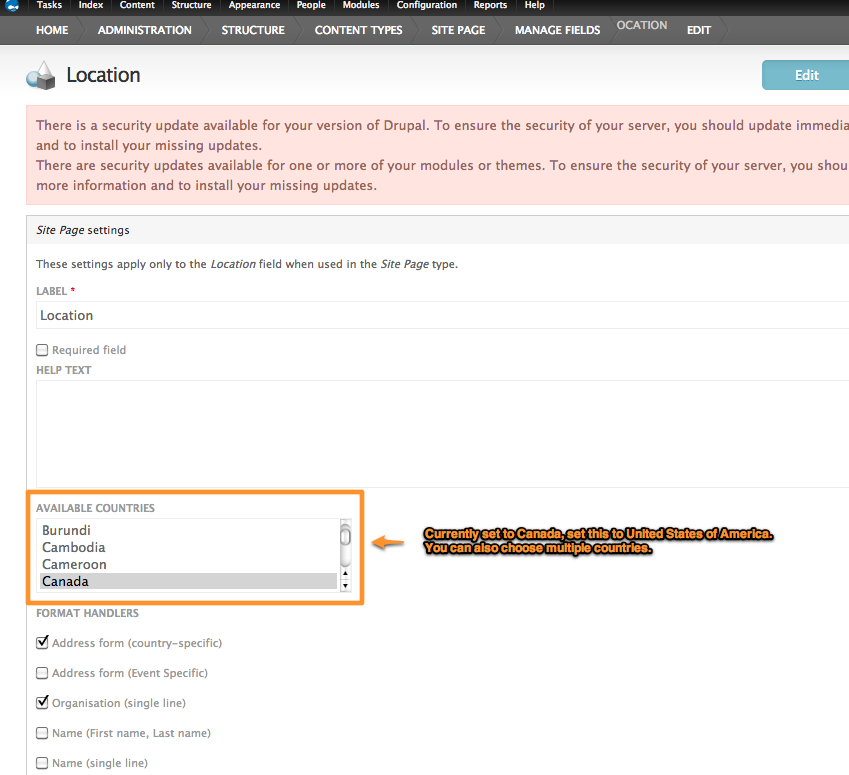
I've included two screenshots that will show you how to change it.
The Location CCK field in the Site Page content type needs to be modified to allow the USA and it's states to be chosen.
From the top menu follow:
Structure -> Content Types -> Site Page -> Manage Fields -> Location -> Edit
Once you are in the Edit field screen, scroll down to the "Available Countries" list and add the USA to the list or just choose USA on it's own.
You should then be able to add locations in the USA to your pages.
Let me know if this does/does not work.
Comment #3
JudithBarnett commentedTrying to make the changes also using your suggestion of:
Structure -> Content Types -> Site Page -> Manage Fields -> Location -> Edit
However, my site does not have a content type of Site Page.
What to do in that case?
Comment #4
colincalnan commentedHi Judith,
you had mentioned in your issue that you were using a page, so I assumed it was the Site Page content type.
What type of content is the page? Are you creating something else other than a page? Is this an Event type or some other type you are trying to create?
Col.
Comment #5
JudithBarnett commentedThe default user registration page only shows one country - United States. Need to have a list of countries in the dropdown.