

Closed (fixed)
Project:
Drupal.org CVS applications
Component:
new project application
Priority:
Normal
Category:
Task
Assigned:
Unassigned
Issue tags:
Reporter:
Created:
21 May 2010 at 01:20 UTC
Updated:
6 Jan 2020 at 13:09 UTC
Jump to comment: Most recent, Most recent file





Comments
Comment #1
developer-x commentedComment #2
developer-x commentedAllow me to add more detail. Specifically, eventbookings provides the following functionality off of the bookingsap (none of this functionality is currently provided)i:
1. Book resources directly from an Event - aka date enabled Nodes.
2. Allow either multiple or exclusive booking of resources.
3. Add view definitions to allow a user to create views which join an "Event" with a booked resource
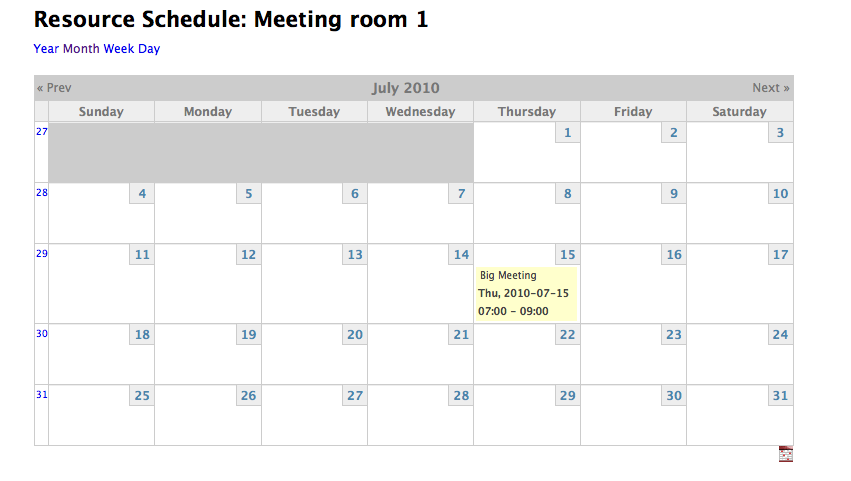
4. Provide "out of the box" calendar views of bookable resources
5. Provide ajax functionality that refreshes available resources when date values change on an Event edit page
6. Provide links to conflicting events.
7. Provide security permissions to allow/restrict users from booking resources.
This module works very nicely with publicbookings - syncing event dates and booking records. But doesn't require publicbookings or conflict with publicbookings.
I updated an issue with the maintainer of thge bookingsapi and publicbookings module: http://drupal.org/node/630874
Comment #3
avpadernoHello, and thanks for applying for a CVS account. I am adding the review tags, and some volunteers will review your code, pointing out what needs to be changed.
Comment #4
developer-x commentedHere is another version - review this one - coder gives it a clean bill of health.
Comment #5
developer-x commentedHi - what is the status of this? I see a link "CVS edit link for developer-x" - but when I click on it, I get an "Access denied" msg. I don't know if that is working as expected or is a bug.
Anyhow, thanks in advance!
Comment #6
avpadernoI apologize if the application review is taking more time than it would need. Users who review applications are few, and that makes the reviews longer than you would expect.
About the link on the top of the page, I think that is only for users with the right permission. Once your account gets approved, it's probable the same link works for you too (I cannot test it, so I cannot report you something that is 100% true).
Comment #7
developer-x commentedNo problem - I appreciate everyone who is volunteering - it's great to have a thorough process that ensures quality. I was just confused by the link.
Comment #8
dogboy72 commentedHello, I am getting this error:
Bookings API 6.x-3.x-dev
Public Bookings 6.x-3.x-dev
Drupal 6.17
Thanks.
Comment #9
avpadernoThe category for these applications is always Task.
Comment #10
developer-x commentedHi,
I'm unable to reproduce this - can you provide a few details:
1. How does this happen? Did you try to create an Event and it appeared when the add screen was shown?
2. Does it happen on an Edit of an Event?
3. Does it happen when the Event was submitted?
4. Were any resources defined (Bookings API resources)
5. Have you been able to book any resources or is the entire thing broken?
Also, I've attached a new version which fixes a number of bugs - you may want to try installing this.
Comment #11
dogboy72 commentedHello,
This happened upon installation. I had bookings.api installed but not public bookings. That may be the reason-didn't realize Public Bookings was required. I've got it working somewhat now, but to be honest, am having a hard time understanding how this interacts with Public Bookings. Let me play around with it and get back to you with questions and any bugs.
Thanks!
Comment #12
developer-x commentedHi,
It doesn't require publicbookings - it actually replaces publicbookings. However, you can have both installed. If you modify bookings via eventbookings, the changes will show up in publicbookings and vis-a-versa.
If you can - please run with the latest tar ball - it is more polished and fixes a couple of critical bugs. Also, there is still one change I have pending - I'm going to move the per-content type settings from the eventbookings settings page to content type based settings. So I may provide yet another update fairly soon.
Just in case this wasn't clear, after installing, you will need to goto the eventbookings settings page and enable eventbookings for the date enabled nodes - it won't enable these nodes by default when installing.
Regarding the bug, did this happen as soon as you enabled the module or was there a follow on action? I want to resolve this before making it widely available.
Thanks for testing this!
Comment #13
dogboy72 commentedThe error happened upon installation. When I installed public bookings it went away. With the new tar ball no errors.
Some notes:
To be fair, I don't really understand how to set this up so I'm sure many of the errors are my fault. I need to spend some time with this to make sure I understand what I am doing.
I am going to set up a testing site just for this. The one I used has too many modules installed so resolving conflicts could be a hassle.
Finally, thank you for working on this module. A robust scheduling system is sorely lacking in Drupal. It amazes me that so few are taking on this challenge. I'll keep you posted as I work with this. Feel free to ask questions anytime.
Comment #14
developer-x commentedOk - you're forcing me to write some proper documentation ;-)
One thing - bookings created by publicbookings will not appear in the resource calendar. What eventbookings does is add in the "missing link" between a booking and a node - so, without that link, the calendar doesn't have any nodes to display.
For the sake of testing - disable publicbookings - that will probably just confuse matters.
Also, I realize that I wasn't handling datestamps properly - I've enclosed another version that handles that field type. I should be handling datetime properly - so I'm wondering if the datetype you were having problems with was really a datestamp?
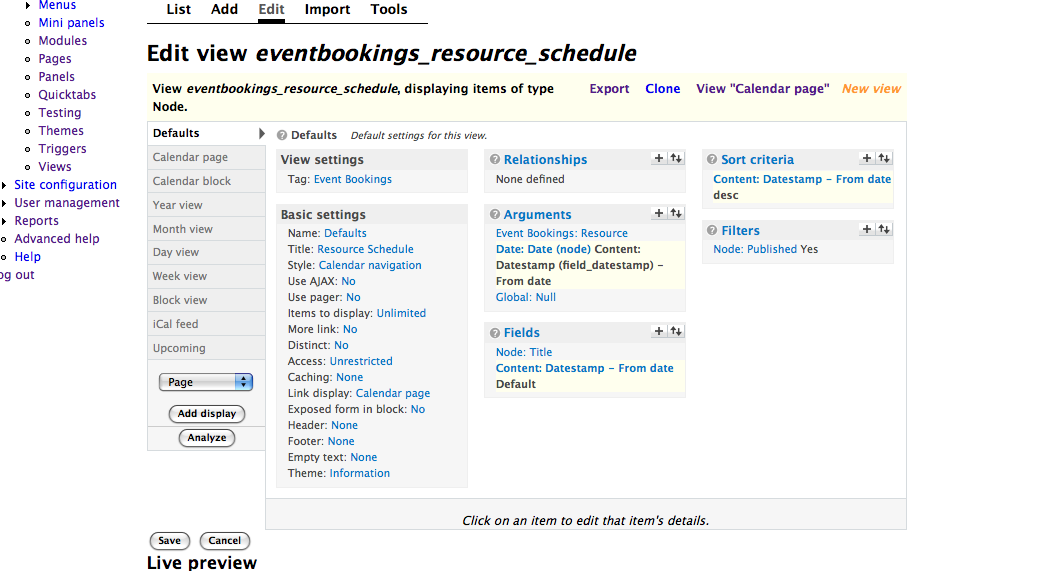
Here are the step by step instructions:
Installation
Create Bookings API Resources
Modify the Resource Schedule View
Create a booking
I've enclosed a new tarball with the datestamp fix along with the screenshots showing how things should look if everything is working. Thanks!
Comment #15
developer-x commentedThe previous screenshot of the calendar has a bug - this one is correct.
Comment #16
dogboy72 commentedAwesome. I'll test this tomorrow and give you my results. Thanks!
Comment #17
dogboy72 commentedI was able to play around with this today. First of all, thanks for the instructions.
I've attached two screenshots that show some problems I'm having.
One is that the from and to times in the message on the create a booking page are the same.
The second is that there are never any conflicts. I only have one resource and I am book it more than once for the exact same time frame.
To be continued...
Comment #18
developer-x commentedI think the reason there isn't any conflicts is because the to and from are the same - thus every booking has a zero duration.
So, if I can fix the "to" problem - I think the other problem goes away.
I'll try to reproduce this - what datatype is your date field and which widget is it set to? Also, what version of the date module do you have?
Comment #19
dogboy72 commentedThe field is a "date" field. Version 6.x-2.4 of the Date Module.
Edit: Set to "Text field with pop up calendar"
Comment #20
developer-x commentedFound the bug - it had to do with user configurable timezones. I had it set to user configurable, so that is why I wasn't able to recreate it. Anyhow, I fixed it. Also, I made it so you can change the title of the bookings fieldset - you can change it to something like "Fitting Rooms".
Please deploy this and let me know if you start seeing conflicts (you still need to delete the old bookings - just rebook those events to fix them).
Comment #21
developer-x commentedActually, the bug was purely cosmetic - it wasn't actually effecting the bookings dates. The actual reason I suspect that the bookings aren't showing as a conflict is that the setting for the initial booking state is pending. Change the initial state to be finalized in the Event bookings settings page. Then re-save each of the Events - that will change the booking state. The alternative is to use Public bookings to change the state of the booking.
Comment #22
dogboy72 commentedI've done a quick test and everything is working well. Conflicts are showing up now.
Going forward I think the ability to change the booking state on a per node basis would be nice. Also the ability to see potential conflicts that are "pending"(without having to click the schedule link). It would be great to be able to schedule the resource similar to the Public Bookings mod. That is have "closed" hours and slots of availability.
I'm actively learning Drupal and hope to help extend this and/or Public Bookings. My needs are a little more specific than most.
I'm off for several days backpacking - I'll be back next week to further test this. Thanks!
Comment #23
developer-x commentedI'm glad everything is working. Regarding managing the bookings - my goal was to not duplicate functionality in publicbookings - but rather complement it - by adding the missing link to the event node. My suggestion is to use both eventbooking and publicbookings together. Create the initial booking via eventbookings. Then manage the workflow with publicbookings. My module "listens" to publicbookings - so if you change anything with publicbookings - my module will do the book keeping to keep the link to the event in sync, as well as any date changes.
The one gap is that my module doesn't create a corresponding event when a booking is created via publicbookings. Maybe I'll look into that.
The other thing I might do is add a link to the publicbookings page from the bookings table that would let you manage the booking.
Anyhow, thanks for doing some QA and enjoy the hiking!
Comment #24
developer-x commentedOk, I've done a 180. The more I looked into your suggestions, the more I thought it made sense for eventbookings to handle the full range of functionality rather than splitting it with publicbookings. To that end, I have another release. The major highlights:
1. You can associate content types to either create availabilities or bookings.
2. You can specify whether pending bookings show as conflicts
3. If you have rights, you can set the status of a booking
4. New views to show availabilities and booked resources for an event.
5. Bug fixes
If you get a chance, install this version and see if it address your requests.
One suggestion, for availabilities, select "multiple bookings" in the configuration screen. Then you can associate an "Regular Business Hours" (or whatever) availability to many resources. This makes it easier to manage availabilities across resources.
Comment #25
dogboy72 commentedWow, you work quickly! I've done a preliminary test, and so far, so good. I'll keep testing.
Comment #26
developer-x commentedThis version supports "all day" events. You can define which hours to book for an "all day" event.
BTW, how long does it take to get this reviewed? I understand the nature of the volunteer system - but wanted to have a sense of how long this usually takes. Thanks!
Comment #27
developer-x commentedThis version is compatible with bookingsapi - 6.x-3.x-dev / 2010-Jul-09
Comment #28
developer-x commentedie javascript fixes
Comment #29
avpadernoThe points reported here are not ordered by importance / relevance. This is not a complete review; there could be code that needs to be changed that has not reported here.
Indexes must be included in the schema.
The menu is rebuild when a new module is installed, or when an update function is called; there should be just a case where
menu_rebuild()should be called: when you change the menu callback definitions, and the module doesn't have an update function to execute.t().Those variables are not defined in the installation file; if the file is referring to variables defined in the module file, it is better to load it with
drupal_load().Why is that hook defined in the installation file? It doesn't seem a hook used by Drupal core module.
When a module is installed, and its settings form has not been visited, the module doesn't have any Drupal variables saved in the database; the code I reported is causing the code to exit without doing anything, in such cases.
variable_get()uses the second value as default value in the case the variable is not saved in the database; the code should use a better default value.There is no reason to write a string as concatenation of literal strings.
Drupal modules should not even cause a PHP warning; accessing a not initialized variable causes a PHP warning.
The value of
$form_statepassed to a submission handler used by an implementation ofhook_form_alter()doesn't end in$node->eventbookings_pending['form_state']. There is just a way, to add fields to a node.Reserved SQL words must be written in uppercase characters.
function names used in Drupal don't use uppercase characters.
Normally, functions don't need to use
$_POST.$is_available?There is a Drupal function to call in these cases.
Comment #30
developer-x commentedThank you - I'll review and submit another version with the needed changes
Comment #31
Chris Sloan commentedI can't figure out how to define a resource; I've looked everywhere.
Comment #32
developer-x commentedTo create a bookable resource (like a meeting, projector, shared van, etc..), do the following:
Hope that helps
Comment #33
scoobie commentedThe way this is implemented will leave a blank help line on the pages that have no help. Also a typo on closing p tag.
Comment #34
developer-x commented*blush* - good catch, thanks!
Comment #35
developer-x commentedHere is an updated version, I made most of the recommended changes. My comments are as follows :
1. The index is defined now as part of the schema and I've removed the call to menu_reguild
2. Removed the t() calls in the schema descriptions.
3. Add call to drupal_load to load the constant definitions
4. Removed call eventbookings_variable_init
5. I've tried to conform to the coding standards - the coder module indicates no problems - but this is my first module, so I might have missed something. If there is something specific - let me know - I appreciated the education :-)
6. Changed the default value to "_undefined_" - but the default value should never be returned - if it hasn't been set, then that leg of code will not driven.
7. I've seen concat of literal strings in various modules similar to mine, and in the documentation for SQL indention, http://drupal.org/node/2497, they concat literal strings. I'll change it, but doesn't seem like I'm violating any standard by doing so.
8. Those variables will always be initialized in the previous call to _eventbookings_parse_date_value - so calling isset seems unecesarry
9. I don't fully understand this comment - could you elaborate?
10. Fixed the lower case reserved words
11. Changed GMT to gmt
12. This value is only accessible by referencing $_POST since it isn't defined within the form structure.
13. $is_availability refers to whether the node defines an event or an "availability" record (that defines a period of availability for a resource)
14. This was taken from the drupal documentation - http://drupal.org/node/331941 - if this is an error, the documentation should be fixed. However, it appears that it isn't needed, so I removed it.
I also made the fixed as mentioned in #33
Thanks.
Comment #36
webchickI reviewed the code in #35 (didn't test it, since I don't use bookingsapi and the code seems like it was already tested pretty extensively by dogboy72 above), and can confirm that the majority of kiamlaluno's suggestions have been implemented. There are still some outstanding feedback items, and I also ran across some additional nit-picky things around comment/PHPDoc conformance and so on, but I see nothing here that can't be fixed via the normal route of filing minor bug reports from here out. This module is clearly useful and something we don't have already, or else several people wouldn't have seeked it out in the middle of a CVS application to test it.
IMO, developer-x has clearly shown due diligence here of taking feedback on his module seriously, both in responding promptly to requests for bug fixes / improvements and even writing an entire fricking tutorial for how to use his module (!) to aid in testing. I think he will make a great Drupal code contributor.
CVS account granted. Welcome to the team! :)
Comment #37
sunThanks, webchick, for taking the extra time to handle this application! We love you. :)
Comment #38
developer-x commentedWebchick,
You do indeed rock! Thanks so much for approving this!
- x
Comment #41
avpadernoComment #42
avpadernoI am giving credits to the users who participated in this issue.