It worked, but somehow, the View stopped working :-(
The default View for a panel does not show any node when a group is selected. Altering the no results-field changes the output, so i'm working in the right View & properly connected to the panel.
So .. what's going wrong? Where can i start? A different DR7-setup doesn't have this problem and all the settings are exactly the same.
The View below is nearly the default View (except Dutch).
$view = new view;
$view->name = 'og_nodes';
$view->description = 'Show all content (nodes) of a group.';
$view->tag = 'og';
$view->base_table = 'node';
$view->human_name = 'OG content';
$view->core = 0;
$view->api_version = '3.0-alpha1';
$view->disabled = FALSE; /* Edit this to true to make a default view disabled initially */

/* Display: Defaults */
$handler = $view->new_display('default', 'Defaults', 'default');
$handler->display->display_options['access']['type'] = 'none';
$handler->display->display_options['cache']['type'] = 'none';
$handler->display->display_options['query']['type'] = 'views_query';
$handler->display->display_options['query']['options']['query_comment'] = FALSE;
$handler->display->display_options['exposed_form']['type'] = 'basic';
$handler->display->display_options['exposed_form']['options']['reset_button_label'] = 'Opnieuw instellen';
$handler->display->display_options['exposed_form']['options']['exposed_sorts_label'] = 'Sorteer volgens';
$handler->display->display_options['pager']['type'] = 'full';
$handler->display->display_options['pager']['options']['expose']['items_per_page_label'] = 'Items per pagina';
$handler->display->display_options['style_plugin'] = 'default';
$handler->display->display_options['row_plugin'] = 'node';
$handler->display->display_options['row_options']['links'] = 1;
$handler->display->display_options['row_options']['comments'] = 0;
/* No results behavior: Global: Tekstveld */
$handler->display->display_options['empty']['area']['id'] = 'area';
$handler->display->display_options['empty']['area']['table'] = 'views';
$handler->display->display_options['empty']['area']['field'] = 'area';
$handler->display->display_options['empty']['area']['empty'] = FALSE;
$handler->display->display_options['empty']['area']['content'] = 'There is no content in this group. ..';
$handler->display->display_options['empty']['area']['format'] = 'full_html';
$handler->display->display_options['empty']['area']['tokenize'] = 0;
/* Relatie: Group membership: Node group membership */
$handler->display->display_options['relationships']['og_membership_rel']['id'] = 'og_membership_rel';
$handler->display->display_options['relationships']['og_membership_rel']['table'] = 'node';
$handler->display->display_options['relationships']['og_membership_rel']['field'] = 'og_membership_rel';
$handler->display->display_options['relationships']['og_membership_rel']['required'] = 0;
/* Sorteercriterium: Inhoud: Post date */
$handler->display->display_options['sorts']['created']['id'] = 'created';
$handler->display->display_options['sorts']['created']['table'] = 'node';
$handler->display->display_options['sorts']['created']['field'] = 'created';
$handler->display->display_options['sorts']['created']['order'] = 'DESC';
/* Contextual filter: OG membership: Groep gid */
$handler->display->display_options['arguments']['group']['id'] = 'group';
$handler->display->display_options['arguments']['group']['table'] = 'og_membership';
$handler->display->display_options['arguments']['group']['field'] = 'group';
$handler->display->display_options['arguments']['group']['relationship'] = 'og_membership_rel';
$handler->display->display_options['arguments']['group']['default_action'] = 'not found';
$handler->display->display_options['arguments']['group']['default_argument_type'] = 'fixed';
$handler->display->display_options['arguments']['group']['default_argument_skip_url'] = 0;
$handler->display->display_options['arguments']['group']['summary']['number_of_records'] = '0';
$handler->display->display_options['arguments']['group']['summary']['format'] = 'default_summary';
$handler->display->display_options['arguments']['group']['summary_options']['items_per_page'] = '25';
$handler->display->display_options['arguments']['group']['break_phrase'] = 0;
$handler->display->display_options['arguments']['group']['not'] = 0;
/* Filter criterion: Inhoud: Gepubliceerd */
$handler->display->display_options['filters']['status']['id'] = 'status';
$handler->display->display_options['filters']['status']['table'] = 'node';
$handler->display->display_options['filters']['status']['field'] = 'status';
$handler->display->display_options['filters']['status']['value'] = '1';

/* Display: Content pane */
$handler = $view->new_display('panel_pane', 'Content pane', 'panel_pane_1');
$handler->display->display_options['pane_title'] = 'OG nodes';
$handler->display->display_options['allow']['use_pager'] = 0;
$handler->display->display_options['allow']['items_per_page'] = 0;
$handler->display->display_options['allow']['offset'] = 0;
$handler->display->display_options['allow']['link_to_view'] = 0;
$handler->display->display_options['allow']['more_link'] = 0;
$handler->display->display_options['allow']['path_override'] = 0;
$handler->display->display_options['allow']['title_override'] = 'title_override';
$handler->display->display_options['allow']['exposed_form'] = 0;
$handler->display->display_options['allow']['fields_override'] = 0;
$handler->display->display_options['argument_input'] = array(
  'group' => array(
    'type' => 'context',
    'context' => 'entity:group.gid',
    'context_optional' => 0,
    'panel' => '0',
    'fixed' => '',
    'label' => 'Organic groups membership: Group gid',
  ),
);

/* Display: CP2 */
$handler = $view->new_display('panel_pane', 'CP2', 'panel_pane_2');
$handler->display->display_options['defaults']['empty'] = FALSE;
/* No results behavior: Global: Tekstveld */
$handler->display->display_options['empty']['area']['id'] = 'area';
$handler->display->display_options['empty']['area']['table'] = 'views';
$handler->display->display_options['empty']['area']['field'] = 'area';
$handler->display->display_options['empty']['area']['empty'] = FALSE;
$handler->display->display_options['empty']['area']['content'] = 'There is no content in this group. ..cp2';
$handler->display->display_options['empty']['area']['format'] = 'full_html';
$handler->display->display_options['empty']['area']['tokenize'] = 0;
$handler->display->display_options['defaults']['relationships'] = FALSE;
$handler->display->display_options['defaults']['arguments'] = FALSE;
$translatables['og_nodes'] = array(
  t('Defaults'),
  t('more'),
  t('Toepassen'),
  t('Opnieuw instellen'),
  t('Sorteer volgens'),
  t('Asc'),
  t('Desc'),
  t('Items per pagina'),
  t('- All -'),
  t('Offset'),
  t('There is no content in this group. ..'),
  t('group membership'),
  t('Alle'),
  t('Content pane'),
  t('OG nodes'),
  t('View panes'),
  t('CP2'),
  t('There is no content in this group. ..cp2'),
);




Comments
Comment #1
chasingmaxwell commentedI'm having this same problem for 7.x-3.3. The view was working perfectly and then all of the sudden it started showing an empty result. Checked the nodes and they are still associated with the group. The og members content pane is having the same problem. Seems like there is something wrong with the relationship or contextual filter. This happened for me after the most recent update to views 7.x-3.3. Anybody know what is going on here? Is there any more information I can provide to be more helpful?
Comment #2
chasingmaxwell commentedDid some more digging. Appears to be a problem with the panels context settings. I found the correct gid and entered it in to the arguments for the preview in views UI. In the preview it returned the correct results. So some how the contextual filter is not being passed correctly to the view from panels.
Comment #3
chasingmaxwell commentedComment #4
dawehnerThis sounds a bit more like a problem of ctools.
Comment #5
bart3d commentedI have the same problem
Comment #6
James A commentedThis sounds like the same issue I highlighted here in R2:
http://drupal.org/node/1490372
Comment #7
hypnokayte commentedI'm experiencing the exact same issue as #1 chasingmaxwell - both my OG Content and Members panes are showing up blank and were working before.
I even tried rebuilding my panel, clearing cache, truncating cache tables - still no luck. I agree that it appears to be an issue with the contextual filter.
Comment #8
James A commentedNot sure if it will help you guys, as I'm not sure you have exactly the same issue, but I did find a fudge that gets my views up and running again. I've gone into it on my updated post here http://drupal.org/node/1490372
From my tests, I found panels new the taxonomy I required (simply included it in the title as a test), views could handle the taxonomy value but views didn't seem to get anything when it request the term id. The solution was to use an input on pane from views which I then set to %taxonomy_term:tid in the panel views settings.
If this is a reasonable solution for now I'd be grateful if you'd let me know, also if it's flawed for any reason.
Comment #9
Tma75 commentedI have the same problem. Both my OG Content and OG Members panes are now gone. I used this video to set up my OG Groups using Panels and Views: http://www.youtube.com/watch?feature=player_embedded&v=8YFWlZF-u6s and it was working beautifully until I upgraded my ctools this week.
Comment #10
James A commentedHi Tma75, watched the video and think you can certainly fix things to your views if you want using my suggestion (http://drupal.org/node/1490372). That said a full fix would be great.
Comment #11
Tma75 commentedI am not using Taxonomy terms. The default views that come with Organic groups does not use taxonomy terms. So I don't see how this "fix" is of any help. If you look at the default views provided by OG there is NO reference to taxonomy terms at all.
Comment #12
Tma75 commentedScreen shot of "Argument Input"
Comment #13
James A commentedHi Tma75
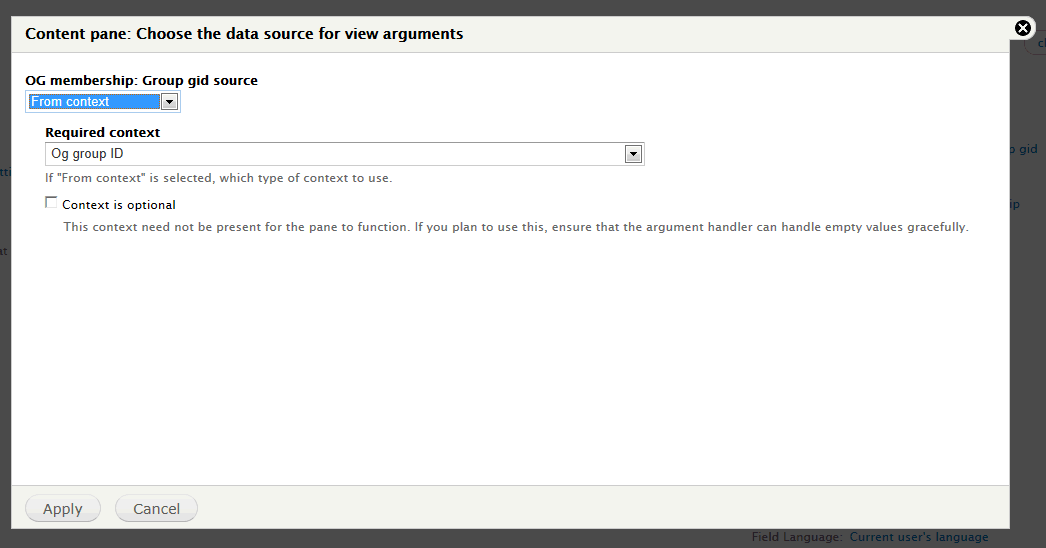
OK, I may well be wrong as I'm very new to Drupal and haven't used OG but as per your screenshot what I don't believe it matters whether you're using OG or Taxonomy, the key part is what you set to use as your data source for view arguments. If under the drop down options you can choose Input on pane config (at the very bottom of the list) rather than From Context then I don't see why you can't do what I'm suggesting. See attached image 1.
The key I believe is if you choose to do it this way then when you go to settings for the view from within the content section of panels you should have the title you specified in the view (image 1) with a text box below it (image 2). In the text box you simply enter what I would call the context term (not sure of the right name) which you can get from the panels context page (just above the content menu item). As you can see from image 3, for me I simply entered the one for a Term ID which Is what I want to get as the argument (%taxonomy_term_page:tid), I could have chosen any value available in any of the arguments. You would simply choose the one relating to OG Group ID.
I hope this helps you and maybe others. Once again, I'm not sure if there's anything wrong with doing it this way but at least it works for now. If it does work and this has clarified it please post saying that so others will give it a try if needed!
One last note, If you adding a number of the same kind of relationships, for me I added 3 taxonomy relationships all pointing to different vocabularies, make sure for their settings you create different keywords (image 4) otherwise by default in my example they'll all come out as taxonomy_term and then you'll obviously have confusion (hence I added _page to the end of this one and _sg to the end of another).
Comment #14
Tma75 commentedThank you for trying to help me. Looking at my taxonomy vocabularies OG has no vocabularies for me to use. Would it work for me to create them? Also everything was working great until last week and only 2 of the views I'm using in my panel aren't showing any content; the rest are fine. I also have 2 other pages setup using panels and views that are fine. I'm starting to wonder if this is the right forum for this question but I'm fairly certain it was the recent ctools upgrade that caused the problem. Here's what I'm running for anyone who may have any more ideas for me:
Drupal core 7.12
Chaos tool suite (ctools) 7.x-1.0-rc2
Panels 7.x-3.2
Views 7.x-3.3
Organic groups 7.x-1.3
Comment #15
James A commentedHi Tma75, I think you're getting side tracked by the fact that I'm using Taxonomy terms. Basically that has nothing to do with it as far as I can see. The key is how views is interacting with panels and the part that appears broken is when you try to hand a context accross. So for you instead of choosing From context under argument input in views you simply choose Input on pane config this then allows you to put in a context string (the video you used shows a list of these at the bottom of the screen after he added the OG group from node relationship 1:17ish) that should be visible for you here, %group:id or something like that. You then plug that string into textbox that will now be available under your panel content view setting. This is at about 2:50 in your vid but of course he doesn't have a text area because his view is setup to use From Context not Input on pane config.
The only reason I can think you'll run into problems is if for some reason you don't get what I've called the context string (the %group:id ish bit) otherwise it should be easy as long as you set your view for Input on pane config. In essence using this method you could just type a value into the text box under the panels content views settings and it would be passed to the view, simply using the context string keyword allows this value to change dynamically with your node which is exactly what you want.
I think you definitely are suffering from the same issue I had, also caused by the update, and this is not me telling you you're doing it the wrong way but just offering what I see as a work around. The views that you have that are still working I guess are either displaying default values of aren't using contextual filters.
Anyway best of luck with it.
Comment #16
chasingmaxwell commentedJames A, thanks for being so thorough in this work-around. My views are officially 'fudged' and working!
Comment #17
merlinofchaos commentedUnless I misunderstand, the thing that is causing "From Context" to not work on view panes is fixed in latest CTools -dev. Unless there's another bug in here that I am not aware of. It's difficult to track, though; there's a lot of data here.
Comment #18
Syntapse commentedI dont think the code is broken. Problem appears to be one of not passing context correctly...
Simple fix:
1. update views block Argument Input > From Context > Required Context = Content ID (guess this will work for pane scenario also).
2. Select (page manager node) Variants > group page 2 > Content > (insert) views block > settings > OG Membership Group ID = Content ID.
This seems to pass the content ID thru to the view, and (after many hours head scratching) has fixed my "no members view" problem.
Hope this helps.
Comment #19
Syntapse commentedI replaced latest og and ctools (to eliminated possible version clash), but the problem still existed. The above fix sorted the problem...
Comment #20
Syntapse commentedsorry mistake made in my "recipe" - i disposed of the members block as i could not find a way of passing context to it. i replaced with content pane and followed simple recipe already described.
Comment #21
stupiddingo commentedFor anyone else experiencing this same behavior and looking for a resolution (Views both standalone and rendered as panels or blocks work, but View Panes do not) this issue has been patched in the latest Chaos Tools 7.x-1.0.
This issue did not exist in Chaos Tools 7.x-1.0-rc1, was introduced in Chaos Tools 7.x-1.0-rc2 and is fixed by Chaos Tools 7.x-1.0. I'm tempted to update the status, but am not a maintainer and not sure what is appropriate, perhaps "fixed"?
Comment #22
merlinofchaos commentedYay! Fixed it is! Thanks stupiddingo! (Boy that's hard to actually say)
Comment #23.0
(not verified) commentedshort extra explanation