


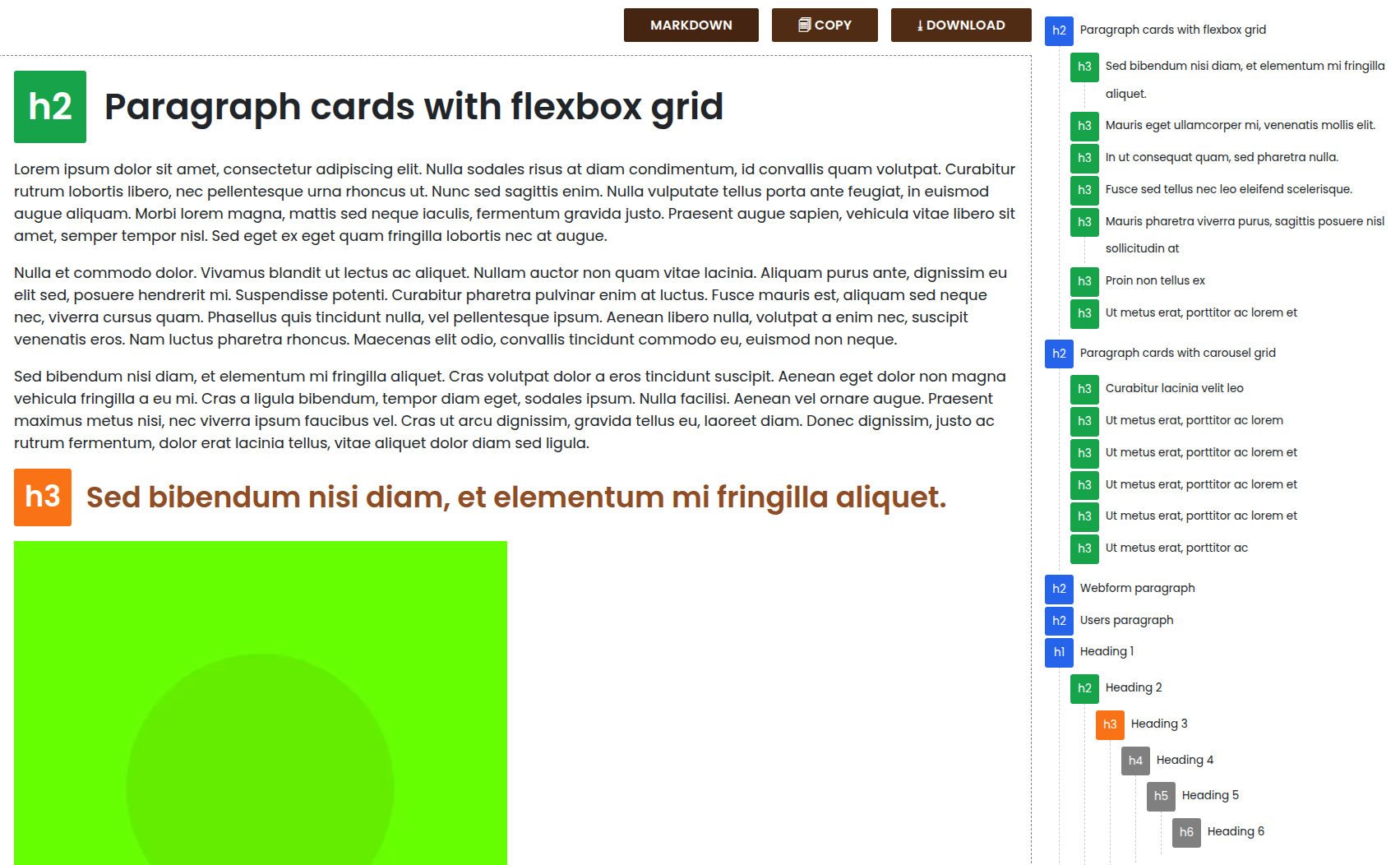

The Content First module provides a simple tool for viewing the plain text content of any node without design, media, or layout distractions. It helps content teams, editors, and designers focus on what matters most: the content itself.
Whether you're drafting, reviewing, or rethinking your site's messaging, this module supports a true "content-first" approach by giving you a clean, layout-free version of your page.
Content First: Features
Content tab
The content first module adds a new tab to every node page. That tab shows a clean, structured text version of the page content.
From this tab, you can:
- View all text content (without layout noise): Markdown and simple HTML formats
- Copy it with one click
- Download it as plain text: Markdown and simple HTML
No configuration. No views to build. Just access to the content.
Markdown content visualization

(simple) HTML content visualization

Headings tree visualization
Headings tree visualization, including missing headers (SEO/Accessibility) 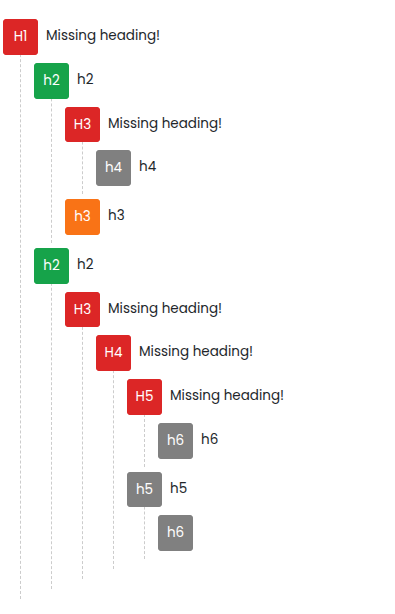
Content export
The module allows to select multiple content and download them all at once into a .zip so you can process the data elsewhere.

Menu visualization
Available since 2.1.0. The module adds a Content First tab to every menu edit page (/admin/structure/menu/manage/{menu}). That tab renders the full menu tree as plain Markdown, respecting the current content language, so you can copy or download the site navigation as structured text — useful for AI prompts, documentation, or content audits.
Drush export command
Available since 2.1.0. The content-first:export command (alias cf:export) exports nodes and menus as individual Markdown files to a local folder. Key options:
--entity=node|menu|all— choose what to export (default: all)--bundles— filter by content type or menu machine name--status— filter by published/enabled state--language— limit to specific language codes (nodes only)--folder— output path (defaults toprivate://content_first/)--rewrite-links— convert internal page links to local filenames for Obsidian or similar tools--assets-base-url— make relative asset URLs absolute (images, PDFs, etc.)--flatten-properties— flatten nested YAML front-matter keys with a dash separator (e.g.meta-titleinstead ofmeta: {title: ...}), required for tools like Obsidian that do not support nested YAML
Node files are named after the content path alias; menu files follow the pattern menu-{langcode}-{menu-id}.md.
Content First Audit: Features (sub-module)
Available since 2.0.2. The optional Content First Audit sub-module persists heading analysis results on every node save and provides site-wide reporting. It stores the H1 count and heading hierarchy validity per node and language, and includes:
- An admin report at
/admin/reports/content-firstlisting all nodes with their heading health, filterable by title, content type, language, H1 count, and hierarchy status. - A status report entry on
/admin/reports/statussummarizing nodes without H1, with multiple H1s, or with broken heading hierarchy.

Use cases:
- Content strategy and copywriting review sessions (human or AI)
- Pre-design content validation
- Content audits or UX writing sprints
- Minimal reading interface for accessibility reviews
- Bulk Markdown export for AI pipelines, knowledge bases, and Obsidian vaults
Usage
Install and enable the module.
- Assign the View Content First tab permission to the appropriate roles.
- Navigate to any node page — you'll see a new "Content First" tab.
- Click the tab to view the stripped-down, text-only version of the node.
- No additional configuration is needed.
Supporting organizations:
Development
| Attachment | Size |
|---|---|
| content_first_audit_view.png | 96.53 KB |
Project information
- Project categories: Content editing experience
 487 sites report using this module
- Created by gedur on , updated
 Stable releases for this project are covered by the security advisory policy.
Look for the shield icon below.


