

Closed (fixed)
Project:
Commerce Extra
Version:
7.x-1.x-dev
Component:
Login page module
Priority:
Normal
Category:
Bug report
Assigned:
Unassigned
Reporter:
Created:
19 Nov 2012 at 03:33 UTC
Updated:
7 Mar 2014 at 20:07 UTC
Jump to comment: Most recent, Most recent file

Comments
Comment #1
wadmiraal commentedSame issue here.
Attached is a (tiny) patch to change the label to "username", which is what the module does at this time.
Maybe it should be configurable ?
Comment #2
quantos commentedExact same problem. Not sure when this started as I'm sure the email address login worked fine originally. The site has been up and running for a year now - but I only just spotted this error today when patching and testing the site for Commerce Kickstart 2.0 and Drupal 7.18.
Any progress/feedback with this item guys?
I'm a designer/front-end guy so can't help throw much more light on this from here.
Comment #3
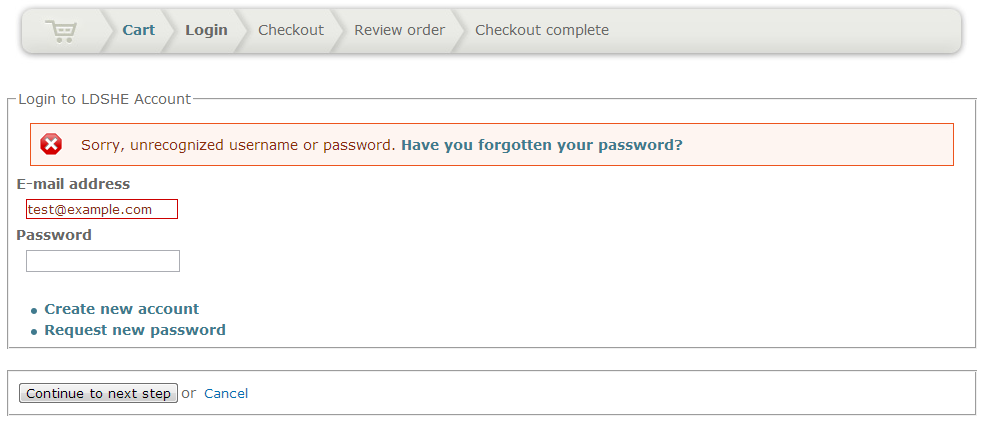
deggertsen commentedI've got the same problem here. I've attached a screenshot here. I will use the temporary fix in #1, but it would be good if people could use their email addresses to login during checkout. All other login forms allow email and username, but this is the only one that doesn't. Maybe an integration issue with LoginToboggan?
Comment #4
imiksuOh, how that got there? :)
I decided not to define any label and let the original label come in place by itself.
That's now committed.
Comment #6
mistersevans commentedWOW, in a bad way! I admit I'm a noob at Drupal but I do have a computer background. I just installed this module and tried to log in for a very long time with my email but it just wouldn't work! I tried USERNAME and it worked. After some searching, I found this bug here. Now here is my big beef:
1.) If I just installed it, shouldn't this bug be fixed in the latest release so people like me don't have to discover the bug for themselves in a new install since it was resolved?
2.) I don't know much about patches and I tried for a REALLY long time to try to get it to work. I finally figured out that even that patch doesn't have the same directory. For noobs like me that can take a LONG TIME to figure out!
Look at the directories:
--- C:\Users\wadmiraal\Documents\_Clients\Pilates Academy\drupal\modules\commerce_extra\modules\commerce_extra_login_page.panes.inc
+++ C:\Users\wadmiraal\Documents\_Clients\Pilates Academy\drupal\modules\commerce_extra\modules\login_page\commerce_extra_login_page.panes.inc
The first line doesn't have login_page! I just assumed it was correct for a long time.
Now I was on my server and I just tried to replace the first words not sure if it would work. Took me a while to notice the "\" and "/" were different! Okay that was my fault but I think most people aren't running windows... When I finally established it should be something like "username/sites/all/modules/commerce_extra/modules/login_page/commerce_extra_login_page.panes.inc"
running "git apply -v [patch file]" it finally found the file, but I never was able to get the script to run! It couldn't find that line. What I ended up doing was going into the file and changing it manually myself. Looks like it says USERNAME instead of EMAIL.
3.) Most people remember their email address not username for random sites. It would be really helpful to enter email instead- or even better - both - like this site - Drupal.org!!
PLEASE fix these problems so no one and no noobs like me have deal with trivial problems.
Comment #7
deggertsen commented@mistersevans
I think you're misunderstanding what this bug is/was. This was fixed in this commit, thus your concern in #1 was resolved. However, the fix has only been applied to the dev version, so you're probably right that a new release should be announced. However, the release is still in alpha so as you are new to drupal I encourage you to learn the difference between dev, alpha, beta, and stable releases. See this documentation https://drupal.org/node/467020
Concerning #2. Please read https://drupal.org/patch. Be aware of the version of the module the patch was written to apply to (usually they are designed to apply to the dev version). You should also notice the date of the patch in relation to the date of the dev release as the patch may not apply to more recent versions of dev.
#3. Look at this module. This is a standard module that I install on all of my sites for the exact reasons you mention. https://drupal.org/project/logintoboggan
Glad to have you involved in drupal. I encourage you to read about Issue Queue Etiquette as following those guidelines will help you in the future. Remember that Drupal is a project of love, and any of the modules and even Drupal itself is the result of the good people of the community giving back with karma often being the only real compensation for doing so. If you are frustrated with the way something is, at least offer to compensate someone for their efforts to fix it if you cannot fix it yourself. https://drupal.org/node/1839650
Comment #8
mistersevans commented@deggertsen
Sincerely thanks for the knowledge! I really learned a lot from those few paragraph. I hope I didn't come off like a jerk. I graduated in computer science and wish I could help more but I don't really know about drupal. I was trying to post to help future people if they went through the same problem as I did. I had such a hard time with this. I wish I had more help when I installed as a noob.
You are right. Maybe I should have downloaded the dev version. But like a noob I went for the green, usually the stable or recommended releases. Looking at the dates It has been over two years without a new release for alpha version! I second a newer release with the updates.
Patches- I was learning on the fly to get it to run properly. I learned a lot maybe I can help one day. I was not aware of the version patches were supposed to run for. Thanks for the knowledge.
I'll look into logintoboggan, I've seen it mentioned all over but never got into it. Thanks.
Thanks for the etiquette link. My rant had good intentions for the community if I wasnt so ignorant on about drupal I probably wouldn't have posted that much.
Thanks for all the knowledge.
Comment #9
deggertsen commented@mistersevans, glad I could be helpful! I know Drupal can be difficult at first, but once learned you'll never want to do anything else!
If you're feeling ambitious, you may want to contact the maintainer of this module and offer to help maintain. You could then prepare the module for a new release and get it done. People will often do this in order to get a module to a certain point and then pass it off to another maintainer. For example, if you go to https://drupal.org/node/1344594/committers you will see a list of all the maintainers for this module and their activity on this module. You can see that iMiksu started things rolling then Cottser came along to help with 1 commit and then 5n00py came along 4 months ago with 2 more commits. At this point it seems like none of these maintainers are actively maintaining this module so it may be time for somebody else to step in. Usually if you contact a maintainer they are more than happy to add you as a maintainer as long as they are convinced you aren't going to sabotage it.
Cheers