

Closed (fixed)
Project:
Commerce Core
Version:
7.x-1.x-dev
Component:
User experience
Priority:
Normal
Category:
Task
Assigned:
Issue tags:
Reporter:
Created:
18 Oct 2010 at 16:28 UTC
Updated:
3 Jan 2014 at 02:04 UTC
Jump to comment: Most recent, Most recent file


Comments
Comment #1
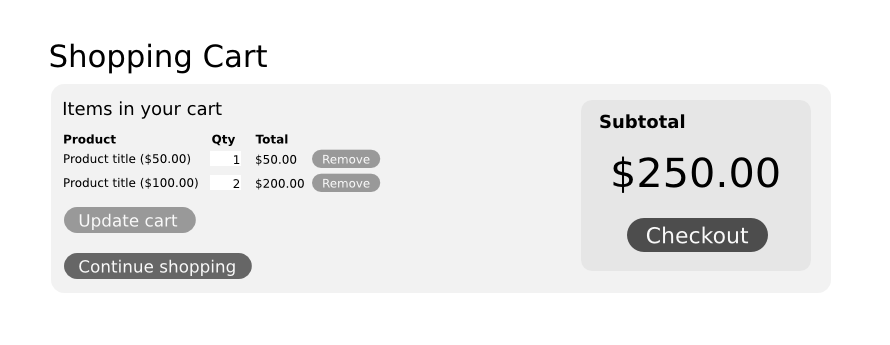
rszrama commentedI dig the concept - highlighting the subtotal is a nice touch. The line item listing doesn't leave much space for thumbnails and the like, but this doesn't need to be for every store. This could easily be a drop-in replacement for the Cart form.
Comment #2
recidive commentedWith product thumbnails it would look something like this. This is a simple change that may require just overriding the view.
For the thumbnails in standard cart view, I think the question would be: will commerce module ship with image fields for standard product type? If so, then I think it makes sense having a product thumbnail also in the cart listing.
Are image fields, thumbnails and this kind of cart UI part of Commerce module goals, or would it make more sense as a feature module instead?
Comment #3
recidive commentedAnother take, keeping it all in one column.
I've figured out this table is not a view. I guess it's not possible to make it a view due to the update operations. Am I right?
I see there's no way for extending this table, e.g. to add a column. Have you discussed this already?
Comment #4
pieterdcAFAIK update operations can be included in a view; cfr. http://drupal.org/project/views_bulk_operations
I'm in favor of the subtotal and relocating the 'Delete' buttons.
But I would place the 'Update cart' button in the middle so it's closer to the quantity fields to which it's related.
Comment #5
mertskeli commentedImo 3.png is perfect (as had been mentioned in http://drupal.org/node/840786)
Just maybe to put the "Continue shopping" button first, and "Update cart" closer to "Checkout" (or above of it).
Comment #6
recidive commentedOk, here is a patch changing the cart slightly in the direction proposed in mockup #3.
Check the before and after screenshots for comparison.
Comment #7
rszrama commentedThought I'd post this here. It's an example of a friend's Magento site at the shopping cart.
http://img.skitch.com/20101022-t9p87auqe1ikx3x9niuyki41b2.png
Comment #8
Jackinloadup commented@recidive I like what you did with mock #3 and how its implemented. It looks like it will be very straight forward visually to have editable products as well.
Comment #9
rszrama commentedI do like the more pronounced checkout button and switching the quantity and unit price ordering, but I don't think I like the remove button on the right. It messes up the flow of seeing the various line item total prices totaled into the cart subtotal at the bottom of the table. If we were to move it from the very left, I think putting it beneath the product information would be ok.
Comment #10
mertskeli commentedLine item total is not important at all. Users care about 3 numbers: line item price and quantity, and cart subtotal. That's all.
I am sure that 'Remove' on the right is better than on the left. If a line item starts with the suggestion to remove it, it is not good. Maybe it is good for a user, but not for a shop.
Per Magento sample cart,
Imo it is not so perfect. Imagine 20 line items in it - it will look messy.
1. No coloumn head titles.
2. Too much stress on actions with quantity (x, remove, update, qty, input field).
3. "Unit" in "Unit Price" and "Item" in "item Total" are unecessary.
4. No "Update" cart button.
5. Total > Subtotal > Total (again?) is misleading.
6. "Continue shopping" is misleading. Sounds like a suggestion to proceed with the process (of checking out). "Back to products" or alike would be more adequate.
But not bad, of course. Usable.
Comment #11
recidive commentedI'll move the "remove" button bellow quantity field. This should be better since this will allow the totals to line up.
I'm just wondering if you can just go ahead and make this a view. This will need a couple "virtual fields" for the quantity field, remove button, etc. Do you think it's feasible?
Working on something that will get replaced soon is not funny.
Comment #12
rszrama commentedI haven't really pursued the Views forms integration lately, though it's been on my mind. I honestly don't know how possible it is or what approach it'll take... feel free to let this sit for a week or two, though, to see if I can get traction on the Views stuff for this and the line item manager widget.
Comment #13
recidive commentedOk, I'm having a crack at making shopping cart a view.
Comment #14
recidive commentedJust posted a patch to #944640: Shopping cart as a view implementing most of what was proposed here.
Comment #15
Bojhan commentedCan anyone explain to me whats going on? Are we hardcoding the visual display of this?
Comment #16
recidive commented@Bojhan: what do you mean?
What we are doing is the opposite, this is currently a hardcoded table with fixed data, the patch in #944640, makes this a view, so you can change, add, remove fields, as well setting if this should be displayed as a table (usual) or any other view style plugin (edge case). You can also set the summay (totals) and butons to be displayed on views footer, header, or both.
Comment #17
Bojhan commentedAlright :) I might have some additional changes when we reach something flexible.
Comment #18
jmahan commentedI'm very interested in using Drupal Commerce and have just started to learn the application... so my comments are late but hopefully welcome. I also have some questions in Drupal Commerce Forums (user johnm)
It seems the notion of collecting discount codes at this point (before checkout) is still open?
I favor collecting early so buyer can see impact and maybe buy more after seeing total price reduced?
Also, using trash can icon for Remove is an option to consider. Attached is a screenshot example from one of my Magento sites.
Regards, John Mahan
Comment #19
recidive commentedNow that the "cart as view" patch is in, I think it's time to look at the current default view for the shopping cart form, and see if there's room for improving it. The "Remove" button is in the first column and IMO it doesn't look good there. Also there are some usability issues, like if you enter a quantity and hit enter, you'll get the product removed. Some jQuery behavior can be added to work around this problem.
@jmahan: I don't know if there's a discount coupon module ready yet. Collecting this early as you propose looks like a nice feature. For the "Remove" button as a trash can you can do that with css in your theme. I think Drupal Commerce module is going to ship it as "Remove" button for now.
Comment #20
rszrama commentedI'm not sure there's any work remaining on this issue. I can't recall why I left it open, but since the cart form is a View now and it follows more closely recidive's suggestions, perhaps it's a good time to close this and let other issues open up if necessary. I'm tagging this for review at our sprint in June.
Comment #21
recidive commentedYeah, I think it's ok to close this issue. Most of what I've pointed to in #19 was implemented already.
Comment #22
rszrama commentedAlrighty, I'll close it for now and run through everything with Bojhan in June.