Lets say I have clothes with color(5 possible variants) and size(5 possible variants)
but I want to have 1 SKU for all combination since creating one product for each combination would result into unmanageble store
not all products will have the same variants of color and size (some product can have 2 colors lets say)
thus I need options/attributes to be available on the product edit form and those would need to determine what option attributes appear on the add to cart form
I have tried using http://drupal.org/project/commerce_option
the module looks unusable for this use case and I have filled lots of bug reports for what I discovered to be missing
I have tried many other options and the closer I got was this simpler scenario (not using size for now)
put colorvariant field (with all 5 color variants) in the product line item (displays in add to cart form)
here admin/commerce/config/line-items/product/fields
put color field in product object
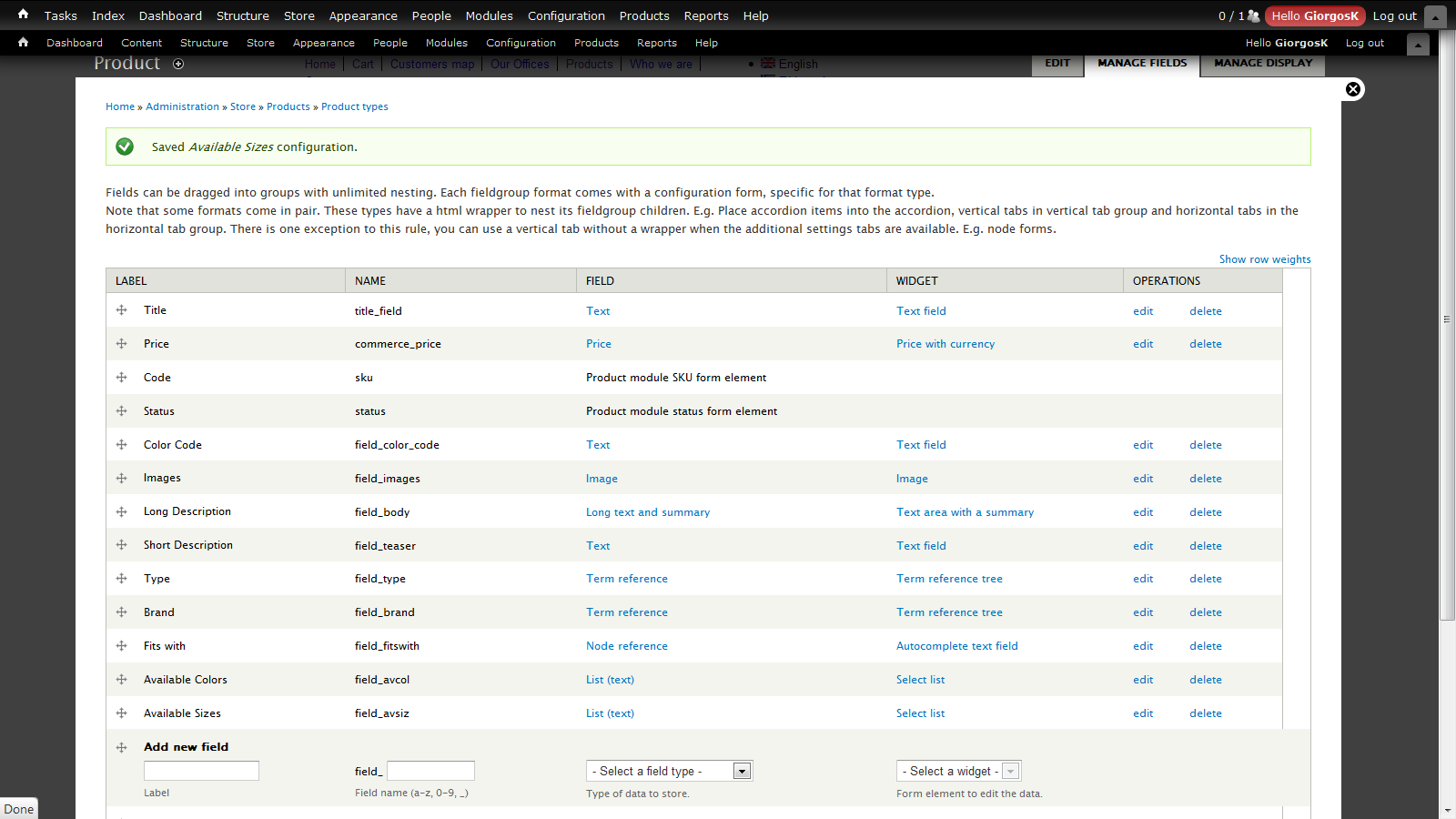
here admin/commerce/products/types/product/fields
but this produces the same options/attributes for color on the add to cart form for all products
how do I get the add to cart form get rid of color variants that the product does not have ?
isn't add to cart form a view ? can I override views-view.tpl.php ?
using netbeans debugger I can't seem to get the relevant info in any of the views preprocessors or templates
any pointer towards this solution or any other possible solution would be appreciated



Comments
Comment #1
rszrama commentedThe idea behind Drupal Commerce is that you should not be able to do what you're requesting. Each of those different variations of the same product are in fact different products. When it came time to order more shirts, you wouldn't say "Just give me more shirts." You'd say "I need 5 small, 3 medium, 7 large, and no XL." This is why Commerce forces you to define each of these uniquely with a separate SKU.
Instead of trying to undo the data model, what you have instead are valid UI concerns. How can I create and manage many of these at once. The first issue, creating them in bulk, is being addressed by http://drupal.org/project/commerce_bpc. Questions about managing them need to be more thoroughly explored in core for 2.x and in contrib until then, either through product groups (think a product with a product reference field) or modules like my Inline Product Form module in development (http://drupal.org/node/1181862).
Another thing; when you define products this way, the Add to Cart form will always only show valid color / size combinations. That's in fact one of the very good reasons for defining individual product variations as separate products.
For more information on our product data model and why it's important, check out my discussion with Jeff on the Lullabot podcast: http://www.lullabot.com/podcasts/podcast-96-ryan-szrama-on-drupal-commer...
Comment #2
giorgosk@rszrama
thanks for the answer and I never meant that commerce module should work this way
I was looking for a hack as I described
indeed I know the existence of commerce_bpc which is a very good module but it works only for creation of products and product displays
As you mention there is no easy solution for editing products in groups based on these attributes/options
and waiting for 2.x version or a contrib module to come alone is not an option for me at this moment
Moreover my store model is one that does not need to keep track of stock so instead of me finding for a way to group them together I am going for the easy solution
I am currently trying out hook_form_alter to modify the attributes/options and keep the ones that are relevant to the product and I will post my solution if anyone is interested
the solution is similar to this #1269480: Modifying the "quantity" text field comment 5
Comment #3
giorgoskhere is my solution just in case anyone cares
put available color field (with all color variants) in commerce product type
(screenshot > admin/commerce/products/types/product/fields)
put color field in the product line item (displays in add to cart form)
(screenshot > admin/commerce/config/line-items/product/fields)
NOTE: attributes and available attributes above have to have the same option values
can do the same for other attributes (in this example for size attribute)
put following in template.php (or you can use same code in your module change)
and create products with available attributes (size, color)
and wherever there is a add to cart form it would have the correct attributes for the product
Comment #4
rszrama commentedAhh, ok. In that case, you might be interested to know that you can attach fields to your product line item types and expose them to the Add to Cart form. This is the way to have customizable products in Commerce (working similar to Ubercart style attributes that don't adjust SKUs). The only hitch is that if you don't need the same fields exposed to the form for all your product types, you'd need to define additional product line item types in code until I can get a contrib up to do that via the UI.
Comment #5
giorgoskthat sounds interesting
can you give a code snippet on how is that done in code ?
Comment #6
rszrama commentedCreating the custom product line item type? You just need to implement hook_commerce_line_item_type_info(), define your line item type, and set its 'base' => 'commerce_product_line_item'.
Comment #7
petu commentedGiorgosK! Thank you very much!
Your code helped me. I added size property for product.
Now I can select several sizes during editing the product and shop's customer see only selected sizes, not all from taxonomy vocabulary.
Comment #8
FranCarstens commentedI know this is an old thread, but having wrestled with Commerce for some time, there appears appears to be two schools of thought on how variations in specific products should be handled. The first, as seen in Ubercart, is to add attributes to the specific product (SKU). This is simple enough if you have relative simple, non priced attributes. The second is the approach taken by Commerce - simply create a new entity for each possible combination. This has the advantage of relatively straightforward inventory management and pricing. Here’s where it turns South.
Neither of these models address the issue of complex products - especially customizable products, but this problem is not limited to that. Here’s a simple example and the Ubercart vs. Commerce model of doing things. For this example I am going to be creating a customizable dress shirt shop. Fancy, fancy.
Okay, let’s start with the variables:
Smokin’ Suzy White.
Shirt type is determine by the fabric used in the main body, white in this case.
And so forth.
Ubercart might look like the winner, but that’s only if:
In both cases the truly customizable products become ridiculously unmanageable - so both fail at truly meeting the needs of more complex or custom products. Neither is the “better” option.
Modules like commerce_option and commerce_pricing_attributes have attempted to meet the needs of more complex stores, but with long queues of unanswered issues, broken features with no commits in over 2 years.
I’ve installed and used both Ubercart and Commerce for various customers. Both have their pros and cons. Ubercart is great if you know very little about Drupal, and don’t want to learn Rules. Rules makes Commerce very powerful, but, and this is a big but, the end user - the shop owner - will generally not be interested in performing programming style changes to their store. The UI for Commerce falls significantly short in this area - managing shipping, discounts and other pricing automation requires accessing rules style UI - a very unfriendly environment for a small shop selling canvasses.
But really, by far the biggest problem in both is the handling of complex products and pricing without the sacrifice of UI - both in the back end and customer facing environments.
It leaves me at a cross roads… where to from here?
Markdown support in the comment section would be nice...