

This project is not covered by Drupal’s security advisory policy.
Important: This project is in alpha phase and a work in progress, please report bugs, other issues that you face and any recommendations on the module issue queue
.
What does this module do?
This module, when installed on your Drupal site will provide a mechanism and interface for the users of your site to be able to share sensitive files in a zero-knowledge mechanism, as in, no intermediate system administrator or someone with physical access to the servers will be able to decrypt and access your files. This module will also prevent any data leak in case of a compromised server/site. It enhances the user’s privacy by restricting the file access to the intended role that the file is to be shared to.
More about how this works is in the Architecture Document.
https://vimeo.com/231041126 Screencast demonstrating the use and install of the module.
Installation instructions
Step by step instructions for installing the module:
If you are on a unix system with a terminal:
- Open the terminal on your Drupal installation folder
Ex:cd /var/www/html/drupal - Change directory to the modules folder.
cd modules - Clone the 8.x-1.x release branch of the repository in that folder
git clone --branch 8.x-1.x https://git.drupal.org/project/client_side_file_crypto.git - Run the following commands to place the necessary JS dependencies in your libraries/client_side_file_crypto/ folder
cd ../
mkdir -p libraries/client_side_file_crypto/
cd /libraries/client_side_file_crypto/
wget http://bitwiseshiftleft.github.io/sjcl/sjcl.js
wget http://travistidwell.com/jsencrypt/bin/jsencrypt.js
Download aes.js from crrypto-js and rename it as cryptojs.js
- Install the module by logging into the Drupal site as an admin and then enable the module from
http://localhost:8000/admin/modules. You will be automatically logged out after this. - It is recommended that you clear all caches (from /admin/config/development/performance) once after enabling the module or the module might malfunction.
If you would rather prefer a windows/GUI approach without the terminal:
- In your file explorer, open the file manager to the “modules” folder in your drupal installation directory.
- Extract this zip file in that directory such that the client_side_file_crypto.info.yml and other files are placed directly in your [Drupal root]/modules/client_side_file_crypto directory.
- Download and place these files in the above directory with the name as given:
- Install the module by logging into the Drupal site as an admin and then enable the module from
/admin/modules. You will be automatically logged out after this. - It is recommended that you clear all caches (from /admin/config/development/performance) once after enabling the module or the module might malfunction.
Also make a new folder [Drupal root]/libraries/client_side_file_crypto/.
Granting access to the REST APIs
In /admin/people/permissions, allow access to the following REST APIs to the all roles other than anonymous.
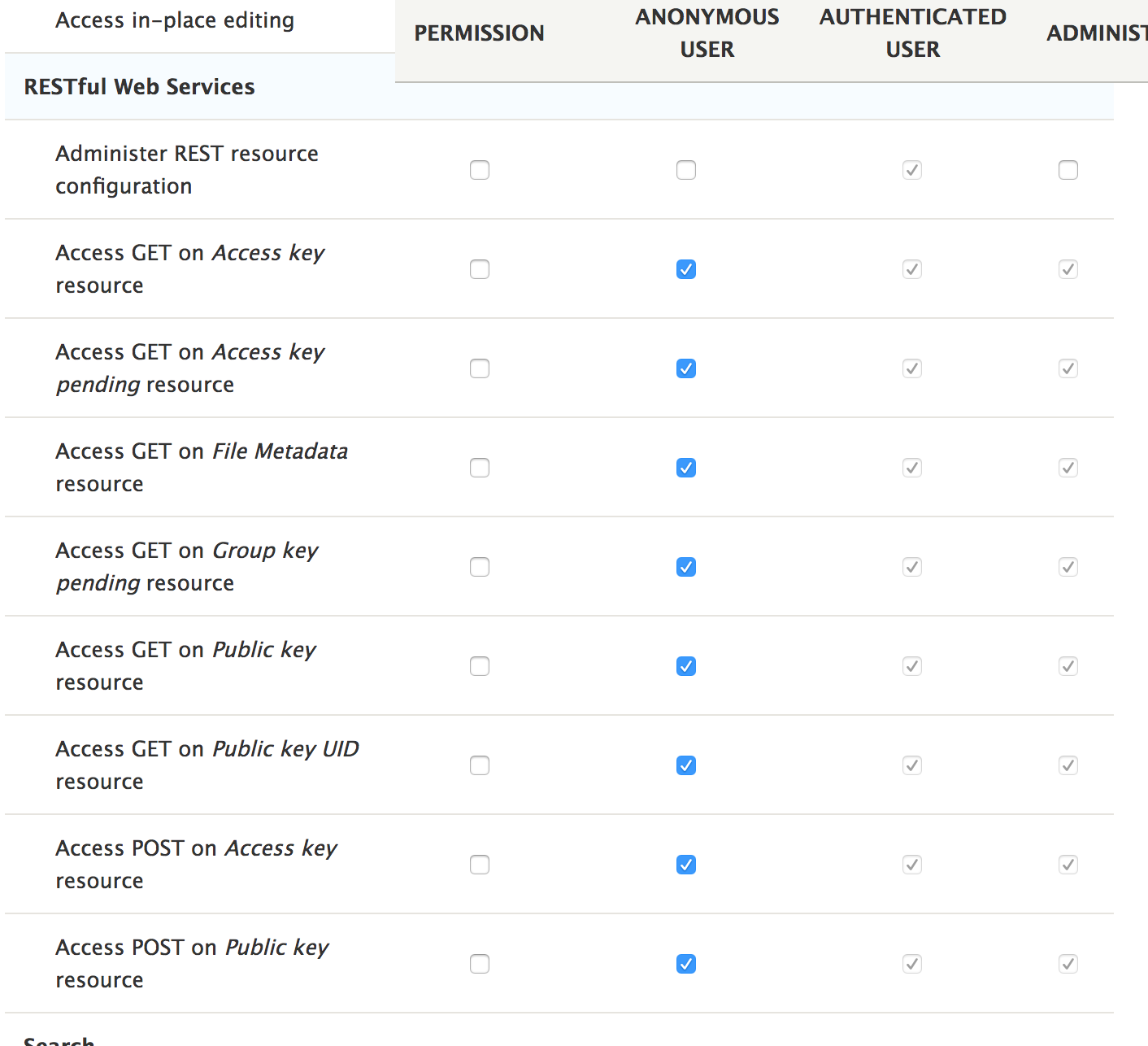
How to use it?
Once you install the module, all the users will be logged out, this is necessary for a one-time public/private key generation.
The module relies on a mechanism where the keys required to access the files are not stored as cleartext on the server. Hence once a user has generated their public-key (on their first login post-module-installation), they must wait for until another user in the same role comes online and provides them with the keys. If a key has not been generated yet, you will get an error message stating the same when you try to encrypt/decrypt a file.
If you are the first user logging in after the module install from a particular role, you won’t need to wait, keys for that role will be automatically generated for you.
However, once a second user logs in for the first time, they will need you to log back in for you to provide them the keys (all these things happen in the background, all you need to do is just log in or visit the Drupal site after another user has logged in for the first time ).
Once all the keys are in place, you should seamlessly be able to encrypt and decrypt files. The UI after that is very intuitive and simple.
The mechanism of the module uses HTML5 local storage to store private keys, so the encryption and decryption processes won’t work if you empty your browser data or log in from another computer the second time, in case you do either, you can restore the private key using the PrivateKey.pem file that was downloaded on your first login by navigating to
[DrupalSite]/user/restoreKey
Supporting organizations:
Mentoring and Funding
Mentoring
Stewardship
| Attachment | Size |
|---|---|
| REST permissions | 185.79 KB |
Project information
 Seeking new maintainer
The current maintainers are looking for new people to take ownership.- Project categories: Security
- Created by tameeshb on , updated
 This project is not covered by the security advisory policy.
Use at your own risk! It may have publicly disclosed vulnerabilities.


