Problem/Motivation
When user has access to view the list of terms/taxonomy overview page and they don't have access to manage them, the style is broken and confusing.
The user sees a + SVG but no indentation. It's quite hard to distinguish between parent and child terms.
Also, the Weight column appears and is empty. The column is included in the data rows but not the header, resulting in invalid markup.
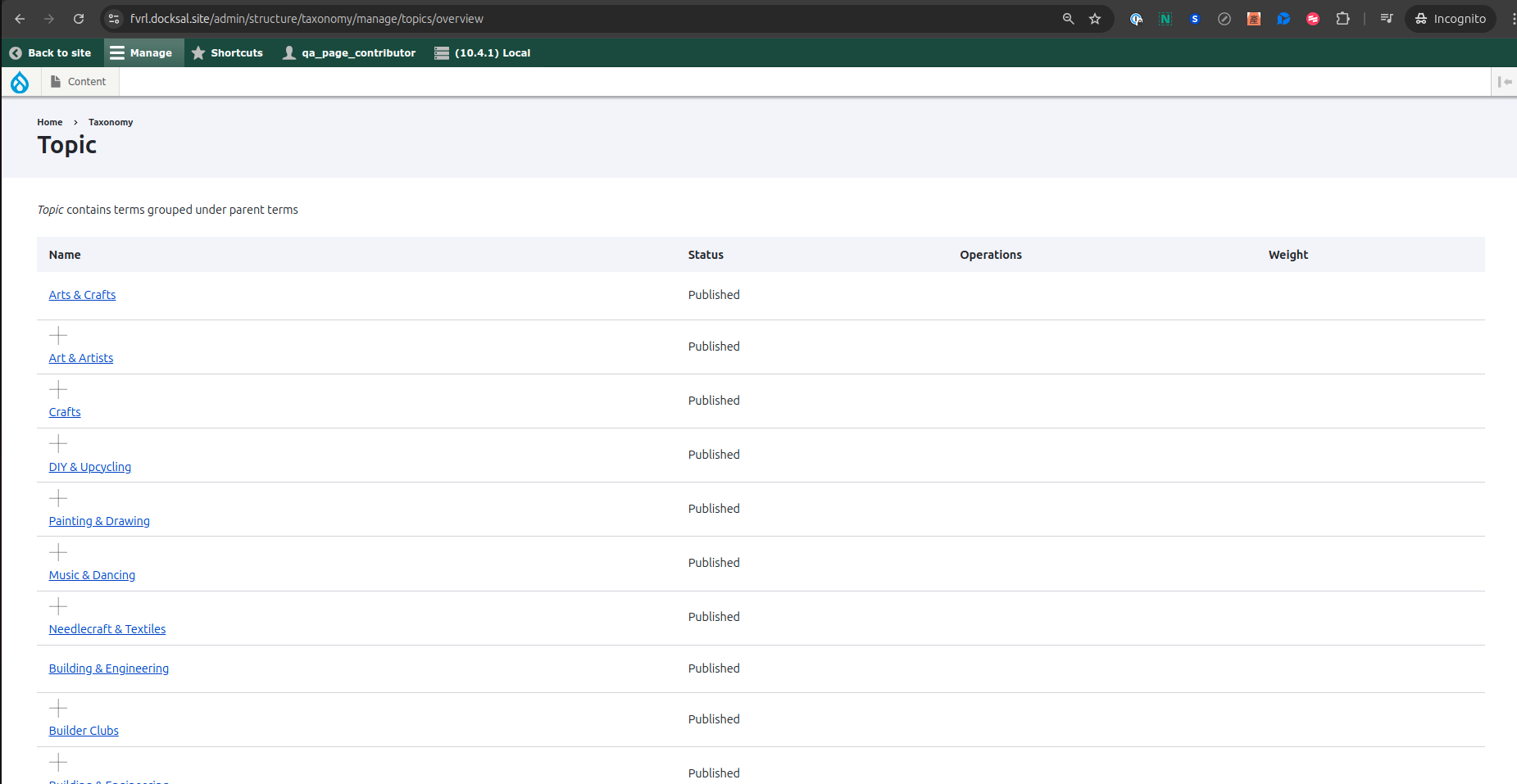
The problem is that the tabledrag SVGs (indentation and handles) and the weight are added in code, but their styling and functionality depend on the tabledrag JS and CSS. These assets are not added to the term overview page when the current user doesn't have edit terms permissions, resulting in a broken display and invalid markup.
Steps to reproduce
- Create a taxonomy
- Add few terms
- Add children terms so you can get the indentation
- Create new role with vocabulary overview access only
- Login and visit taxonomy terms
Proposed resolution
Add consistent permission checks so that all tabledrag-related code and assets are handled the same way.
Remaining tasks
Tests
User interface changes
Users with vocabulary overview access but without term edit access will not see the drag handle images or the Weight column.
Introduced terminology
None
API changes
None
Data model changes
None
Release notes snippet
TBD


 Show commands
 changes



Comments
Comment #2
quietone commentedChanges are made on on 11.x (our main development branch) first, and are then back ported as needed according to the Core change policies.
Comment #3
saurav-drupal-dev commenteddid u logged in using admin account or its just a normal account without admin access because i am not able to reproduce the issue here.
please share a short video of the issue. thanks
Comment #4
carolpettirossi commented@saurav-drupal-dev, you must remove the permission to create/edit terms and add the view overview,
See the permissions here for content editor:
Evidence that the layout is broken for the user with content editor role:
Comment #5
kushagra.goyal commentedIssue is able replicate on local, Here this issue coming due to styled components as they would be only view only access to editors. Hence does not containing draggable table that doesn't allow svg and indentation styles get rendered, so for Proposed solution is to create a separate component style to overwrite as below.
Did a try on my system it worked for me. (as image attached). not sure so, I would like to explore any other potential solutions to address this. if all good Will Raise MR.
Comment #6
kushagra.goyal commentedComment #7
brunoalmeida commented@kushagra.goyal What if all the code related to .indention and .tree classes was moved to the new indentation.pcss.css file?
It looks like this block of code can be completely extracted from the tabledrag.css file.
I have tested your suggestion and I can confirm it's working fine.
Comment #8
kushagra.goyal commentedHi @brunoalmeida, thanks for looking into this. Yeah It will ok by adding code for tree and indentation As Tree is the visual representation for draggable rows. This will help item visibility for view access.
Comment #10
brunoalmeida commentedI needed to fix this in my current project so I have created a MR using the @kushagra.goyal solution.
I'm also adding a patch for Core version 10.4.x.
Comment #11
brunoalmeida commentedComment #12
smustgrave commentedTried replicating this following the steps but not getting the results mentioned. Think more information is needed. Adding a new file and editing a library probably will need sub-maintainer approval too.
Comment #14
lisotton commentedI resolved the conflict and changed the class "tabledrag-cell-content" in the "indentation.css" to "tabledrag-cell", as the "tabledrag-cell-content" is created by JS when tabledrag is enabled.
I had the same problem in the menu form when the tabledrag is disabled using a form alter.
@smustgrave you can replicate the issue creating a menu with some items in different levels and then with a form alter doing:
unset($form['links']['links']['#tabledrag']);Comment #15
cboyden commentedI was looking at #2921700: Conditionally show Operations, Weight column in Vocabulary, Terms overview and posted a comment there, but it looks like this is a better issue for it. The problem isn't only the display, it's also the invalid markup.
I believe the source of the problem is that the tabledrag SVGs (indentation and handles) and the Weight header are added in code, but their styling and functionality depend on the tabledrag JS and CSS. These assets are not added to the term overview page when the current user doesn't have edit terms permissions, resulting in a broken display and invalid markup.
Steps to reproduce:
I tested the latest MR and it still produces invalid markup: The header row has 4 cells, but each data row only has 3 cells.
Comment #16
brunoalmeida commented@cboyden currently, the "Weight" thead is always created. There's only a condition for the label, as you can see below:
'weight' => !$operations_access ? $this->t('Weight') : NULL,The weight column that is created for each term has a different validation:
My proposal is to create the Weight thead separately, combining the two validations:
This validation can be used to add any element that has to do with weights and drag and drop.
I updated the MR with these changes.
Comment #17
cboyden commentedThanks @brunoalmeida, I tried this out locally and it's working as expected.
Comment #18
smustgrave commentedSeems like an issue that probably should have test coverage, since the fix was in the taxonomy module wonder if the component should be set to that.
Also current solution doesn't match the summary where this was originally about adjusting styling
Comment #19
cboyden commentedI've updated the issue summary with more info about the invalid markup and a new proposed resolution.
It is possible that this problem occurs in other places that use tabledrag, but that would require more investigation.
Comment #20
brunoalmeida commentedComment #21
dcam commentedThis was marked as needing tests in #18. None have been added, so I'm restoring the Needs Work status.
Comment #22
ironnuts commentedIt seems the latest code has broken VocabularyPermissionsTest.php. That file looks like where test coverage can be placed, too. For example line 107 is a comment:
// Login as a user without any of the required permissions.And line 115 contains this comment:
// Log in as a user with only the overview permission,..Comment #23
ironnuts commentedI think that fixes the VocabularyPermissionsTest.php. There are now 2x seeming unrelated Unit test failing. I am not sure what new test coverage is needed.
Comment #25
quietone commentedThe Claro theme was approved for removal in #3576460: [policy, no patch] Deprecate and remove Claro.
This is Postponed. The status is set according to two policies. The Remove a core extension and move it to a contributed project and the Extensions approved for removal policies.
The deprecation work is in #3576668: [meta] Tasks to deprecate Claro and the removal work in #3584638: [meta] Tasks to remove the Claro theme.
Comment #26
smustgrave commentedClaro has moved to contrib
Comment #27
inaw commentedReupload patch for MR 11112 11.4.x