

 The 2026 Drupal Business Survey is open. Your response will help shape the future of the Drupal business ecosystem.
just follow the steps described in the documentation, I installed the required modules, and quiz book, certify the module
I configured the pdftk executable file path, I created the certificate bound to the quiz in order, the certificate is created, but in time
generate the pdf error occurs. a file. fdf is created in the specified folder to store the certificates, from what I understand the data in this file. fdf forumário should be written to the pdf at this point is that the error occurs.
warning: Missing argument 1 for certify_user_page_generate_pdf_certificate () in / home/weusder/www/dev/drupal-6.22/sites/all/modules/contrib/certify/certify.module on line 612.
The certificate generation failed. Please contact the system administrator for assistance.
| Comment | File | Size | Author |
|---|---|---|---|
| #15 | cert_0_3.pdf | 0 bytes | ontwerphuis |
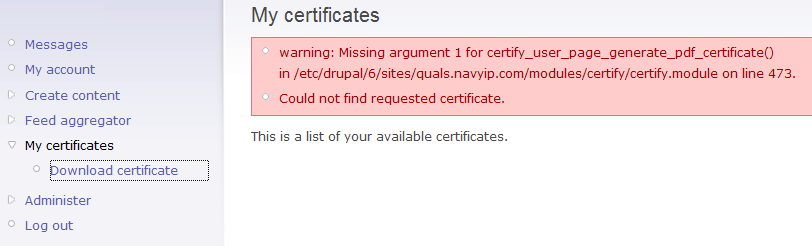
| #7 | Cert_ScreenShot.png | 17.36 KB | IndustryReform.org |

Comments
Comment #1
fuzzy76 commentedSorry for not getting back to you earlier. Which link are clicking to generate the certificate? You might be better off updating to the 2.x version. It has been running here for months without problems.
Comment #2
IndustryReform.org commentedI have a similar issue, but my error message is:
warning: Missing argument 1 for certify_user_page_generate_pdf_certificate() in /etc/drupal/6/sites/quals.navyip.com/modules/certify/certify.module on line 473.
Could not find requested certificate.
Is this possibly a Drupal or server configuration issue?
Comment #3
fuzzy76 commentedIs clean URLs enabled for the site? And what does the URL that produces this error message look like? And are you logged in?
Comment #4
fuzzy76 commentedMoving down to major since 1.1 is not the recommended version any more. But I will fix it if I manage to track down the cause.
Comment #5
IndustryReform.org commentedHello,
Thanks for getting back to me.
I'm logged in with an admin account, and cleanurls is turned on; see url below:
https://FQDN.TLD/certify
Thanks!
Comment #6
fuzzy76 commentedLet me see if I get this straight... You are AT the page https://FQDN.TLD/certify and you click the link to download the certificate when this occurs? Can you right-click the download link, copy it, and paste it here?
Comment #7
IndustryReform.org commentedoops.. sorry; clearly having the whole URL would be useful.
The I'm at when I get the error message is :
https://quals.navyip.com/certify/
Here is the URL of the link that I click "Download certificate" (in the Navigation) under the menu item "My certificates":
https://quals.navyip.com/certify/certify_user_page_generate_pdf_certificate
Comment #8
fuzzy76 commentedAnd you are using Certify 1.1, just like the original poster? I'm having a hard time reproducing this... Is there anything in the error log / db log that might relate to this?
Comment #9
fuzzy76 commentedComment #10
ontwerphuis commentedHi
I'm also having the same issue - when i click download pdf it gives me a blank page.
I'm working on my local machine - have created a server environment with just the bare minimal modules that comes with Drupal 7. Have installed Quiz and Certify and have set the path to the pdftk exe as well as the path to a folder containing the certificates outside of my drupal root.
When i navigate to the certificates folder i can see a new file there named cert_0_3.fdf while the path that has the blank page result is http://localhost:8888/kznbiz/user//certify/download/3 - looks funny to me "//" after the user?
I've tried removing the one / but that doesn't give me the download just a access denied - could this be a permissions issue? I'm logged in as the admin.
I've tried changing the file found under the certificate folder from fpf extention to pdf and opening it but it says that it cannot as the file is empty.
Your help much appreciated!
Comment #11
fuzzy76 commentedWhat OS is running on your local machine? I've been experiencing troubles getting pdftk to merge the pdf's on both OS X and Windows. And do you find any error messages in the watchdog? It does sound like your local setup is set to not print errors to screen.
Comment #12
ontwerphuis commentedI'm running Leopard 10.7.4 ;) How do i set it to print errors?
Comment #13
fuzzy76 commented/admin/settings/error-reporting :) But the messages are written to the watchdog / error log of Drupal anyway, so you will find your error message there.
Comment #14
ontwerphuis commentedHi
I've checked but only see the access denied in the error logs - it was allowing me to download the pdf just now but failing to open it due to the file being "empty". I have created another quiz and certificate and when I answer the question and the document becomes downloadable it says that I haven't passed the quiz yet?
Below is the logs that I have:
access denied 06/04/2012 - 12:48 user/certify/download/3 admin
access denied 06/04/2012 - 12:47 user/certify/download/3 admin
cron 06/04/2012 - 12:46 Cron run completed. Anonymous (not verified)
cron 06/04/2012 - 12:46 Cron run completed. Anonymous (not verified)
cron 06/04/2012 - 12:46 Attempting to re-run cron while it is already running. Anonymous (not verified)
theme 06/01/2012 - 15:18 Theme key "node_form" not found. admin
access denied 06/01/2012 - 14:47 user/certify/download/3 admin
access denied 06/01/2012 - 14:42 user/certify/download/3 admin
content 06/01/2012 - 14:36 certificate: added Certificate 102. admin view
content 06/01/2012 - 14:36 quiz: added kzn quiz 2. admin view
Thanks for all the help
Comment #15
ontwerphuis commentedOh and here is the pdf its allowing me to download thats empty
Comment #16
icc commentedTry running something like this:
/usr/bin/pdftk /path/to/drupal/sites/all/modules/certify/default_certificate.pdf fill_form /path/to/cert_0_3.fdf output cert_0_3.pdf flattenReplace filenames and paths to suit your system.
This will check that your pdftk is working.
Comment #17
ontwerphuis commentedHi Icc, Thanks for the reply
/path/to/drupal/sites/all/modules/certify/default_certificate.pdf gives me the pdf with no errors
I might be referencing the incorrect path but when i searched for the pdftk on my mac it gave me this path /opt/pdflabs/pdftk/bin - this is the path i configured into my certify module settings - could this be incorrect?
for these two fill_form /path/to/cert_0_3.fdf output cert_0_3.pdf flatten - what am i suppose to do?
Thanks for the help
Comment #18
icc commentedAs stated the path to the pdftk executable should be to the executable and not to a directory. In your case it would be:
/opt/pdflabs/pdftk/bin/pdftkIf that doesn't work you should make sure your pdftk command works by using it directly in a shell.
Comment #19
weusder commentedComment #20
ontwerphuis commentedHi
I've updated my link to the pdftk but still getting the empty pdf generation.
Sorry for the hassle but I'd really like to get this working.
Any other suggestions ? When you mentioned running it in a shell what do i need to do to get this to work?
Thanks for all the help
Comment #21
fuzzy76 commentedDrupal should log the exact commandline it tries to execute in the watchdog log. Try finding that and copy-paste it into a terminal. This should give you the same execution as Drupal, which might give you some additional error messages.
But as I said in #11, I've yet to find an actual version of pdftk for OS X that manages to fill forms. I'm guessing that is the cause of your problems. So far, I've only got it working on Linux.
Comment #22
ontwerphuis commentedThanks Fuzzy76,
I'm not going to bother trying to get it to work on Mac anymore - moving over to Linux.
Does anyone know if they're planning on supporting other pdf generators? I'm in a shared environment and dont have access to the server to install pdftk.
Thanks for all the help ;)
Comment #23
fuzzy76 commentedMy though so far is that it's a "good idea for later", but I don't have time to do it myself. There are some discussion around this at #1593928: Support other PDF generation methods. :)