

Closed (fixed)
Project:
CCK Fieldgroup Tabs
Version:
6.x-1.x-dev
Component:
User interface
Priority:
Critical
Category:
Bug report
Assigned:
Unassigned
Reporter:
Created:
6 May 2008 at 07:08 UTC
Updated:
18 Feb 2011 at 07:55 UTC
Jump to comment: Most recent file


Comments
Comment #1
borfast commentedI can verify this problem.
I also have a fresh install, created a new content type, set up the groups, configured everything as per instructions but I see no tabs when viewing the node, only when editing it.
Comment #2
submit.dk commentedI can also verify this problem. This is what I did:
1) Installed CCK and activated all (include content and fieldgroup)
2) Installed Tabs and activated
3) Installed CCK_fieldgroup_tabs and activated
4) Created a new content type called "tabpage"
5) Created a field called "test1field"
6) Created a fieldgroup called "test1fieldgroup" (remembered to select tabs)
7) Told the field "test1field" that it shoud be a part of the fieldgroup "test1fieldgroup"
8) Created a field called "test1field"
9) Created a fieldgroup called "test1fieldgroup" (remembered to select tabs)
10) Told the field "test1field" that it shoud be a part of the fieldgroup "test1fieldgroup"
11) Gave permissions to view the fields under User > Permissions
12) Went to "display fields" and choosed "tabs" in both Teaser and Full node
13) Created a new page based on my new contenttype "tabpage"
14) When creating there was two tabs as expected
15) But when viewing the page with the content in the browser there was no tabs (see the attached file no-tabs.gif)
I'm using Drupal 6.2, IE 7.0, and a theme I have based on Garland.
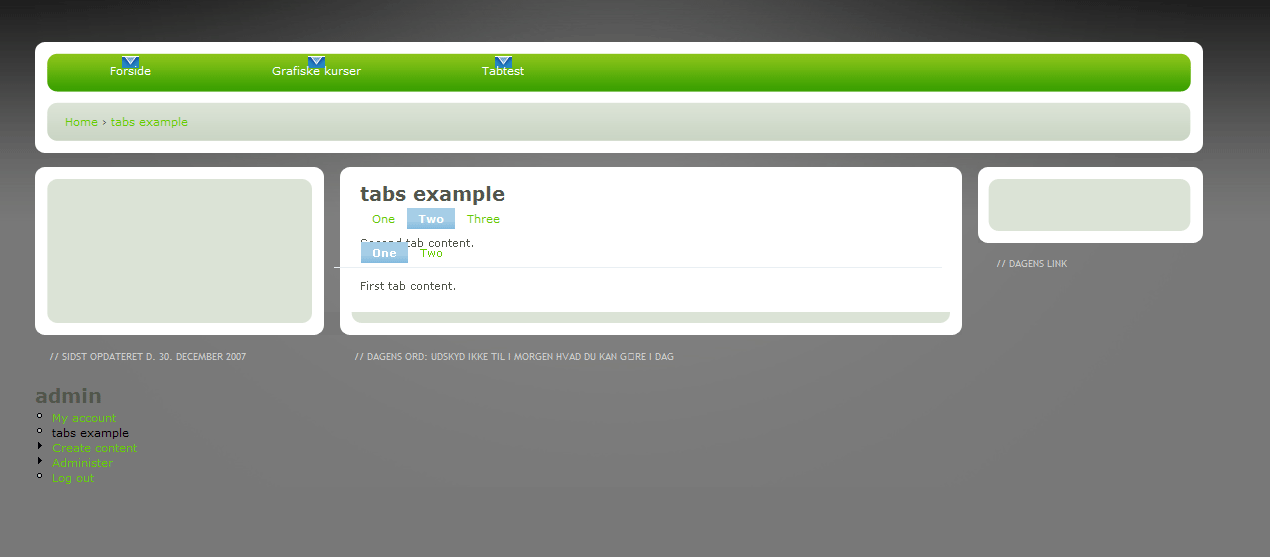
The tab example is also acting strange. When I click on the first and third tab it's cool. But when I click on the second, something is wrong. I attached the
screendump (tabs-example.gif).
Thank you in advance
www.submit.dk/drupal
Comment #3
rivena commentedI also have this problem on Drupal 5. I checked it through the tapestry theme, so it's not theme specific.
Anisa.
Comment #4
gabork commentedThis would be a very useful module, but it seems the code does not work with 6.x and the corresponding CCK - the data structures are different, the API-s have changed, etc. - although the fact that it does render tabs in the editing mode, indicates that the underlying libraries do work.
We would all be very thankful for a fix, I believe...
-- Gabor
Comment #5
einsicht commentedI have the same problem. Set "tabs" display everywhere and still nothing when viewing, only editing. Anyone find a solution yet?
Comment #6
gabork commentedWell, could somebody please check this patch: diff:
$ diff cck_fieldgroup_tabs.module.org cck_fieldgroup_tabs.module
118c118
< if (isset($node->content[$group_name]) && $group['settings']['display'][$context] == 'tabs') {
---
> if (isset($node->content[$group_name]) && $group['settings']['display'][$context]['format'] == 'tabs') {
135c135
< // Title is required for tabs.
---
> // Title is required for tabs.
159c159,160
< $node->content['fieldgroup_tabs'] = form_builder('tabset', $node->content['fieldgroup_tabs']);
---
> $empty = array();
> $node->content['fieldgroup_tabs'] = form_builder('tabset', $node->content['fieldgroup_tabs'], $empty);
Each group gets its own tab, and the fields are beneath, arranged vertically - is this how it is supposed to work?
Comment #7
borfast commentedgabork, it works just fine, for me. Thanks!! :)
Could you please add the patch as an attachment to this issue?
Comment #8
gabork commentedSorry, I don't know the etiquette but I attached my patched file here.
Make a backup copy of your cck_fieldgroup_tabs.module and use the attached file instead.
Note: this is for the 6.x version!
Comment #9
submit.dk commentedGod damn - I love you gabork!
It works for me to. Thanks a LOT.
Comment #10
borfast commentedgabork, I'm attaching your fix as a patch.
Thanks again for finding and fixing the problem! :)
Comment #11
dman commentedYAY that worked for me too.
+1 RTBC
(um, Almost ... just swap that tab for some spaces when committing please!)
Thanks heaps!
Comment #12
nedjoThanks, applied.
Comment #13
nedjoComment #14
Anonymous (not verified) commentedAutomatically closed -- issue fixed for two weeks with no activity.
Comment #15
mattez commentedHi can any body help with patch for version for D5? There exactly same problem..
http://drupal.org/node/285735
Comment #16
mattez commentedComment #17
nedjoFrom the link given, this appears to be a different issue. Reclosing.
Comment #18
toddchris commentedI read through the entire thread, and I'm having the same issue now, even though the patch has been applied. Does anyone know of any module conflicts that have come up recently? I thought it might have been the Fivestar module, since that doesn't seem to be working for me in IE7 either, but disabling it does not fix the problem with the tabs not showing up in view.
Any ideas would be appreciated.
tc
Comment #19
wildebeest commentedI have the same problem since I upgraded from D6.10 to D6.12 a few days ago.
I use the latest modul-version from oct. 2008 (6.x-1.x-dev).
Any help on that issue would be great!
Comment #20
Gábor Mayer commented+1 D6
Comment #21
nedjoI can't reproduce this issue with the current version. Please reopen with details if it recurs.
Comment #22
ardnet commentedYup, me too right now, I can't get the tabs work even though I implement gabork's patch.
Well, i did installed the current version one,but still doesn't work with me.
Anyone can give some idea what's going on probably?
Sorry, so I activate again this issue.
Thanks
Comment #23
ardnet commentedApologized, seems I managed to get it done though.
Switch back to close now.
Thanks