

Active
Project:
Case Tracker Due Date
Version:
6.x-1.0-beta1
Component:
Code
Priority:
Normal
Category:
Bug report
Assigned:
Unassigned
Reporter:
Created:
1 Sep 2010 at 06:31 UTC
Updated:
15 Feb 2011 at 09:18 UTC
Jump to comment: Most recent, Most recent file


Comments
Comment #1
Anonymous (not verified) commentedCan you explain why you are able to set a "to" and "from" date for the due date? Did you modify the fields that the module set up for you? Can you explain exactly how you modified them?
Comment #2
knarzer77 commentedHi,
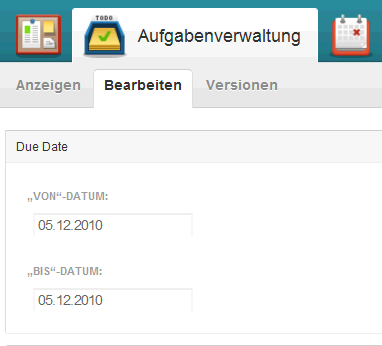
now I'm confused. I think I changed nothing. I only installed the module and the patch (http://drupal.org/node/893118) and than the two new date fields appeared in the case form (see attachment).
Comment #3
knarzer77 commentedI found an entry, that there was a bug: http://developmentseed.org/blog/2010/jan/12/future-open-atrium-beta-4-re... (search for "Event date appeared one day earlier").
Maybe not solved yet complete.
Comment #4
Anonymous (not verified) commented@knarzer77 - I have a feeling that a bug that major and that old would have been resolved by now. Can you look through the issue queue and see if anyone is describing your exact problem: http://drupal.org/project/issues/date and link to it if you find it?
Also, can you post a screenshot of your "add new casetracker case" page? There shouldn't be the option to set a to/from date and I'm having trouble understanding how it got there.
Also, can you go to /admin/build/features and make sure that the feature isn't overridden at all.
Thanks!
Comment #5
knarzer77 commented@auzigog - I have found some issues, but not a real solution. Normally it should be solved:
http://drupal.org/node/344268
http://drupal.org/node/313742
http://drupal.org/node/591744
I have found something: It's a timezone problem. When I set the date without a time or the time on 1:00 clock, then the day is wrong. When I set the time to 2:00 clock or up, then the day is CORRECT. It must be a problem of the "Case Tracker Due Date" modul, because with a manually cck field; i have not this problem. Maybe in connection with XAMPP?
I also have recreated all features, but no change.
Jan
Comment #6
bryan kennedy commentedI think we've got two separate issues here.
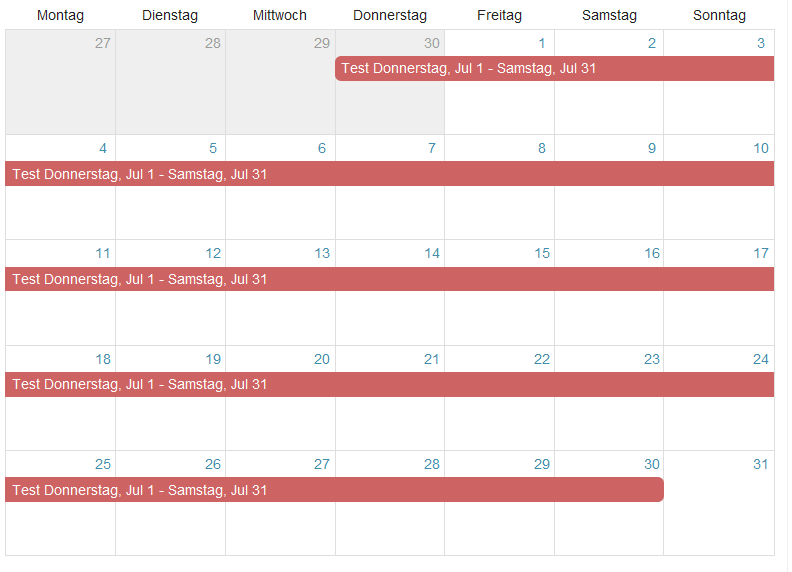
1. You've turned up an issue with the patch I submitted over here - http://drupal.org/node/893118. I think I don't have the right date format for the view, and the granularity of the date field is including hours, min, and sec. I'm working on a new patch, that I think will fix your problem with due dates showing up on the wrong day in the calendar.
2. I have no idea how you got to and from dates into your case content type. Did you manually added the "date" field from the event content type to your case content type, possibly? I don't think the two date fields is an issue with this module.
Comment #7
knarzer77 commented@bryan kennedy:
Yes, I played with the "date" field from the event content type. But now I removed the field from the content type, but how I can get a normal state in the case form?
Thank you for for working on the patch.
Comment #8
Anonymous (not verified) commented@knarzer77 - Got to /admin/build/features and press revert on the Case Tracker Due Date feature then let me know if you have the same problem you originally reported (after applying bryan's patch).
Comment #9
Anonymous (not verified) commentedComment #10
Anonymous (not verified) commented@knarzer77 - Is this issue still a problem? Try updating to the latest CVS or -dev version.
Closing for now. Please re-open if this is still an issue.
Thanks!
Comment #11
knarzer77 commentedHi,
I tried the actual beta1 and it's still a problem.
Jan
Comment #12
nkmcgee commentedI just loaded this module (new to Open Atrium) and I absolutely love it. However, I'm also noticing this issue in both the beta1 and dev versions. As is mentioned above, it looks to me like a time zone problem, which would probably explain why some people can reproduce it and others can't.
I'm in Pacific time, and running the module normally the events always fall on the same day. The default "input_format" for the due date is "m/d/Y". I think that means that the database uses either no data for hours (this is what is suggested on the Date module API) or (maybe) throws in 12 noon to complete the MySQL DATETIME data type. In Administer > Content management > Case > Manage fields, I changed the input format to include the hour.
Anything early in the day shows up on the calendar on the correct day. Later times (after 4:59PM for me) show up on the calendar on the day after. I'm guessing the cutoff for when this gets pushed to the next day might vary depending on the time zone of the server.
Does this make sense? I'm too new to Drupal and Open Atrium to know how this might be fixed.
Thanks for the great module.
Also, if I wanted to add a time to the due date (a lot of my tasks are event based) would it be better to change the field input format via the Administer panel or directly in casetracker_duedate.features.content.inc?
Comment #13
Anonymous (not verified) commented@nkmcgee - Thanks for the detailed report! That kind of debugging is extremely valuable. I appreciate it. The solution is probably as simple as being more explicit in my code when saying "is date A < date B" and including some logic that makes it clear that the time of day is irrelevant. That said, I should probably also make it possible for times to be relevant if people like yourself want to add times to the due date.
For the separate issue of adding times to due dates, I'd suggest opening a new support issue in the queue. But for the sake of ease: Adding it in the admin panel gives you a one-time solution, Adding it casetracker_duedate.features.content.inc gives you a solution you can take elsewhere. You could also explore using Features Override (a separate module) if you want a *Feature* you can take elsewhere really easily and place on top of existing features.
Comment #14
nkmcgee commentedThanks auzigog! I'll open a new issue.
Comment #15
nkmcgee commentedI've corrected this bug. If auzigog or another maintainer contacts me I can send them the updated code.
Comment #16
Anonymous (not verified) commented@nkmcgee Thanks great to hear!
Please open a new issue that is specifically about the details of the features you've added. That will be one "patch".
Then submit a separate patch (in this thread) relating to the bug.
Here are the details on creating a patch: http://drupal.org/patch
Read that article and all the sub-pages (see the nav bar on the right).
Please let me know if you have any questions! Thanks for contributing!
Comment #17
gb5256 commentedIs there any news on this issue?
Has a patch been created for this?
Thanks for help,
gb5256
Comment #18
vanillawater commentedIt's a field configuration matter.
Please check field Time zone handling http://drupal.org/node/767182 so that the retrieved datetime value isn't altered.
Thanks.
Comment #19
gb5256 commentedHello Vanillawater,
thanks for the hint.
But this does not solve my problem.
I have a user in the same time-zone as my site.
I have allowed user-time zones.
But when I enter full days, they are always shown one day too early.
I found out this:
When I set due date from: 23.Dec 2010 to 24.Dec 2010
then the date is stored as:
23.Dec2010-00:00 to 24.Dec.2010-00:00 and the node is shown too early in the calendar.
When I change this to
23.Dec2010-00:01 to 24.Dec.2010-00:01 it is shown correct.
So it feels to me that this is not due to the time zone setting or time conversion setting.
Somehow it thinks that 00:00 is still the previous day.
Any ideas on this or am I again wrong with this?
thanks for any ideas,
gb5256
Comment #20
James Lawson-1 commentedHi Everyone,
Hi Tried out what Vanillawater suggested in #18. More specifically I read this...
------------------------------------------------
Use ISO-8601 week numbers
For USA/Canada/Australia as well as many Middle East countries, week numbers DO NOT follow the ISO-8601 standard, and this option should be unchecked (unchecked is the default behavior).
To fully comply with the ISO-8601 standard for date & time, this option should be checked & First day of week should be set to Monday. This is common for much of Europe & Asia.
-------------------------------------------------
and as I am in the UK (server is in the states) I set the beginning of the week to be Monday and checked the comply with ISO-8601 standard.
This has now worked.
Many thanks for your help.
James
Comment #21
James Lawson-1 commentedCorrection. It has almost worked.
The due date is weds 16th at midnight.
In the case it says that it is due today.
Strictly speaking that is incorrect as it is due tomorrow.
However, from a workflow point of view it is due today because if I don't complete the task today it will be overdue after midnight.
Thoughts anyone?
With thanks
James