Hi, I've been playing around with this manually and then came across beautytips and then your module - really nice work!!
I've put a test calendar together and let a few people loose on it and the feedback is that only one person actively rolled over the date on the month view. The rest either missed the balloons completely as they never rolled over the date or came across it by accident.
The functionality as it stands works perfectly for year view and month view when viewed as a block as mini calendar) which I appreciate was its intended function. However people seem much more inclined to rollover the actual events within the month/week view and the default calendar pop up is not the best(!) so.....
I was wondering whether it's possible (and where to start) to change the mouseover from the date to an event. I am complicating matters further by using the new calendar multi-day module but given a push in the right direction I'm sure I could work it out.
Once again, props to you and thanks.
Crom



Comments
Comment #1
rjb commentedHi,
Ok, let's see how we can make this work. If you look in sites/all/modules/calendar/theme, you will find all the templates used for building the calendars. The template which needs to be overridden is
calendar-month-node.tpl.php. This file does the rendering of a node (an event) in a cell of the month view calendar.If you open that file you will see something like this:
You can temporarily modify the file in order to create a div for a test balloon:
Note the extra line, as well as the "temporarily" part because it is considered bad practice to edit the original template or source files. We should override the template by copying it over to your theme directory and edit it there. Or override it using the method i use in the calendar tooltips module. For the sake of simplicity though we will keep on editing source files :-)
Next thing to do is modifying the cssSelect. Edit sites/all/modules/calendar_tooltips/calendar_tooltips.module and find this line:
What this does is that Beautytips will lookup the HTML element which matches one of the two CSS selectors (these are separated by a comma), and it will expect the balloon data in the HTML element that comes next.
Add a third selector for our month view test balloon:
and separate it from the other two by a comma.
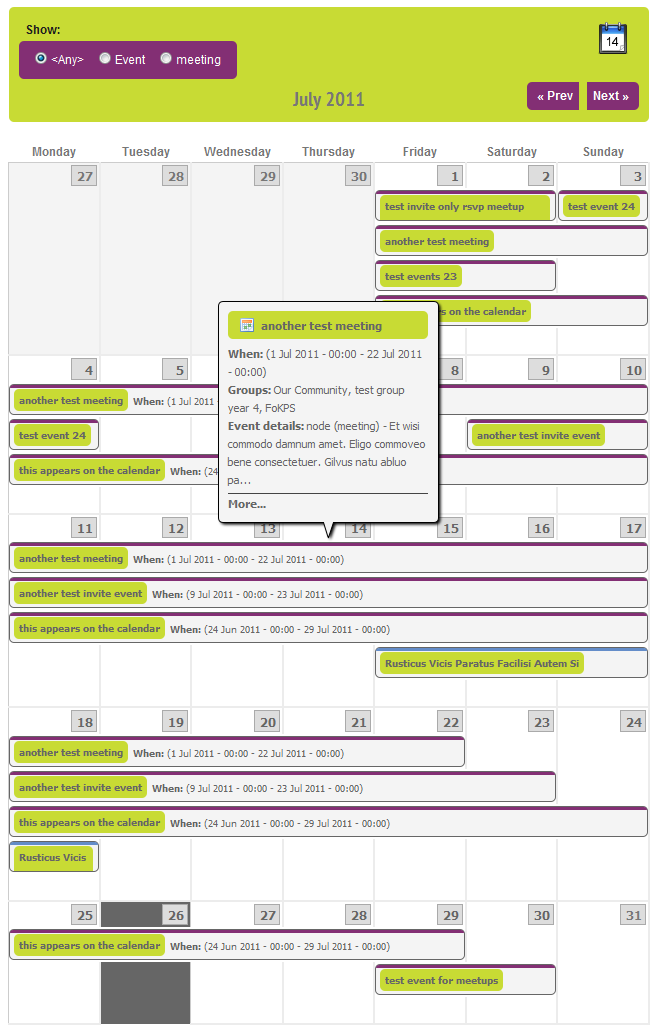
Now if you hover over an event you will see the test balloon. See the attached screenshot. Next thing to do is deciding what you want to appear in the balloon, and what should stay in the calendar. You can copy the whole loop or just move individual items from the calendar to the balloon.
Hope this gives you a start. If you need more help, let me know.
Cheers,
Ronald
Comment #2
Crom commentedRonald, Thanks for the amazingly clear instructions. I'll give them a go and send you a pic!
Cheers,
Crom
Comment #3
rjb commentedLooking forward to it :)
Comment #4
Crom commentedRonald, I am definitely making headway and it looks beautiful...almost!
I have run into the old fusion overflow problem and have included
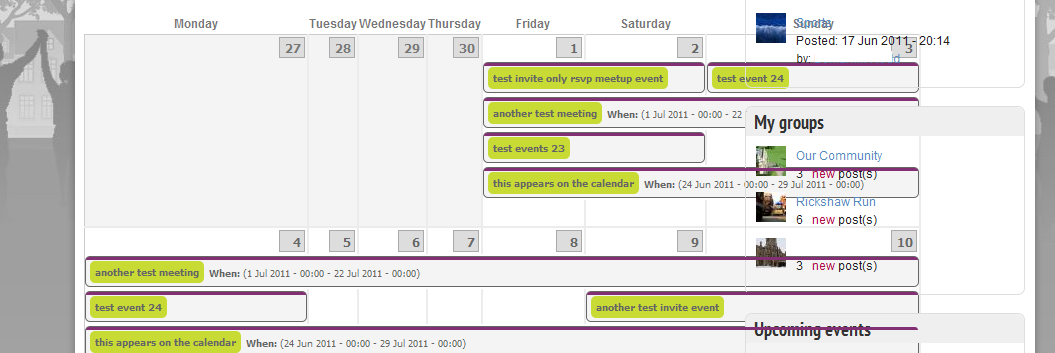
into the style sheet (as just including the .row class didn't appear to do anything). I now have a perfect mini/block calendar in the sidebar last but on the page monthly calendar (which has a sidebar last on the right) the calendar extends over the sidebar.
So close and yet so far. Any ideas?
Cheers,
Crom
Haven't forgotten about the picture - must get it looking it's best though ;-)
Comment #6
rjb commentedWhat theme are you using?
Comment #7
Crom commentedI'm developing on Drupal Commons and using Commons_origins as the theme. I have then created a sub theme to do any of my own customisation. I'm currently working through the CSS files and switching them off one by one to see which is affecting it. Not going well :-)
Here's a pic of the problem.
Comment #8
Crom commentedThis looks like a CSS issue with the calendar multiday module (issue reported here: http://drupal.org/node/1230318). I managed to find the places that were causing the problems and sorted them. So, after much gnashing of teeth here is the calendar with some fantastic looking tooltips.
Thanks very much for your help, the event rollovers work really well.
Crom.
Comment #9
rjb commentedWow, I'm impressed! It looks great. Thanks for the picture. Glad you got it working.
Cheers,
Ronald