

 Come together with the global Drupal community in Rotterdam, 28 Sept – 1 Oct 2026. Sessions, contribution, connection, and Early Bird savings until 8 June.
Just to calm any possible problems I'm not looking for the drop down menus to hover. I recognize the need and reasons for the clickable dropdown menus.
That said I'm not finding any way to make the dropdown menus function on my home page.
I set the default menu block in my navbar (collapsible) and modified my menus to have child objects, however, the dropdowns do not show up on the home page.
I fact they only show up on the respective navigation pages; e.g. my "Galleries" menu link shows on the home page, and if I click on it it takes me to the "Galleries" main page. At that point I can see the dropdown arrow and can click on the menu item to see my sub gallery pages. However, none of my other dropdowns show on that page unless I click to their respective pages and then the "Galleries" sub menus no longer shows.
Am I missing something in how I need to set up the submenus or is this the way the menu is supposed to behave?
Thank you in advance for any help.
Regards,
J Neubaur
| Comment | File | Size | Author |
|---|---|---|---|
| #6 | menu-link.png | 39.17 KB | kurinjiselvan v |

Comments
Comment #2
diego.paroni commentedYou can set it in block settings of the main menu block:
Initial visibility level (1)
Number of levels to display (unlimited)
Comment #3
jneubaur commentedI have already set the menu block's menu levels to those matching settings, and I'm still facing this issue.
Thank you for the suggestion though.
Regards,
J Neubaur
Comment #4
StevenWill commentedI am also having this issue. The steps in number 2 where complete, but no dropdown.
Comment #5
StevenWill commentedFound why I was having the issue. In my case the js was not added to the info.yml file so the dropdown js was not loading.
libraries:
- 'utsystemsosi/global-styling'
- 'utsystemsosi/bootstrap-scripts'
Comment #6
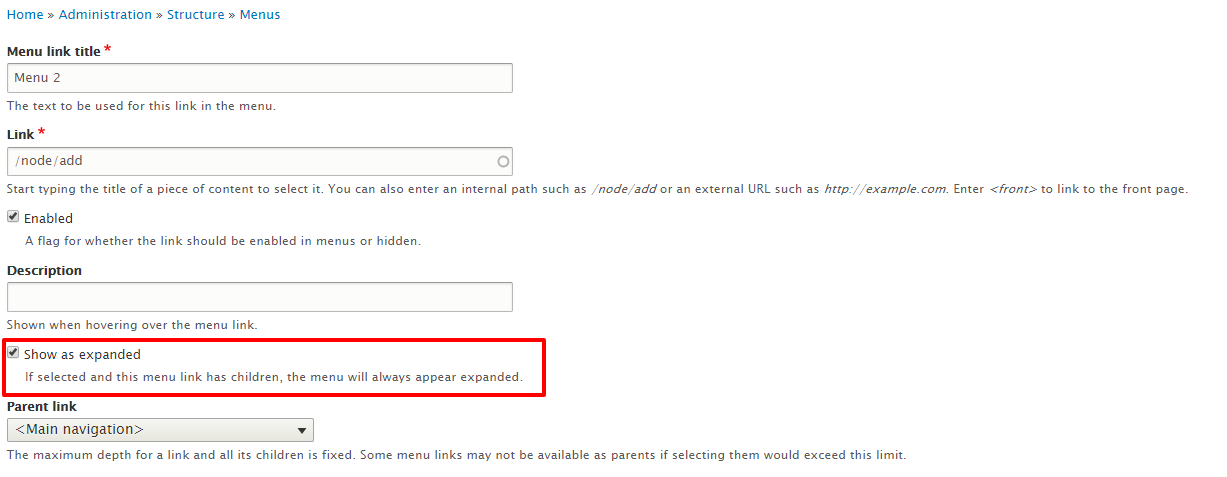
kurinjiselvan v commentedIn the menu settings just enabled "Show as expanded" option from your menu item.

Comment #7
markhalliwell@kurinji selvan is correct, this is (and always has been) a configuration option on the menu item itself.
Comment #8
jneubaur commentedThank you Kurinji selvan,
That solved the issue.
However, I would like to make note that the option "show as expanded" is in no way intuitive to enabling dropdowns. I would add that to the documentation; "show as expanded" does not in fact expand the menu automatically but enables the dropdown feature.
Thank you everyone for your input and assistance in this.
Regards,
J Neubaur
Comment #9
aswathyajish commented#6 worked for me. Thanks.