

 Come together with the global Drupal community in Rotterdam, 28 Sept – 1 Oct 2026. Sessions, contribution, connection, and Early Bird savings until 8 June.
Is there not yet support for dropdown menus in the main menu navbar?
It seems like the support for it is commented out in the twitter_bootstrap_menu_link hook, but this isn't used for the main nav? I just want to check that I'm not missing an easy fix before hacking away to get this working. Thanks.
| Comment | File | Size | Author |
|---|---|---|---|
| #37 | bootstrap-dropdown-menu-1706180-37.patch | 1.69 KB | natted |
| #27 | dropdown_menu_v2.patch | 1.83 KB | frankbaele |
| #26 | dropdown_menu.patch | 1.69 KB | frankbaele |
| #24 | apllypatch_and_remove_nav_menus.patch | 4.53 KB | frankbaele |
| #14 | bootstrap-nested-patch.png | 40.34 KB | natted |

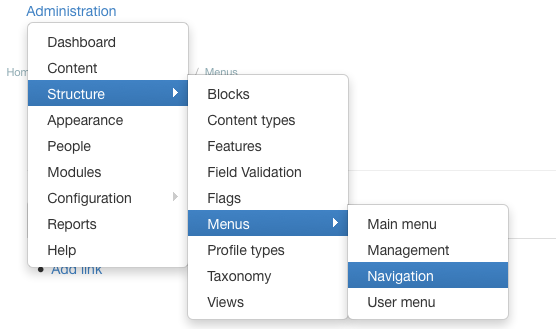
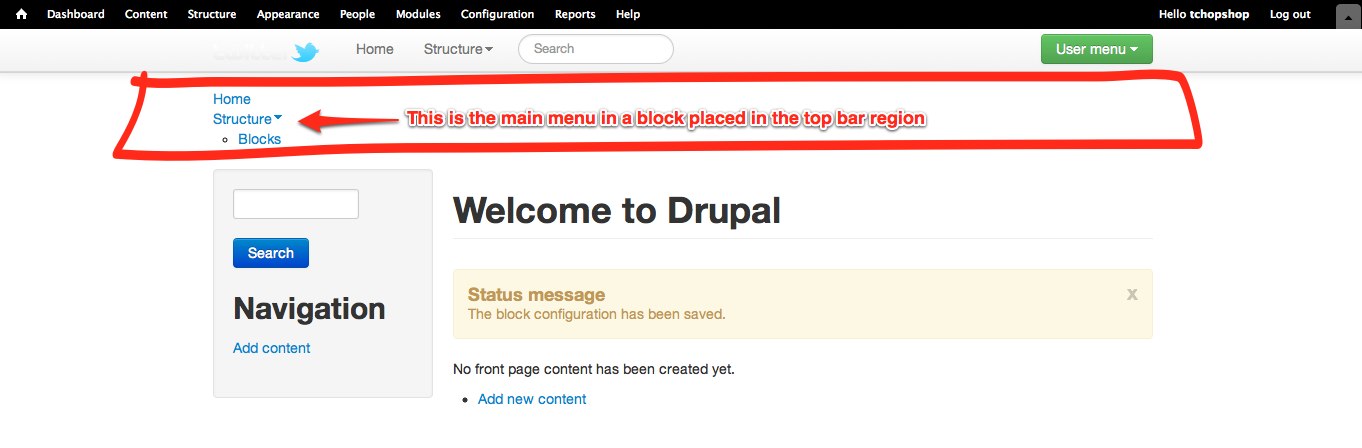


Comments
Comment #1
Jack3rror commentedI think you must install jquery 1.7 instead of jquery 1.4 wich is the default version on drupal 7.
Comment #2
Melissamcewen commentedmake sure you have clicked "show as expanded" in the menu item options. If that doesn't work you need jquery 1.7 and perhaps this readme file can help
http://drupal.org/node/1668794
Comment #3
tchopshop commentedI have not been able to get dropdowns working on any menu in a block. I've installed query 1.7, I've used "show as expanded". I've uncommented the lines in menu_link_hook.
The markup seems to be right (when you uncomment those lines), but the dropdown is still not working.
I'm pulling my hair out on this one!
Please help!
Comment #4
natted commentedHello,
Sorry but I am not able to reproduce.
Just as @Melissamcewen mentioned earlier, you need to click show as expanded and also have the parent menu item set.
If you can demonstrate the issue so that I can reproduce, then maybe I can assist.
Comment #5
tchopshop commentedPerhaps you are thinking only about the main menu in the Navigation bar with the twitter logo. This issue is not about that -- that works, but that menu is hard-coded.
I want to use the system menu block for the main menu. Or a menu-block for Main Menu. With that menu block the drop downs do NOT work.
I've tried it in many configurations and finally I have installed it on a pristine site, with only a few modules -- jquery update, libraries, twitter bootstrap ui.
See attachments showing all this.
The drop down is not working and it's frustrating. Don't you want more flexibility with the menu system, to use all the menus that Drupal outputs, not just hard-coding it in the template.php?
Comment #6
natted commentedHi @tchopshop,
Thanks for the extra detail - it helps me greatly. I will have a look and see what I can improve with a patch. The original poster only asked about the Navigation, which is why I asked.
I'd love to solve these issues permanently but I'm not a maintainer and can only post patches.
Comment #7
tchopshop commentedThank you @natted. Tinkering with the preprocess functions a bit I have gotten the html to be what is needed for it to work -- identical in class and attributes to the navigation menu which *does* work -- but even so the javascript will not apply the class "open" to the element to make it trigger the drop down. I really don't understand why.
Comment #8
eg2234 commentedYes, thank you, @natted! @tchopshop is definitely not the only person having trouble with this.
Comment #9
wooody commentedAnyone fix the problem..
I think we need to make it like this
http://www.bootstrapmenumod.net/examples/navbar/navbar-with-dropdowns
Comment #10
wooody commentedI have idea to make it , If u use the Special menu items module
http://drupal.org/project/special_menu_items
and make the main item as and put the sub items it will work fine .
BR,
Comment #11
tchopshop commented@wooody, can you explain further what you mean?
Comment #12
stevenx commentedUpgrading to jquery 1.7 with the module jquery_update worked for me
thanks to #1
Comment #13
wooody commented@tchopshop If u want make item in menu and make Sub-menu ,,, Dropdown list , u can use the Special menu items module to make Main item in main menu and then make the sub-items.
Comment #14
natted commentedHi guys,
Please try this patch and let me know whether this solves the issue.
If you use the latest dev version with this patch, you should see dropdown menus when the menu item is set to "expanded".
It also allows you to nest expanded menus and they will appear as submenus.
Cheers.
Comment #15
natted commentedI can think of a couple of scenarios where this could be improved, it probably should be optional as well.... so I'll try work on it again later this week.
Comment #16
zmove commentedHello,
It is possible to make the dropdown working for main menu block ? Actually the main menu is called with the $primary_nav variable, but you can add the main menu using drupal block system too (which is more flexible).
It is possible to make it compatible ? Actually its not.
Same for search
Regards
Alex
Comment #17
natted commentedHi Alex,
Yes, it is possible. Give the patch a try and it should work.
Comment #18
natted commentedI need to reroll patch in #14 against latest dev.
Comment #19
andregriffin commentedComment #20
andregriffin commentedComment #21
natted commentedComment #23
zmove commentedtested the patch and it works.
Just one thing:
Replace
$element['#href'] = "#";By
$element['#localized_options']['attributes']['data-target'] = '#';Comment #24
frankbaele commentedWell i have been snooping around the menus and cleaning up.
here is an other patch, but i think i went too far with it, i added your patch and also remove the main menus and replaced them with a navigation region.
any thoughts on that?
Comment #25
frankbaele commentedcleaned up the patch so that it only contains code related to this issue, my bad
Comment #26
frankbaele commentedpatch itself
Comment #27
frankbaele commentedok i narfed that patch up, here is new one
Comment #28
zmove commentedSeems perfect to me.
Comment #29
joshuautley commented#27 worked for me.
Dropdown Sub-menus do not work though. Anyone else working on Sub-menus in the Main Menu?
Comment #30
frankbaele commentedfixed in this issue http://drupal.org/node/1850934
Comment #31
frankbaele commentedoops wrong issue sorry
Comment #32
frankbaele commentedComment #33
natted commented#27: dropdown_menu_v2.patch queued for re-testing.
Comment #35
natted commentedMy only problem with this patch are that it currently forces all menus to be dropdowns. My plan when submitting the original patch was to allow for it to be configurable but I didn't get to that...
I don't really think it works well if all menu's default to dropdowns.
Comment #36
natted commentedPerhaps it's just something with my sandbox, I will retest.
Comment #37
natted commentedOk, issue was my sandbox.
I've re-rolled.
Comment #38
natted commentedComment #39
natted commentedI've committed the patch. To make dropdown menu's, you can set the expanded option, same for nested menus.
Comment #40
cthiebault commentedI can't make sub menus work...
It displays only a one level dropdown with menu 1.1. All my menus are shown as expanded.
I using latest commit #1a15c89.
Did I miss something?
Comment #41
frankbaele commentedthis commit should be processed with http://drupal.org/node/1460508
Comment #42
natted commented@cthiebault I've tested and it's definitely working for me.
I've just committed the patch to #1460508: Don't use menu_tree_page_data for $main_menu and $secondary_menu so, get the latest dev and try it out. Ensure that you have
menu 1.1set to expanded as well, not just the top menu.If it's still not working, open a new issue with as much info as possible.
Comment #43
joshuautley commentedWorks here. Thank you > natted!
Comment #45
windmaomao commentedthanks #2 for "show as expanded" in the menu item options, very helpful