

 The 2026 Drupal Business Survey is open. Your response will help shape the future of the Drupal business ecosystem.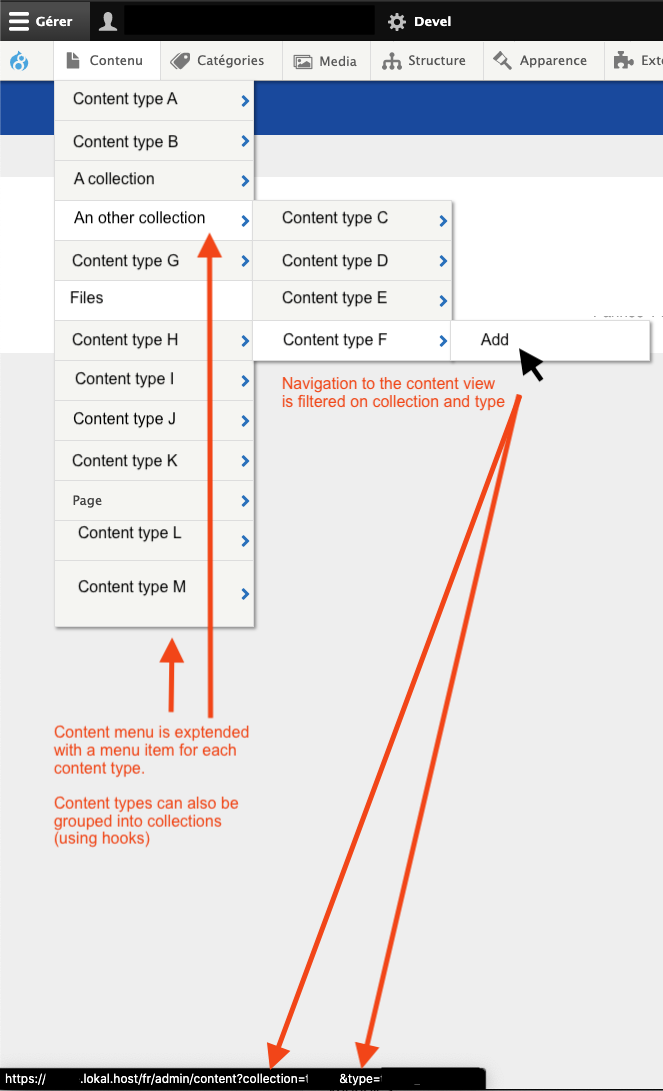

Replaced by:
We will be moving and bringing the same functionality of admin toolbar content to the new Navigation module in D11.
What does it do?
- Extends the admin toolbar "Content" menu by listing all content types.
- Allows for grouping content types into collections
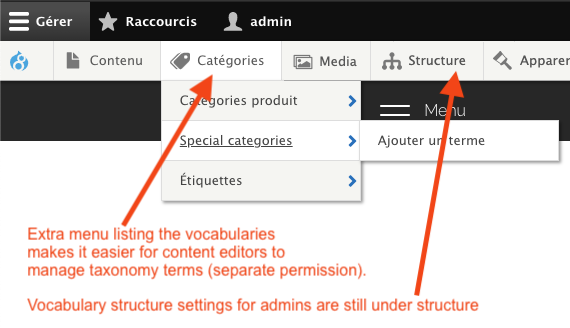
- Adds a "Categories" menu item, that lists the vocabularies.
- Optional customised content view exposed filters per content type
- Edit recent items per content type (number configurable).
Version 2
- Supports hierarchical collections.
- Plugin based system (other modules can write their own plugins)
- CSS more uniform class naming
Content menu and collections
The content menu will list all available content types and adds a "Add" menu item to each. Clicking the menu item links to a filtered content overview page. Optionally also list a configurable number of recent items to directly edit.
Content overview page
For each content type a specific view can be created when using the following naming convention: content_. This allows you to have customised exposed filters for each of your content types.
The overview page, when filtered will show a "add " button, allowing you to directly add this kind of content.
Categories menu
Taxonomy term management is split into a content and admin. Managing term (content) is done in the new "Categories" menu. Managing the admin part (vocabularies) is left under structure. This way the structural (admin technical) part can be hidden for content editors who just need to manage terms (content).
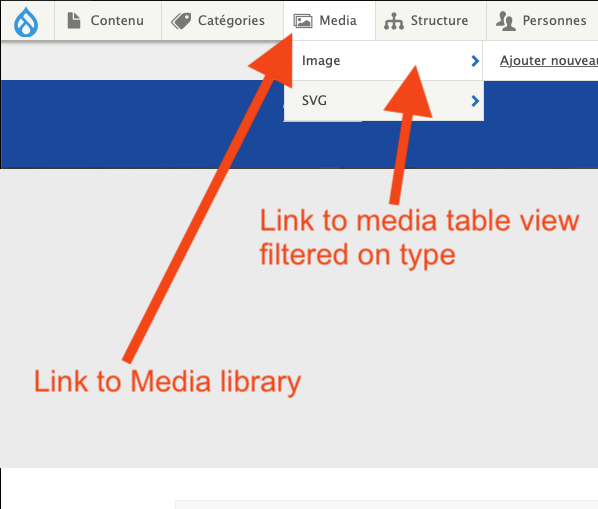
Media menu
New "Media" menu listing all media types. Overview item links directly to the media library.
Webform menu
New "Webform" menu listing all webforms. Overview item links directly to the overal webform submissions page. Individual items link to the submission results of that webform.
Drupal menu
Adds a link to the user account page and/or account edit form to the Drupal Icon menu item.

Supporting organizations:
Project information
 Minimally maintained
Maintainers monitor issues, but fast responses are not guaranteed. No further development
No longer developed by its maintainers.- Project categories: Administration tools, Content editing experience, Site structure
- Ecosystem: Admin Toolbar
 283 sites report using this module
- Created by kriboogh on , updated
 Stable releases for this project are covered by the security advisory policy.
Look for the shield icon below.


