Closed (fixed)
Project:
Token
Version:
6.x-1.15
Component:
Code
Priority:
Normal
Category:
Bug report
Assigned:
Unassigned
Reporter:
Created:
12 Aug 2010 at 16:58 UTC
Updated:
29 Nov 2011 at 01:59 UTC
Jump to comment: Most recent file


After upgrading to token 6.x-1.14 pathauto stopped token replacements of page paths.
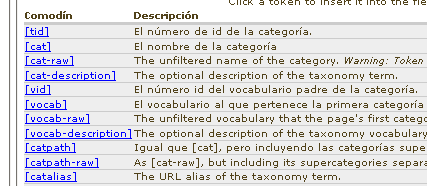
Looking at the pathauto settings the token list is broken.
Downgrading to token 1.13 restored the list correctly.
| Comment | File | Size | Author |
|---|---|---|---|
| #33 | Selection_098.png | 81.08 KB | dave reid |
| #32 | token-list1.jpg | 24.7 KB | SeanA |
| #32 | token-list2.jpg | 32.62 KB | SeanA |
| #3 | node_paths.png | 4.3 KB | pepemty |
| #3 | term_paths.png | 7.79 KB | pepemty |



Comments
Comment #1
dave reidA bug with the [menupath-raw] was fixed in Pathauto already: #881270: [bookpath], [menupath], [*path] tokens not cleaned: aliases without punctuation removed, lower casing, etc..
If you click to the right of the token types in the list do they expand? Are the arrow images just not showing up?
Comment #2
easp commentedI tried clicking on the types in several places and it does not expand although I can see the hidden sub-list in the source code.
Looked for javascript errors but did not find any. I also changed my theme to Garland and it still fails for me.
Comment #3
pepemty commentedHello everybody!
Pretty much the same here, after upgrading to 1.14.
Node paths are not js links, and are really just a few.
Although the other features (taxonomy paths, user paths, etc.) seem to be OK.
I'm attaching 2 pics so you can see for yourself.
Any ideas on what to do? Do I downgrade to 1.13?
Meanwhile I put my site in maintenance mode, so no node creation will be possible for now.
Warm regards from sunny México!
:-)
Pepe
Comment #4
dave reidWhat theme are you all using?
Is your Drupal intall in a sub-directory?
Comment #5
pepemty commentedHey Dave!
Thanks for an extraordinary prompt reply... 2 minutes, man, 2 minutes! :-)
I'm using a zen subtheme, and my Drupal installation is not in a subdir.
Hope this helps... ;-)
Pepe
PS.- Still have the problem with Garland.
Comment #6
easp commentedI am also using a Zen subtheme and my Drupal is not in a subdirectory. The problem still happens with the Garland theme.
Comment #7
spencerwv commentedSame thing happening here. As soon as I add a new field under "Manage Fields" in a content type, the list disappears (except for "CCK text" and "node".) If I remove all custom fields, the list returns under "Replacement Patterns" in the "Node paths" subsection.
Comment #8
KoCo commentedI do get a jquery error:
reference to undefined property d.queue - jquery.js line 13
I get this in firebug and only when expanding replacement patterns for nodes in autopath.
Other expanding replacement patterns don't give this warning.
The tokens of each group are present in the html output. But parent elements aren't clickable in any way to trigger the expand of their child items. There's just no href element around e.g. CCK Date.
(I'm using aqcuia theme and drupal is not in a sub folder.)
thx
Koen
Comment #9
dave reid@all: Is everyone using jquery_update() or something that's causing the JS conflict? Be sure to check your browser's javascript console for errors. If you disable JavaScript do you see all the tokens?
Comment #10
easp commentedIf I disable JavaScript then the list displays. I am not using jquery_update but I am using jquery_ui.
Looking at the Firebug console I do not see any errors loading the page or clicking on the lists.
Comment #11
pepemty commentedThanks Dave!
No jquery_update, but I do have jquery_ui installed. Although my WebDeveloper console doesn't show me any js errors...
Checking out javascript in Firefox brings me back the list for node paths, but they are not links.
Comment #12
easp commentedDisabling jquery_ui did not resolve the issue.
Comment #13
boftx commentedSame problem here after upgrading. Using Garland for admin theme, jquery present.
Comment #14
pepemty commentedJust to inform.
I updated another site, with a customised Multiflex-3 theme and no jQuery at all (actually I don't even have CCK or Views there).
No problem at all with token and/or pathauto.
Best regards to all.
José
Comment #15
quiptime commentedSame bug with Token 6.x-1.14.
This version breaks all replacements with a user ID in all paths and the pathauto administration displays all replacement lists without tokens (see attached image of the issue).
The tested dev from August 15, 2010 - 02:18 has the same problem.
A downgrade to Token 6.x-1.13 has no problems with user IDs in paths and pathauto is usefull configurable with tokens. In other words, with this version works Token with Pathauto.
Comment #16
freelockSame issue here, Token 1.14 -- no tokens showing in the list, but they appear if I disable Javascript.
I'm using Rootcandy theme for admin.
Subscribing.
Comment #17
KoCo commentedI'm so stupid!
This piece of code gets generated through js.
Check out the span with class "expander".
Yes if you move the mouse cursor right before the CCK, you get a pointer and a clickable location.
Can it be expanded to incorporate more space, or maybe some standard image?
thx
Koen
Comment #18
Deimos-dupe commentedI've been searching for a solution to this - I thought the functionality was broken until I found this thread.
I've just had a look with Firebug, and there is a style associated with that span:
.treeTable tr.collapsed td .expander {
background-image: url("arrow-right.png");
}
It looks like that image file is missing, perhaps it was missed in the CVS checkin?
Edit: The file isn't missing, it's just not appearing on the page.
Comment #19
pepemty commentedThank you Koen!
This will do until this issue is fixed.
Warm regards from sunny México!
:-)
José
Comment #20
dave reidOk I think I know what's going wrong. If you'd like to test this, edit the token.css file and change the .token-tree CSS to the following:
Comment #21
pepemty commentedRight in the nail's head!
So guess this will be committed in the next dev...
Thanks Dave!
Warm regards...
José
Comment #22
AliveAgain commentedThe above code by adding a margin-left: 19px to .token-tree is not working with IE7, but works with FF.
This works for me with all browsers I'm using:
Open jquery.treeTable.js and find this line:
Change it to
Comment #23
liza commentedi have tried clicking everything and nothing exapands. same problem here with 6.x-2.0-alpha2.
Comment #24
liza commentedi am using jquery update AND ui. have to. instead of disabling the modules, i disabled javascript on admin/build/path/patterns and all token patterns now appear on the page.
UPDATE:
i used the token.css correction on answer #20,
.token-tree {
  font-size: 0.85em;
  margin-left: 19px;
}
and it works.
Comment #25
AdrianB commentedI have the same problem.
Adding
margin-left: 19px;to.token-treeCSS (as in #20) didn't change anything for me.But the solution from AliveAgain in #22 to edit the
jquery.treeTable.jsdid work! Thanks!Comment #26
SeanA commentedTrying #20 sort of works, but the arrows appear outside the table on the left. Trying #22 instead, everything looks and works properly.
Comment #27
mikebell_ commentedTried #22 and it works great, thanks.
Comment #28
dotidentity commented24 works for me (safari)
Comment #29
emilyf commentedsame issue viewing tokens on pathauto config page. #24 fixes it. Thanks!
Comment #30
dave reidCommitted the CSS fix in #20 to CVS:
http://drupal.org/cvs?commit=416990
http://drupal.org/cvs?commit=416992
Please file a separate issue for any IE bugs since its no longer the CSS that would need to be changed.
Comment #31
AdrianB commentedWas it only for me that the (now committed) CSS fix in #20 didn't do any good at all but the jquery.treeTable.js fix in #22 worked?
Comment #32
SeanA commentedI tested both fixes in Firefox, Chrome, Opera, and IE6 (using Wine). #20 works in Firefox and Chrome, but the arrows don't seem to be positioned correctly, see first attached screenshot. In Opera the arrows appear, in IE6 they don't, and in both Opera and IE6 the clickable area is only 1 or 2 pixels wide. On the other hand, the js fix in #22 works properly (with a suitable clickable area) and looks right in all of these browsers, see second attached screenshot.
Comment #33
dave reid#22 has to be tested using D7 when we have tested tokens.
Comment #34
dave reidSo let's please file a separate issue with the specific browsers that it's happening on.
Comment #36
dunx commentedSame issue with FF3.6.10 under ubuntu. Fix in #24 does the trick. Would make sense for the whole string to clickable though.
Comment #37
zeropaperIndeed, same configuration, same problem, fixed the same way (#24)
Comment #38
Vasiliy Grotov commentedHave this problem in 1.15 version. CSS correction (#24, that is already in token,css) didn't help. But changing java code (#22) fix it.
Comment #39
msathesh commentedI'm using Token 6.x-1.18 and it works fine in Firefox but not in Safari.