This is a great module, but there is a real problem in the core code (in both 4.6 and 4.7.
It is possible, based on our tests, that $position is not unique for elements in a nodequeue.
Therefore, when you run "front" or "back", this code executes:
function nodequeue_queue_front($queue, $position) {
  if ($position < 2 || $position > $queue->count)
    return;
  $entry = db_fetch_object(db_query("SELECT * FROM {nodequeue_nodes} WHERE qid=$queue->qid AND position = $position"));
  db_query("DELETE FROM {nodequeue_nodes} WHERE qid=$queue->qid AND position = $position");
  db_query("UPDATE {nodequeue_nodes} SET position=position + 1 WHERE position < $position");
  db_query("INSERT INTO {nodequeue_nodes} (qid, nid, position) VALUES ($queue->qid, $entry->nid, 1)");
}
The DELETE at the top of this statement wipes out any assigned nodes with the value $position. (Hence, you might accidentally delete half the nodes in your queue).
This function, and nodequeue_queue_back() should be rewritten to call:
function nodequeue_queue_front($queue, $nid)
Rather than $position, since $nid is unique.




Comments
Comment #1
merlinofchaos commentedI don't consider this a 'critical' bug, though it's definitely an annoying bug. Also, I prefer titles that describe the problem.
position should not be duplicated for a given qid; if it is, then that is a bug and it should be fixed. The code doesn't use NID as the primary identifier because it doesn't know what the NID is in all cases.
If your tests indicate that position can be duplicated, do you know how? That's the area that needs to be investigated.
Comment #2
agentrickardSorry, I've been working on a tight deadline.
Your strategy is fair enough, though I think DELETEs are never appropriate when you really mean to UPDATE (too much risk of damage).
It may also be a problem that I'm running 4.6 code (I think) -- your releases aren't labelled within the code, so I can't give you a version number.
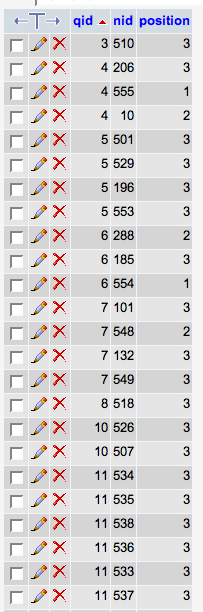
Attached is a snapshot of the nodequeue_nodes table from one of our test installs.
In some cases, $position is not set to a unique value. I'm trying to track down when.
Comment #3
merlinofchaos commentedIn order to use an update I'd have to set the position to some temporary value to ensure no duplication. It may be a better solution, I'll have to run through it. When I was writing the module I had originally not meant to use delete but ended up with it because the other method used more queries.
Comment #4
merlinofchaos commentedOh yes, that snapshot shows there is definitely a bug in there with respect to setting the position flag. I looked but I couldn't see a glaring error, but it is clearly there. I'll have to see if I can do it.
Do the various QIDs that have a bunch of 3s in the position table have anything in common?
Comment #5
agentrickardI think the problem may exist when the Nodes in the NQ are Flexinodes, not regular Drupal nodes.
The errors went away when I reset the $position values for all my NQs. Then I assigned some stories, and all went as planned.
But when I assigned some "media" -- $node->type = 'flexinode-2' --, I got duplicate $position values whenever I used a function button.
See attached screenshot.
Comment #6
agentrickardTo be more clear, the rules for my NQ allow the assignment of Flexinodes to the Q, but when I reorder them, the $position value doesn't increment correctly.
I gotta run. Back tomorrow.
Comment #7
agentrickardOK. This took some testing, but I think I finally tracked it down.
If one of the nodes in your Q is marked "sticky at top of lists" and you hit the "top" or "bottom" action, the $position variable is reset for every entry in the 'nodequeue_nodes' table.
Attached is a snap of that table after I hit the 'top' action on a node that was 'sticky at the top of lists.' The instant before this action, the $position values were all aligned correctly (1, 2, 3 ...), as I had reset them by hand.
Oddly, the change did not affect qid 13, the NQ that I was editing at the time. So I think that the 'sticky' issue turned out to be a red herring.
The problem is here:
The UPDATE statement in the middle of that function needs a QID atached to it, doesn't it? Otherwise, it updates all nodes in the db.
I changed the following three lines:
And I believe that fixes the issue.
Please test.
Comment #8
merlinofchaos commentedI am blind. I looked at every one of those queries multiple times, but...well, I knew what I was supposed to be seeing and only saw that, I guess.
Fix put in and tested in both 4.6 and 4.7 versions. cron will run the packaging sometime today. Embarassment will last awhile.
Comment #9
agentrickardYeah, I was looking right at it too, at harping on the DELETE, when the real problem was the UPDATE.
Then I went on a looong hunt for differences in my assigned nodes to find the cause.....
Still, it was worth it b/c I love what this module does.
Comment #10
raema commentedComment #11
rajiv.singh commentedHi,
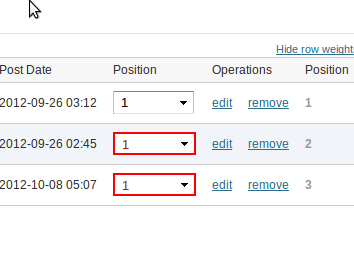
I am using 7.x-2.0-beta1 , the problem is still exists in this version. When I select 1 as position in two drop-downs(as in attached image) , one item gets deleted on submit.
Comment #12
rajiv.singh commentedI fixed the bug of #11 by applying this patch .
Please review.
Comment #13
rajiv.singh commentedFound One more issue :( The code at line:880
form_set_error($nid . '][position', t('Duplicate position value.'));is not highlighting as error (border:red) to the select lists containing duplicate values.
It should be as attached image . going to submit another patch for it.
Comment #14
rajiv.singh commentedThis patch is to fix issue in both #11 and #13
Comment #15
rajiv.singh commentedthis issue has been fixed by previous patch
Comment #16
agentrickardAn issue can only be marked fixed if the patch has been committed.
Comment #17
fizk commentedI just ran into this bug because the Javascript in nodequeue_dragdrop.js -> nodequeueUpdateNodePositions() was not consistently changing the selected options, which caused duplicate positions, and thus deleted queue entries. Here's the code I added to the patch in #14:
Comment #19
fizk commentedActually, there's one more change. Too many elements were being included in the
find():Comment #21
othermachines commentedComment #22
fizk commentedIf someone can mark this RTBC after testing it, I can commit the patch.
Comment #23
othermachines commented@fizk, do you have the steps to reproduce? It's all gotten a bit convoluted over 8 years so providing steps might be the ticket to getting this reviewed and fixed. I'll be your first tester. :)
Comment #24
fizk commented@othermachines Thanks :) Try to create a queue with three items. Arrange them in a specific order, save that, then rearrange them in another order. Notice that it won't save according to the order you wanted.
Comment #25
othermachines commentedI can't seem to reproduce the delete behaviour when using drag-and-drop, only with row weights. I've revised the steps to reflect this.
Regarding the problem reported in #17 - I couldn't reproduce this at all. Maybe we need separate steps?
Steps to reproduce
1. Create queue with 3 items;
Result:
- First item
- Second item
- Third item
2. Using row weights (not drag-and-drop), change position of third item to [1];
3. Save.
Result:
- Third item
- Second item
First item is deleted.
Comment #26
othermachines commentedPatch in #19 needs an
isset()check to avoid an "Undefined index" error when adding the first node to the queue.As mentioned above, I couldn't reproduce the problem in nodequeue_dragdrop.js, so couldn't test. Sorry. :-/
Comment #28
fizk commentedCommitted with the isset(). Thanks!