

 The 2026 Drupal Business Survey is open. Your response will help shape the future of the Drupal business ecosystem.
I have a bilingual Drupal 6 site. the bilingual switching works pretty well all in all.
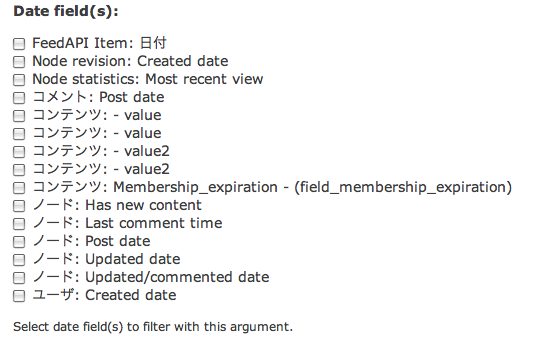
One thing that is confusing though is that in the Views2 UI when I go to add a date, even if I have picked English, I get some Japanese mixed in, making it really difficult to pick out the correct date field to add. See the attached image.
| Comment | File | Size | Author |
|---|---|---|---|
| #4 | Views bilingual confusion.jpg | 120.66 KB | cpelham |
| date-fields.jpg | 36.97 KB | cpelham |


Comments
Comment #1
karens commentedLots of the translation stuff has evolved since this was reported. Is this still a problem? If so I need more info about what kind of date field you are using and a way to replicate the problem.
Comment #2
arlinsandbulte commentedNo response after LOTS of time at "postponed (maintainer needs more info)"
Marking as fixed to clear up queue.
Comment #4
cpelham commentedHere is a picture of a view, just after clicking "edit" to open the View UI of a view. The English interface should be displaying but as you can see in the attached screen grab, there are Japanese characters next to the date argument for some reason.
Here's an export of the view:
Comment #5
damienmckennaUnfortunately the Drupal 6 version of the Date module is no longer supported. That said, we appreciate that you took time to work on this issue. Should this request still be relevant for Drupal 7 please feel free to reopen it. Thank you.