

Summary
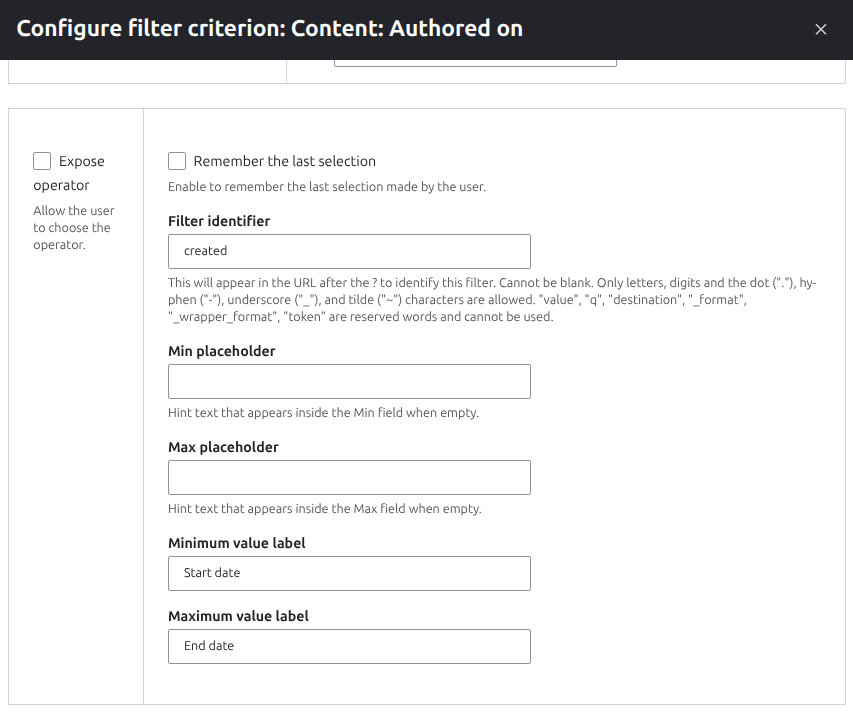
Numeric-based Views filters (including date filters) can now have their labels configured for the minimum and maximum input fields. Numeric filters default to "Minimum" and "Maximum"; date filters default to "Start date" and "End date". Site builders can override these labels — for example, changing a price range filter to "From" and "To" — without requiring custom code.
Example of how to use
- Create a View of Articles
- Add a Filter for 'Authored on'
- Expose the filter
- Set the operator to 'Between'
- Change the minimum and maximum labels to 'From' and 'To'
Here is how the new inputs appear in the Exposed Filter configuration form:
Considerations for module maintainers that extend the numeric or date filter handlers
The update hook checks for the existence of min_placeholder in the configuration, and if found and no min_label or max_label are set, it automatically adds them with the previous default of 'Min' and 'Max'.
If your module provides default Views configuration (e.g. via config/install/) using the handler (or extending it), you should also update your default configuration to include the min_label and max_label.
| Attachment | Size |
|---|---|
| Screenshot of the Minimum and Maximum label configuration form | 62.18 KB |

