

 The 2026 Drupal Business Survey is open. Your response will help shape the future of the Drupal business ecosystem.
Problem/Motivation
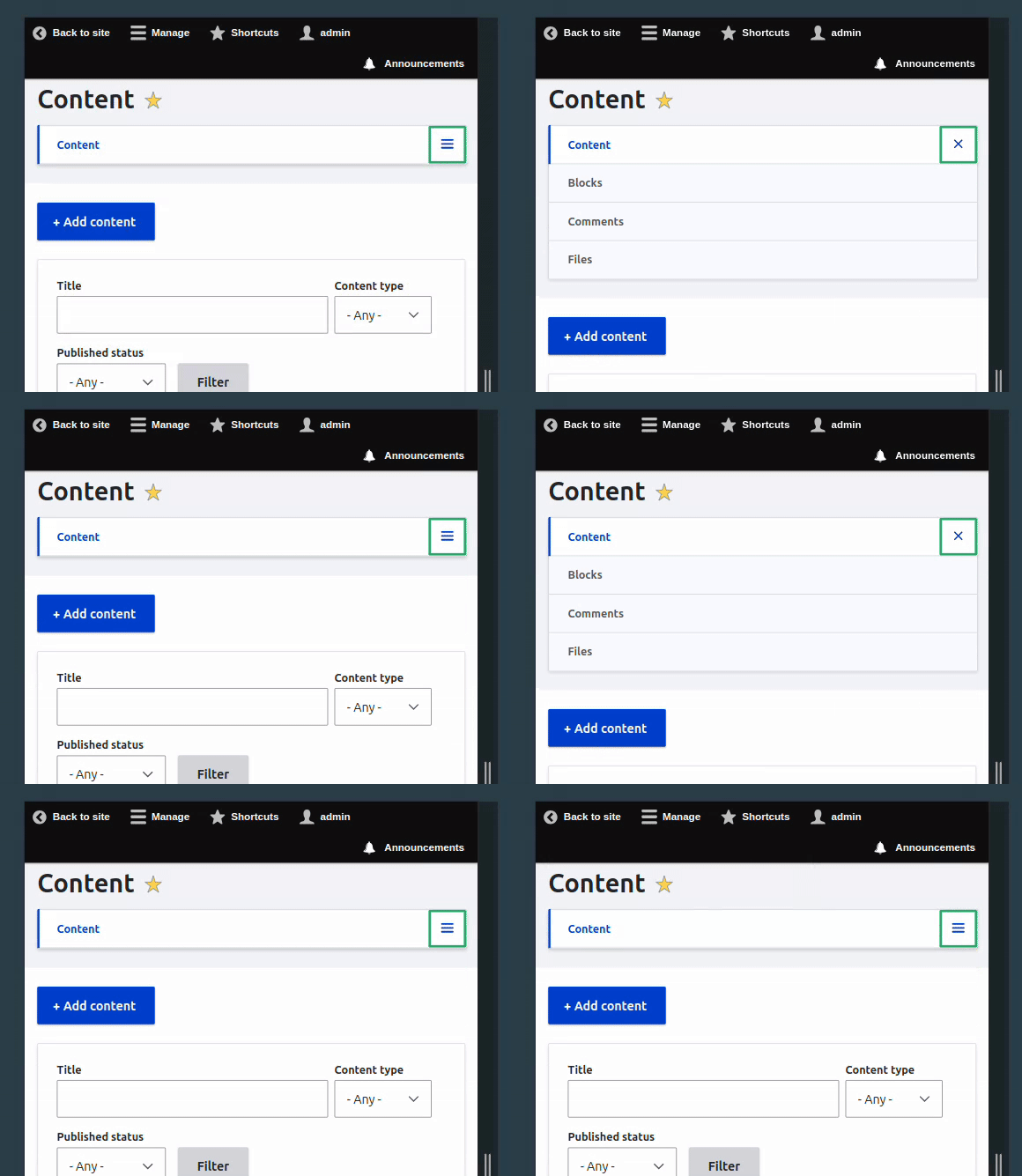
The admin toolbar dropdown icon (indicated in the screenshot) on the content page does not appear to function as expected. Users are unable to access additional options or features when clicking the icon.
Observed Behavior
No menu or options are displayed when clicking the dropdown icon. The button appears to be non-functional.
Relevant Screenshots

Steps to reproduce
- Log in as a user with administrative privileges.
- Navigate to the Content page (/admin/content).
- Zoom in your browser (300% should be enough).
- Observe the dropdown menu icon in the upper right corner of the page (highlighted in the screenshot).
- Attempt to click or interact with the icon.
- Expected Behavior
Clicking the dropdown menu icon should reveal additional options or functionality, allowing administrators to access relevant features directly from the content page.
Proposed resolution
Added icon to close menu and js to proper apply css based on the state of menu open/closed
Remaining tasks
Code review & test.
User interface changes
It changes hamburger menu behaviour under tabs component.
Introduced terminology
NA
API changes
NA
Data model changes
NA
Release notes snippet
Added close icon for hamburger menu.
| Comment | File | Size | Author |
|---|---|---|---|
| #31 | 3500425-nr-bot.txt | 91 bytes | needs-review-queue-bot |
| #27 | 3500425-nr-bot.txt | 91 bytes | needs-review-queue-bot |
| #26 | Issue-3500425.gif | 202.06 KB | sandip |
| #23 | open-state-after.png | 51.79 KB | snehal-chibde |
| #23 | open-state-before.png | 52.57 KB | snehal-chibde |
Issue fork drupal-3500425
 Show commands
Start within a Git clone of the project using the version control instructions.
Or, if you do not have SSH keys set up on git.drupalcode.org:
- 3500425-admin-toolbar-dropdown
 changes, plain diff MR !11490



Comments
Comment #2
haris khan jadoon commentedComment #3
haris khan jadoon commentedComment #4
cilefen commentedThe menu appears to be working in the screenshot you posted. Additionally, I can't reproduce the problem on Drupal 10.4 with the steps to reproduce as written above.
Comment #5
haris khan jadoon commentedYes, it's working, but when it's opened, the icon or appearance doesn't change as it should.
Like this
Comment #6
cilefen commentedThe issue summary says that "users are unable to access additional options or features when clicking the icon", but in fact the problem is that the icon should change when used. Do I understand now?
Which theme is this?
Comment #7
haris khan jadoon commentedIts Administration theme (claro)
Comment #8
haris khan jadoon commentedThe issue is on the administration theme
Comment #9
quietone commentedChanges are made on on 11.x (our main development branch) first, and are then back ported as needed according to the Core change policies.
Restored the standard template, which we use to track progress and others tasks on an issue.
I tested this on Drupal 11.x, standard install, following the step in the issue summary. At step 3, there is no "dropdown menu icon in the upper right corner of the page". Is something missing? Is there custom code on the site?
Comment #12
julio_retkwaI've added a possible fix for that, would be helpful to add on test instructions that if you are on vanilla drupal site you can just zoom in the browser under step 3
If anyone could review, that would be great :)
Comment #13
julio_retkwaComment #14
smustgrave commentedProbably be good to get test coverage added for this. Twig template will probably need a CR as contrib themes would have to update theirs.
Comment #15
julio_retkwa#14 Hi @smustgrave sorry I'm not sure if I get it right. I should add some test coverage on which stage exactly? (I presume nightwatch?) and the CR would stand for Change Request on contrib themes yes?
Comment #16
julio_retkwaComment #17
bnjmnmThis isn't a bug - it's a feature request.
The issue summary is still inaccurate. It should be presented as a desire to have a different icon present depending on open/closed state.
Comment #18
smustgrave commentedSo my fault I actually should of mentioned the issue summary is incomplete. Proposed solution should almost always be filled in.
Maybe nightwatch (I'm not great with those) or a functional javascript test maybe? So we can confirm that the functionality is still working to make sure the bug doesn't comeback.
And correct CR is change record, you'll see the button on the right at the top for adding one. Can be real simple too
Comment #19
julio_retkwaComment #20
bnjmnmComment #21
julio_retkwaComment #22
julio_retkwaComment #23
snehal-chibde commentedhello, I have checked this on Drupal 11.x-dev, as per the steps mentioned. The MR is working as expected.
On click of hamburger, when the menu is open the hamburger icon changes to close icon. Added before and after screenshots for reference.
Comment #24
sandip commentedHi @julio_retkwa, I’ve reviewed your MR — the changes are looking good overall. One suggestion I’d like to propose is to enhance accessibility by adding the
aria-hiddenattribute to the<span>elements wrapping the hamburger and close icons.In addition, we should update the JavaScript to toggle the
aria-hiddenvalues based on the menu state. This ensures that only the currently visible icon is announced by screen readers, aligning with accessibility best practices.Let me know what you think!
Comment #25
julio_retkwaHi @sandip thank for the suggestion! - I've added that on my last commit
Comment #26
sandip commentedChanges looks good to me attaching a Video for better understanding. Also corrected the branch versions in CR. Moving this issue to RTBC.
Comment #27
needs-review-queue-bot commentedThe Needs Review Queue Bot tested this issue. It no longer applies to Drupal core. Therefore, this issue status is now "Needs work".
This does not mean that the patch necessarily needs to be re-rolled or the MR rebased. Read the Issue Summary, the issue tags and the latest discussion here to determine what needs to be done.
Consult the Drupal Contributor Guide to find step-by-step guides for working with issues.
Comment #28
julio_retkwaComment #29
julio_retkwaCan anyone review this?
Comment #30
nod_Comment #31
needs-review-queue-bot commentedThe Needs Review Queue Bot tested this issue. It no longer applies to Drupal core. Therefore, this issue status is now "Needs work".
This does not mean that the patch necessarily needs to be re-rolled or the MR rebased. Read the Issue Summary, the issue tags and the latest discussion here to determine what needs to be done.
Consult the Drupal Contributor Guide to find step-by-step guides for working with issues.
Comment #32
vasantha deepika commentedI'll look into this.
Comment #33
sandip commentedAs there is no response from @vasantha for one week so i am picking it up.
Comment #34
sandip commentedI am again moving it to RTBC as the MR is clean after the rebase. Here is the After image: After Image Link that i already posted in #26.
One minor thing is if i am not wrong the CR should be updated for version 11.3 right?
Comment #37
nod_I don't think this warrant a change record, i won't publish it.
Committed 4f4ff21 and pushed to 11.x. Thanks!
Comment #39
quietone commentedPer #37 I am deleting the change record. It was simply one sentence saying a feature was added which is not something for a change record.