


This project is not covered by Drupal’s security advisory policy.
This field is a tool to manage the visualization of the content according to the date settings.
It is important to keep this in mind.
- This field allows you to choose between several dates.
- Ideal for displaying content on the days you want.
- If you select one date, it will be validated as a unique date (the content will be displayed on this date).
- If you select only two dates, it will be validated as a range of dates (the content will be displayed from the first date to the last date).
- If you select more than three dates, the content is displayed in each of them.
How can you use it?
- Select the content type.
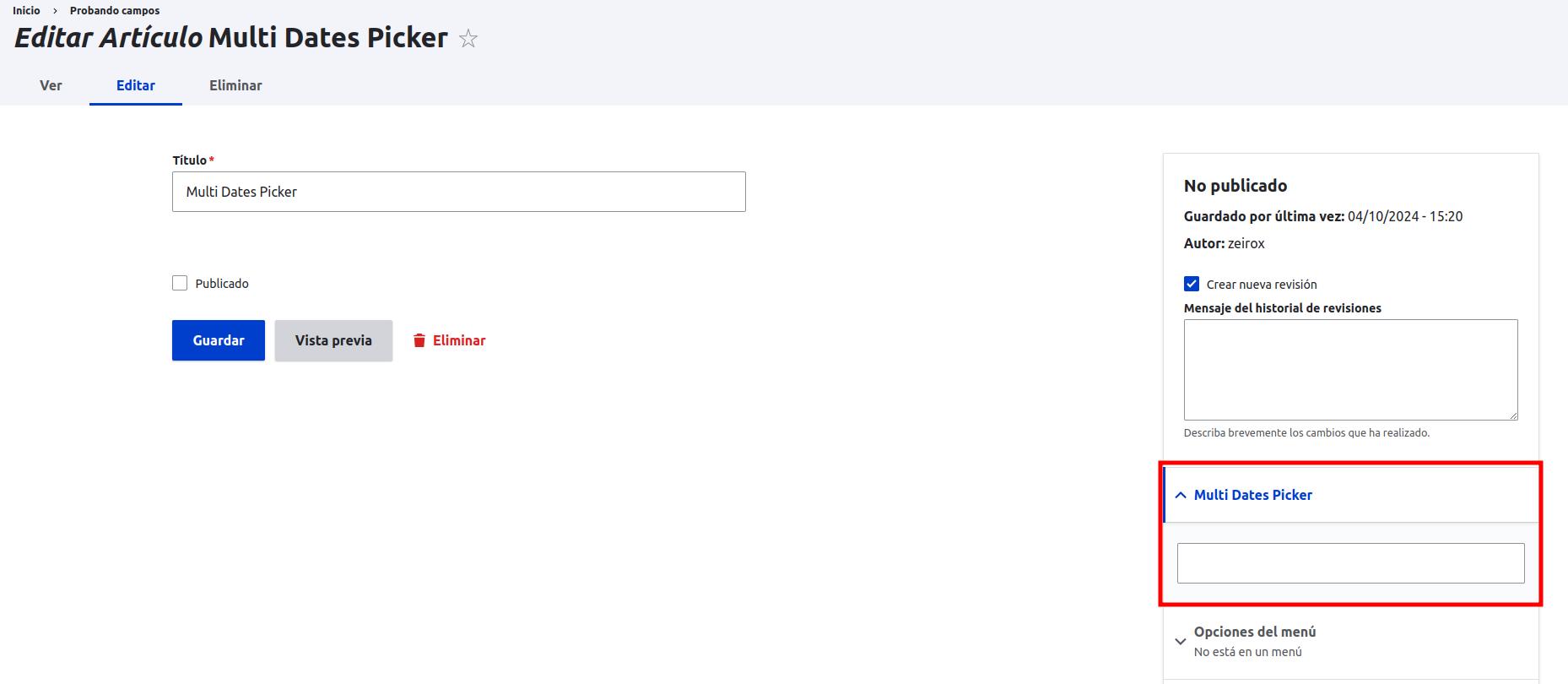
- Add the Multi Dates Picker field.
- In the advanced settings of the content, select the desired dates.
- That's it, the content will be shown or hidden according to the selected dates.
This module use jQuery UI calendar http://luca.lauretta.info/Multiple-Dates-Picker-for-jQuery-UI/
Supporting organizations:
By offering contributivo days at work and encouraging teamwork.
Project information
- Project categories: Administration tools, Content editing experience, Developer tools
 1 site reports using this module
- Created by jcbautista97 on , updated
 This project is not covered by the security advisory policy.
Use at your own risk! It may have publicly disclosed vulnerabilities.


