Problem/Motivation
I have done a routine update to my Drupal 10.1.17 > 10.2.0 using
composer update
As I do on a regular basis.
The result was...
Upgrading drupal/core-composer-scaffold (10.1.7 => 10.2.0)
Upgrading drupal/core-project-message (10.1.7 => 10.2.0)
Upgrading phenx/php-svg-lib (0.5.0 => 0.5.1)
Upgrading dompdf/dompdf (v2.0.3 => v2.0.4)
Upgrading nikic/php-parser (v4.17.1 => v4.18.0)
But my site is still reporting...
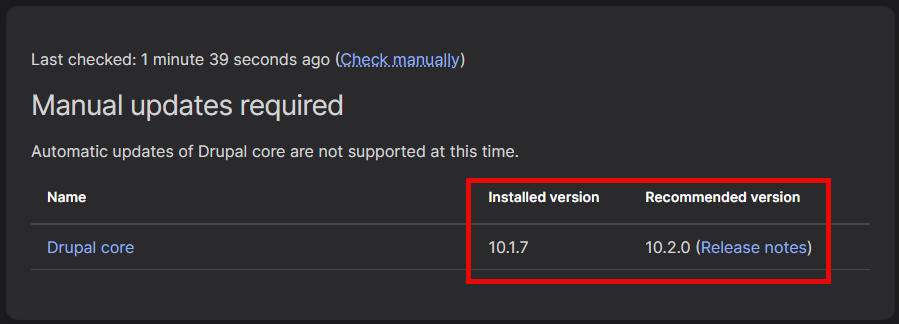
I have performed the same update on three Drupal sites and the result is the same.
ALL site are still working fine despite the failures to register the updates.
Any suggestions?


 Show commands
 compare


Comments
Comment #2
sirclickalotComment #3
larowlanTry clicking 'check manually'
Comment #4
sirclickalot@larowlan,
That was the very firs thing I tried; the result is the same on all three of my D10 sites, the update is not recognised to have taken place although according to Composer and mu Git log is clearly has been on all three sites.
Comment #5
ressaPlease share the complete actual update command, and resulting message. I ask for this, because I saw something similar yesterday with the recommended update command for Drupal 10.2:
composer update "drupal/core-*" --with-all-dependenciesFrom https://www.drupal.org/project/drupal/releases/10.2.0
After this,
drupal/core-composer-scaffoldanddrupal/core-project-messagewas updated to 10.2 butdrupal/core-recommendedstayed at 10.1.7 ...First please check what you get with this command (the one I used to see that some packages were updated, others not):
composer outdated "drupal/*"Then perhaps try clearing the Composer cache, and run the update command again, and see if that helps?
composer clear-cacheAlternatively, this may work
composer update [<package-name>] --no-cacheIf this is a general problem which many people encounter (and it takes care of the problem) we may need to add
composer clear-cacheto the recommended method of updating Drupal.PS. I ended up running
composer updateyesterday, but that updates everything, and I wish I had tried cache-clearing first.Comment #6
cilefen commentedComment #7
mr.white commentedI saw this issue when updating yesterday as well. The packages which were not getting updated automatically (and were blocking the Drupal update) were
drush/drushandaws/aws-sdk-php.Updating these two items explicitly allowed the normal Drupal update to proceed as expected.
Comment #8
ghost of drupal pastTry https://drupalusbcandmore.blot.im/upgrading-from-drupal-9-to-drupal-10
Comment #9
ressaThanks @jabeler, your comment made me pursue the Drush clue.
composer.jsonwith this:composer.jsonto this:composer updateDoesn't work, without Drush
Include Drush, and it updates to 10.2
I now actually see this on the Drupal 10.2 release page:
Comment #10
ressaAdding
drush/drushseems to be the solution: https://www.drupal.org/forum/support/upgrading-drupal/2023-12-16/new-upd...Comment #11
fkelly12054@gmail.com commentedThanks!! @ressa for number 9. After running through all the steps in this thread, my core version was still refusing to update from 10.1.7. Prohibits was not really telling me anything. Then I realized I might need to run:
composer require drush/drush:^12.4.3
all by its lonely self. That worked. Then I could run:
composer update "drupal/core-*" drush/drush --with-all-dependencies
all by its lonely self and my core version would update. Too bad the instructions for updating Drush could not have been integrated into the core update instructions for 10.2 a little more tightly.
Comment #12
longwaveThanks for getting back to us, marking "works as designed" - hopefully your comment will help others in the same situation. We did try to make this clear in the release notes, for future similar requirements we will see if we can make it even clearer.
Comment #13
ressaYou're welcome @fkelly12054! Thanks for confirming that this solves the problem for you.
About updating Drush, was it pinned to an old version in your
composer.json? Because you shouldn't have torequireit again.If for example it said
"drush/drush": "^12.1"in yourcomposer.json, just runningcomposer update drush/drushshould allow it to update to 12.4.3.By the way, I separated out Drush in the update process on https://www.drupal.org/docs/updating-drupal/updating-drupal-core-via-com... after a comment from @jaypan, to make Drush's role clearer.
Congratulation with getting promoted to release manager @longwave :)
The Drush requirement was included in the Release notes at https://www.drupal.org/project/drupal/releases/10.2.0#drush after all, but not in the blog post https://www.drupal.org/blog/drupal-10-2-0 ...
Such blog posts are of course mostly about showcasing new improvements (and they're great!) but I think you should consider including a note about the Drush 12.4.3 requirement. I think it might help some have an easier update experience.
Also, maybe @Gábor Hojtsy or someone else on Planet Drupal can create a short, quick blog post about this, to alert the Drupal community about it? Maybe a tweet is also worth considering?
Comment #14
matt_zimo commentedThanks fkelly12054 !
I needed to update drush first in composer, then run the core and drush updates at the same time
Comment #16
leewbutler commentedUpdating Drush first also worked for me, but at first I could not update Drush because of a "chicken-and-egg" dependency issue. The fix is to use the "--no-update" flag with a series of composer updates, like so...
Comment #17
dadderley commentedthanks fkelly
Comment #18
ressaAnother method shared by @jaypan is simply to remove Drush before updating Drupal, and add Drush again afterwards.
It would be interesting to hear if Drush in your
composer.json's was pinned at for example Drush 12.1, which would block Drupal from updating.Comment #19
renat commentedWas really surprised (no) to see this issue classified as "support request" and "closed (works as designed)", while Composer command, proposed at release page:
composer update "drupal/core-*" --with-all-dependenciesactually fails, and fails silently, with such an output, that looks perfectly normal:
You have to either notice, that too few packages were actually updated, or to go to
admin/reports/updates
page to find out, that upgrade failed.
Obviously many users would never read "Drush versions below 12.4.3 are incompatible with Drupal 10.2.x" statement, placed after "Upgrading from Drupal 6 and 7", and/or would not understand, what should they actually do, which will leave them with half-upgraded sites.
Comment #20
ccolumbie commentedThe #16 it's the only one that worked for me. Thanks leewbutler!!!
Comment #21
ellenjones123 commented#16 did the trick. Surprised this was so complex.
Comment #22
ressaRemoving Drush before updating Drupal, and adding Drush again afterwards is probably the easiest method.
Still it would be great to understand why this happens. Is it because Drush was pinned to for example 12.2 or even Drush 11 in your
composer.json's?Comment #23
goose2000 commented#11 got me into the promised land, this was not fun, but thanks @fun.fkelly12054@gmail.com
Comment #24
arunkumarkI solved the issue by updating the Drush separately and updating the Drupal core.
composer require 'drush/drush:^12.4.3' --with-all-dependenciesdrush updb