

Field States module is base on state machine module. Unlike the standard state machine module, Field States offers an extended feature set. With this module, you have the flexibility to define a list of states, and within your field settings, you can easily specify transitions. This process becomes even more user-friendly, as you can conveniently copy and paste configurations directly from your workflow YAML files.
Field States uses library mermaid.js for visualizing your state machine, making it easy to understand and manage your states and transitions. Moreover, in the field formatter, you have the added convenience of selecting transitions effortlessly, enhancing your overall workflow management experience.
There are state machine editor. you can draw and config transitions (support only bootstrap 5 theme), It will create a state machine directly and not via yml configuration.
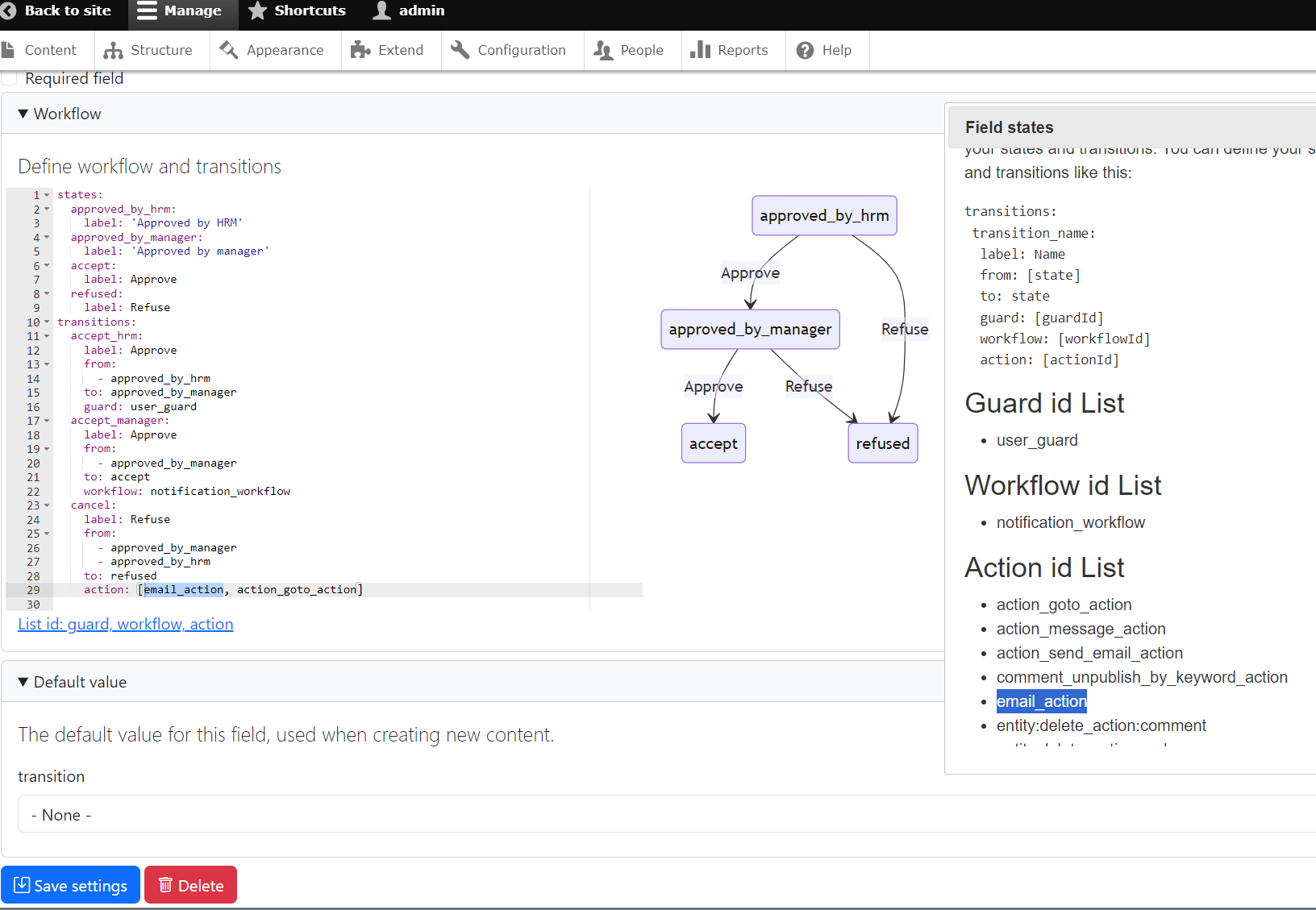
How to work
- Add field States transitions
- Fill all state in field storage (it looks like list string)
- set transitions in field settings (Yaml format)
- label: Transition Button Name
- from: [Multi states] # The states from which this transition is allowed
- to: state # The state to which the field should transition
- role: The role name that can see the transition button
- permission: Permission can see button
- group: Group id
- guard: Guard Plugin ID in Your Custom Module (method allowed) #
- workflow: [Multi workflow id] in your custom module (Pre-transitions method action)# Custom workflow logic if needed
- action: [Multi action id] in your custom module (Post-transitions method execute)# Custom action logic if needed
- extra: True|False
In case of you don't want to show extra field
guard: create custom/your_module/src/Plugin/Guard/CustomGuardPlugin.php
workflow: create custom/your_module/src/Plugin/Workflow/CustomWorkflowPlugin.php
action: create custom/your_module/src/Plugin/Action/CustomWorkflowPlugin.php
you can see exemple in module.
Extra field: In case you want to submit with a certain field, you can choose this field option. For example, when you want users to leave comments when changing status
History field: support double field, triple field, json table field
This comprehensive sequence ensures smooth and flexible handling of state transitions in the Drupal environment.
Do you like this module? Show your appreciation by buying me ☕.
| Attachment | Size |
|---|---|
| Screenshot 2023-09-18 222154.png | 172.33 KB |
Project information
- Project categories: Site structure
- Ecosystem: Bootstrap 5 admin
 314 sites report using this module
- Created by lazzyvn on , updated
 Stable releases for this project are covered by the security advisory policy.
Look for the shield icon below.


