Problem/Motivation
After a site is upgraded to Drupal 10.1, the new Password Compatibility module lets users log in with existing passwords.
Normally, this module is enabled in a post-update function. There are many things that can go wrong: at least
- No administrator is logged in when the code is updated, so no one can access
/update.php.
- The site administrator uninstalls the module, not recognizing the consequences.
- The database is restored from a backup made before the upgrade.
- The module is uninstalled by importing configuration saved before the upgrade.
- Another update or post-update function creates an error, so the module is never enabled.
- The administrator neglects to execute database updates.
If no administrator is logged in, and any of these happens, then is is hard to enable the module and fix the problem.
Steps to reproduce
The following steps illustrate (1) from the previous section:
- Install Drupal 10.0.9 with the Standard profile.
- As a site admin, check the available updates.
- Notice that 10.1.0 has been released. (Currently, 10.1.0-alpha1 is the most recent version.)
- Decide to upgrade the next day.
- Log out and get a good night's sleep.
- The next day, update the code.
- Try to log in with the existing password. It will not work.
Proposed resolution
Recommend various ways to enable the module:
- Log in as a site administrator using a one-time login link.
- Enable the
phpass module using Drush.
- Set
$settings['update_free_access'] = TRUE; in settings.php and then visit https://mysite.com/update.php.
We should communicate these options in as many ways as possible:
- Add a new section, "If you cannot log in", to the release notes, before "Upgrading from Drupal 6 and 7".
- Move the Q&A section from https://www.drupal.org/docs/core-modules-and-themes/core-modules/passwor... to the change record, so that it is one click away from the release notes instead of two clicks away. Or link directly to that page from the release notes.
- Expand the text on
/admin/help/phpass. At least recommend logging out and logging in before uninstalling the module.
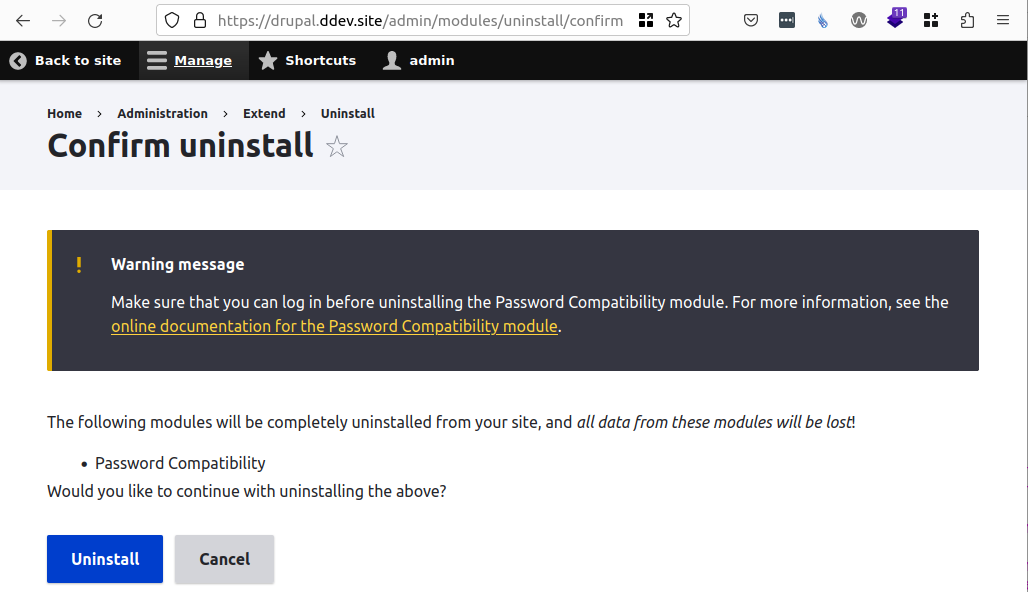
- Add a warning message to the confirmation form
/admin/modules/uninstall/confirm when uninstalling phpass.
- (followup issue) Consider adding part of the Password Stats module to the Password Compatibility module. This will add a notice to the site status report, and it can be used to update the warning message in the previous point.
Remaining tasks
User interface changes
Before this issue, the text on /admin/help/phpass is
The Password Compatibility module provides the password checking algorithm for user entities created with Drupal prior to version 10.1.x. For more information, see the online documentation for the Password Compatibility module.
This issue expands that:
The Password Compatibility module provides the password checking algorithm for user accounts created with Drupal prior to version 10.1.0. For more information, see the online documentation for the Password Compatibility module.
Drupal 10.1.0 and later use a different algorithm to compute the hashed password. This provides better security against brute-force attacks. The hashed passwords are different from the ones computed with Drupal versions before 10.1.0.
When the Password Compatibility module is installed, a user can log in with a username and password created before Drupal 10.1.0. The first time these credentials are used, a new hash is computed and saved. From then on, the user will be able to log in with the same username and password whether or not this module is installed.
Passwords created before Drupal 10.1.0 will not work unless they are used at least once while this module is installed. Make sure that you can log in before uninstalling this module.
When the module is uninstalled through the admin UI, this issue adds a warning to the confirmation form at /admin/modules/uninstall/confirm:
API changes
None
Data model changes
None
Release notes snippet
TBD


 Show commands
 changes

Comments
Comment #2
benjifisherI am updating (1) in the proposed resolution: make it earlier on the page.
Comment #3
quietone commented@benjifisher, pinged me in Slack about this. I can confirm the problem using the steps to reproduce in the issue summary.
Even though there is a workaround (using a one time login link) and there is no data loss I am changing to Critical, this should be done before 10.1 is released.
Comment #4
quietone commentedTalked to catch, who pointed out that there is update_free_access and drush for situations where you can't login. and moving back to Major.
I have done #2, updated the CR with the data from the Q and A section of the module doc page. I think that section can be removed from the docs page. For the CR, I moved the phpass section to the top of the API section and added formatting. I was going to add text to strongly suggest reading the CR but it just became too late.
Comment #5
quietone commentedI updated the release notes to encourage reading the change record, but not as suggested in #1. Is it sufficient?
Comment #6
benjifisher@quietone:
I fixed a broken link in the release notes, and I formatted the Q&A section of the module docs using
<h3>tags.I think we still need to do more in the release notes. If I am a site administrator who does not read instructions carefully, and find that I cannot log into my site, then I need something in the release notes that says, "If you cannot log in, then READ THIS." It should go on to tell me how I can install the module even though I cannot log in.
I think that a separate
<h3>near the top of the release notes, as I suggested in #1 of the proposed resolution, is the best way to help administrators in this situation. It should include something like the unordered list (bullet points) at the start of the proposed resolution.Thanks for turning the "API deprecations and behavior changes" section into a list. The previous formatting did not make it clear where one point finished and another started.
I think I should pay some more attention to the text I added to the module doc page. I will try to do that in the next few days.
Comment #7
quietone commentedOops. And I usually check links. Thanks for the fix.
I have added the module docs to the parent guide and added a section 'if you can not log in' to the change record. While not being to log in is disconcerting, getting a one-time login link is common practice. So, I don't think a new section in the release notes is needed.
Comment #9
benjifisherMR 3991 implements (3) and (4) from the proposed resolution. I have not yet updated the text on the module doc page.
Most of the new text on the module's help page comes from the online documentation page. The paragraph at the end is new:
I hope that gets the point across. While the module is installed, legacy passwords will work. When the module is not installed, legacy passwords will work if they have been used while the module was installed.
Comment #10
benjifisherI made one change to the existing text on the help page: I replaced "user entities" with "user accounts". I made the same change in the .info.yml file. (That text appears on
/admin/modules.)Comment #11
smustgrave commented@benjifisher thank you so much for pointing this out. I was considering upgrading a site to 10.1 that will launch end of June and this made me pause more.
@rkoller left some comments and I chimed in but would refer to his expertise on the wording.
Comment #12
benjifisher@smustgrave:
Thanks for updating the issue status. I did not notice the comments on the MR.
I updated 10.1.x to 10.1.0 in the MR and in the issue summary. I disagree with the other suggestions on the MR. Back to NR.
Comment #13
smustgrave commentedChanges look good.
Comment #14
benjifisherI added #3360854: Add counts of legacy password hashes for Part 5 of the proposed resolution.
Comment #17
catchThis looks like a good improvement and it should get in before 10.1.0 - committed/pushed to 11.x and cherry-picked to 10.1.x, thanks!