Postponed on #3318549: Rename Custom Block terminology in the admin UI.
This issue is part of the wider reorganisation of the block UI #3318110: [meta] Reorganize Block items in the administration menu.
Problem/Motivation
In the linked meta issue the Block items are getting reorganized and renamed in the administration menu. While working through the issues it was apparent that those changes would require a few changes to titles and labels for layout builder as well to keep consistency and at the same time improve the clarity to the user.
In a standard Drupal 9.5.x-dev install with Layout Builder installed (without any Layout Builder related extra modules), with the changes suggested in the meta issue, the + Create custom block button label would become + Create content block. This is perfectly fine and clear to the user.

The overall title Choose a block is “ok” but imprecise. The first category title the user reads is called Content fields even though blocks are the elements the user would expect based on the sidebar title. Then there is also User fields at the end of the list. None of the fields listed in Content fields and User fields could be added under Block layout (/admin/structure/block), so technically they aren’t blocks the user might ask? This could be considered a potential source of confusion.
In this context it is also uncertain if shortening the category term titles to just System, Content, Menus and so on is such a good idea. In particular the User fields category has a block category counterpart (User <-> User Fields). Then Custom Blocks are getting renamed into Content blocks in the meta issue, so with the same current naming conventions applied the counterpart situation would be also the case here with Content <-> Content fields.
And there is also the fuzziness in regards of the naming of the sidebar title Choose a block which also applies to the + Add block-button label in the main layout builder window.
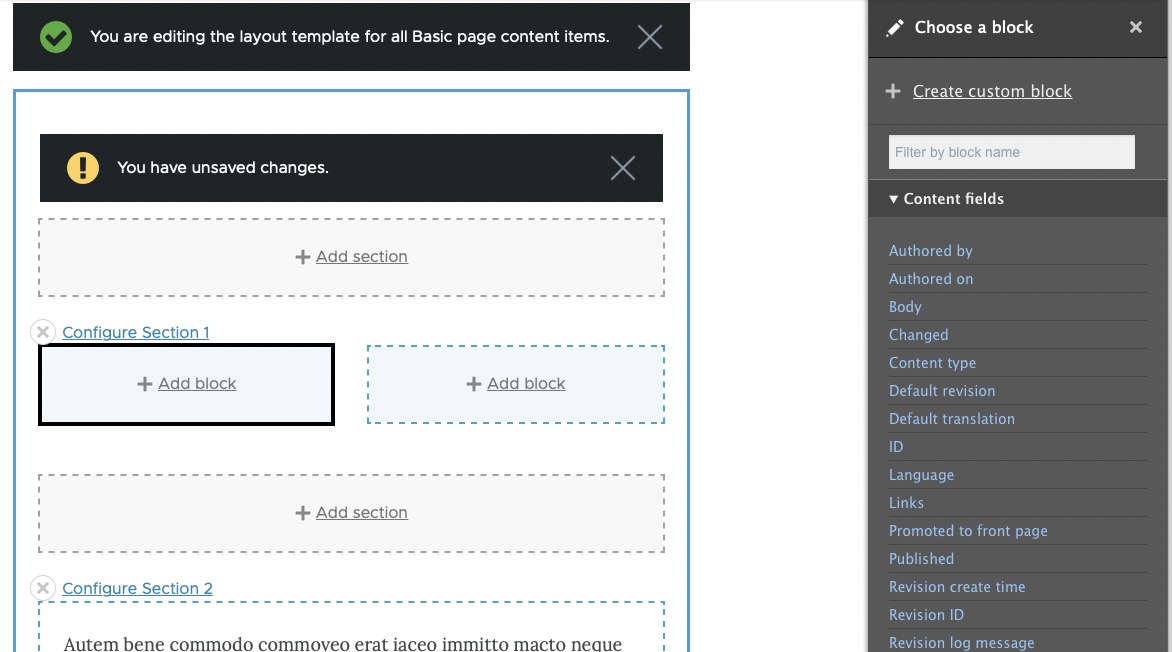
For the reference the issue was discussed and agreed on in the linked issue on Slack by @aaronmchale, @benjifisher, @rkoller, and @smustgrave
Steps to reproduce
Proposed resolution
- Rephrase the overall title Choose a block to something else. Because strictly speaking the user is able to choose between blocks and fields. The sidebar title should reflect that. The + Add block button should be changed accordingly since you are able to add blocks and fields there as well. (*There is no idea and no consensus about a suggestion yet)
- Append block to every block category. Then you have Content fields , Content blocks, User fields, User blocks, Devel blocks, Help blocks and so on. It would be clearer to the user without any ambiguity.
- Since there are cases with only a single item in a category it might be considered to add a singular and plural form to the category titles so based on the count it would be User block with one item and User blocks for several items (for the english singular/plural example)
- One nitpick, the category title core is written in lowercase but all other terms are upper case at the beginning of each category title.
Remaining tasks
User interface changes
API changes
Data model changes
Release notes snippet




Comments
Comment #2
rkollerI've created a mockup by adjusting the titles and labels like suggested in the proposed resolution section in the issue summary.
The changes i've applied were:
block administration page->block layout page+Add blockbutton ->+ Add component(the idea was as a preliminary draft to use something broader that encloses blocks and fields)Choose a blocktitle ->Choose a component+ Create custom block->+ Create content blockList (Views)(block added to each block category)->List (Views) blocksI've then went ahead and presented the current plan for moving and untwining the block related pages in Core at the Drupal Dojo Austin to yesterdays attendees @rocketeerbkw and @arcticcheetah. The plan was as agreed in https://drupal.slack.com/archives/C1AFW2ZPD/p1666965008595329 to get some general feedback about the plan by a diverse number of users.
In addition to the general thumbs up for the different steps there were the following comments specific to the layoutbuilder screenshot:
choose a block->choose a component) as well as theaddbutton in the main layout builder screen (add block->add componentremoves potential confusion. it basically says now not only blocks can go here.+ create custom blockbutton in the layout builder sidebar. just changing it to+ create content blockis still misleading. it creates the impression the block would go into thecustom block librarybut instead those blocks are only available for the particular layout builder layout one attendee pointed out. they are layout builder blocks not core content blocks.Comment #3
rkollerI've presented the current plan for moving and untwining the block related pages in Core at the weekly Lean Coffee Table at the Drupal User group in Munich to @drubb, @franz-m, @it-cru, @jurgenhaas, @martin-mayer as well as to the Fox Valley Computer Professionals attendees Anthony E. Scandora, @bsnodgrass, Sally Gradle, @TBone242.
The term
componentwhich i've used for the side bar title and the+ add button-button was considered too generic. the critiquecomponentis a term that is mainly found and is associated with front end development context. But there was an agreement that finding a more broad term than the current over-specific and imprecise termbuttonis a good thing. One suggestion was to perhaps think about the termelement.The idea of appending the term
blockfor the block related categories titles illustrated in the screenshot was well received.The button label
+ create content blocksurfaced again the main problem people not fully understanding the the different types of block available and their implications laied out in https://www.drupal.org/project/drupal/issues/2862564#comment-14789469. We also have to keep in mind #2999491: Add reusable option to inline block creation which introduces a checkbox enabling the user switching the standard not reusable block to a reusable one. https://www.drupal.org/project/drupal/issues/2999491#comment-14601739 also provides a few alternative suggestions in regards of how to name that button. but without the aforementioned issue fixed the naming of the button has a few implications the user HAS to be aware that the blocks created within the layout are only available in that particular context. most of the attendees in both meetings were not really aware about that fact to the full extent until the day of the discussion.At the end an idea i've voiced in one of the comments already that gained a bit of traction and positive resonance during both discussions. it deals with a similar problem like the custom block library https://www.drupal.org/project/drupal/issues/2862564#comment-14789469 problem. currently there is no way to know if a website has layouts or not. you have to go into each content type to see if
use layout builderis checked. in caseallow each content item to have its layout customizedis checked you then have to go into each of the nodes of that content type. there is no way on huge content heavy sites to know each individual node. even worse if you get into a new huge project there is no way to know how many layouts are there nor is some sort of overview. as a user you are not really in control. if i understand it correctly there is already an open issue #3143007: Make it possible to create views listing content with layout overrides that enable to create list views of nodes that have layout and or layout overrides. such list view page could be added to the appearance page. nothing for this issue but perhaps for a followup or everything could already done in #3143007: Make it possible to create views listing content with layout overrides. but the proposed changes by the attendees for the custom block library as well as the addition of a list view page of layout was considered useful and helpful by the attendees. it would help to keep them in control.Comment #4
aaronmchaleThis issue is only really postponed on 1 issue: #3318549: Rename Custom Block terminology in the admin UI.
That is the issue where we will be changing the block terminology, so once that's done we'll have a clear view on what this issue needs to change.
Comment #5
aaronmchaleUpdating the title to better clarify what this issue is doing.
Comment #6
rkollerThe sole blocking issue #3318549: Rename Custom Block terminology in the admin UI got committed to 10.1.x-dev today, therefore this issue can become active now. To get the discussion started again, the current proposed resolution is the following:
going through the aforementioned points:
1. in that case it might be a good thing to try something we've touched in the last usability meeting. to create a one-two punch questionnaire. a google form providing in the first question a quantitative question (multiple choice) about the "what" followed by an open ended question to get qualitative feedback about the "why" the previous choice was made.
Currently the off-screen sidebar header (Choose a block) as well as the button in layout builder (add block) refer to the element to add as
block. but as noted the sidebar listscontent blocks,blocks,fields, as well asinline blocks. therefore blocks is "sort of imprecise". but the question is what would be the clearest reference? with the "one-two punch" you could explain the scenario in the first question to the participants and provide the following options for the multiple choice question with options like:and in the second question you could ask the participants in the open ended question why they made the decision. the form could be quickly set up and if we get a good number of replies quickly it would be helpful feedback in case the distribution of answers looks fine and the qualitative answers have no hard blockers in. cuz overall you don't necessarily need statistical significance to be pointed in the right direction in regards of a term choice
2. i am still in line with the proposed resolution for 2
3. i am still in line with the proposed resolution for 3
4. i am still in line with the proposed resolution for 4
5. and there is one last tricky detail. as already mentioned in #2 and #3 the label
Add content blockwasn't clear at all to the users that the content block created in layout builder differs from those created for example on/block/add. the former are not reusable inline blocks while the latter are reusable content blocks. the labelAdd content blockmight create misleading assumptions as well as expectations. the outcome of this choice also directly affects #3352550: Hook help for block content module is out of date after new permissions since it would be a reasonable step to name the distinction between reusable and not reusable blocks there.Comment #7
rkollerComment #9
rkollerUsability review
We discussed this issue at #3414129: Drupal Usability Meeting 2024-01-19. That issue will have a link to a recording of the meeting.
For the record, the attendees at the usability meeting were @benjifisher, @rkoller, @simohell, @shaal, and @worldlinemine.
If you want more feedback from the usability team, a good way to reach out is in the #ux channel in Slack.
We’ve discussed the four open points listed in #6 - this comment will refer to those points. It has to be noted that none of the following is considered a strong recommendation.
#6.1
There was sort of a consensus that the mental model for the Layout Builder page shouldn’t be changed at this point and the terms
SectionandBlockshould be kept. In consequence+ Add blockshould be kept as well.It has to be noted that the suggestion to go with the suggestion of something like
+ Add componentraised in #6 was based on the observation that the user has to pick from a list of content blocks and fields in the offscreen tray and fields are actually no blocks. But I’ve learned that technically, under the hood, fields are wrapped in blocks in the context of Layout Builder. Therefore changing+ Add blockto something more generic likeComponentwould be sort of counter productive and potentially confusing to the user. The same applies to the title of the offscreen tray andChoose a blockcould be kept.But on the other hand the label
+ Create content blockin the offscreen tray is semantically wrong. Content block implies that you have a “reusable” block but the user actually creates a none-reusable inline block here. Problem is this button is the only touch point of a user with the concept of a none reusable inline block. We went through the help topics and neither on the help pages for blocks/admin/help/topic/block.overview,/admin/help/block_contentnor on the help pages for layout builderadmin/help/layout_builderwas any word or explanation about the concept of re-usuable content blocks vs none reusable inline blocks, only content blocks are mentioned.One option might be to make additions to those help pages. Aside making additions to the help pages another option might be to add more touch points with those concepts in the admin ui, as proposed in #3325029: Improve the overview of the list of available blocks:
/admin/content/blockAbout the actual label for the
+ Create content blockbutton, the group came up with the following suggestions:Create block for this pageorNew block for this pageOn the plus side that label makes it clear that the block is only created for this page but on the other hand the label is lengthy and what type of block is actually being created is not communicated with this label.
Add inline blockOn the plus side inline block is the most accurate and one of the shortest labels but as mentioned before due to the fact that this offscreen tray is currently the only touchpoint with this concept inline block would also be one of the most confusing choices at this point.
Create blockOn the plus side, in contrast to the other too specific and potential confusing suggestions,
Add blockis very simple and brief and through experience users will learn what this means. But on the downside going with just “block” might be too generic and again the underlaying concept of reusable and none reusable blocks isn’t touched with that variant.Add exclusive blockThe last suggestion that was brought up during ideation was
Add exclusive block. But the consensus was that there are too many potential meanings of the word "exclusive" and it is unclear what it acutally means and refers to .It was also noted to keep in mind that an option to convert an inline block to a reusable content block is on the horizon as well which will complicate things even further: #2999491: Add reusable option to inline block creation
#6.2
Appending the term
Blockwould add a redundancy, but it would be an acceptable downside since the details of interest are front loaded. But that way it would help to clarify the point of confusion why fields are listed under the overall headlineChoose a block#6.3
There was sort of an agreement that based on the number of blocks it might make sense to distinguish between singular and plural form for the appended term
blockin the category title.Comment #10
aaronmchale"Create content block" is technically correct, as the user is creating a content block, and the user may have the option to make the block reusable. Using "content block" also avoids confusion with the list of types, after the user clicks "Create content block" if there is more than one content block type, the user will be shown a list of block types and asked to choose one to create from. In the exact same way that if they use the Add Block button on the Content Block list. So keeping the reference to "content block" ensures the user is aware that the types they are choosing from are the content block types configured under Structure.
Comment #11
rkollerYes "Create content block" is "technically" correct but imprecise.
At the moment if you click the "Create content block" button and create a block, that block shows up in the chosen section in the main content area, but at the same time you have the "Content block" section in the sidebar, the second section underneath the "Create content block" button. But the content block you've just created isn't showing up there as well. Identical labels but completely different behavior. With the current micro copy a certain knowledge about the technical backgrounds is taken for granted. And as I've noted before this sidebar is the sole direct touch point for the user with the concept of none reusable blocks in the ui.
Comment #12
bradallenfisher commentedI'm not sure if the following is being tracked, but it seems related.
When editing a block with layout builder enabled, you no longer edit the layout builder in the front end theme. You now use the admin theme.
Ex. /admin/content/block/1/layout - now uses admin theme whereas in the past it was frontend theme.
on the contrary, managing the layout display for all blocks of a type:
/admin/structure/block-content/manage/{block_name}/display/full/layout still uses the frontend theme.
I think the preferred method is to always use the frontend theme, unless you are using a module like: https://www.drupal.org/project/layout_builder_admin_theme
is this an issue anywhere? i can't find it. thanks!