

 Come together with the global Drupal community in Rotterdam, 28 Sept – 1 Oct 2026. Sessions, contribution, connection, and Early Bird savings until 8 June.
Problem/Motivation
There are several issues with RTL alignment of text, mostly with checkbox margins and alignment of elements. Originally discussed in #3315854: Improve the readability of module cards in grid view, where @rkoller kindly supplied most of the text.
Steps to reproduce
Open Project Browser and see that some elements are either misaligned, or needs adjustment of margin or padding. To switch between LTR and RTL, Firefox supports toggling between RTL and LTR alignment of text.
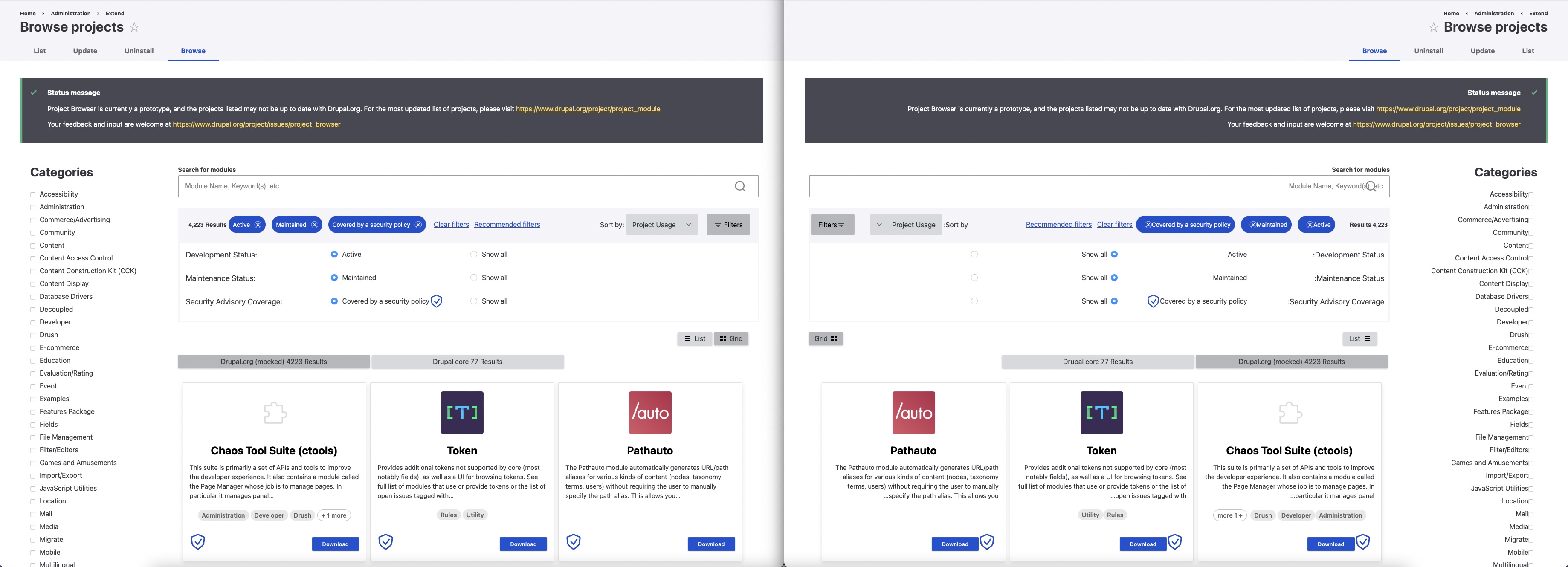
LTR RTL elements comparison
Proposed resolution
Fix the issues below, and if more issues are discovered, add them to the list.
Lists
- Grid: "List" button is right aligned and should be moved to the left over to the grid button.
- Grid: Card Download button: Needs more margin but the button has to be moved towards the left card border. The spacing part applies to LTR as well.
- Categories: Need spacing/margin between label and checkbox. There is a general issue about the checkbox styling #3300262: Adjust the checkbox design for the categories sidebar to the Drupal Design system.
- Search box: The magnifying glass has to be moved to the left border in the search box.
- Filter component: The results count needs a padding, it is too close to the border (but that result count will probably be moved out of the filter component #3310896: Improve UI of results count). If you compare the spacing between the results count and the chips the spacing between the two is smaller in LTR than RTL. Also, the spacing between the sort by select and filters button is smaller in LTR than RTL while the filters buttons is missing a spacing to the left border.
- Filter component: The radio button labels in the expanded filters buttons are on the left instead of the right of the label. Also, spacing needs adjustment.
Project page
- The details section in the sidebars has quite a few alignment issues.
- The headlines like features, getting involved... etc are aligned left instead of right.
- The quote in the feature section is aligned left instead of right.
- The whole getting the most out of the webform module section, headlines as well as paragraphs is aligned to the left instead of right
- Meet the project maintainers the images are correct as well its descriptions but the headlines are aligned to the left instead of to the right.
See https://www.drupal.org/files/issues/2022-10-23/webform_ltr.jpg and https://www.drupal.org/files/issues/2022-10-23/webform_rtl.jpg.
Instructional modal
- The code snippets don't have enough margin or padding at the beginning and too much margin or padding at the end after the clipboard icon.
See https://www.drupal.org/files/issues/2022-10-23/instructional_modal.jpg
Remaining tasks
- ✅ File an issue about this project
- ☐ Manual Testing
- ☐ Code Review
- ☐ Accessibility Review
- ☐ Automated tests needed/written?
| Comment | File | Size | Author |
|---|---|---|---|
| #28 | Browse projects _ pba.png | 190.09 KB | narendrar |
| #26 | Screenshot 2022-12-15 at 11.26.43 AM.png | 737.05 KB | utkarsh_33 |
| #26 | Screenshot 2022-12-15 at 11.26.31 AM.png | 652.95 KB | utkarsh_33 |
| #25 | addinstallbutton.png | 402.7 KB | narendrar |
| #23 | Screenshot 2022-12-13 at 10.35.13 AM.png | 220.1 KB | srishtiiee |
Issue fork project_browser-3316998
 Show commands
Start within a Git clone of the project using the version control instructions.
Or, if you do not have SSH keys set up on git.drupalcode.org:
 changes







Comments
Comment #2
rkollerI've taken a look a one of the project pages as well. i've picked the webform module that it has one of the more extensive body fields (see the two screenshots). a few potential problems i've noticed:
Comment #3
ressaThanks for checking the project page @rkoller, I have added your observations under a new "Project page" heading.
I have been thinking more about creating child issues, and in a related LTR/RTL issue, the solution was not to add
text-align: rightfor RTL, but instead removetext-align: leftfor LTR.So dealing with RTL from the "helicopter view" (text-align almost everything right by default) is probably better, resulting in leaner code. So from that perspective, let's maybe keep RTL.issues in one place, as much as possible. What do you think?
Comment #4
rkollerThat is totally up to you. I am not a developer, therefore i am unable to judge which solution would result in the leanest code. Totally trust on your judgment on that end. But also definitely a +1 for creating child issues and trying get the leanest most robust solution. What ever works best.
And did a quick last check and took a look at the instructional modal in case package manager is not installed and or #3312289: Svelte UI for install controllers is not landed yet. the margin at the beginning and at the end of the code snippets is not correct. At the beginning it is too less and at the end after the icon it is too much. Also added the details to the issue summary.
Comment #7
utkarsh_33 commentedI have tried to address most of the feedbacks regarding the RTL support.Please check and provide feedbacks for more improvements .
Comment #8
utkarsh_33 commentedComment #9
ressaThanks @Utkarsh_33, great work! It looks to me like many of the issues in the Issue Summary are now fixed.
It would be great if someone who is natively a RTL-reader (such as Arabic, Hebrew or Persian) could try out the patch, and check if everything looks all right in RTL-view.
Comment #11
bnjmnmThe inline css properties is a great solution! It seems like this could all be addressed in one issue, but if we hit something trickier it's certainly worth moving that to a followup so we can commit all the good improvements here.
On manual review I spotted the following:
Comment #12
utkarsh_33 commentedComment #13
rkollerI 've tried to test the merge request a few days ago for the first time but I was unable to apply. But with the latest changes today it possible to apply. thanks! I've then installed the multilingual modules and installed and set hebrew as the administration language (even though it hasn't had much of an effect since most of the strings aren't translated yet).
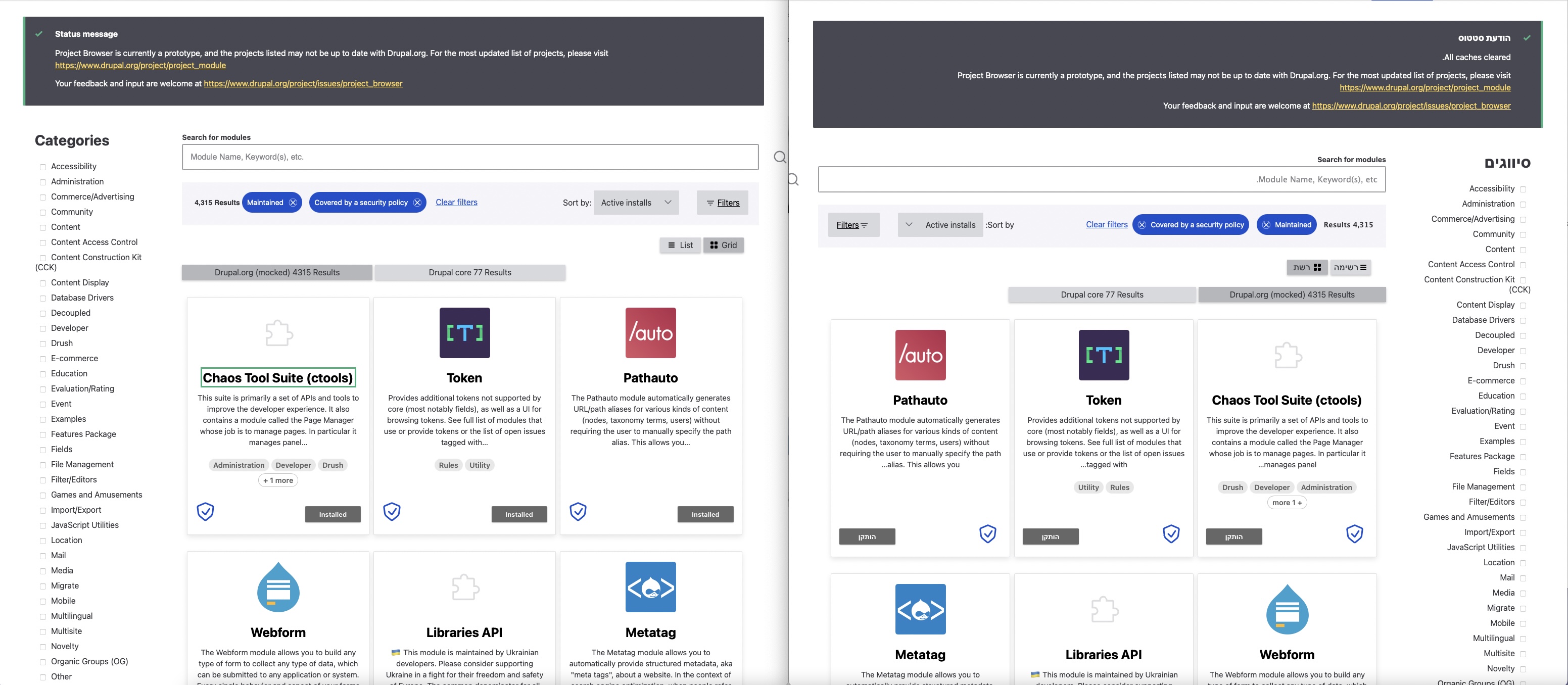
The three points in #11 still apply. In addition #11.1 does apply for ltr as well:
(*on the left a window with english as the administration language (ltr) and on the right with hebrew as the administration language (rtl))
on single project pages on the first look the points in #2 seem also still to apply. the body is left aligned instead of right aligned. same for the details section in the sidebar with its elements (especially the unordered lists looks off)

but on a second look it seems not in general for every single project page cuz i've taken a look at the webforms module i've used as an example in previous comments. there parts of the body (for example the unordered lists) are correctly aligned to the right (see webform.jpg)
Comment #14
utkarsh_33 commentedComment #16
narendrarStill right aligned.
Spacing needs to be adjusted.
Design not correct in RTL.
This is not fixed yet.
Comment #17
utkarsh_33 commentedAddressed all the feedbacks in #16.
Comment #18
utkarsh_33 commentedComment #19
srishtiiee commentedAll the feedback is addressed and the changes look great. I could find only one issue with the list view. The security icon is not aligned with the other elements and spacing between the two icons in RTL is not as much as in LTR.
Comment #20
bnjmnmComment #21
bnjmnmComment #22
bnjmnmMR as of right now:

Comment #23
srishtiiee commentedTested the MR locally and I'm seeing some of the alignments different than the screenshots in #22.

1. The filters are going out of the box on the right.
2. The "Add and install" buttons are not aligned with the security icon and the "Installed" button.

Comment #24
bnjmnmForgot to push the changes to the MR that result in the successful screenshots from #22. They are pushed now
Comment #25
narendrarFound 2 design issues in attached screenshot, circled in red.

Comment #26
utkarsh_33 commentedAddressed feedbacks from #25.
Comment #27
bnjmnmComment #28
narendrarEverything looks great except 2 points:
Comment #29
bnjmnmComment #30
narendrarAll points addressed. Marking as RTBC.
Comment #31
tim.plunkettComment #32
bnjmnmThis seems to provide only improvements without regressions and if we missed anything we can take care of it in followups. This should get in before the pending CSS cleanups make it a nightmare to rebase. Merging.
Comment #34
bnjmnm