Problem/Motivation
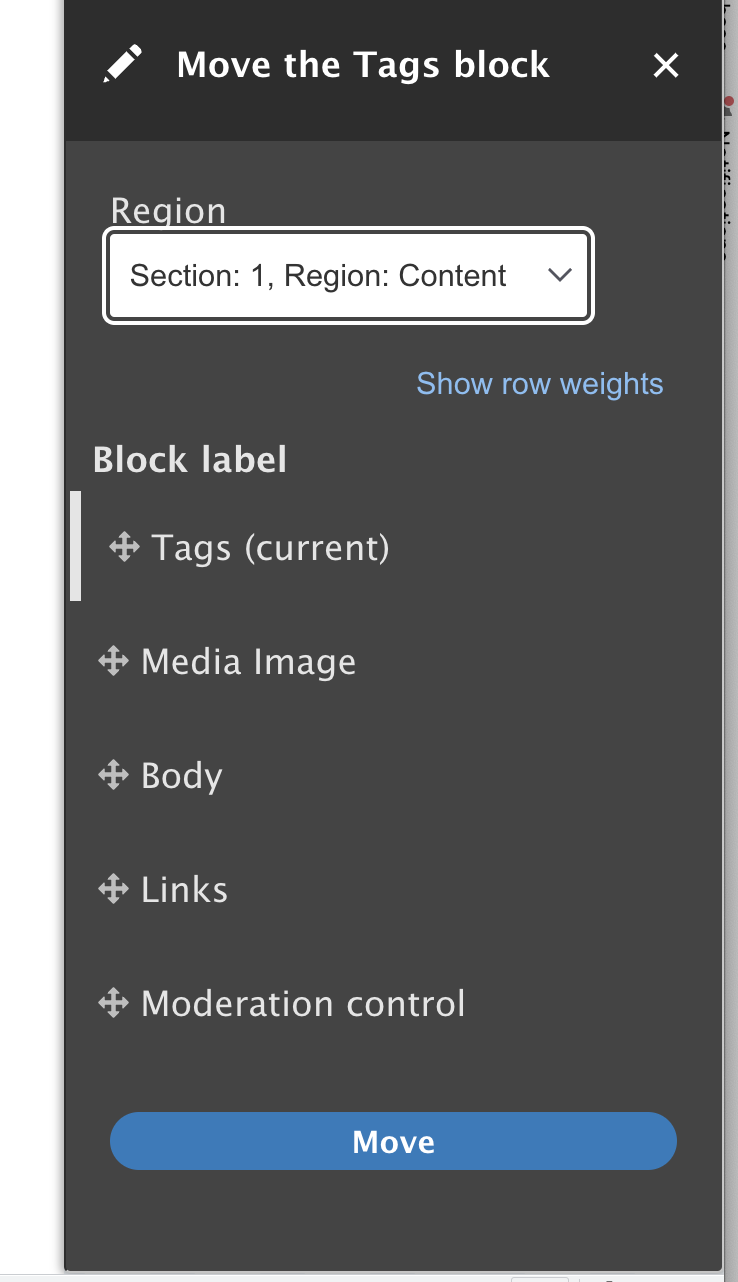
Tabledrag is broken in the sidebar when using the 'Move' option in Layout builder. The arrows icon is not visible so there is no way to drag and drop items.
This only occurs in 9.5.x-dev, it is working in 9.4.8 and in 10.1.x-dev, but I tested on a fresh install a few times just to make sure. The issue is there with Olivero and Bartik so doesn't seem to be a theme-specific issue.
Screenshots of broken state (from 9.5.x-dev):


Screenshots of working state (from 9.4.8)


Steps to reproduce
- Install Drupal 9.5.x-dev
- Enable Layout builder and Layout builder modules
- Enable Layout builder on the article content type
- Go to Manage display
- Select a block and click 'Move'
- See that the drag-and-drop icon is not visible and you are unable to move the items
Proposed resolution
Remaining tasks


 Show commands
 compare




Comments
Comment #3
bnjmnmIt appears this is due to two changes introduced in #3227431: Tabledrag icon doesn't adapt to forced-colors mode.
The mask added in tabledrag.module.css
Removing the nbsp in the tabledrag handle in misc/tabledrag.es6.js
Although I'm pointing those out as the cause of the issue reported here, simply undoing those changes is probably not the right approach if it reverts the accessibility fix from that issue.
This likely isn't a problem in 10.x due to the off canvas CSS improvements that were introduced there due to 10 no longer having to support IE11.
Comment #4
bradallenfisher commentedso should this be fixed/addressed there or here?
Comment #5
bnjmnmThis is in fact fixed in Drupal 10



Claro
Olivero
Stark
Re #4
I'm not sure what the "there" is in that question. If it's asking if it should be addressed in the issue #3227431: Tabledrag icon doesn't adapt to forced-colors mode, that is definitely no as that issue is closed. The activity would happen here.
Because this works fine in Drupal 10, this would be something only implemented in 9.5. Whatever the solution is, keep in mind that it needs to continue working in forced-colors mode.
Comment #6
zipymonkey commentedIt looks like this is related to height and width of the handle icon being set to auto for off-canvas draggable tables. If we remove this style then the move icon is visible again. I have attached a patch that fixes this for 9.5.x.
Comment #7
pameeela commentedTested the patch but I'm seeing this (in Chrome on Mac):
Comment #8
zipymonkey commentedLooks like there is a mask in the tabledrag styles that is on top of the background image. Removing the mask appears to make this work.
Comment #9
pameeela commentedThis is better, though not quite aligned. I'm also not able to test high contrast since that's on Windows. Not sure whether this is committable in this state, since it is totally broken right now?
Comment #10
bnjmnmHigh contrast support can now be tested on any Chrome browser. Test with forced colors mode on both light and dark scenes and that’ll do it https://devtoolstips.org/tips/en/emulate-forced-colors/
Comment #11
pameeela commentedOh thanks, the other issue said it needed Windows.
Honestly not sure whether this is a pass or fail? But again at the moment it's not there at all, in any mode, so should this go in as a fix? It's already fixed properly in 10.x so this is just a band-aid.
Comment #12
rmixter commentedI've attached a patch to fix this in Stable9 as well.
Comment #13
akoe commentedTested patch with v 9.5.9 and it solve the issue with a Claro based theme
Comment #14
shyam_bhatt@akoe @rmixter I have checked the #12 patch, but the alignment does not look good for the layout builder fields.
Please check the following steps to test it:
Please check the provided patch, I have fixed the layout alignment issue.
After patch:

Comment #15
smustgrave commented@Shyam_Bhatt believe include interdiffs when uploading patches
Think this will also need a test case.
Doesn't appear to be an issue in D10.1.x
Comment #16
gauravvvv commentedI have fixed the order/properties-order in multiple files in patch #14, attached the interdiff for same. Test case still needs to be added
Comment #17
shani mauryaAfter applying the patch #16, drag-drop icon is coming. but the alignment of the button has been dislocated. This needs to be fixed.
Comment #18
shani mauryaPatch #6 is working fine and there is not a y alignment issue coming.
Thank You!
Comment #20
mingsongDoes this issue still exist?
I did a quick test by following the steps in the issue description and I can't reproduce this issue any more.
Test environment:
Drupal core: 10.2.3
PHP version: 8.3.2
Chrome 122.0.6261.94
and
Firefox 123.0
Comment #21
pameeela commentedIt was only ever an issue in 9.5.x so this can be closed.
Comment #22
pameeela commented