Problem/Motivation
Since the name of the button on the Extend page is "Install", and also pm:install the default Drush command to install a module, whereas pm-enable is merely an alias, we should probably use that. This way, we can also reduce "install/enable" to just "install", and match the heading.
$ drush | grep "pm:install"
  pm:install (in, install, en, pm-enable, pm:enable) Enable one or more modules.
Steps to reproduce
Install https://www.drupal.org/project/project_browser. Log in to the site using the default credentials. Select "Extend" from the Admin menu, then select the new "Browse" tab under the page title "Browse Drupal.org projects".
Click the "Download button" from any of the modules displayed in the card view.
Find the Drush part at the bottom, under "Install".
Proposed resolution
Update the Drush section in the Download modal window.
Now
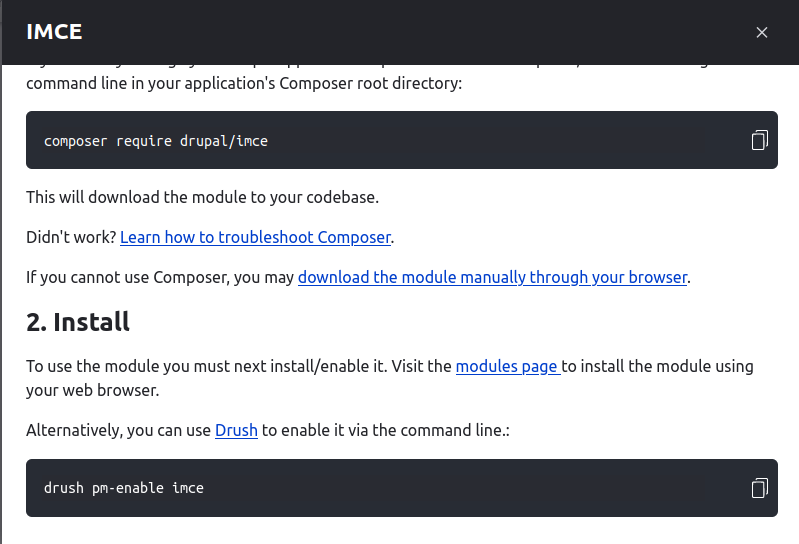
To use the module you must next install/enable it. Visit the modules page to install the module using your web browser.
Alternatively, you can use Drush to enable it via the command line.:
drush pm-enable ctools
Better?
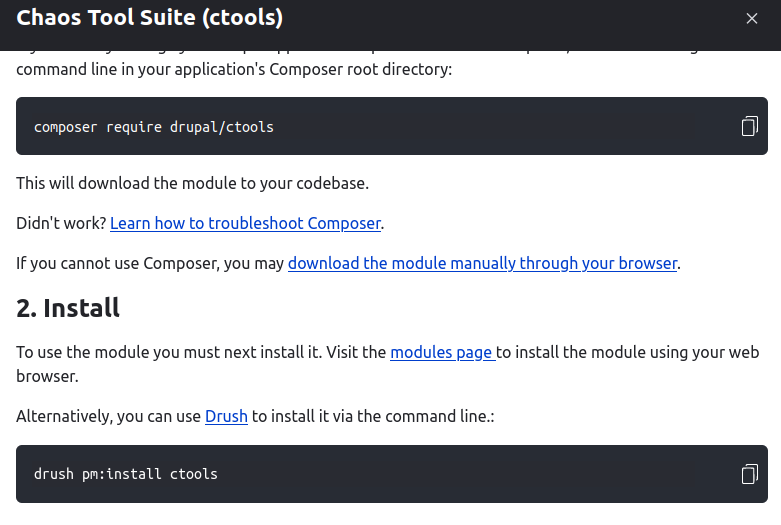
To use the module you must next install it. Visit the modules page to install the module using your web browser.
Alternatively, you can use Drush to install it via the command line:
drush pm:install ctools
User interface changes
Remaining tasks
- ✅ File an issue about this project
- ☐ Manual Testing
- ☐ Code Review
- ☐ Accessibility Review
- ☐ Automated tests needed/written?


 Show commands
 changes


Comments
Comment #3
ressaTrying to include all the changed files after compiling, sorry about the noise.
Comment #5
ressaClosing my Merge Request, since my compiled svelte-files didn't match the test ...
Comment #6
ressaTrying a patch file in stead.
Comment #7
ressa... which also fails. I can't figure out how to run commit-code-check.sh against contrib module, which I think would shed some light on the reason. I found https://www.drupal.org/docs/develop/development-tools/running-core-devel..., but it seems to be focused on core, and not a module.
Anyway, it looks like the problem is that "Svelte compiled files do not match." so if anyone else can make them match, feel free to create a patch :-)
Comment #8
tim.plunkettThe README in the module has the necessary information: https://git.drupalcode.org/project/project_browser/-/blob/1.0.x/README.m...
Though I think you must run
yarn buildfrom inside the sveltejs directory, notyarn dev(that's for real-time dev, as opposed to the build for committing the changes)Comment #9
tim.plunkettThe test error says: "Svelte compiled files do not match. Running yarn build and commiting the changs should fix this."
I like the double typo (committing and changes) but yeah, that :)
Comment #10
ressaThanks for pointing me to the README file, I hadn't seen the info there. But I get the same result ...
By the way, I am using Ubuntu 20.04.3 and yarn 1.22.19 (I tried 1.22.17 also, but it made no difference).
It would be great if I could run commit-code-check.sh locally, before uploading the patch to drupal.org. Do you know if it's documented somewhere how to run it against a module? Or maybe simpler, how can I run the command, which finds that Svelte compiled files do not match, to perhaps get some more details?
Perhaps you can try to make the three changes in
sveltejs/src/Project/ActionButton.svelte, compile the files, and see if you get a better result?... and yes, I also appreciated commiting and changs :-)
Comment #11
ressaI created #3296324: Update Contributing section in README, to add
yarn build.Comment #12
ressaComment #15
omkar-pd commentedAdded build files.
Comment #16
narendrarMerge latest 1.0.x branch code in MR, resolve conflicts, run yarn build to solve this issue.
Comment #17
omkar-pd commentedMR 201 is up to date with 1.0.x but the tests are running against old MR 199 which is closed. I tried to reopen that MR but it gives me a 404 error.
Comment #18
ressaIs it because you need to change Status to "Needs review", to trigger the test?
Or maybe just "Create new branch" and start fresh?
Comment #20
narendrarI don't think we need to mark it as "Needs review" to trigger the test in case of MR. Not sure but somehow the MR was not working properly.
I created another MR from @omkar-pd's branch and it seems working now.
Comment #21
ressaAh yes, marking it as "Needs review" is probably only required for the old patch method, where you attach a file, as in #6. Great that you got it created together with @omkar-pd, and that the test passes.
Comment #22
tim.plunkettRebased and then pushed up one commit for the remaining references to "enable"
Comment #23
aarti zikre commentedreviewing this
Comment #24
aarti zikre commentedComment #25
aarti zikre commentedSummary Updated!
Comment #26
aarti zikre commentedComment #27
ressaThis issue is about changing from using "enable" to "install" as can be read in the summary. Also, please see as an example from the plain diff one of the changes:
From https://git.drupalcode.org/project/project_browser/-/merge_requests/202....
Maybe you can give it another go, check with 202.diff exactly what changes should happen after patching, and check if it works?
Comment #28
aarti zikre commentedComment #29
aarti zikre commentedApologize for the confusion
Reviewed and verified MR
https://git.drupalcode.org/issue/project_browser-3296264/-/tree/3296264-....
Testing step:
* Install new instance of Drupal 9.5.x.
* Install and enable project browser module.
* Go to the /admin/modules/browse.
* Click on Download button.
Test Result:
The popup modal have the install as well as download drush command and another way to enable module. In the description it is shown that
"To use the module you must next install/enable it. Visit the modules page to install the module using your web browser.
Alternatively, you can use Drush to enable it via the command line.:"
drush pm:install ctools
where
modules page has link to : /admin/modules#module-machine-name
drush linked to the : https://www.drush.org/latest/
In drush command module name change as per our selection
Every things looks great. Excluding copy command feature. It is not copy the command.
Small suggestion:
can we add space between . and :
here in the description
Alternatively, you can use Drush to enable it via the command line.:"
Attaching SS for reference.
Detail page on browser:

Enable module using drush install command:


CMS back end after installation of particular module:
Moving to need works
Comment #30
aarti zikre commentedComment #31
ressaThanks @aarti zikre, that looks better. (though your text still says "Alternatively, you can use Drush to enable ..." ?)
Good catch with the punctuation mark. Actually, we just need to get rid of it like this:
Since it might involve generating new files after updating the ActionButton.svelte file, and I failed miserably with mysteriously failing tests last time I tried, perhaps someone else can do that?
Comment #32
narendrarComment #33
omkar-pd commentedLGTM.
Comment #35
tim.plunkettThanks! Merged
Comment #36
omkar-pd commentedComment #37
ressaThanks everybody, it looks good!