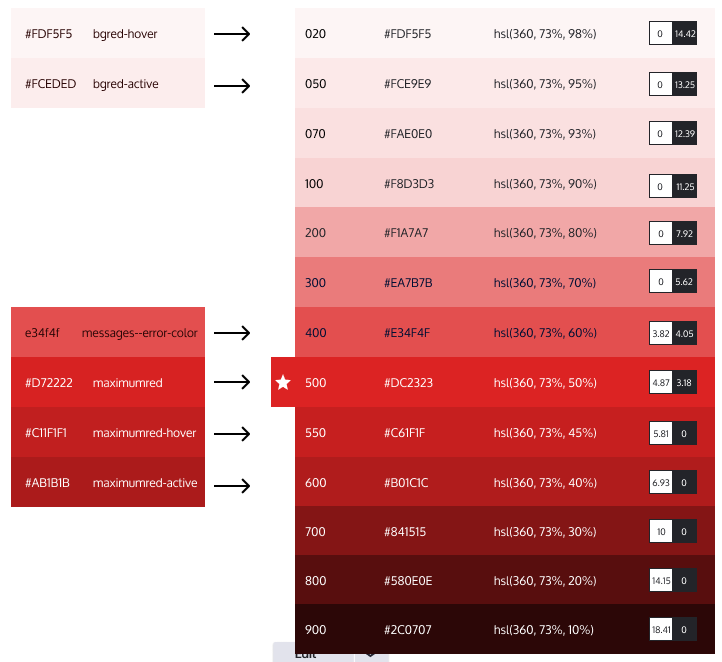
Problem/Motivation

Following the work from #3251709: Define Blue scale for Claro and defined in #3155531: Naming convention of color shades in the Drupal Design System (e.g. for Claro), we are creating a red color scale.
Right now we have 5 reds on the design system, but they are not completely related to each other and do not pass some accessibility tests.

Proposed resolution

Update the current red colors defined on the code and files with the new ones. Color definition can be seen at Figma, where you can copy&paste the color values:

Remaining tasks

  • Replace the 6 red colors with the new ones
  • Replace any icon color using red with the new ones. This will mean to:
    • Update the color inside the SVG
    • Update icons' directory names (based on their hexadecimal color).
    • Update any reference to that icons in the CSS.
  • Accessibility sign-off

Testing steps

Components to test using red:

  • Action link
  • Button
  • Ckeditor
  • Fieldset
  • Form
  • Form password confirm
  • Form checkbox/radio
  • Form text / textarea
  • Messages

User interface changes

All red colors will change their values.

Issue fork drupal-3270842

Command icon Show commands

Start within a Git clone of the project using the version control instructions.

Or, if you do not have SSH keys set up on git.drupalcode.org:

Comments

ckrina created an issue. See original summary.

ckrina credited saschaeggi.

ckrina’s picture

ckrina’s picture

Issue summary: View changes
ckrina’s picture

Assigned: Unassigned » ckrina
ckrina’s picture

Assigned: ckrina » Unassigned
Status: Active » Needs review
StatusFileSize
new19.94 KB
new26.07 KB
javi-er’s picture

Status: Needs review » Needs work
StatusFileSize
new238.77 KB

Seems like CSS needs to be recompiled for tests to pass and also the deleted image needs to be re added in a different folder, in my local it's saying that core/themes/claro/images/core/dc2323/error.svg is missing when there is an error in the status report.

javi-er’s picture

StatusFileSize
new330 KB

Sorry, I uploaded the wrong screenshot in the previous comment.

javi-er’s picture

StatusFileSize
new20.83 KB

Updated patch for 9.4.x, this is passing all tests in my local.

javi-er’s picture

StatusFileSize
new20.83 KB

The color in error.svg needed to be updated as well.

sharayurajput’s picture

Assigned: Unassigned » sharayurajput

sharayurajput’s picture

Assigned: sharayurajput » Unassigned
javi-er’s picture

StatusFileSize
new25.88 KB

Adjusted the D9 patch to account for the new changes in 9.4.x ( blue variations)
Also, I moved the error icon to /core/misc/icons/dc2323/error.svg following " Refactor references to images in Claro's images/core directory "

javi-er’s picture

Updated D10 patch.

javi-er’s picture

Status: Needs work » Needs review
WagnerMelo’s picture

Status: Needs review » Reviewed & tested by the community
StatusFileSize
new281.49 KB
new211.51 KB

I reviewed this issue, and all the changes asked looks like ok for me, all the codes was changed correctly, and i checked the color on drupal site.

Version: 9.4.x-dev » 9.5.x-dev

Drupal 9.4.0-alpha1 was released on May 6, 2022, which means new developments and disruptive changes should now be targeted for the 9.5.x-dev branch. For more information see the Drupal core minor version schedule and the Allowed changes during the Drupal core release cycle.

alexpott’s picture

Version: 9.5.x-dev » 9.4.x-dev
Status: Reviewed & tested by the community » Fixed

Committed a2ce4d4 and pushed to 10.0.x. Thanks!
Committed and pushed 304c695aee to 9.5.x and 20d4f84621 to 9.4.x. Thanks!

  • alexpott committed a2ce4d4 on 10.0.x
    Issue #3270842 by javi-er, sharayurajput, ckrina, WagnerMelo, saschaeggi...

  • alexpott committed 304c695 on 9.5.x
    Issue #3270842 by javi-er, sharayurajput, ckrina, WagnerMelo, saschaeggi...

  • alexpott committed 20d4f84 on 9.4.x
    Issue #3270842 by javi-er, sharayurajput, ckrina, WagnerMelo, saschaeggi...

Status: Fixed » Closed (fixed)

Automatically closed - issue fixed for 2 weeks with no activity.