Problem/Motivation
Right now we have 3 blues on the design system, mainly used for the Primary button and the link:
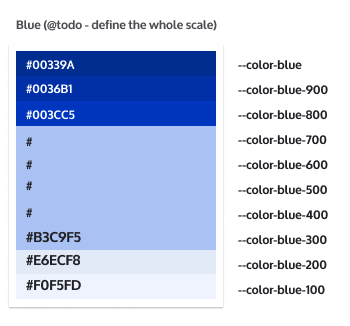
  --color-absolutezero: #003cc5;
  --color-absolutezero-hover: #0036b1; /* 10% darker than base. */
  --color-absolutezero-active: #00339a; /* 20% darker than base. */
  --color-bgblue-hover: #f0f5fd; /* 5% darker than base. */
  --color-bgblue-active: #e6ecf8; /* 10% darker than base. */
So far we don't have other elements that use the blue, but we might have in the future. Also, we're starting to work on #3251278: [META] Designs for dark background layers and its color palette and we might or might not want to use the same blue scale.
Proposed resolution
Use a new Blue scale. Proposal:
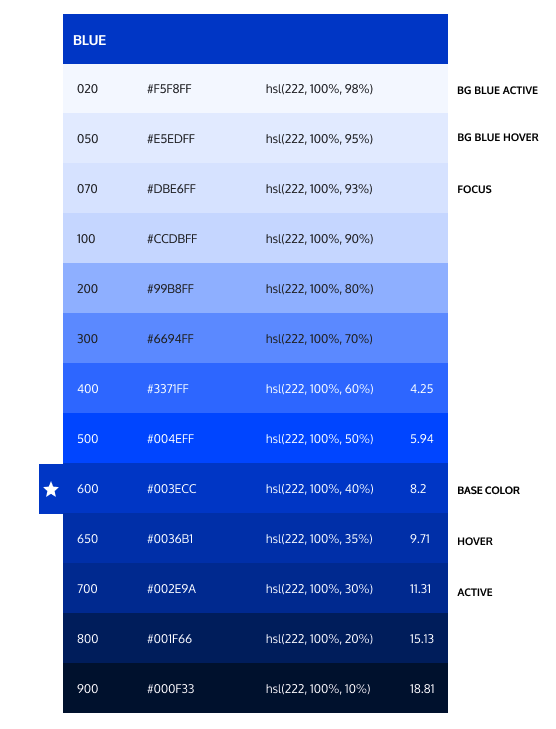
The biggest change is the main blue color will be changed to the new one, slightly lighter but still keeping a WCAG compliant contrast: from 8.56 for #003CC5 to 8.2 for #003ECC against white, the most important combination used for the primary button). See several component examples with the new blue:

Other combinations that would still have enough color contrast:

Remaining tasks
New color scale approval.- Patch introducing the new color scale.
- Change any blue instances from:
--color-absolutezero: #003cc5; to --color-absolutezero: var(--color-blue-600);--color-absolutezero-hover: #0036b1; to --color-absolutezero-hover: var(--color-blue-650)--color-absolutezero-active: #00339a to --color-absolutezero-active: var(--color-blue-700)--color-bgblue-hover: #f0f5fd; to --color-bgblue-hover: var(--color-blue-020)--color-bgblue-active: #e6ecf8; to --color-bgblue-active: var(--color-blue-050)--button--focus-border-color: #5a8bed; to --button--focus-border-color: var(--color-blue-300)
- Accessibility review & approval.
Notes:
1. Any other blue instance, please compare with the color scale and choose the closer blue.
2. This is not intended to refactor the tokens naming: we'll do it as part of #3254529: [PLAN] Drupal CSS Modernization Initiative.
User interface changes
The biggest change is the main blue color will be changed to the new one, slightly lighter but still keeping a WCAG compliant contrast: from 8.56 for #003CC5 to 8.2 for #003ECC against white, the most important combination used for the primary button).
Release notes snippet






Comments
Comment #2
ckrinaUpdating the summary with the light blue colors and some screenshots.
Comment #3
ckrinaWorking on this since it's a blocker for a Claro stable blocker issue.
Comment #5
ckrinaHere's a proposal for the blue scale. Each shade has been set changing lightness in a hsl-based scale (based on @saschaeggi's feedback) so later on it can be calculated with hsl functions if needed.
And here's a contrast grid to be sure there are enough variants WCAG compliant:

Notes:
hsl(222, 100%, 40%)instead ofhsl(222, 100%, 39%), but it's still WCAG compliant with a 8.2 contrast against white.Comment #6
ckrinaComment #7
ckrinaIssue summary update and status change.
Comment #8
saschaeggiLooks good to me. A good overall improvement over what we have in place now and also better extendable in the future.
From my side it's a 👍
Comment #9
andregp commentedI brought this issue to the Drupal Usability Meeting 2022-02-11 and we concluded that some screenshots of the site before/after this color change would be helpful for comparison. This way we can better see how this change will affect the overall look on the site.
Comment #10
ckrinaThanks Sascha!!
For the screenshots the code needs to be updated first. Here's the scale we should use:
It needs to be added into the
base/variables.pcss.cssfile, and update any other blue variations. I've added instructions on the remaining tasks in teh summary on what needs to be done.Update: Please add screenshots of the resulting work as requested in comment #9.
Comment #11
ckrinaUpdated missing blue instances in the summary.
Comment #12
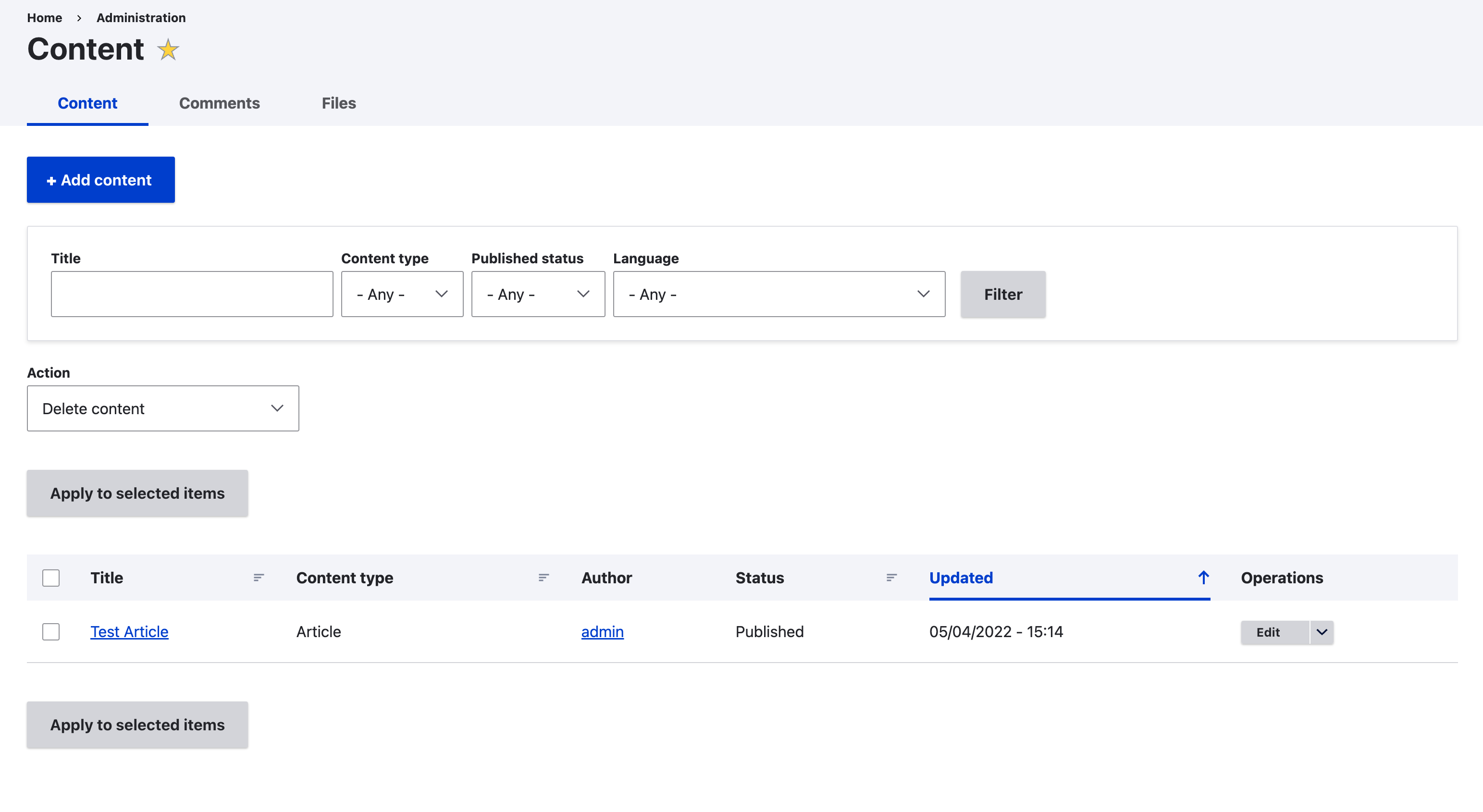
cindytwilliams commentedHere is a patch that adds the new blue variations and updates them throughout the theme. Before and after screenshots are also attached.
Comment #13
ankithashettyJust fixed the custom command error, thanks!
Comment #14
ckrinaThanks both for jumping so fast to work on this :)
I just suggested a few changes to the comments since the scale base points are different now and they describe better what the difference is:
With the new color scale this becomes 5% instead of 10%.
This one becomes 10%.
This one is 2% darker now.
This one is 5% lighter.
Comment #15
cindytwilliams commentedHere is another patch that includes the custom command error fix (thanks ankithashetty!) as well as the requested updates to the comments.
Comment #16
kristen polThanks for the update @cindytwilliams. Fyi, it's useful to have an interdiff in these cases so we can see what the changes were: https://www.drupal.org/docs/develop/git/using-git-to-contribute-to-drupa...
Comment #17
ckrinaThanks for the changes! I've done a deeper review for several components and I've found a few blue color declarations that still need to be changed:
1. In
core/themes/claro/css/components/tabs.pcss.css, the following line needs a new blue color implemented:--tabs--hover-bg-color: #e6ecf8;to--tabs--hover-bg-color: var(--color-bgblue-active);2. There's another blue defined and note used anywhere in
core/themes/claro/css/base/variables.pcss.cssin line 116 that should be deleted:--input--focus-shadow-color: rgba(0, 74, 220, 0.3); /* Absolute zero with opacity. */3. Missing hexadecimal blue in core/themes/claro/css/base/off-canvas.theme.pcss.css line 70:
color: #85bef4;should becolor: var(--color-blue-200);4. In
core/themes/claro/css/components/jquery.ui/theme.pcss.cssline 377 and line 415. It could even become a new variable in variables.pcss.css as a "jQuery.UI theme" section before "jQuery.UI dropdown":#0072b9 /code> to <code><code> var(--color-blue-600)5. I'm not sure this is actually needed because I can't find it on the UI, but the closer color for
color: #008bcb;in lcore/themes/claro/css/components/views-ui.pcss.css(line 184) would bevar(--color-blue-400).6. In
core/themes/claro/css/theme/field-ui.admin.pcss.cssline 56:background: #d5e9f2;should bebackground: var(--color-blue-050);7. And SVG files should update the old blue colors to the new ones too.
Although I'm thinking that this is a lot of work and maybe could be moved into its own issue, and then even discuss if we can move some of them to use more currentColor. Any thoughts?Just discussed with @lauriii in Slack and he mentioned to address it here.core/themes/claro/images/src/hamburger-menu.svg, change#0048dcto#003ECCcore/themes/claro/images/src/sort--asc.svg, change#004adcto#003ECCcore/themes/claro/images/src/sort--desc.svg, change#004adcto#003ECCcore/themes/claro/images/icons/004adcshould change#004adcto#003ECC, the folder name should be updated and have any reference to them changed.core/themes/claro/images/icons/00309Eshould change#00309Eto#002E9A, the folder name should be updated and have any reference to them changed.core/themes/claro/images/icons/222330should change#222330to#000F33, the folder name should be updated and have any reference to them changed.Out of scope:
- Quick Edit styles are using Seven styles, so Seven' blue colors for the button. But 1. Quick Edit is leaving core in D10 and theming a while button is out of scope for this issue. It should be done in #3025911: Quick Edit Style Update.
- Install Page: it is being addressed in #3085219: Installer is not very usable in Claro.
- CKEditor styles in
core/themes/claro/css/theme/ckeditor-dialog.pcss.csshave several Seven button-related styles in there, but we shouldn't invest the time on changing it since CKEditor 5 will replace CKEditor 4 in D10.Comment #18
cindytwilliams commentedHere is a patch that also includes changes 1-7 above.
(I'm trying to figure out how to create an interdiff but have so far been unsuccessful -- sorry. I'll keep trying and will post one here shortly.)
Comment #19
cindytwilliams commentedI used the wrong issue number in the patch name above. Here is the correctly named patch, along with the interdiff.
Comment #20
ckrinaRemoving the Stable blocker tag.
Also, the patch is not applying anymore, sorry! And it would be great to add a D10 patch because the code is realy different and both will be needed for the commit. Thanks!!
Comment #21
andregp commentedHi @ckrina I can try to work on a reroll :)
Comment #22
andregp commentedHere are the rerolls for D9 and D10.
Comment #23
cindytwilliams commentedThank you, andregp. Both of these patches apply, and I confirmed that the requested color changes are present throughout in both D9 and D10. Screenshots are attached. Marking RTBC.
Comment #27
ckrinaCommitted 34915ec and pushed to 10.0.x, 9.5.x and 9.4.x. Thanks all, it is awesome to get this done!