

Needs review
Project:
Redirect
Version:
8.x-1.x-dev
Component:
Code
Priority:
Normal
Category:
Bug report
Assigned:
Unassigned
Issue tags:
Reporter:
Created:
3 Mar 2021 at 08:46 UTC
Updated:
7 May 2025 at 13:01 UTC
Jump to comment: Most recent, Most recent file
 Show commands
 changes


Comments
Comment #2
arjunonemail@gmail.com commentedI am also having a similar kind of issue When I am importing the Database.
ERROR 1062 (23000) at line 48278: Duplicate entry '/' -en' for key 'PRIMARY'
Due to this import failed.
Comment #3
rmitt commentedI have same issue when importing mysql 5.7 database dump to mysql 8.
Comment #4
aluzzardiI have a similar issue with strings containing emojis:
the database saved 2 times:
/kurse/outdoor-kurse?
but for the cms shows:
/kurse/outdoor-kurse?
and:
/kurse/outdoor-kurse🆕
when I try to import I have and duplicate error.
My suggestion is to remove the idea of do primary key being only path and langcode, and add an id together, that will avoid errors errors when we search for a string with emoji or whitespaces.
Comment #5
joe huggansAlso seeing this issue.
Comment #6
bjackson commentedI have a client that is also encountering this issue when trying to restore a dump from a 5.7 MySQL server to 8.0:
ERROR 1062 (23000) at line 6465: Duplicate entry 'xxxxx' for key 'redirect_404.PRIMARY'
Entry ID intentionally xxx'd out. Anyone have a workaround?
Comment #7
darrenwh commentedI can't restore backups of my database because of this issue, escalating to Major
Comment #8
darrenwh commentedAs a interim fix when you export your database add the extra flag --insert-ignore to the dump command
drush sql-dump --extra-dump='--no-tablespaces --insert-ignore' | gzip > ~/dbbacks/site_db.$(date +%Y-%m-%d-%H%M).sql.gzThe code should be fixed to prevent these records being entered into the database.
Comment #9
marianojp commented@darrenwh this solution works for me. Thanks for the awesome flag tips
Comment #10
joegl commentedStuck on this. We don't create the database dumps ourselves and can't use the workarounds provided.
Comment #11
joegl commentedI believe the issue we are having is due to Pantheon using MariaDB 10.4. We are importing the database into MySQL 8 locally.
Comment #12
sharmaraunak1998 commented@joegl,
I am stuck in this situation.
Did you get any solution?
Comment #13
joegl commentedI did not have a solution, however as a workaround I've been using the
-fparameter when importing the database locally. This will keep importing and display the errors but ignore them. Usually there's only 3-4 errors related to this and everything else works fine. It's not ideal but it works. E.g.,gunzip < database.sql.gz | mysql -u dbuser -p -f dbnameComment #14
loopy1492 commentedSimilar error on both sql-sync and fin db import on our site.
> ERROR 1062 (23000) at line 25846: Duplicate entry '/consumer/ca_ren.htm-en' for key 'redirect_404.PRIMARY'
I ran sql-sync with --extra-dump='--no-tablespaces --insert-ignore' but got:
> ERROR 1227 (42000) at line 18: Access denied; you need (at least one of) the SUPER, SYSTEM_VARIABLES_ADMIN or SESSION_VARIABLES_ADMIN privilege(s) for this operation
Clearly I do not have permissions for on our shared hosting environment.
At any rate, I went into admin/config/search/redirect/404 and actually searched for this redirect. I was shocked/not shocked to see that there actually were two of these in there.
Apparently, this module uses the url as the unique key for this field instead of a unique ID. That probably should be changed; either that or some kind of check needs to be performed that denies the user the creation of a duplicate entry.
Comment #15
loopy1492 commentedSo, it seems that telling the module to do nothing with one of these urls does not delete it from the table. Instead, it marks it as resolved. Interestingly, when you mark one as resolved, that stops both it and the duplicate from displaying on the page. You cannot resolve the other one. It wouldn't matter anyways because both are still in the database table. Time to break out the big guns:
The response:
Okay!
Of course, when I do that, ANOTHER site comes up as a duplicate. What's a boy to do? Oh right....
Now I can sql-sync without error.
Comment #16
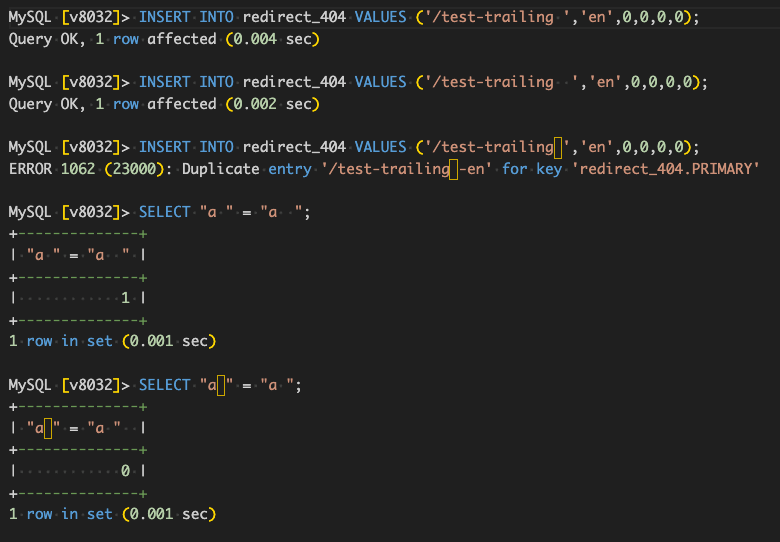
joegl commentedI am guessing the issue has to do with collation of a database and how it stores unique characters. Because if the unique key is the URL, then duplicate entries by definition shouldn't exist. The only reason they exist is because they're not duplicates, and one is probably using a special character of some kind. The problem is when the database gets dumped and imported, somewhere along that process the unique character which makes two entries separate gets stripped or modified and thus the entries now match and are considered duplicates.
In my case, it was because the difference in MySQL versions between the production site and my local where I was importing and how certain characters were treated between those versions.
As a crude, made-up example, let's say on production there are two entries like this:
1.
/path/my-path2.
/path/my-path😀These are considered unique paths and then stored in the database. Then let's say I export the DB and import into a database that doesn't allow emoji's. So when importing, it strips out the emoji from example #2, and now I'm left with two "DUPLICATE ENTRIES".
Comment #17
berdirI don't see what this module could change to fix that, as #16 explains, this is a collation problem and different databases with different settings.
If you get this on local environments for development, it's perfectly fine to just ignore this table unless you for some reason want to work specifically on this. On staging/test environments, you likely want to ensure that you use the same collation.
Comment #18
joelpittet@Berdir, we are running into this, the path is used as an index, and MySQL 8 changes what can be in an index and seems to normalize the values where MySQL 5.7 didn't care that there was some weird character some hacker tried to put in the path should also be an index.
Maybe we can either remove the index/primary key on path, or apply a filter to remove characters that can't be real paths as per some RFC (didn't google yet)
Comment #19
joelpittetSome examples of paths where this MySQL 8 key collision occurred
Can you spot the funny characters?
Edit: The last one doesn't show on the page but looks like this in sublime text
<0x18>Comment #20
berdir> that can't be real paths as per some RFC (didn't google yet)
Well, they can be in the path or the server wouldn't be able to receive and log them.
But yeah, fair enough, I'm open to trimming and otherwise removing characters, but not sure how easy that part is, there's plenty of international characters that might actually be used in an URL.
Comment #21
joelpittet@Berdir, how about URL encoding them?
There may be some that are worth stripping, I'll look around and see if there is a spec to reference.
Comment #22
joelpittetThis is a really good answer, but still trying to grok how to implement it. https://stackoverflow.com/a/36667242/80281 Basically what you said written as RFC 3987 is out-of-date from reality.
Comment #23
joelpittetWe should have tests to show a sampling of characters that should work. And maybe if they are valid characters for URLs we ensure they save properly in MySQL 8.0?
Like maybe we don't index the path, which would be a performance issue I imagine.
There is probably a nice middle ground here... but lets start with test coverage to set the expectations.
Comment #24
sseto commentedI'm also getting this from trying to dump from 5.7 to 8.0. Is it safe to just delete the data from the table `redirect_404` and mysqldump that way?
Comment #25
loopy1492 commentedJust got it on another site. Need to copy the db to a different environment upstream, and wipe the redirect_404 table before I can download it and use it locally.
Comment #26
taran2lURL encoding should be the way here, as @joelpittet suggested
Comment #27
scott_earnest commentedWe have been copying our database to a lower environment, then running a database update, then sql-sync to local.
This command will clear the problem records:
drush @stage sql-query "DELETE FROM redirect_404 WHERE path LIKE '%my-duplicate-key-redirect%'"Or we have dropped the PRIMARY KEY, this also works:
drush @stage sql-query 'ALTER TABLE redirect_404 DROP PRIMARY KEY'This is our current workaround.
Comment #28
tedfordgif commentedComment #29
tedfordgif commentedAdding core issue for reference on handling case sensitivity, but with only one mention of "collation".
Comment #30
tedfordgif commentedAnother approach might be to simply diverge from core's handling of URLs, and make redirect_404 everything-sensitive, e.g. throw 'binary' on the 'path' field in the redirect_404 schema. That would be unexpected for users/devs, and is probably not correct, but would have the same effect as the URL-encoding suggestion (absent normalization).
This is not the right ticket to discuss it, but another place we end up with inconsistencies is that public files don't get served by Drupal, but the 404 page for the same does. Should core have a redirect if the file_managed uri matches the path modulo collation? That would also mean fewer redirect_404 records would get created.
The issue with allowing the database collation to determine matches is that we may want different behavior in different circumstances. For example, if a single character in /some/long-URL-slüg has a diacritic mark like that, we probably want to serve the same page, especially if the canonical path has the diacritic and the request path does not. However, in a short url slug, such as you might see on /a/view-page-with/tags/slüg, some languages probably have word collisions we wouldn't want. Maybe the correct approach is to always have unambiguous short slugs (add context to the "machine name", e.g. garden_slug).
Comment #31
loopy1492 commentedStill busted.
Comment #32
sonnyktThe issue is still occurring with MySQL 8:
The special character is

0xC2A0(UTF-8 non-breaking space).Comment #33
joao.ramos.costa commentedFaced the same issue with mysql 8.
ERROR 1062 (23000) at line 11049: Duplicate entry '/mypage page/example/1.pdf-en' for key 'redirect_404.PRIMARY'Comment #34
loopy1492 commentedWith Acquia moving over to mysql 8 soon, folks on that platform may want to petition Acquia to contribute to this module.
Comment #35
loopy1492 commentedstill busted
Comment #37
loopy1492 commentedWhile I've been developing a solution, I can confirm @joao.ramos.costa that we're getting this issue still with upstream MySQL 8. For some reason, locally with Docksal running mysql 8.0.28, it thinks the full-width kana characters are the same as the medium width ones.
Comment #38
loopy1492 commentedI started by changing how the URLs were stored, but then I realized we'd have to change how they were accessed as well. Different characters that happen to look the same are still different after all. I didn't want to risk the possibility that there were intentional uses of these characters.
I went back to my original thought that we simply need a proper unique key. The merge request/patch creates an update that creates a new id field, assigns an id value to all the existing 404 entries, then sets that ID as the primary key, then sets the value as auto-incrementing.
Comment #39
loopy1492 commentedTesting steps:
drush cr && drush updb -yon the dev serverdrush sql-sync @thesite.dev @self -ydrush sql-query "DESCRIBE redirect_404;", then…drush sql-query "select * from redirect_404;"drush crseveral times. We have to clear cache every time we hit the url because cache protects the resource from incrementing after the first hit.drush sql-query "select * from redirect_404;"and check to make sure that path has incremented.Comment #40
loopy1492 commentedComment #41
joao.ramos.costa commentedHi @loopy1492, I will soon test your steps, although I think we should add them as kernel/unit tests. As for the table auto-incremental unique id, here's my two cents: Seems indeed like the most wise choice; otherwise, we might get lost in the infinite creativity of character combinations.
Comment #42
grayle commentedBesides any possible performance issues with joins which should be investigated, and writing an update hook to update the existing column, adding `binary` to the hook schema should "fix it" no?
https://www.drupal.org/node/1237252
https://git.drupalcode.org/project/redirect/-/blob/8.x-1.x/modules/redir...
That will result in binary collation. So if the database default charset is utf8 the collation would essentially be utf8_bin. If the charset is utf8mb4 the collation would then be utf8mb4_bin, etc.