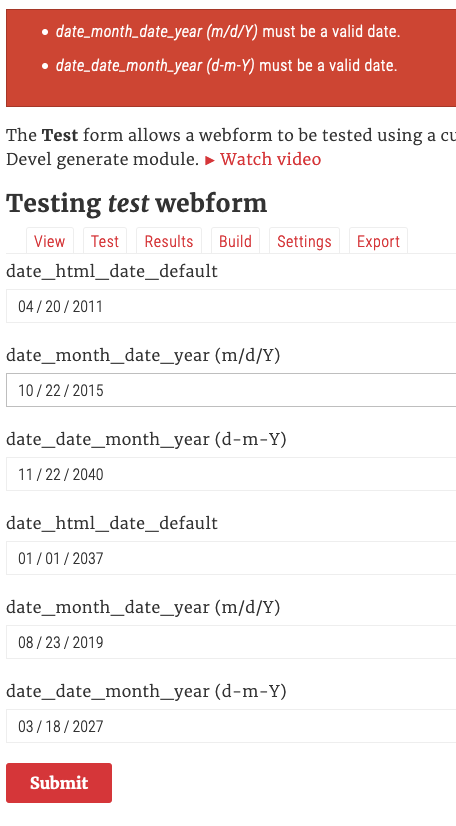
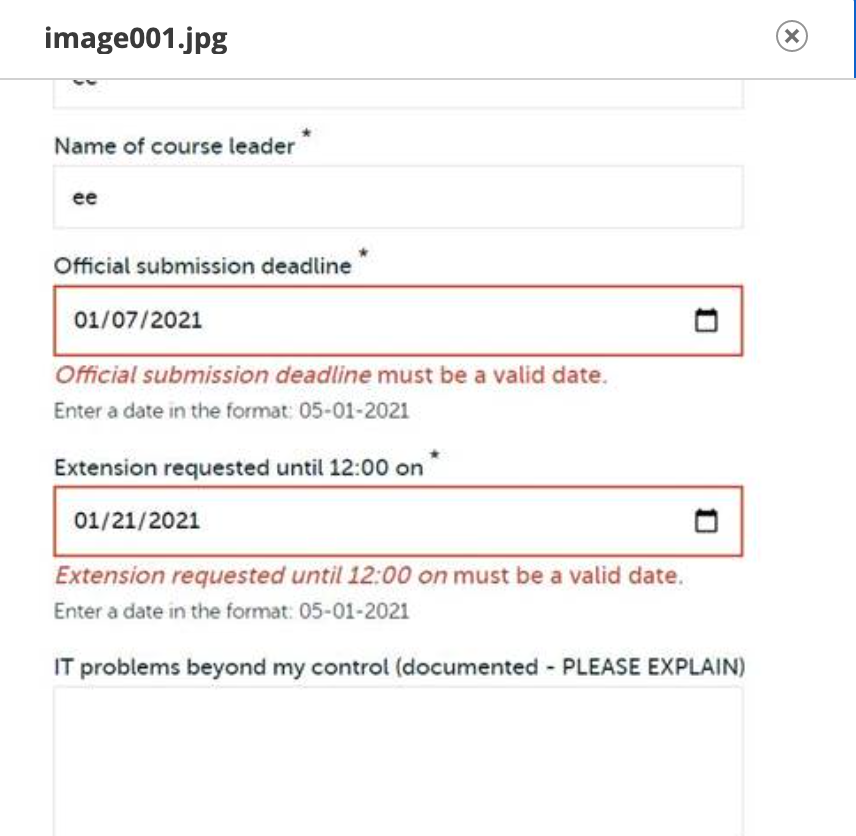
I'm having a strange problem with a date field on a webform.

I have it set, in the Element Settings, to a minimum date of "today" and a maximum date of +2 months. To my understanding, this should allow the viewer to select any date from the day they are submitting the form to two months later. Under Form Validation, nothing is checked — so to my understanding, it should not be performing any sort of validation.

But — when I test the form, no matter what value I set for the date, I get "The value in What would be the most convenient time to meet with our expert?: Date has to be greater than Thu, 12/17/2020 - 00:00." Even though the value IS greater than that. Even dates weeks in the future result in the same message.

I initially got a similar error for the time field that follows it, but that one disappeared when I switched the element from jQuery time picker to HTML5 time input. (I had initially used the jQuery time picker for both, but switched it to HTML5 because the jQuery picker was giving me other weird problems). But switching to HTML5 did not affect the validation issue with the date field.

So there seem to be two issues here: First, since I didn't set any rules under Form Validation, why is it trying to validate input anyway? The only date min/max I set was under Element Settings, which as far as I know should only affect what's displayed to the viewer.

Second, why is the unwanted validation insisting that the date has to be greater than today when the date IS greater than today?

Comments

spidersilk created an issue. See original summary.

spidersilk’s picture

Title: Date and time fields keeps giving validation error even though submitted values are valid, and no validation rules are set » Date field keeps giving validation error even though submitted date is valid, and no validation rules are set
jrockowitz’s picture

Version: 8.x-5.22 » 8.x-5.x-dev
Status: Active » Postponed (maintainer needs more info)
StatusFileSize
new5.05 KB

I am not able to replicate this issue using the attached webform in Chrome.

The submitted value must be YYYY-MM-DD.

Please provide an example webform.

safetypin’s picture

I just received a report from someone else that this was happening for our webform. I went to test it, and everything worked fine. Sounds like we're in almost exactly the same error situation, tho. We have 2 date fields, we are validating "required" and the date selection is from "today" to "+1 year" for one field and "+2 year" for the other.

uuid: d9592cdf-9167-4a39-bd78-a4134f404a61
langcode: en
status: open
dependencies: {  }
open: null
close: null
weight: 0
uid: 1
template: false
archive: false
id: rsap_request_to_hire
title: 'RSAP Request to Hire'
description: ''
category: ''
elements: |
  student_rhodes_id:
    '#type': number
    '#title': 'Student Rhodes ID'
    '#description': 'RID of the student you would like to hire.'
    '#field_prefix': R
    '#min': 0
    '#step': 1
    '#required': true
  student_name:
    '#type': textfield
    '#title': 'Student name'
    '#description': 'Enter the student's full name.'
    '#required': true
  supervisor_name:
    '#type': textfield
    '#title': 'Supervisor name'
    '#autocomplete': 'off'
    '#default_value': '[current-user:field_first_name:value] [current-user:field_last_name:value]'
    '#required': true
  assureforce_supervisor:
    '#type': textfield
    '#title': 'AssureForce Supervisor'
    '#description': '(If different than supervisor listed above)'
  job_title:
    '#type': textfield
    '#title': 'Job title'
  start_date:
    '#type': date
    '#title': 'Start date'
    '#required': true
    '#date_date_min': today
    '#date_date_max': '+1 year'
    '#datepicker': true
    '#date_date_format': m/d/Y
  end_date:
    '#type': date
    '#title': 'End date'
    '#required': true
    '#date_date_min': today
    '#date_date_max': '+2 years'
    '#datepicker': true
    '#date_date_format': m/d/Y
  pay_rate:
    '#type': number
    '#title': 'Pay rate'
    '#field_prefix': $
    '#autocomplete': 'off'
    '#required': true
    '#default_value': ''
    '#min': 0
  additional_comments:
    '#type': textarea
    '#title': 'Additional comments'
  agree_to_terms:
    '#type': checkbox
    '#title': 'I agree to the terms and requirements of the Rhodes Student Associate Program as listed in the RSAP Supervisor Handbook.'
    '#required': true
  spoken_to_student:
    '#type': checkbox
    '#title': 'I have spoken with the student named above and they agree to accept this position.'
    '#required': true
  work_cannot_begin:
    '#type': checkbox
    '#title': 'I understand that the student named above cannot begin working until all the required documents have been turned in and approved, and we have both received a confirmation email.'
    '#required': true
  
css: ''
javascript: ''
settings:
  ajax: false
  ajax_scroll_top: form
  ajax_progress_type: ''
  ajax_effect: ''
  ajax_speed: null
  page: true
  page_submit_path: ''
  page_confirm_path: ''
  page_theme_name: ''
  form_title: both
  form_submit_once: false
  form_exception_message: ''
  form_open_message: ''
  form_close_message: ''
  form_previous_submissions: true
  form_confidential: false
  form_confidential_message: ''
  form_disable_remote_addr: false
  form_convert_anonymous: false
  form_prepopulate: false
  form_prepopulate_source_entity: false
  form_prepopulate_source_entity_required: false
  form_prepopulate_source_entity_type: ''
  form_reset: false
  form_disable_autocomplete: false
  form_novalidate: false
  form_disable_inline_errors: false
  form_required: false
  form_unsaved: false
  form_disable_back: false
  form_submit_back: false
  form_autofocus: false
  form_details_toggle: false
  form_access_denied: default
  form_access_denied_title: ''
  form_access_denied_message: ''
  form_access_denied_attributes: {  }
  form_file_limit: ''
  share: false
  share_node: false
  share_theme_name: ''
  share_title: true
  share_page_body_attributes: {  }
  submission_label: ''
  submission_log: false
  submission_views: {  }
  submission_views_replace: {  }
  submission_user_columns: {  }
  submission_user_duplicate: false
  submission_access_denied: default
  submission_access_denied_title: ''
  submission_access_denied_message: ''
  submission_access_denied_attributes: {  }
  submission_exception_message: ''
  submission_locked_message: ''
  submission_excluded_elements: {  }
  submission_exclude_empty: false
  submission_exclude_empty_checkbox: false
  previous_submission_message: ''
  previous_submissions_message: ''
  autofill: false
  autofill_message: ''
  autofill_excluded_elements: {  }
  wizard_progress_bar: true
  wizard_progress_pages: false
  wizard_progress_percentage: false
  wizard_progress_link: false
  wizard_progress_states: false
  wizard_auto_forward: true
  wizard_auto_forward_hide_next_button: false
  wizard_keyboard: true
  wizard_start_label: ''
  wizard_preview_link: false
  wizard_confirmation: true
  wizard_confirmation_label: ''
  wizard_track: ''
  wizard_prev_button_label: ''
  wizard_next_button_label: ''
  wizard_toggle: false
  wizard_toggle_show_label: ''
  wizard_toggle_hide_label: ''
  preview: 0
  preview_label: ''
  preview_title: ''
  preview_message: ''
  preview_attributes: {  }
  preview_excluded_elements: {  }
  preview_exclude_empty: true
  preview_exclude_empty_checkbox: false
  draft: none
  draft_multiple: false
  draft_auto_save: false
  draft_saved_message: ''
  draft_loaded_message: ''
  draft_pending_single_message: ''
  draft_pending_multiple_message: ''
  confirmation_type: page
  confirmation_title: ''
  confirmation_message: ''
  confirmation_url: ''
  confirmation_attributes: {  }
  confirmation_back: true
  confirmation_back_label: ''
  confirmation_back_attributes: {  }
  confirmation_exclude_query: false
  confirmation_exclude_token: false
  confirmation_update: false
  limit_total: null
  limit_total_interval: null
  limit_total_message: ''
  limit_total_unique: false
  limit_user: null
  limit_user_interval: null
  limit_user_message: ''
  limit_user_unique: false
  entity_limit_total: null
  entity_limit_total_interval: null
  entity_limit_user: null
  entity_limit_user_interval: null
  purge: none
  purge_days: null
  results_disabled: false
  results_disabled_ignore: false
  results_customize: false
  token_view: false
  token_update: false
  serial_disabled: false
access:
  create:
    roles:
      - anonymous
      - authenticated
    users: {  }
    permissions: {  }
  view_any:
    roles: {  }
    users: {  }
    permissions: {  }
  update_any:
    roles: {  }
    users: {  }
    permissions: {  }
  delete_any:
    roles: {  }
    users: {  }
    permissions: {  }
  purge_any:
    roles: {  }
    users: {  }
    permissions: {  }
  view_own:
    roles: {  }
    users: {  }
    permissions: {  }
  update_own:
    roles: {  }
    users: {  }
    permissions: {  }
  delete_own:
    roles: {  }
    users: {  }
    permissions: {  }
  administer:
    roles: {  }
    users: {  }
    permissions: {  }
  test:
    roles: {  }
    users: {  }
    permissions: {  }
  configuration:
    roles: {  }
    users: {  }
    permissions: {  }
handlers:
  email_results:
    id: email
    label: 'Email Results'
    notes: ''
    handler_id: email_results
    status: true
    conditions: {  }
    weight: 0
    settings:
      states:
        - completed
      to_mail: test@example.com
      to_options: {  }
      cc_mail: '[current-user:mail]'
      cc_options: {  }
      bcc_mail: ''
      bcc_options: {  }
      from_mail: '[webform_submission:user:mail]'
      from_options: {  }
      from_name: '[webform_submission:values:supervisor_name:raw]'
      subject: 'RSAP Request to Hire from [webform_submission:user]'
      body: _default
      excluded_elements: {  }
      ignore_access: false
      exclude_empty: true
      exclude_empty_checkbox: false
      exclude_attachments: false
      html: true
      attachments: false
      twig: false
      debug: false
      reply_to: ''
      return_path: ''
      sender_mail: ''
      sender_name: ''
      theme_name: ''
      parameters: {  }
variants: {  }
jrockowitz’s picture

My best guess is a specific browser is having an issue with date min/max. This could also be triggered by a time zone related issue.

Someone needs to provide the steps and browser required to replicate this issue.

safetypin’s picture

It is something to do with the browser, but it's not super specific. Both Chrome and Firefox are unable to submit the form. Safari can do it. What's confusing is that in both Chrome and Firefox the form is submitted to the server and the error I'm seeing is a drupal message, not a browser/javascript validation error message. I will try to recreate the error on a new form.

safetypin’s picture

I have narrowed my problem down to the date_format configuration. Custom properties like this cause the error:

datepicker: true
date_date_format: m/d/Y
step: ''

If I leave the formatting like this, the error goes away:

datepicker: true
date_date_format: Y-m-d
step: ''

I duplicated the form and still saw the problem. I deleted the forms, and then added to new fields for the date fields, and the problem went away. When I exported and compared the two forms, I see this as the difference:

    '#format_items': comma
    '#datepicker': true
    '#date_date_format': m/d/Y

These are missing in the new form that doesn't have the error. When I added the date_date_format configuration, the problem came back, so I think the problem is related to date format requirement. I'm not sure about the '#format_items': comma. I can't find a place for that configuration in the original form, so I don't know where to put it in the new form to test whether it has any effect.

dennis cohn’s picture

I can confirm this issue.
All our forms with date elements doesn't validate anymore!
Only new forms with date fields are validating correctly.

Our date format is d-m-Y (in advanced custom settings) and we don't have any min/max set.
We're editing all (!) our forms now with the date format Y-m-d so the forms are working again.
But this is a quick fix for us and isn't the ideal solution as the date format is now different then our standard date format on our website.

dennis cohn’s picture

StatusFileSize
new295.89 KB

See attachment for the error

jdearie’s picture

I can confirm this issue as well. Not all of our forms have the date format of d-m-Y. I'm not sure why one form had d-m-Y, whereas a new form as well as several older forms were using Y-m-d when the validation and other settings were identical.

Changing the setting from d-m-Y to Y-m-d solved the problem.

jrockowitz’s picture

Status: Postponed (maintainer needs more info) » Needs work
jrockowitz’s picture

StatusFileSize
new5.36 KB

I am not able to replicate this issue using the attached webform with the below elemense

date_default:
  '#type': date
  '#title': date_html_date_default
date_month_date_year:
  '#type': date
  '#title': 'date_month_date_year (m/d/Y)'
  '#date_date_format': m/d/Y
date_date_month_year:
  '#type': date
  '#title': 'date_date_month_year (d-m-Y)'
  '#date_date_format': d-m-Y
datepicker_default:
  '#type': date
  '#title': date_html_date_default
  '#datepicker': true
datepicker_month_date_year:
  '#type': date
  '#title': 'date_month_date_year (m/d/Y)'
  '#date_date_format': m/d/Y
  '#datepicker': true
datepicker_date_month_year:
  '#type': date
  '#title': 'date_date_month_year (d-m-Y)'
  '#date_date_format': d-m-Y
  '#datepicker': true
jrockowitz’s picture

Status: Needs work » Postponed (maintainer needs more info)

Please provide an example element that can be used to replicate the issue.

My local site is in English using Drupal's default locale and regional settings.

dennis cohn’s picture

@jrockowitz,
I've exported a webform that gives the error:

uuid: 472496c3-bf99-4670-a820-711663963a40
langcode: en
status: open
dependencies:
  module:
    - custom_webform
third_party_settings:
  custom_webform:
    captcha: 0
    last_updated: 1565166764
open: null
close: null
weight: 0
uid: 334
template: false
archive: false
id: applying_for_electives
title: 'OSC - Applying for electives'
description: ''
category: ESE
elements: |
  first_name:
    '#type': textfield
    '#title': 'First name:'
  family_name:
    '#type': textfield
    '#title': 'Family name:'
  date_of_birth:
    '#type': date
    '#title': 'Date of Birth:'
    '#required': true
    '#datepicker': true
    '#date_date_format': d-m-Y
  address_1:
    '#type': textfield
    '#title': 'Street+ Number:'
  address_2:
    '#type': textfield
    '#title': 'Zip Code + City:'
  email_address_:
    '#type': email
    '#title': 'E-mail Address:'
    '#required': true
  letter_of_approval_of_your_examination_board_:
    '#type': managed_file
    '#title': 'Letter of approval of your examination board'
    '#required': true
  checkbox:
    '#type': checkbox
    '#title': 'I am aware of:'
    '#description': "<p>******</p>\n"
    '#required': true
  apply:
    '#type': webform_actions
    '#title': Apply
    '#submit__label': Apply
  
css: ''
javascript: ''
settings:
  ajax: true
  ajax_scroll_top: form
  ajax_progress_type: ''
  ajax_effect: ''
  ajax_speed: null
  page: true
  page_submit_path: ''
  page_confirm_path: ''
  page_theme_name: ''
  form_title: both
  form_submit_once: false
  form_exception_message: ''
  form_open_message: ''
  form_close_message: ''
  form_previous_submissions: true
  form_confidential: false
  form_confidential_message: ''
  form_disable_remote_addr: false
  form_convert_anonymous: false
  form_prepopulate: false
  form_prepopulate_source_entity: false
  form_prepopulate_source_entity_required: false
  form_prepopulate_source_entity_type: ''
  form_reset: false
  form_disable_autocomplete: false
  form_novalidate: false
  form_disable_inline_errors: false
  form_required: false
  form_unsaved: false
  form_disable_back: false
  form_submit_back: false
  form_autofocus: false
  form_details_toggle: false
  form_access_denied: default
  form_access_denied_title: ''
  form_access_denied_message: ''
  form_access_denied_attributes: {  }
  form_file_limit: ''
  share: false
  share_node: false
  share_theme_name: ''
  share_title: true
  share_page_body_attributes: {  }
  submission_label: ''
  submission_log: false
  submission_views: {  }
  submission_views_replace: {  }
  submission_user_columns: {  }
  submission_user_duplicate: false
  submission_access_denied: default
  submission_access_denied_title: ''
  submission_access_denied_message: ''
  submission_access_denied_attributes: {  }
  submission_exception_message: ''
  submission_locked_message: ''
  submission_excluded_elements: {  }
  submission_exclude_empty: false
  submission_exclude_empty_checkbox: false
  previous_submission_message: ''
  previous_submissions_message: ''
  autofill: false
  autofill_message: ''
  autofill_excluded_elements: {  }
  wizard_progress_bar: true
  wizard_progress_pages: false
  wizard_progress_percentage: false
  wizard_progress_link: false
  wizard_progress_states: false
  wizard_auto_forward: true
  wizard_auto_forward_hide_next_button: false
  wizard_keyboard: true
  wizard_start_label: ''
  wizard_preview_link: false
  wizard_confirmation: true
  wizard_confirmation_label: ''
  wizard_track: ''
  wizard_prev_button_label: ''
  wizard_next_button_label: ''
  wizard_toggle: false
  wizard_toggle_show_label: ''
  wizard_toggle_hide_label: ''
  preview: 0
  preview_label: ''
  preview_title: ''
  preview_message: ''
  preview_attributes: {  }
  preview_excluded_elements: {  }
  preview_exclude_empty: true
  preview_exclude_empty_checkbox: false
  draft: none
  draft_multiple: false
  draft_auto_save: false
  draft_saved_message: ''
  draft_loaded_message: ''
  draft_pending_single_message: ''
  draft_pending_multiple_message: ''
  confirmation_type: inline
  confirmation_title: ''
  confirmation_message: '<p>Thank you for your application. You may close this page.</p>'
  confirmation_url: ''
  confirmation_attributes: {  }
  confirmation_back: false
  confirmation_back_label: ''
  confirmation_back_attributes: {  }
  confirmation_exclude_query: false
  confirmation_exclude_token: false
  confirmation_update: false
  limit_total: null
  limit_total_interval: null
  limit_total_message: ''
  limit_total_unique: false
  limit_user: null
  limit_user_interval: null
  limit_user_message: ''
  limit_user_unique: false
  entity_limit_total: null
  entity_limit_total_interval: null
  entity_limit_user: null
  entity_limit_user_interval: null
  purge: none
  purge_days: null
  results_disabled: false
  results_disabled_ignore: false
  results_customize: false
  token_view: false
  token_update: false
  token_delete: false
  serial_disabled: false
  auto_delete: 1
  privacy_statement: |
    <p>&nbsp;<br />
    Fields marked with an * are required</p>
    
    <p>************************</p>
  purge_days_explanation: ''
  purge_webform_closed_date: null
access:
  create:
    roles:
      - anonymous
      - authenticated
    users: {  }
    permissions: {  }
  view_any:
    roles: {  }
    users: {  }
    permissions: {  }
  update_any:
    roles: {  }
    users: {  }
    permissions: {  }
  delete_any:
    roles: {  }
    users: {  }
    permissions: {  }
  purge_any:
    roles: {  }
    users: {  }
    permissions: {  }
  view_own:
    roles: {  }
    users: {  }
    permissions: {  }
  update_own:
    roles: {  }
    users: {  }
    permissions: {  }
  delete_own:
    roles: {  }
    users: {  }
    permissions: {  }
  administer:
    roles: {  }
    users: {  }
    permissions: {  }
  test:
    roles: {  }
    users: {  }
    permissions: {  }
  configuration:
    roles: {  }
    users: {  }
    permissions: {  }
handlers:
  email:
    id: email
    label: Email
    notes: ''
    handler_id: email
    status: true
    conditions: {  }
    weight: 0
    settings:
      states:
        - completed
      to_mail: ******
      to_options: {  }
      cc_mail: ''
      cc_options: {  }
      bcc_mail: ''
      bcc_options: {  }
      from_mail: ******
      from_options: {  }
      from_name: _default
      subject: '******'
      body: _default
      excluded_elements: {  }
      ignore_access: false
      exclude_empty: true
      exclude_empty_checkbox: false
      exclude_attachments: false
      html: true
      attachments: true
      twig: false
      debug: false
      reply_to: ''
      return_path: ''
      sender_mail: ''
      sender_name: ''
      theme_name: ''
      parameters: {  }
      submission_data_pdf_attachment: false
  response_email:
    id: email
    label: 'Response Email'
    notes: ''
    handler_id: response_email
    status: true
    conditions: {  }
    weight: 1
    settings:
      states:
        - completed
      to_mail: '[webform_submission:values:email_address_:raw]'
      to_options: {  }
      cc_mail: ''
      cc_options: {  }
      bcc_mail: ''
      bcc_options: {  }
      from_mail: ******
      from_options: {  }
      from_name: _default
      subject: '******'
      body: |
        <p>Dear [webform_submission:values:first_name] [webform_submission:values:family_name],</p>
        
        <p>Thank you for registering for one of our electives. We will get back to you as soon as possible. You have entered the following information:</p>
        
        <p>[webform_submission:values]<br />
        Submitted on [webform_submission:created]</p>
      excluded_elements: {  }
      ignore_access: false
      exclude_empty: true
      exclude_empty_checkbox: false
      exclude_attachments: false
      html: true
      attachments: false
      twig: false
      debug: false
      reply_to: ''
      return_path: ''
      sender_mail: ''
      sender_name: ''
      theme_name: ''
      parameters: {  }
      submission_data_pdf_attachment: false
variants: {  }
dennis cohn’s picture

Status: Postponed (maintainer needs more info) » Needs work
alberto56’s picture

Status: Needs work » Active
StatusFileSize
new436.48 KB

I believe "active" is more appropriate than "needs work" (which I think means that a solution is being worked on).

I am getting this problem with the following form:

'#method': post
'#action': 'https://webto.salesforce.com/servlet/servlet.WebToCase?encoding=UTF-8'
'#attributes':
  class:
    - gtm-appointment-request
date_of_birth:
  '#type': date
  '#title': '* Date of Birth'
  '#required': true
  '#format_items': comma
  '#date_date_min': '-100 years'
  '#date_date_max': '+1 year'
  '#datepicker': true
  '#date_date_format': m/d/Y
  '#id': 00N4S000000o1Y5
  '#name': 00N4S000000o1Y5
actions:
  '#type': webform_actions
  '#title': 'Submit button(s)'

Even though I have specified m/d/Y as the date format, the date format appears as Y-m-d on Firefox, Chrome, Opera on mac OS Big Sur 11.1,

The problem does not happen on Safari on mac OS Big Sur 11.1, IE 11 on Windows 8.1, Firefox on Windows 10

Please see the enclosed image

safetypin’s picture

StatusFileSize
new75.56 KB

@jrockowitz - I created a completely new form using the source you provided on a development server and replicated the error. I've attached a screenshot - I clicked into each of these forms and selected a new date in the date picker, and the date is formatted incorrectly. I'm not sure it's relevant but I'm using Firefox on MacOS. I can confirm that Safari won't replicate the error.

alberto56’s picture

A workaround we've used on production forms is to change the forms from "date" type to "textfield".

Also, I am experiencing this on 6.x, I have not tested it on 5.x.

alberto56’s picture

Priority: Normal » Major

According to https://www.drupal.org/docs/develop/issues/fields-and-other-parts-of-an-..., major bugs "Interfere with normal site visitors' use of the site (for example, content in the wrong language, or validation errors for regular form submissions), even if there is a workaround."

Based on the above I'll set this to major.

alberto56’s picture

Version: 8.x-5.x-dev » 6.x-dev

I will set the version to 6.0.0 because that is the version I tested. However it might be safe to say that the issue might have been introduced in 5.23 which was released on the same day as 6.0.0. (I tested 5.22 -- see below -- and it works fine).

Here is how I reproduced this. I will start by demonstrating that version 5.22 works perfectly; then we will show that 6.0.0 (presumably 5.23 also, but someone should confirm this) fails.

  • Step 1: Install Drupal 8.9.12 and webform 5.22 (NOT the latest 5.x version!)
  • Step 2: drush si -y && drush en -y webform_ui
  • Step 3: Go to /admin/structure/webform/add, Call the webform "Test", then "Save"
  • Step 4: In the source tab, enter the following and Save
    date:
      '#type': date
      '#title': date
      '#format_items': comma
      '#date_date_min': '-2 months'
      '#date_date_max': '+2 months'
      '#date_date_format': m/d/Y
      '#datepicker': true
    actions:
      '#type': webform_actions
      '#title': 'Submit button(s)'
      '#submit__label': submit

Go to /form/test and enter today's date in the format m/d/Y (at the time of this writing that's 01/15/2021), then submit. Try it with several different browsers.

  • WF 5.22 on Safari mac: datepicker exists, date is correct format, everything is saved
  • WF 5.22 on FF mac: datepicker exists, date is correct format, everything is saved
  • WF 5.22 on Chrome mac: datepicker exists, date is correct format, everything is saved
  • WF 5.22 on IE11 win8.1: datepicker exists, date is correct format, everything is saved
  • WF 5.22 on FF win10: datepicker exists, date is correct format, everything is saved
  • WF 5.22 on Chrome win10: datepicker exists, date is correct format, everything is saved

Up to now everything works fine.

  • composer require drupal/webform:6
  • make sure webform is update to 6.0.0
  • drush updb -y
  • make sure all the updates work without error, the last one being "webform_update_8621"

Again, go to /form/test and enter today's date in the format m/d/Y (at the time of this writing that's 01/15/2021), then submit. Try it with several different browsers.

  • WF 6.0.0 on Safari mac: datepicker exists, date is correct format, everything is saved
  • WF 6.0.0 on FF mac: datepicker exists, date is in incorrect y-m-d format, entering 2021-01-15 causes "date must be a valid date. " error.
  • WF 6.0.0 on Chrome mac: datepicker exists, date is in incorrect y-m-d format, entering 2021-01-15 causes "date must be a valid date. " error.
  • WF 6.0.0 on IE11 win8.1: datepicker exists, date is correct format, everything is saved
  • WF 6.0.0 on FF win10: datepicker exists, date is correct format, but even when selecting today's date (01/15/2021), we get the error "date must be a valid date."
  • WF 6.0.0 on Chrome win10: datepicker exists, date is correct format, but even when selecting today's date (01/15/2021), we get the error "date must be a valid date."

Methodology

I created a brand new Drupal site on a Docker machine using d8 starterkit, then used my local mac OS machine (11.1) to test mac OS and lambdatest to test Windows.

My only workaround for now is to remove all date fields and replace them with plain text fields.

jrockowitz’s picture

I think the issue is with Webform 6.0, you currently need to have the jquery_ui_datepicker.module enabled.

Do you have the jquery_ui_datepicker.module enabled? If yes, does the issue still occur?

jrockowitz’s picture

StatusFileSize
new1.89 KB

I think the attached patch starts to address this issue.

dennis cohn’s picture

I can confirm that after I've enabled the jQuery UI Datepicker module, the issue is gone.

jrockowitz’s picture

The patch should help address the issue for the below scenarios.

In Drupal 8, core's or the jquery_ui_datepicker.module can be used.

In Drupal 9, the jquey_ui_datepicker.module is an optional dependency. If the jquey_ui_datepicker.module is not installed the #date_date_format will be ignored.

jrockowitz’s picture

Status: Active » Needs review
alberto56’s picture

Status: Needs review » Needs work

The patch inserts the $this outside of an object, in the webform_library_info_alter() function, in the file ./includes/webform.libraries.inc, which results in the error:

Error: Using $this when not in object context in webform_library_info_alter() (line 72 of modules/contrib/webform/includes/webform.libraries.inc).

Also, without the patch, On Drupal 8 with Webform 6.0.0, I ran

composer require drupal/jquery_ui_datepicker
drush en -y jquery_ui_datepicker
drush cr

After that, with the form from comment 20, the following browsers worked as expected (d8/wf6/jquery_ui_datepicker 8.x-1.0):

* Safari mac OK
* FF mac OK
* Chrome mac OK
* IE11 win8.1 OK
* FF win10 OK
* Chrome win10 OK

I then ran a fresh install of WF6 on D9, and had the same errors as described in comment 20. Again, I did not add the patch because of the "this when not in object context" error.

I then ran this on my D9 setup:

composer require drupal/jquery_ui_datepicker
drush en -y jquery_ui_datepicker
drush cr

After that, with the form from comment 20, the following browsers worked as expected (d9/wf6/jquery_ui_datepicker 8.x-1.0):

* Safari mac OK
* FF mac OK
* Chrome mac OK
* IE11 win8.1 OK
* FF win10 OK
* Chrome win10 OK

Thus, using jquery_ui_datepicker works perfectly.

Setting to "needs work" because of the "this when not in object context" error introduced by the patch.

jrockowitz’s picture

Status: Needs work » Needs review
StatusFileSize
new1.9 KB
alberto56’s picture

Status: Needs review » Needs work

Thanks for the patch! I ran the following tests with patch at 27, using the latest dev version (2ec980b00dff2f2f0a5ba35c4940817405772301) Webform 6.x with the following form:

date:
  '#type': date
  '#title': date
  '#format_items': comma
  '#date_date_min': '-2 months'
  '#date_date_max': '+2 months'
  '#date_date_format': m/d/Y
  '#datepicker': true
actions:
  '#type': webform_actions
  '#title': 'Submit button(s)'
  '#submit__label': submit

Drupal Patch jquery_ui_datepicker OS Browser Datepicker Date format Can submit form
8 No No Mac Safari Yes Yes Yes
8 No No Mac FF Yes No No
8 No No Mac Chrome Yes No No
8 No No Win IE11 Yes Yes Yes
8 No No Win FF Yes Yes No
8 No No Win Chrome Yes Yes No
8 Yes No Mac Safari Yes Yes Yes
8 Yes No Mac FF Yes Yes Yes
8 Yes No Mac Chrome Yes Yes Yes
8 Yes No Win IE11 Yes Yes Yes
8 Yes No Win FF Yes Yes Yes
8 Yes No Win Chrome Yes Yes Yes
8 Yes Yes Mac Safari Yes Yes Yes
8 Yes Yes Mac FF Yes Yes Yes
8 Yes Yes Mac Chrome Yes Yes Yes
8 Yes Yes Win IE11 Yes Yes Yes
8 Yes Yes Win FF Yes Yes Yes
8 Yes Yes Win Chrome Yes Yes Yes
9 Yes No Mac Safari No YYYY-MM-DD Only if YYYY-MM-DD
9 Yes No Mac FF Yes YYYY-MM-DD Only if YYYY-MM-DD
9 Yes No Mac Chrome Yes YYYY-MM-DD Only if YYYY-MM-DD
9 Yes No Win IE11 Yes YYYY-MM-DD Only if YYYY-MM-DD
9 Yes No Win FF Yes Yes Yes
9 Yes No Win Chrome Yes Yes Yes
9 Yes Yes Mac Safari Yes Yes Yes
9 Yes Yes Mac FF Yes Yes Yes
9 Yes Yes Mac Chrome Yes Yes Yes
9 Yes Yes Win IE11 Yes Yes Yes
9 Yes Yes Win FF Yes Yes Yes
9 Yes Yes Win Chrome Yes Yes Yes

Without jquery_ui_datepicker, Safari (Mac), FF (Mac), Chrome (Mac) and IE11 (Win10) on Drupal 9, even with the patch, require input in the format YYYY-MM-DD, even though the date format is specified as "m/d/Y" in the form YML.

On FF (Mac), Chrome (Mac) and IE11 (Win10), this is mitigated by the fact that there is a datepicker and it works correctly.

However, on Safari there is no datepicker and no indication that the date needs to be Y-M-D.

I am setting this to needs work based on the following scenario:

  • A website exists with Webform 5.22 on Drupal 8, with a date field which has the '#date_date_format': m/d/Y, and a title like: "Please enter the date in format m/d/Y". This works fine.
  • Site builders update Webform to 6.x (even with this patch) and Drupal 9.
  • Now the field's title still says "Please enter the date in format m/d/Y", but end users on Safari (mac) have no way of knowing that they should enter the date in Y-M-D
  • All other browsers and situations work though.

One possible solution would be to have a big warning on forms which have date fields on sites (maybe only D9 sites?) without jquery_ui_datepicker, stating something like "date fields might not work as expected without the jquery_ui_datepicker module", and perhaps have hook_requirements() give an error as well, that way site builders migrating from D8 to D9 will not run into this

jrockowitz’s picture

Without jquery_ui_datepicker, Safari (Mac), FF (Mac), Chrome (Mac) and IE11 (Win10) on Drupal 9, even with the patch, require input in the format YYYY-MM-DD, even though the date format is specified as "m/d/Y" in the form YML.

In Drupal 9, if the datepicker is unavailable we should completely hide the date format property.

However, on Safari there is no datepicker and no indication that the date needs to be Y-M-D.

Safari does not support HTML5 datepicker and this is also an issue with date inputs in Drupal core. The best we can do for Drupal 9 is recommend that people install the jquery_ui_datepicker module.

@see #3027747: Safari does not support HTML5 date format so is not clear what format the date needs to be

alberto56’s picture

Status: Needs work » Reviewed & tested by the community

Thanks for the info. Based on the above I'll set this to RTBC.

jrockowitz’s picture

Status: Reviewed & tested by the community » Needs review
StatusFileSize
new9.54 KB

This patch hides date picker related properties in D9 when the jquery_ui_datepicker is NOT installed.

alberto56’s picture

Hi, I ran the patch from #31 with the form in #28 on Drupal 8 and 9 with the latest HEAD of Webform 6 (919532f5ceee62b42a01277407ff5c4e6b642cdc at the time of this writing). The results are indentical to the table in comment 28.

Specically, the issues remain with Safari, Chrome and FF on mac OS, and on IE on Windows 11 on Drupal 9 when jquery_ui_datepicker is _not_ enabled.

In #31, you say:

> This patch hides date picker related properties in D9 when the jquery_ui_datepicker is NOT installed.

I cannot find anything different in the patch in 31 and the patch in 27, in terms of functionality. How could I confirm that the patch, in fact, hides date picker related properties in D9 when the jquery_ui_datepicker is NOT installed?

I'll leave at needs review for now.

  • jrockowitz authored 95cc1a1 on 6.x
    Issue #3188940 by jrockowitz, alberto56, Dennis Cohn, safetypin: Date...
jrockowitz’s picture

Status: Needs review » Fixed

Status: Fixed » Closed (fixed)

Automatically closed - issue fixed for 2 weeks with no activity.