

 The 2026 Drupal Business Survey is open. Your response will help shape the future of the Drupal business ecosystem.
I built a form and created a custom composite element in this form. 
I would like to add the table header in the red marked area. So I added the Table Header Label like this one 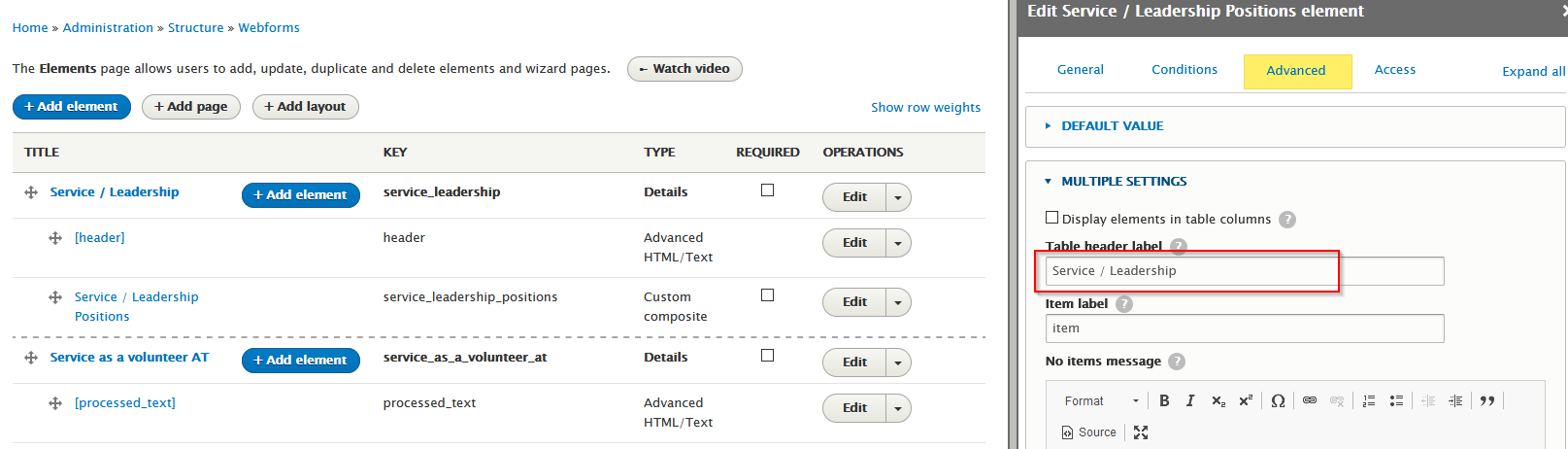
After adding the Table Header Label, my custom composite element turned into the table display 
| Comment | File | Size | Author |
|---|---|---|---|
| #10 | 3178432-9.patch | 13.46 KB | jrockowitz |
| #6 | 3178432-6.patch | 2.41 KB | jrockowitz |
| #3 | Screen Shot 2020-10-22 at 12.23.19 PM.png | 79.95 KB | jrockowitz |
| Screenshot (28).png | 31.72 KB | sea2709 | |
| 2020-10-22 10_29_49-Service_Leadership _ Honors and Awards.png | 52.86 KB | sea2709 |




Comments
Comment #2
sea2709 commentedComment #3
jrockowitz commentedI am not able to replicate this issue using any of the below example elements
Can you please post an example?
Comment #4
sea2709 commentedPlease look at the second element "custom_composite_no_columns". As you can see, it is being displayed in columns mode. If I remove the table_header_label of this element, then the element will display in rows.
Comment #5
sea2709 commentedComment #6
jrockowitz commentedHere is a very rough patch that adds dedicated support for a
#header_labelproperty.Comment #7
sea2709 commentedI confirm #6 patch works on my current project (D9.05 & PHP7.4)
Comment #8
jrockowitz commentedComment #9
jrockowitz commentedComment #10
jrockowitz commentedThis patch definitely has to be committed to only the 6.x branch, since some people might have the #header and #header_label set.
The attached patch has some additional test coverage.
Comment #12
jrockowitz commented