Hi,
I said it before but I really like this module, thanks for all the work you put into this module!
I'm building a travelblog with OSM maps (and leaflet). The maps show points of interests displayed per destination (e.g. a map of Berlin with restaurants, hotels, museums etc.). I have a destinantion content type and I use the paragraphs module to create paragraphs with a geolocation field and taxonomy terms to add points of interest to a destination. I use taxonomy terms as exposed filters to let visitors filter the points of interest on the map (e.g. only show hotels). All this is working very well!
In short what I want to do:
I want to show the data from a gpx file on a OSM map.
More in depth explanation of what I want to do:
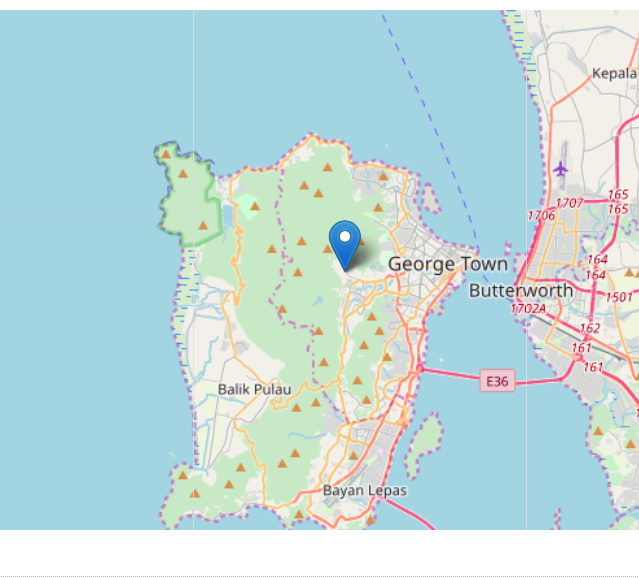
I like hiking and motorbike trips. I track my rides and hikes with an app. I export the route I took as a gpx file. I import the gpx file into a route content type with a file field. On this content type I also have a geofield provided by the Geofield module. In the settings of this field I set Geocode from an existing field to the file field with the gpx upload. This option becomes available after installing the Geocoder module. But if I set the display of the field to Geolocation Geofield Formatter - Map I only get a map with a marker:
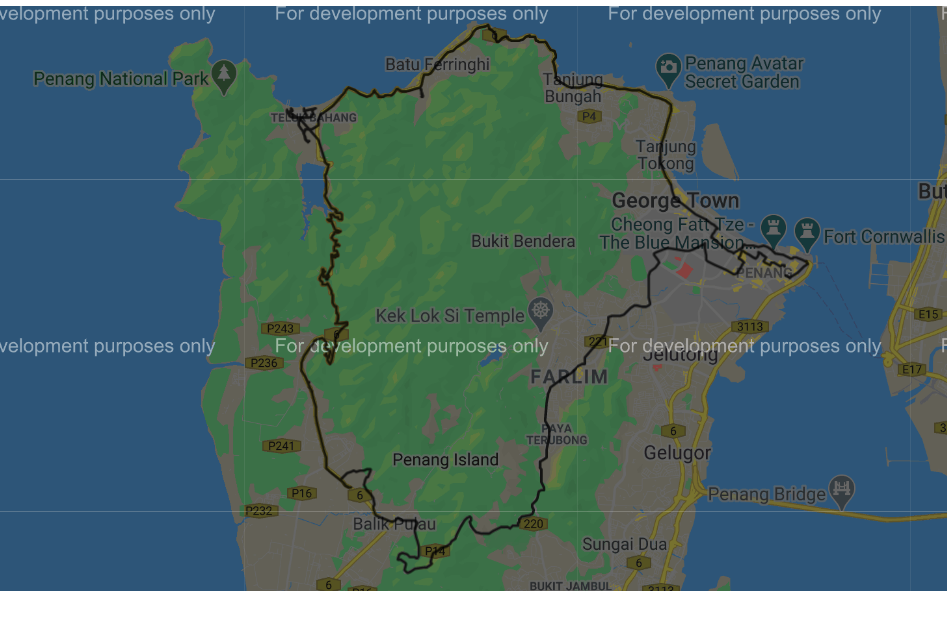
If I set the display of the field to use the Geofield Google Map widget provided by the Geofield map module a map with the route I rode gets displayed:
Also I would like to add points of interest (e.g. restaurant, hotel, nice view) to this map with the paragraphs module and filter them with views exposed filters (same like I do with the destination content type).
I think what I want is not possible with geolocation. At least I did not get it to work.
Jasper






Comments
Comment #2
jazzper commentedComment #3
christianadamski commentedThis not one request, but several
- there is currently no drawing support for leaflet
- the geolocation DataSouce plugin for GeoField does seem to be incomplete from your description
- the thing with POI might be possbile with the GeolocationLayers in views
Comment #4
jazzper commented@ChristianAdamski thanks for the quick reply!
Ah that's too bad. I will have to use Google Maps then. With the Geofield module, the Geofield map module and the geofield map widget on the content type manage display this is working:
I did not try to create a view with filters and paragraphs based POI's with the Geofield & Geofield map modules. So I am not sure if I can do what I want with those modules. I will try this when I have time. I did create a view using the Geofield module with Format: Geofield Google Map and I do get my route on the map:
I tried to use the Geolocation module. I enabled:
Geolocation - Google Maps API
Geolocation - Google Places API
Geolocation - Google Static Maps
On the Destination content type I added a geolocation field. Next I uploaded the gpx file to the file field. But this does not seem to work. I used Geocoder V2 and V3 on the manage field page of the Geolocation field.
If the Output format is set to Geolocation Geocoder V2, I get following error:
Unable to geocode '/var/www/ksro/web/sites/default/files/route/gpx/2020-02/Penang road 6_2.gpx'.
if I set the Output format to Geolocation Geocoder V3, I get following error:
Fatal error: Declaration of Drupal\geolocation\Plugin\Geocoder\Dumper\GeolocationGeocoderV3::dump(Geocoder\Location $address) must be compatible with Drupal\geocoder\DumperBase::dump(Geocoder\Model\Address $address) in /var/www/ksro/web/modules/contrib/geolocation/src/Plugin/Geocoder/Dumper/GeolocationGeocoderV3.php on line 0
Next I tried it with a view and google maps. I enabled the Geolocation - Geofield Integration sub module. I configured a view with Format: Geolocation CommonMap provided by the Geolocation module. A map without route or markers gets displayed. With Geolocation Layer nothing gets displayed.
So am I correct when I conclude that the Geolocation module does not support the display of gpx data? If so my feature request would be to support gpx data.
I'm not sure what you mean. With the Geofield & Geofield map modules I'm able to display a google map on a content type and with a view. I did not try to add paragraphs with geofield and taxonomy to create POI's and filters. I will try this later when I have time.
Do you mean displaying the route and poi's. I did not get that to work but maybe I should look deeper into this.
Comment #5
jazzper commentedI looked a bit further into this and I probably should use a geofield provided by the Geofield module and the Geolocation - Geofield Integration sub module.
This is working for the maps I have now (with a destination content type and with paragraphs based POIs), although I get an error on a view with a map that has an attachment and ajax enabled:
Deprecated function: call_user_func_array() expects parameter 1 to be a valid callback, non-static method Drupal\geolocation\DataProviderManager::addDataProviderSettingsFormAjax() should not be called statically in Drupal\Core\Form\FormAjaxResponseBuilder->buildResponse() (line 69 of /var/www/ksro/web/core/lib/Drupal/Core/Form/FormAjaxResponseBuilder.php)
I will file an error report on this, with an explanation of my setup when I have time (soon).
But I don't get a view with the route from gpx data working with the Geolocation module.
I have a view with a geofield with the gpx data imported from a file field (like described previously).
Setup of the view
Format: Geolocation CommonMap
Geolocation source field: Content: Geofield
Map Provider: Google maps
I get a map with a single marker instead of the route from the gpx data.
If I change the format to: Geofield Google Map (provided by the Geofield map module) the route gets displayed.
Maybe I miss a setting but I don't think so. Is this a bug or a feature request?
Comment #6
christianadamski commentedThis patch adds a new GPX submodule, including a field type, widget & formatter as well es very basic views support.
Comment #8
christianadamski commentedGo forth and test.
Comment #9
jazzper commentedThanks for the patch!
I think you copied the geolocation_search_api.info.yml and renamed it to geolocation_gpx.info.yml but did not change the values:
name: Geolocation - Search API Integration
type: module
description: 'Use Search API Location fields in geolcoation map views style.'
core_version_requirement: ^8.7.7 || ^9
package: Geolocation
dependencies:
- geolocation:geolocation
- search_api:search_api
- search_api_location:search_api_location
- search_api_location:search_api_location_views
Comment #10
christianadamski commentedYeah, already noticed, plus some minor other issues. Already fixed locally, will push soon.
Comment #11
Slacky08 commentedHi - thanks for adding GPX support!
However, not sure how to use it...? I am using v8.x-3.0-rc8.
I have added a new field to my content type of the type "Geolocation GPX File". Uploaded a GPX file into that content.
When I go to visit that content I get a "Website encountered unexpected error" WSOD. In my Drupal log I get an error starting with...
Error: Class 'phpGPX\phpGPX' not found in Drupal\geolocation_gpx\Plugin\geolocation\DataProvider\GeolocationGpx->getGpxFileFromItem() (line 265 of /home/wheelieg/public_html/web/modules/contrib/geolocation/modules/geolocation_gpx/src/Plugin/geolocation/DataProvider/GeolocationGpx.php)
Equally when I try to create a view of type "Geolocation Common Map" but nothing shows up...
Appreciate any help you can give me.
Comment #12
christianadamski commentedHmm, use "composer require sibyx/phpgpx:@RC" as a workaround
Comment #13
christianadamski commentedI created a new issue to track this #3126571: GPX composer dependency
Comment #14
Slacky08 commentedHi - just installed the latest 3.x-dev version and the composer workaround you suggested and can now report that it works perfectly!
I am happy to put together a short tutorial on how I am implementing this which actually meets the intent of the original post i.e. a single map which shows a GPX track and points of interest as markers too (using Gelocation Layers). Still a bit of playing around to do on my end but could share in the next few days?
Comment #15
jazzper commented@Slacky08
That would be great thanks!
Comment #16
Slacky08 commentedHi @jazzper - what's the best way to get the tutorial over to you for inclusion?
Comment #17
Slacky08 commentedHi,
As previously stated I managed to get this working fine for my use case, including adding a Geolocation GPX file upload.
However, noticed a strange problem. The file I have uploaded seems to "dissappear" overnight i.e. it will be there and my views will be working fine one night, then when I log into the website the next day, the file attachment has dissappeared. Everything else on the view still appears.
I have tried testing add the file, running cron and checking if the file still exists and it does. Similarly with clearing the cache.
Any ideas what's going on?
Thanks,
Richard
Comment #18
christianadamski commentedI created a new issue forthis #3126972: GPX files removed by cache / cron
I could observe that locally too. Drupal clears files "not in use". Seems he does not register GPX files as "in use". Probably easy to fix, just no idea how right now.
Comment #19
jazzper commentedHi @Slacky08
Maybe adding it here? Then other people who come to this issue can follow the guide.
Comment #21
Slacky08 commentedUse Case
A cycling website listing routes (as GPS files) and Points of Interest (e.g. Bike Shops, Accommodation) on the same map.
How I did it
Firstly, I am using the latest Dev version of this module as it contains some fixes around the GPS files.
Content Types
First content type, the Route, with a field of the type "Geolocation GPX File". Make sure to add gpx to the available file extensions list.
Points of Interest content types... I created the first one and added an Address field (from Address module) and a Geolocation Field. The Geolocation field needs to be set to geocode from the previously added Address field with whatever geocode services you normally use.
The key thing here is I then added multiple Points of Interest content types e.g. an Accommodation content type, a Bike Shop content type. But when adding fields to the 2nd, 3rd... I used "Re-use an existing field" and selected the Address and Geolocation fields set up previously. You can give them new label names.
Don't forget to add some content at this point so you can see your map working.
Views
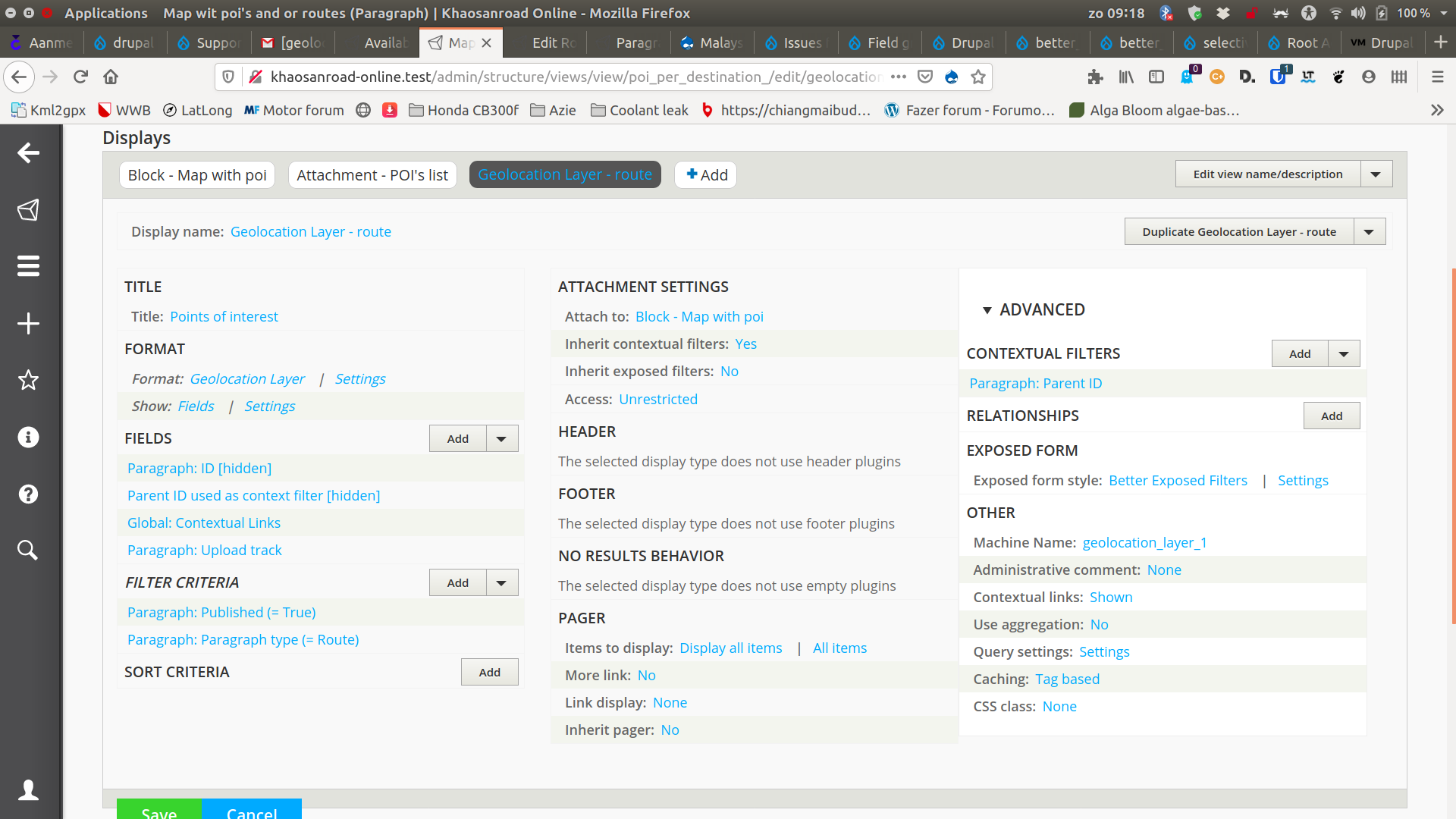
What you are going to do is set up a page/block view which will show your points of interest content, and then add a "Geolocation Layer" to your view which will show your GPX route.
So for the first page/block view:
That should give you a nice map showing all the content available with that geolocation field.
Then for showing the GPX track:
If you now navigate to your page URL you should see a nice map showing your GPX track(s) and all your points of interest.
Bonus tip
I also wanted each different type of point of interest to have its own map marker e.g. the accommodation to have a hotel icon, bike shop to have a repair icon.
I achieved this by adding a new field to all my points of interest content type. Again, this was a single field re-used across the different types and it was a drop-down list which just listed my different points of interest.
Then in my Page view, I added this drop-down field under the fields section. Then under the Geolocation CommonMap settings there is a "Marker Icon path" field. Here you can specify a URL for your marker icons but you can also include the field names from your view to make it dynamic.
All I did was add in there something like: http://www.mywebsite.com/markers/{{ field_marker_type }}.png
Then as long as your file names in that directory match with the options available in the field drop down list, you will see different icons for the different points of interest.
I hope that helps others, let me know if there are any questions!
Comment #22
jazzper commented@Slacky08
Thanks for the detailed instructions!
For people reading this that want to do it with paragraphs like I do:
I don't use a content type to add my POI's and the Geolocation GPX File field. Instead, I use the Paragraphs module to add those to a Route content type. This is working beautifully!
I also had to use the dev version instead of 8.x-3.0.
Comment #23
DaMa commented@jazzper Sounds interesting, but how did you manage this?
I guess you have 1 ... n paragraphs with geolocation fields in it.
But how do you link them to the map from Geolocation GPX File field? Is there a view for it?
Comment #24
jazzper commented@DaMa I followed the instructions from Slacky08 comment #21.
But instead of using a Route content type (with the gpx file) and a Point of interest content type (with Geolocation fields). I used 2 paragraph types, one Route paragraph type and one Point of interest paragraph type. I do not use an Address field (from the Address module). I only use latitude and longitude fields provided by the Geolocation module. But you should be able to use an Address field if you want to. I have no need for this so did not test this.
Comment #25
DaMa commented@jazzper Thank you!
The advantage is, that one has to manage/edit only two nodes, one with the routes and the other with the POIs.
Disadvantage is, if one want to reuse or display POIs in different contexts, this won't work.
Does anybody know, how to add a GPX track as a second Layer? I tried it like described, clicked "+Add" and select "Geolocation Layer" for the second time and so on.
Comment #26
zenimagine commentedHi, great feature. Would it be possible to integrate the GPX files into the Media module for reuse ?
Comment #27
effortdee commented@jazzper i've been trying to do this for a couple of days now, a route with poi along the way using paragraphs on a Route content type.
I just can't get to show the gpx route line on the geolocation layer, any ideas?
Comment #28
jazzper commented@effortDee sorry no idea. There is a lot of info and screenshots in this post. If you follow it I think it should work (I have no time to re-read everything). It's working on my website: https://khaosanroad-online.com/route/thailand/north-thailand/phrae/large... so it should be possible.
Comment #29
effortdee commented@jazzper thanks for getting back, what you show me is exactly what i'm after but i just can't get it to work and spent almost a week trying every combination I can think of to get it to work.
I am using geolocation v4 though so maybe that is why? It seems to work completely differently to the previous module version and saves the gpx routes differently.
Comment #30
jazzper commentedI'm using Geolocation Field 8.x-3.12. Version 4 is in alpha so that definitely could be the reason it's not working for you. Why are you not using the stable version?
Comment #31
effortdee commented@jazzper I have managed to do it!! It seems Geolocation v4 works compeltely differently and saves GPX routes/files as their own entities and there are brand new views integration and even after many days I could not get my head around it and no documentation or answers online.
I now have pretty much what you set up with contextual filter and block view to only show that route and its poi related to that node.
Some more questions if I may.
It looks like you used one Paragraphy Type for the Route GPX and one Paragraph Type for the Points of Interest?
Is this true?
If so, how do you differentiate between the different points of interest, landmark, shops, toilets, water, etc?
I have one for the route and many paragraph types for the POI, one for each of toilets, shops, water, etc.
How do you get the icons/images etc on the markers for the POI? Can I do that just by adding in a title, image field with the POI paragraph type and use that field in views for the marker to inherit?
Thanks so much for your feedback and your original writeup of this approach above ^
Comment #32
jazzper commented@effortDee sorry for the late reply, I'm very busy.
Good to hear you managed to get it working. Can you post your setup here with some screenshots of your views? That would be very helpful for me and other people when upgrading to V4.
Yes
Taxonomy on the POI paragraph
I have a “marker_icon” field on my “POI” paragraph. In my view I reference this field under: advanced settings – icon source field.
There is a marker icon example Geolocation Demo module you might want to check that if it's also available for the version you are using.
Comment #33
zenimagine commented@jazzper very pretty your website with Olivero. How did you manage to present the summaries and filters in collapses ?
Comment #34
jazzper commented@zenimagine
Thanx for the compliment! I overrode a view template in my custom theme and added a details element around the filter. Like so:
Comment #35
zenimagine commented@jazzper Thank you for your help, I managed to do it on my web suite and it is much cleaner :
https://www.cocorinet.fr/points-dinteret
https://www.cocorinet.fr/le-roc-au-chien
I have one last question, you presented your content with a summary, which points to parts of the page. I did a few similar things, but using the links in this ckeditor, entering an ID without putting a link. The problem is that the destination ID appears as a link with an empty href.
On your website it is very clean. How did you do this. I could add the IDs manually in the text of the page but it is very long.
THANKS
Comment #36
jazzper commented@zenimagine
Happy to hear that you got it working, looks nice!
The summary (table of content) is a views block. I use a title paragraph (and the layout paragraphs module -nice module for content editing from the front end, but not relevant to generating the table of content-) and make a view block:
I use js that I took from a youtube video (I cant write js code but understand it a little when reading it):
What I didn't manage to do is to make the table of content collapse after clicking one of the links. Please let me know if you manage to do that :)
I use the display suite module to add the anchor id with tokens (but I think you should be able to add the anchor link in the view as well when you set the view to show fields and rewrite the field with a token to make the anchor link):
This is what I can recall. I made the TOC quite a while ago.
Comment #37
zenimagine commented@jazzper Thanks, I don't use paragraph, prefer to be 100% ckeditor. I will look for another solution. thanks for these informations