

 Come together with the global Drupal community in Rotterdam, 28 Sept – 1 Oct 2026. Sessions, contribution, connection, and Early Bird savings until 8 June.
BS"D
When I was using the TinyMCE module, all of the buttons were neatly arranged across three lines. Now, using WYSIWYG and TinyMCE, all of the buttons are arranged across one long line and I need to scroll horizontally to view them and edit my posts as the text window is also elongated. Please advise.
I am using the Pushbutton theme. Have not tried any other themes.
| Comment | File | Size | Author |
|---|---|---|---|
| #66 | ie7version.png | 31.19 KB | francewhoa |
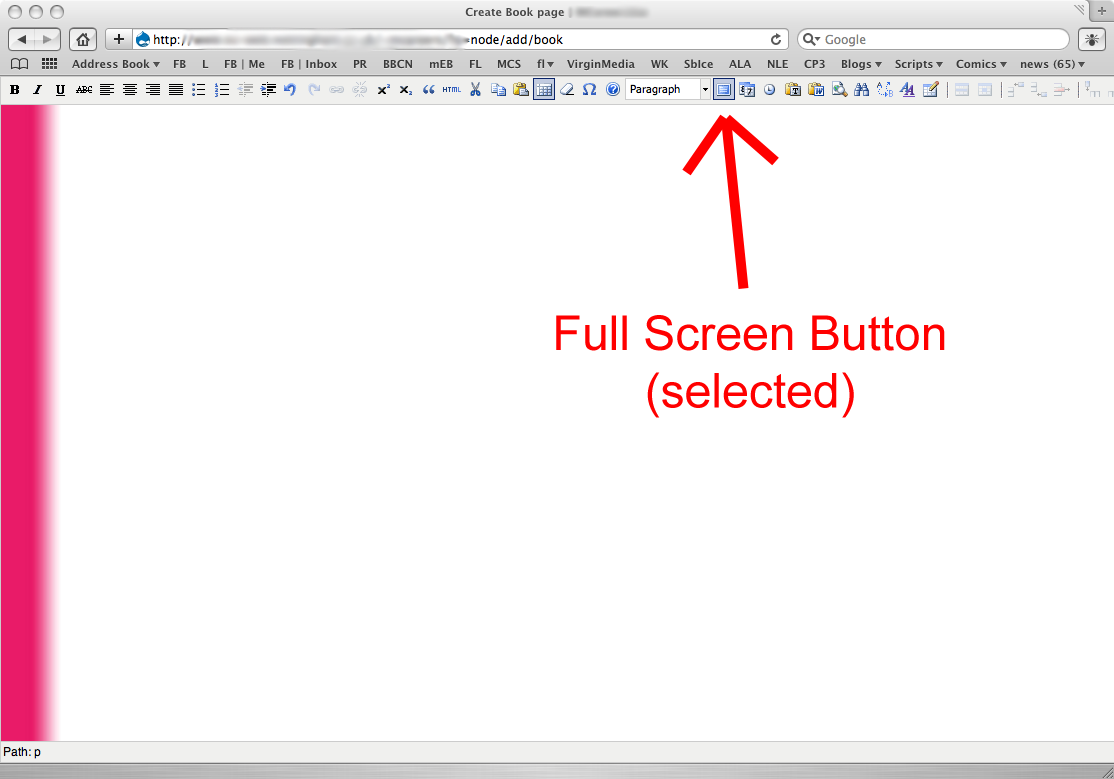
| #56 | fullscreen.png | 69.08 KB | ged3000 |
| #36 | wysiwyg-HEAD.tinymce-ie-toolbar-wrap-36.patch | 1.09 KB | sun |
| #35 | wysiwyg-HEAD.tinymce-ie-toolbar-wrap.patch | 1.29 KB | sun |
| #17 | tinymce_textarea_crossing_page_edge.png | 7.64 KB | markus_petrux |





Comments
Comment #1
sunThis looks like wysiwyg_editor.css is not loaded - can you verify this?
Comment #2
ISchier770 commentedBS"D
Not sure what you mean by not loaded. wysiwyg_editor.css is present in the module file and I selected TinyMCE default as my choice of CSS. Tried it using the theme CSS as well and same problem.
Thanks, Itzhak
Comment #3
sunMy question was whether wysiwyg_editor.css is actually loaded on the page the editor is loaded - please look in the HTML output to check whether the file has been referenced in the header.
Additionally, which browser and browser version on which platform are you using? Are you able to replicate this bug with a different browser / platform?
Comment #4
ISchier770 commentedBS"D
Thanks again.
This error occurs on both Firefox and IE7 as well as in Google Chrome (I do not have Opera installed); here is the reference to the file in the header:
@import "/sites/all/modules/wysiwyg/wysiwyg_editor.css";Comment #5
ISchier770 commentedComment #6
ISchier770 commentedComment #7
sun@ISchier770: Thanks for resetting everything. If you think that your issue will get more attention by setting its state to arbitrary values, then you make wrong assumptions. The previous state was set intentionally. See Status levels of Issues and Priority levels of Issues for further information.
I am not able to replicate this bug report.
Comment #8
ISchier770 commentedBS"D
Sorry about that - I thought I was inadvertently resetting them every time I posted. In any case, the error is there and I am trying another editor module instead.
Comment #9
sunMarking as duplicate of #277954: Allow to sort editor buttons
Comment #10
marcoBauli commentedumm..sorry for reopening this, but while with TinyMCE 2.x buttons tended to wrap on a second line and respect main region width, with Tiny 3.x all the buttons are displayed on one long single line breaking the page layout as reported by ISchier770.
maybe making them wrap is lot easier than allowing (ajax) sorting of buttons as is asked in #277954
PS: wysiwyg_editor.css DOES load. maybe the fix to this is just a small .css tweak *having a look*
EDIT: this is likely to be the Toolbar much more structured into a table in TinyMCE 3.x (editor_ui.css). Needs a deeper look..
Comment #11
sunYes. The obsolete TinyMCE module for Drupal did not allow to sort editor buttons and placed them onto arbitrary locations instead. So the quick fix was to remove that code and stack all buttons into one row and aligning them via CSS afterwards.
Correct, wysiwyg_editor.css contains TinyMCE 2.x specific styles only. Another quick fix would be to just add the necessary styles for TinyMCE 3.x.
The proper, long-term fix is to define "css path"/"css file" in the editor definition, separately for each version of TinyMCE.
I would accept a patch that solves this in one of both ways, preferring the latter of course.
Comment #12
Steve Dondley commentedIf someone can fix this, I can pay a good amount per hour. Please get in touch through my contact form at http://drupal.org/user/4131/contact with a quote. Thanks.
Comment #13
sunAttached patch re-aligns all buttons for TinyMCE 3. First iteration. I'll work on the proper fix now.
Comment #14
sunAnd here comes the proper solution, moving editor specific CSS stylesheets into their own files. Nice.
Committed to all branches. A new development snapshot will be available in approx. 12 hours.
Comment #15
markus_petrux commentedHi,
Just checked latest build and the buttons toolbar in TinyMCE using Firefox 2 is broken. See attached screenshot.
It looks like TinyMCE still builds the toolbar based on
theme_advanced_buttons1, and plugins seem to use this information as well to display popup layers. See colorpicker in screenshot.Comment #16
sunAttached patch should fix this.
Next time, please re-open the issue.
Comment #17
markus_petrux commentedButtons float correctly on Firefox 3.
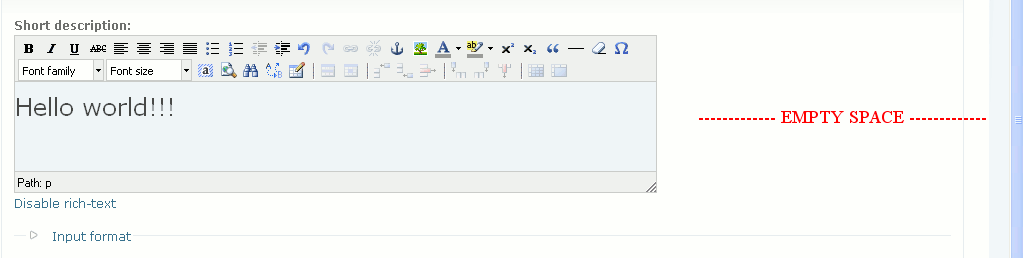
However, it happens something curious now. I'm using 1280x1024 resolution, so the TinyMCE textarea is quite wide. If I resize the browser window to 1024x768, then the TinyMCE textarea keeps its width and so it gets wider than page (Garland them, fluid layout). Please, see attached screenshot
tinymce_textarea_crossing_page_edge.png.When I start to edit at 1024x768 and then resize the browser window back to 1280x1024, then the TinyMCE textarea keeps its width, and so, it gets thick compared to the new page width. Please, see attached screenshot
tinymce_textarea_leaves_empty_space.png.This effect doesn't happen here:
http://tinymce.moxiecode.com/examples/full.php
ie. the whole text area is resized when the browser window resizes.
Comment #18
sunThat's a different issue. Quick inspection tells that they are setting width: 100%, and the default width is set based on the textarea that has been replaced: http://wiki.moxiecode.com/index.php/TinyMCE:Configuration/width - please open a new issue for this.
Thanks, committed.
Comment #19
Anonymous (not verified) commentedAutomatically closed -- issue fixed for two weeks with no activity.
Comment #20
auviweb commentedHello,
Within IE7 all the buttons are on one line like it was the case with the first poster.
Now within firefox the buttons appear like they should.
TinyMCE version 3.2.1.1.
What could cause this?
Comment #21
bigbaldy commentedI believe this is an issue with IE 7 and how it interprets the CSS "display: inline" for td table elements. Firefox treats inline correctly for the specification and the table cells act as if they are characters and rap properly. IE 7 ignores the inline option for td (cell) table elements and creates one long line. I've spent a little time trying to find a CSS option that will make IE work but to no avail. Part of the problem is that TinyMCE is using a table to display its buttons making it hard to do easy CSS formatting. Maybe someone with a better handle on CSS/IE quirks has an idea to make this work.
Short of someone with a CSS fix for IE or a change to the way TinyMCE's HTML is configured to display its buttons, I expect that we will have to wait until the coding in WYSIWIG API to configure button placement is finished.
Comment #22
spiffyd commentedI can confirm this is happening for Google Chrome with the latest version as well.
Comment #23
spiffyd commentedComment #24
spiffyd commentedComment #25
sun@spiffyd: Could you please stop assigning arbitrary statuses and priorities for issues without adding any valuable information to them? Thanks.
a) This is a bug in 6.x-0.5.
b) This is not critical, as you could simply use a different editor to circumvent this issue. It also does not completely break your site.
c) If you alter the issue title, only alter it if you are absolutely sure that the new title is 100% more accurate.
Comment #26
livingegg commentedSubscribing. I am also having this issue in IE7 and Chrome. Not sure about IE6 because whenever I open my Drupal site in IE6 it crashes hard and I usually need a reboot, lol - not sure what fun combination of modules or whatever might be causing that...
Comment #27
sun@livingegg: See #352938: TinyMCE 3: IE6: Memory leak with Forecolor button
Comment #28
smithn.nc commentedI'll be watching this one too. I've got a userbase that loves their IE7, and while I can pass off IE6 as "not modern/not supported", I can't really do the same for 7.
=/
Comment #29
smithn.nc commentedI just threw an ugly hack into WYSIWYG API's tinymce.inc. It starts at line 243, which should start with "// @todo Allow to sort/arrange editor buttons."
If anyone is in dire need of something immediate while they wait for a real fix, this can temporarily solve the problem and brings IE7 (and I assume Chrome) to a usable state. Obviously, this is specifically tailored to the buttons I'm using. Your own buttons may need to wrap sooner or later than the points I've designated. Find out the button name and change the check inside the if, as needed.
Comment #30
sunI tried to debug IE's weird behavior for some hours now. It seems like it does not understand
display: inlinefor table cells (TD) at all.So we need to implement the sorting and placement of editor buttons (see the other issue).
Reverting status to closed. If someone steps up with a working solution that is not a hack (like the previous suggestions), then feel free to re-open this issue. In general, I'd like to see more traction on the other issue though.
Comment #31
webengr commentedsubscribe
Comment #32
gettingjiggywithit commented(Edit: I thought I made this in reply to #29 -- http://drupal.org/comment/reply/308912/1202840#comment-1202840 -- but it seems to be its own thread)
Brilliant!
Excellent hack...
Though for me, the line started around 250...
replacing the code here (for anyone confused about where to place the hack)...
Comment #33
carlclancy commentedI've implemented this fix and although it succeeds in breaking after the right amount of buttons, it throws up another problem.
After my first 11 buttons I have the "Table" check box selected, but instead of displaying the Table buttons it just displays four separators.
I've tried this fix: http://drupal.org/node/277954#comment-1213013
And the same thing happens. Can anyone advise as to why?
Thanks.
edit: The Table buttons display in Chrome but not in IE6,7,8 or in FF2 and 3.
Comment #34
carlclancy commentedI started from scratch and somehow eliminated this issue.
This fix did it: http://drupal.org/node/277954#comment-1239825
Comment #35
sunRe-opening this issue, since #277954: Allow to sort editor buttons will take more time than I initially thought to get resolved.
Please test attached patch. Works for me in FF and IE. Didn't test Chrome and Safari.
Comment #36
sunMinor fix.
Comment #37
docmorphe commentedHello I'm under Drupal 6.9 and windows.
I juste tried to apply the patch after looking how to do that under win32 but the patch application just failed, terminating the patch process.
I'm not able to go further in patching without wasting more time.
I will just wait for a new version of this great API.
Thanks for the patch, hope someone else will succeed, I will just continue to use the basics buttons under tinymce.
Comment #38
Anonymous (not verified) commentedSubscribing
Comment #39
kingandyI'm experiencing this issue in 5.x-1.0. Is it possible to backport this patch?
Comment #40
sunPatch should apply without any issues to both 6.x-2.x and 5.x-2.x.
Comment #41
chaloalvarezj commentedSubscribe
Comment #42
sunReally, this patch worked pretty well based on my own testing. Could at least someone confirm? See http://drupal.org/patch/apply for further information - don't worry, it's very simple to test patches!
Comment #43
chaloalvarezj commentedI am working with the latest stable releases of: imce, imce-wysiwyg, and wysiwyg api
Was experiencing this bug on IE6. I manually applied sun's patch at #36 and the problem has been fixed.
Thank you for the patch, hope it gets committed soon.
Comment #44
Anonymous (not verified) commentedToday I installed the latest dev (4 March) Wysiwyg API, and applied patch in #36. Site D6.10, IE7
Tested under my normal theme and Garland, unfortunately the bar failed to wrap when creating a "Page"
If there is any info that might help identify the cause please ask, as this is one feature I really would like to see resolved,
Comment #45
sun@midkemia: Did you clear your browser's cache? Most probably your browser did not load the updated JavaScript.
Comment #46
Anonymous (not verified) commentedHi Sun, thanks for the reply
My first though to your reply is it can't be that, as my browser is set to check for newer versions each time i visit a page (have been caught before) So I wondered if you might mean "Clear Cached Data" in Site Configuration> Performance, so i cleared that, and as if by magic, it appeared on refresh.
So this may have been coincidence or what was meant to happen, but it did , and i am greatfull ( I just need to find how to stop the editor attaching to specific fields - Thats bit more research for the evening)
Comment #47
sunGood. Someone able to test on Chrome?
Comment #48
sunCommitted to all branches.
Comment #49
Drupal Centric commentedPatch in #36 worked for me with IE7, Drupal 5.16 and WYSIWYG 5.1 with TinyMCE 3.0, thank you sun. :o)
Comment #50
sunNote that this fix is already contained in all latest development snapshots of Wysiwyg API, i.e. also in 5.x-1.x-dev.
Comment #51
giorgoskThanks sun
indeed the problem is fixed in the 6.x dev version
Comment #52
faunapolis commentedI just had the same "not wrapping" problem with the last dev version 6.x-2.x-dev, tinyMCE 3.2.2 and Chrome as my browser.
Comment #53
sun@faunapolis: Did you update to the latest development snapshot? And did you ensure that your browser loads the updated JavaScript?
Comment #54
ged3000 commentedI just upgraded to 6.x-1.1 - using safari, it previously didn't wrap on the inline editor - that's now fixed. It's still not wrapping in the full screen editor - presumably the fix just needs porting across?
Comment #55
sunHuh? What kind of "full-screen editor" are you talking about?
Comment #56
ged3000 commented@sun
Wysiwyg 6.x-1.1 with TinyMCE 3.2.2 comes packaged with the TinyMCE fullscreen plugin: http://wiki.moxiecode.com/index.php/TinyMCE:Plugins/fullscreen .
Turning this plugin on adds a fullscreen button to the editor's button bar, which, when pressed, enlarges the text box to fill the entire browser window. The button bar remains at the top (or wherever it is set to display, I guess), and the whole screen looks a bit like google documents, or word, or something like that.
See attached screenshot of full screen mode, on Safari 4 (Public Beta (4528.16)). This browser had the same layout problem as IE with Wysiwyg 6.x-0.5.
Comment #57
sun@ged3000: Sorry, this cannot be resolved in this issue. You have to wait for #277954: Allow to sort editor buttons.
All we can fix in this issue is compatibility with Chrome. However, I will close this issue if no debug information is provided within 3 days.
Comment #58
kikko commentedSorry for reopening:
I have the same problem with the button bar (on FF 3.0.6), I have installed on Drupal 5.16 Wysiwyg API 5.x-1.1 and TinyMCE 3.1.0.1.
But, instead of the tinymce-3.js in the head of the page you can see:
<script src="/sites/www.mysite.it/modules/wysiwyg/editors/js/tinymce-2.js" type="text/javascript">.But in the Wysiwyg page settings the Full HTML Wysiwyg profile is set on TinyMCE 3.1.0.1.
Thanks
Comment #59
sun@kikko: Based on the information you provided, that's a completely different issue. Please open a separate issue.
Comment #60
kikko commentedOk, thanks and sorry
Comment #61
sunDecision taken. Please open a new issue for Chrome, if it is still an issue at all.
Comment #62
codevoice commentedI can confirm this is definitely still a problem, after a couple hours of testing:
Testing with:
Drupal 5.12
Firefox 3
IE 7
- Config 1
TinyMCE 3.2.3.1
Wysiwyg 5.x-2.0-alpha1
Broken for IE7, toolbar does not wrap. wysiwyg.css is not loaded with the page (tested in Garland, other themes, same problem)
- Config 2
TinyMCE 3.2.3.1
Wysiwyg 5.x-2.x-dev (2009-May-20)
?q=admin/settings/wysiwyg/profile doesn't even recognize that there are any editors installed
- Config 3
TinyMCE 3.2.3.1
Wysiwyg 5.x-1.x-dev (2009-May-20)
Broken for IE7, toolbar does not wrap. wysiwyg.css is not loaded with the page (tested in Garland, other themes, same problem)
editors/js/tinymce-3.js DOES contain the patch in 36 above, however the toolbars are still broken in IE and work fine in Firefox.
Comment #63
brisath commentedSubscribing.
Buttons do not wrap for me in fullscreen with Chrome.
Comment #64
JGO commentedIn my case in fullscreen the window is too wide and not everything on the right is shown (buttons and content)
Didn't find a way to fix it :x
Comment #65
monti commentedwysiwyg 6.x-2.1 (2010-Mar-08) ckeditor buttons are still in one row.
instead of manipulating the code for "quick fix" as in #29 & #32 above, I just added the following css:
a#cke_25{display:block;}
having a single button on a row is probably not nicer, but code-wise I think it is a cleaner "quick fix"
Comment #66
francewhoaConfirming that buttons don't wrapped in IE 7. Windows XP. Using Wysiwyg 6.x-2.1
Comment #67
francewhoa#65 temporary fix works for me. Thanks monti :) I'm using CKEditor and Wysiwyg 6.x-2.1
Comment #68
francewhoaConfirming this is still an issue with:
* IE 7 or Google Chrome 6
* Windows XP
* Wysiwyg 6.x-2.1
For details find above #66 and #67
Steps to reproduce this issue:
1. Go to /admin/settings/wysiwyg/profile/*/edit
2. Under 'Buttons and plugins' section check all boxes
3. Test. All buttons are in one row. Expected result is buttons should wrap.
Comment #69
Anonymous (not verified) commentedSame issues with CKeditor and Wysiwyg 7.x-2.x-dev and Chrome 8 on D7 B3
Comment #70
francewhoaComment #71
boftx commentedSubscribing.
Comment #72
theorichel commentedSubscribing. It happens with me in
Drupal 6.19
Wysiwyg 6.2-2.3
TinyMCE 3391
Win XP
In IE and in FF
Sorry it is different. By changing the width value in tinymce.inc I can make the box smaller and then the buttons do wrap. Min appear to be another problem: No matter what width I choose, I keep having a horizontal scrollbar below. So I never get to see the full width of the text. Do not know if this is a Wysiwyg thing or a Tinymce thing
Comment #73
twodI consider this issue a duplicate of #277954: Allow to sort editor buttons since the problems here are caused by Wysiwyg module currently forcing all buttons to be on a single row or even in a single group. CKEditor button groups are supposed to be kept together on the same row and jump down as a whole when there's no room for that. TinyMCE gets similar problems when only one row is used.
All we can do here without fixing the above issue is to provide hacks and workarounds that will further complicate things.
Could anyone who's got some spare time please help test the latest patch in #277954: Allow to sort editor buttons so we can fix the root cause of these toolbar problems?