


Add a Drupal View to clone a content from a template. This modules requires the Entity Clone module.
Usage
- Configure a content type to use Entity Clone Template
Navigate to the content type you want to use, for example: [SITE]/admin/structure/types/manage/article
Under Entity Clone Content, check Enable Entity Clone Template.

- Set up content templates
When creating or editing a node, you will see an Entity Clone Template section.
Here, you can:
- Define the current content as a template
- Optionally set an image to display on the Entity Clone Template view page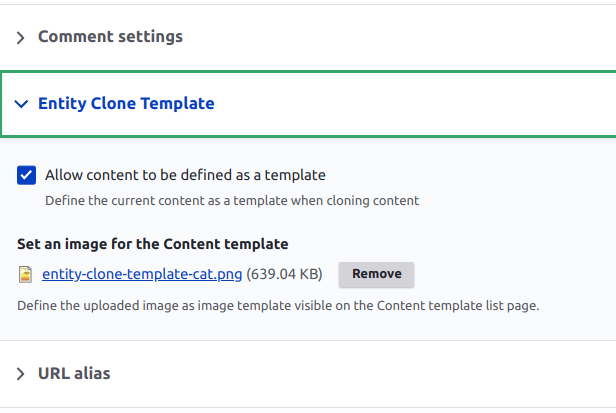
- Access the Entity Clone view page
The view page is available at [SITE]/admin/content/clone-content-from-template or via the Content Admin Menu.
Requirements
Nice to have
For convenience, you can apply the following patch to the Entity Clone module to be redirected to the node edit page after cloning, if needed:
https://www.drupal.org/files/issues/2019-03-11/improve-workflow-of-cloned-entity-2708731-11_1.patch
Supporting organizations:
| Attachment | Size |
|---|---|
| entity-clone-template-content-type-configuration.png | 44.08 KB |
| entity-clone-template-node-configuration.png | 37.29 KB |
Project information
 Maintenance fixes only
Considered feature-complete by its maintainers.- Project categories: Content editing experience
- Ecosystem: Entity Clone
 241 sites report using this module
- Created by guillaumeg on , updated
 Stable releases for this project are covered by the security advisory policy.
Look for the shield icon below.
Releases
2.1.1
released 26 September 2025
released 26 September 2025
Works with Drupal: ^8 || ^9 || ^10 || ^11
Drupal 11 support 🎉 and bug fixes
Install:


