Do you know why my csv file errors using Drupal 8.6.10 and Feeds 8.x.3 alpha5? I've made the file as simple as just one column with no header thus just one username, yet fails. I've tested many other combinations, all fail. I'm importing user.
Error "Failed importing 1 User", The user Anonymous failed to validate with the following errors:Name (name): You must enter a username. Please check your mappings.
Steps:
Created Feed "importusers"
Source "C:\nameonly.csv"
Target "Name"
Fetcher "upload file"
parser "csv"
upload directory: public://feeds
Parser settings tried with and without headings
Import feed from Content>feed
After the progress bar, error appears




Comments
Comment #2
megachrizIt looks like that since Feeds was trying to update the anonymous user, the source column you specified on the mapping did not match with the CSV file.
Suggestions for making above more clear in the UI are welcome. :)
Comment #3
sajosh commentedHi MegaChris,
So nice of you to respond quickly and all your hard work on this module.
What do you mean "since Feeds was trying to update the anonymous user"?
How do I "named 0, 1, 2, etc. on the mapping page"? I don't see that option.
Still not working. I ran these below csv tests while making sure to edit the feed (/feed/1/edit?destination=/admin/content/feed), then removing the file and reuploading it (manually checked the uploaded files on the server to make sure the content is right) and being sure to check and uncheck "No Headers".
Name,Email
Test2,test2@test.com
"Name","Email"
"Test2","test2@test.com"
'Name','Email'
'Test2','test2@test.com'
'0','1'
'Test2','test2@test.com'
0,1
Test2,test2@test.com
Also, why does the error show "Name (name)" which implies that the machine name for username is lower case?
Attached screenshot of mapping.
Any more ideas?
Comment #4
megachrizAh, I see you tried to set a path as source on the mapping form.
Providing the source file happens at a later stage, when creating a feed.
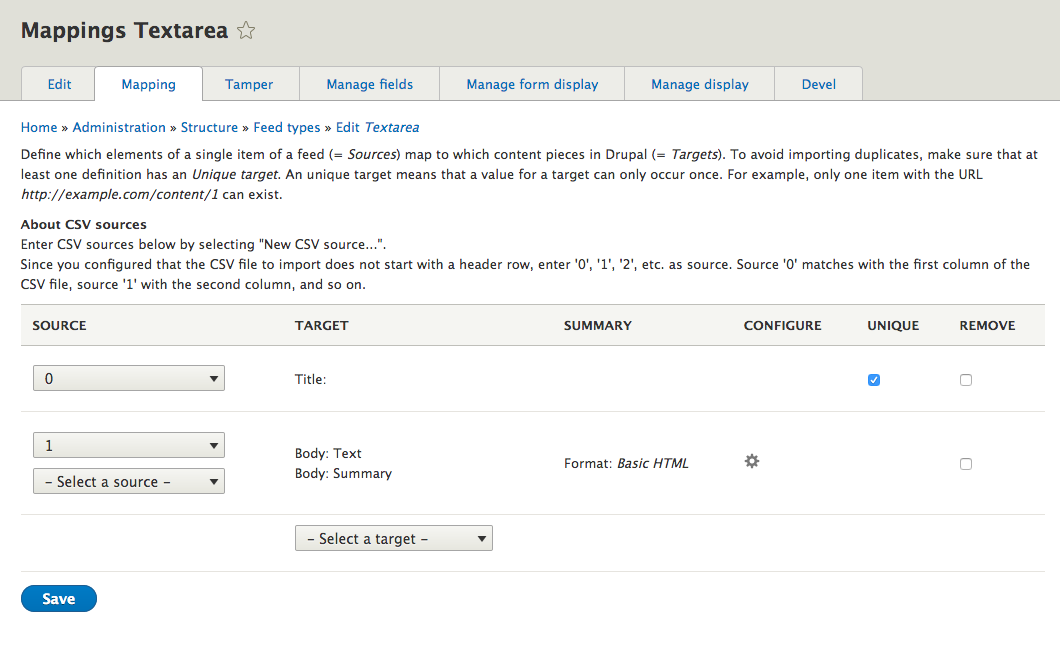
On the mapping form, when using the CSV parser, you need to enter the column names used in your CSV file, not a path to the CSV file itself.
Example:

The error message said: "Anonymous failed to validate". This gave me the hint that Feeds was trying to update user 0, the anonymous user in Drupal. That user has no username. Apart from that Feeds shouldn't try to update that special user, that additionally gave me the hint that the username Feeds received from the source must be empty, thus resulting into Feeds loading the only user that has no username: the anonymous user. And since Feeds received an empty source, that gave me the hint that something on the mapping page was not configured as expected.
Add a new CSV source and type in "0".

Again, suggestions for improving the user interface are welcome!
Comment #5
sajosh commentedWow, it works as you built it. You're awesome.
Now with your explanation, it's so obvious that here they should be fields. Typically in operating systems the words source and destinations mean path. And most imports extract field names from the file. As you asked here...
auto detect the available mapping sources vs defining an import "template"
What you said is what I thought was going to happen ...
first one would be a lot user friendly for most use cases.
https://www.drupal.org/project/feeds/issues/651478#comment-10552532
You're so nice for asking how to improve the ux.
A simple solution might be to just make the titles ...
"Source, a single field, column, header, item, etc. Not path."
"Target, a single field, node, entitiy, content, item, etc. Not path."
Or/and in the description ...
Below, map a feed's single Source element name (field, column, header, item, etc) to a single Drupal Target element name (field, term, node, entitiy, content, database record, etc).
For maximum flexibility, Feeds does not extract element names from a file or url, you must enter them manually here.
So do not enter file paths for source or target. Entering paths is the next step when importing a feed in /admin/content/add CHECK. Note the source element name must match a target element name, and it's case sensitive. Also note, if there's no element name then use 0, 1, 2, etc for Source.
Comment #6
megachriz@sajosh
Thanks for your suggestions! The case sensitivity could differ per parser. And for not every parser you need to enter sources. For some parsers you only need to select from predefined sources, as is the case for the RSS parser. Sources may also mean slightly different things per parser. For example, for the XML parser (from Feeds extensible parsers) they are not fields or headings, but XPaths. And not all CSV sources have to be column names. You can also select from predefined sources. For example: you could add a field to the feed type and map that to a target field.
So as a start, what if we only add help text for the CSV parser now? See images below how that would look like and the patch for the implementation.
No headers

With headers

I would love your feedback! :)
Comment #7
sajosh commentedHi MegaChriz,
You're so quick with these changes and responses!
How about a link to the documentation page, instead of custom logic (if it is) on the mapping page?
https://www.drupal.org/docs/8/modules/feeds/creating-and-editing-import-...
To help you, I've updated that mapping portion that was confusing for me (and so perhaps others). I made it read like how-to steps from beginning (target) to end (save). Do you like it?
In the instructions, I got stuck at "id => Feeds item: Item GUID" because there are two blank boxes. What are "Feed: " list? It was not instantly clear to me so I tinkered but didn't get results. Can you explain these?
In the blank box that appears after selecting New CSV source, can you put "type case-sensitive header name or 0,1,2 if no header"
Also, why not make the first no header a 1 instead of 0? I'm sure it's because of arrays but just to make the UI more human centric.
Typically having Source on the left and Target on the right makes sense but in this Mappings page workflow, the user must start with Target first, so for that reason why not have Target on the left?
I'm committed to continuing to helping you.
Comment #8
megachriz@sajosh
You are making some nice suggestions. Unfortunately, we cannot change the CSV no header start with
1, as that could possibly break existing configurations that now use0as mapping source. So I've noted that in #2984386: Build working UI for csv import for the Feeds Migrate project, which aims to become the next generation Feeds module.Target on the left
We could put the Target column first, but don't people usually think from left to right? So left where things are coming from and right where things are going to?
Nice suggestion, though I have to think about how to properly implement that in a way that it doesn't affect other parsers.
I yet have to look to your suggestions on the instructions. I didn't wrote the instructions on https://www.drupal.org/docs/8/modules/feeds/creating-and-editing-import-....
Thanks!
Comment #9
megachriz"Feed: " mapping sources are fields from the feed entity. You could use this for example in this way:
This is useful in for example the following scenario:
Now that I think about, in the D7 version of Feeds there was a legend, that explained each mapping source (and each mapping target). That's one of the things still missing in the D8 version:

Comment #10
sajosh commentedHi MegaChriz,
I see. Your detailed explanation and clear use case helps explain the "Feeds: " list. So essentially with this list, we can populate a Drupal Entity with the same/fixed value from the feed table/entity?
You've solved my original problem so now we're moving to why I had that confusion in the first place ... to see if we can refine the UI/UX. When I first tried Feeds my immediate reaction to the "Feed: " list in the Source drop-down was "Oh, i guess I map users using this list, since Authored By and Authored On" are also used by Nodes. I had to scrutinize the list to kind of figure out that it's not from the file but rather possibly from the Feeds Entity/table. The colon implies that but it wasn't immediately obvious to me.
The legend is a good idea. Perhaps you can add to the top of it ...
"Feeds:
The following fixed Feed fields will be populated from the Feeds Entity into your Entity. It's fixed so that every row/record/instance will have the same value. This not for custom data from your source."
I hope my experience helps you, since you've been asking for feedback.
Comment #11
megachriz@sajosh
I've added a patch for legend in #3074085: Display descriptions of sources and targets. This displays description for each source and each target.
Not sure yet how to get a description for a group of sources. Descriptions currently can only exist per source.
Comment #12
megachrizThis builds further upon the patch from #6 and adds a description to the "New CSV source" field.
With headers
Without headers
Comment #13
sajosh commentedHi MegaChriz,
Both of your patches work well. Tested them on D 8.6.10 and Feeds 8.x-3.0-alpha5.
The legend appears for both Source and Target fields. Both header and no-header (when enabled and disabled) help texts appears below the blank field under the "New CSV source" field. The description text is also added.
There's one edge case error. After a Feed Type is created initially with header or initially no-header, then when it's edited to be the opposite (no-header or with header) the description text stays as initially set. The New CSV source blank field text does change as expected. Rather than accounting for this use case, you could just link to the help document.
Also, consider using 0, 1, 2 (no quotes) to be consistent with this page and to avoid some people entering the quotes.
https://www.drupal.org/docs/8/modules/feeds/creating-and-editing-import-...
All your changes really make my original question much more clear.
Anything else I can do for you?
Comment #14
megachriz@sajosh
Thanks for testing! I tested with caches disabled, so I wasn't aware of the fact that help text got cached. So the help text should not be dependent on the settings then (or I would need to figure out how to clear the right caches when the config changes). This means that the help text also remains the same when changing the parser plugin.
For now, I've removed the help text per plugin thing completely. I replaced it with a link to the docs as you suggested.
The description for the "New CSV source..." option does not have this problem so this remains dependent on the configuration. I did remove the quotes from "0, 1, 2" as you suggested. I think you are right someone could think they need to enter the quotes.
You've been of great help! :)
The mapping form:

Comment #16
megachrizI slightly changed the description for entering a new CSV source when using the "No headers" option. It is now:
The reason is that now more than a month later I read "Enter the number of the column" as if I need to enter how many columns the CSV file has. So I hope the new description is more clear, despite the slight ambiguity of the word "use".
Committed #14 with that change.
Thanks @sajosh for all your suggestions to improve the user experience.